1. Įvadas
This user manual provides comprehensive instructions for the setup, operation, and maintenance of your SHARP LC-32HI5012E HD Ready Smart LED TV. Please read this manual thoroughly before using your television to ensure proper functionality and safety.
The SHARP LC-32HI5012E is an 81 cm (32-inch) HD Ready Smart LED TV featuring Active Motion 200 technology for enhanced picture quality and a Triple Tuner for versatile reception options. It includes integrated Wi-Fi and a Harman/Kardon sound system for a complete entertainment experience.
2. Pakuotės turinys
Atidarę pakuotę, patikrinkite, ar yra visi šie daiktai:
- SHARP LC-32HI5012E Main Unit
- Nuotolinio valdymo pultas (su baterijomis)
- Vartotojo vadovas (šis dokumentas)

Vaizdas: priekis view of the SHARP LC-32HI5012E television, displaying a vibrant city skyline on its screen. This image shows the slim bezel design and the central SHARP logo.
3. Sąranka
3.1 Stovo surinkimas
Carefully place the TV screen-down on a soft, flat surface to prevent damage. Attach the two stand feet to the designated slots at the bottom of the TV, securing them with the provided screws. Ensure the stand is firmly attached before proceeding.
3.2 Išorinių įrenginių prijungimas
Jūsų televizorius siūlo įvairias išorinių įrenginių prijungimo galimybes:
- HDMI prievadai (x3): Prijunkite „Blu-ray“ grotuvus, žaidimų konsoles arba priedėlius.
- USB prievadai (x2): Skirta medijos atkūrimui iš USB atmintinių.
- Antenna In (RF): Connect your terrestrial antenna for DVB-T/T2HD reception.
- Sat In: Connect your satellite dish for DVB-S/S2 reception.
- RJ45 (LAN): Laidinio interneto ryšiui.
- CI+ Port: For conditional access modules (CAM) to view užšifruoti kanalai.
- Mini Component/YPbPr, Mini AV Composite: Senesniems analoginiams įrenginiams.
- Skaitmeninė optinė garso išvestis: Skirta prijungti prie išorinių garso sistemų.
- Audio out / Headphone: Ausinėms arba išoriniams garsiakalbiams.

Vaizdas: Galinis view of the SHARP LC-32HI5012E television, highlighting the arrangement of various input and output ports for connecting external devices.
3.3 Pradinis įjungimas ir pirmoji sąranka
After connecting all necessary cables, plug the power cord into an electrical outlet. Press the power button on the remote control or the TV. The first-time setup wizard will guide you through:
- Kalbos pasirinkimas.
- Tinklo ryšys („Wi-Fi“ arba laidinis LAN).
- Channel scanning for DVB-C, DVB-S/S2, or DVB-T/T2HD.
- Laiko juosta ir kiti pagrindiniai nustatymai.
4. Naudojimo instrukcijos
4.1 Pagrindinės televizoriaus funkcijos
- Maitinimo įjungimas/išjungimas: Naudokite maitinimo mygtuką ant nuotolinio valdymo pulto arba televizoriaus.
- Garsumo valdymas: Naudokite mygtukus VOL +/-.
- Kanalo pasirinkimas: Use CH +/- or number buttons.
- Įvesties šaltinis: Paspauskite mygtuką SOURCE, kad perjungtumėte tarp HDMI, AV, TV ir kt.
- Meniu naršymas: Use arrow keys and OK button to navigate menus.
4.2 Išmaniojo televizoriaus funkcijos
Your SHARP LC-32HI5012E is equipped with integrated Wi-Fi and offers access to various smart features:
- Iš anksto įdiegtos programos: Access popular streaming services like Netflix and YouTube directly.
- Web Naršyklė: Naršykite internete tiesiai iš savo televizoriaus.
- Aquos Net+: Access additional online content and services provided by Sharp.
Ensure your TV is connected to the internet for full Smart TV functionality.
4.3 Garso sistema
The integrated Harman/Kardon sound system provides a high-quality audio experience with excellent dynamics and clarity. Adjust audio settings in the TV menu to customize your sound preferences.
5. Priežiūra
5.1 Ekrano valymas
Norėdami išvalyti ekraną, švelniai nuvalykite jį minkštu, nepūkuotu skudurėliu. Jei dėmės sunkiai pašalinamos, šiek tiek nuvalykiteampnuvalykite šluostę vandeniu arba specializuotu ekrano valikliu. Negalima spray liquid directly onto the screen.
5.2 Bendroji priežiūra
- Laikykite televizorių atokiau nuo tiesioginių saulės spindulių ir šilumos šaltinių.
- Užtikrinkite tinkamą vėdinimą aplink televizorių.
- Atjunkite televizorių nuo maitinimo lizdo žaibuojant arba kai jis ilgam paliekamas be priežiūros.
6. Problemų sprendimas
If you encounter any issues with your TV, please refer to the following common problems and solutions before contacting support.
| Problema | Galima priežastis | Sprendimas |
|---|---|---|
| Nėra galios | Power cord unplugged, power outlet issue. | Patikrinkite maitinimo laido jungtį. Pabandykite įjungti kitą lizdą. |
| Nėra vaizdo, bet yra garsas | Incorrect input source, faulty cable. | Patikrinkite teisingą įvesties šaltinį. Patikrinkite HDMI/AV kabelio jungtis. |
| Nėra garso | Garsas nutildytas arba per mažas, išorinės garso sistemos problema. | Unmute volume, increase volume. Check external audio connections. |
| Nepavyksta prisijungti prie „Wi-Fi“ | Incorrect password, router issue, TV too far from router. | Re-enter password. Restart router. Move TV closer or use wired connection. |
7. Specifikacijos
| Funkcija | Detalė |
|---|---|
| Prekės ženklas | AŠTRI |
| Modelio numeris | LC-32HI5012E |
| Ekrano technologija | LED |
| Rezoliucija | HD paruošta (1366 x 768 pikseliai) |
| Ekrano įstrižainė | 81.3 cm (32 coliai) |
| Atnaujinimo dažnis | 60 Hz |
| Ypatinga funkcija | Internet (Smart TV) |
| Palaikomos interneto paslaugos | Netflix, YouTube, Browser |
| Ryšio technologija | USB, HDMI, LAN, Wi-Fi |
| Derintuvai | DVB-C, DVB-S/S2, DVB-T/T2HD |
| Garso sistema | Harmanas/Kardonas |
| Produkto matmenys (P x A x G) | 74 x 49.1 x 18 cm (su stovu) |
| Svoris | 4.8 kilogramo |
| Montavimo tipas | Stalo laikiklis |
7.1 Energijos vartojimo efektyvumas
The SHARP LC-32HI5012E has an energy efficiency rating of F. For detailed energy consumption information, please refer to the energy label and product information sheet.

Image: Energy efficiency label for the SHARP LC-32HI5012E television, showing its energy class F and power consumption details.
Daugiau informacijos rasite oficialioje EPREL duomenų bazėje: https://eprel.ec.europa.eu/qr/402565
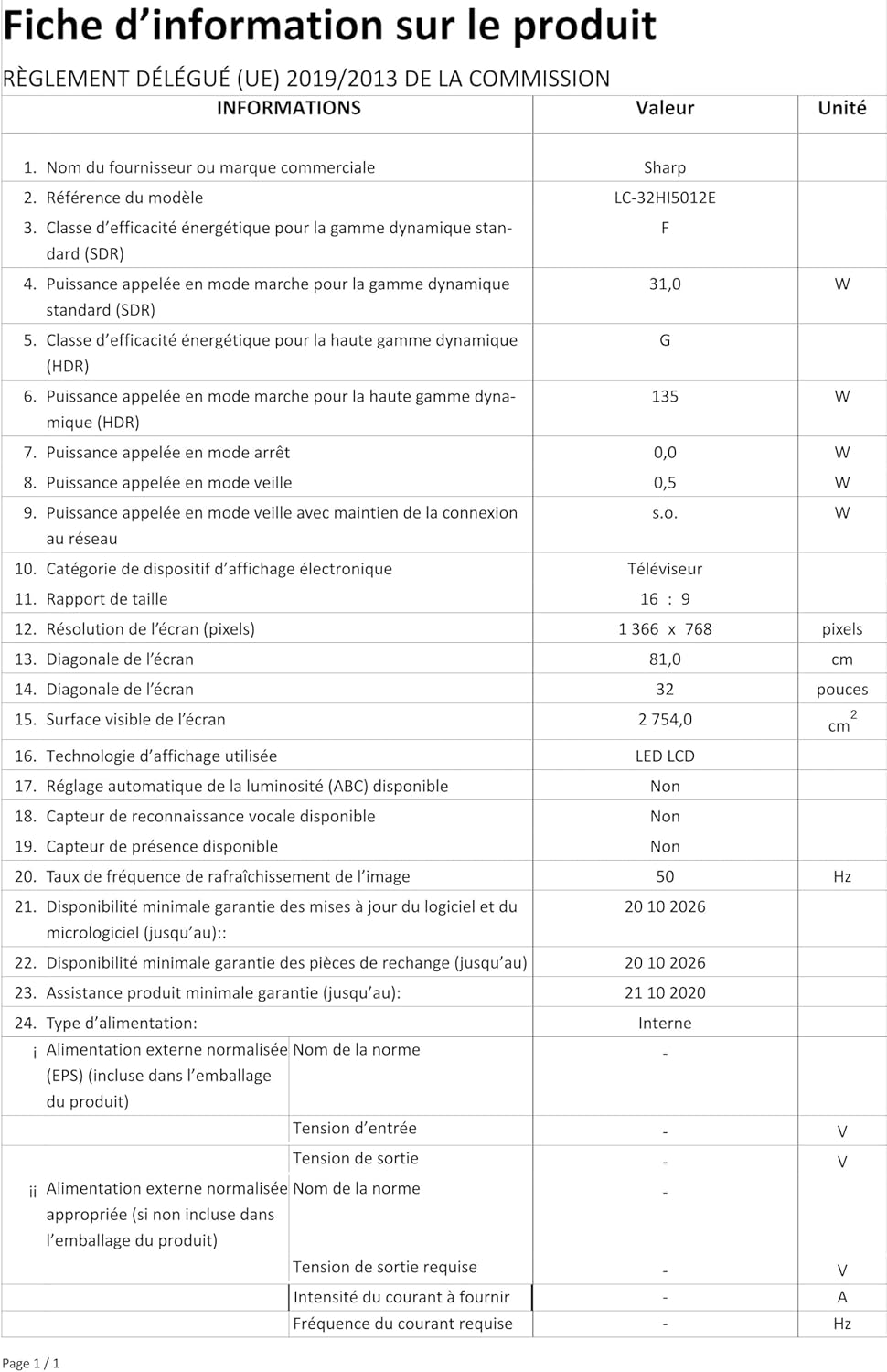
Image: Product information sheet detailing technical specifications and compliance information for the SHARP LC-32HI5012E television.
8. Garantija ir palaikymas
For warranty information, please refer to the warranty card included with your product or visit the official SHARP websvetainėje. Išsaugokite pirkimo kvitą kaip pirkimo įrodymą bet kokiems garantiniams prašymams.
For technical support or service inquiries, please contact SHARP customer service. Contact details can typically be found on the SHARP official websvetainėje arba produkto pakuotėje.


