1. Įvadas
This user manual provides detailed instructions for the installation, operation, and troubleshooting of the SIIG HDMI 2.0 Audio Extractor (Model: CE-H24F11-S1). This device is designed to split an incoming HDMI audio signal into stereo analog audio and Toslink optical outputs, enabling connection to various audio systems that may lack HDMI input.
The extractor supports high-resolution video up to 4K/60Hz with HDR and is compliant with HDCP 2.2. It also features ARC (Audio Return Channel) support via Toslink and CEC bypass, ensuring compatibility with modern home theater setups. Please read this manual thoroughly before use to ensure proper setup and optimal performance.
2. Produkto ypatybės
- HDMI 2.0a and HDCP 2.2 compliant.
- Supports HDCP 2.2, HDR, and CEC bypass.
- Video resolutions up to 4Kx2K@60Hz YUV 4:4:4 8-bit and 4K HDR YUV 4:2:0 10-bit.
- Supports 480p, 720p, 1080i, 1080p resolutions.
- Video bandwidth: 18Gbps (600MHz per channel).
- Audio extraction via 3.5mm stereo jack and Toslink optical output.
- ARC audio extraction via Toslink (S/PDIF).
- Supports audio embedded via stereo and S/PDIF (Toslink).
- Palaikomi garso formatai:
- HDMI: PCM 2/5.1/7.1, Dolby 5.1/7.1, DTS 5.1/7.1
- Toslink (S/PDIF): PCM 2, Dolby 5.1, DTS 5.1
- 3.5mm Stereo: PCM 2
- Sturdy metal enclosure for durability and EMI/RFI noise interference minimization.
- ESD protection: ±15kV Air & ±8kV Contact.
- Country of origin: Taiwan.
- Regulatory approvals: FCC, CE, RoHS.

3. Pakuotės turinys
Please verify that all items are present and in good condition. If any items are missing or damaged, contact your vendor for assistance.
- 1x HDMI 2.0 Audio Extractor/Embedder (CE-H24F11-S1)
- 1x USB Type-A to Micro B Cable (for power)
- 1x Įdiegimo vadovas (šis dokumentas)
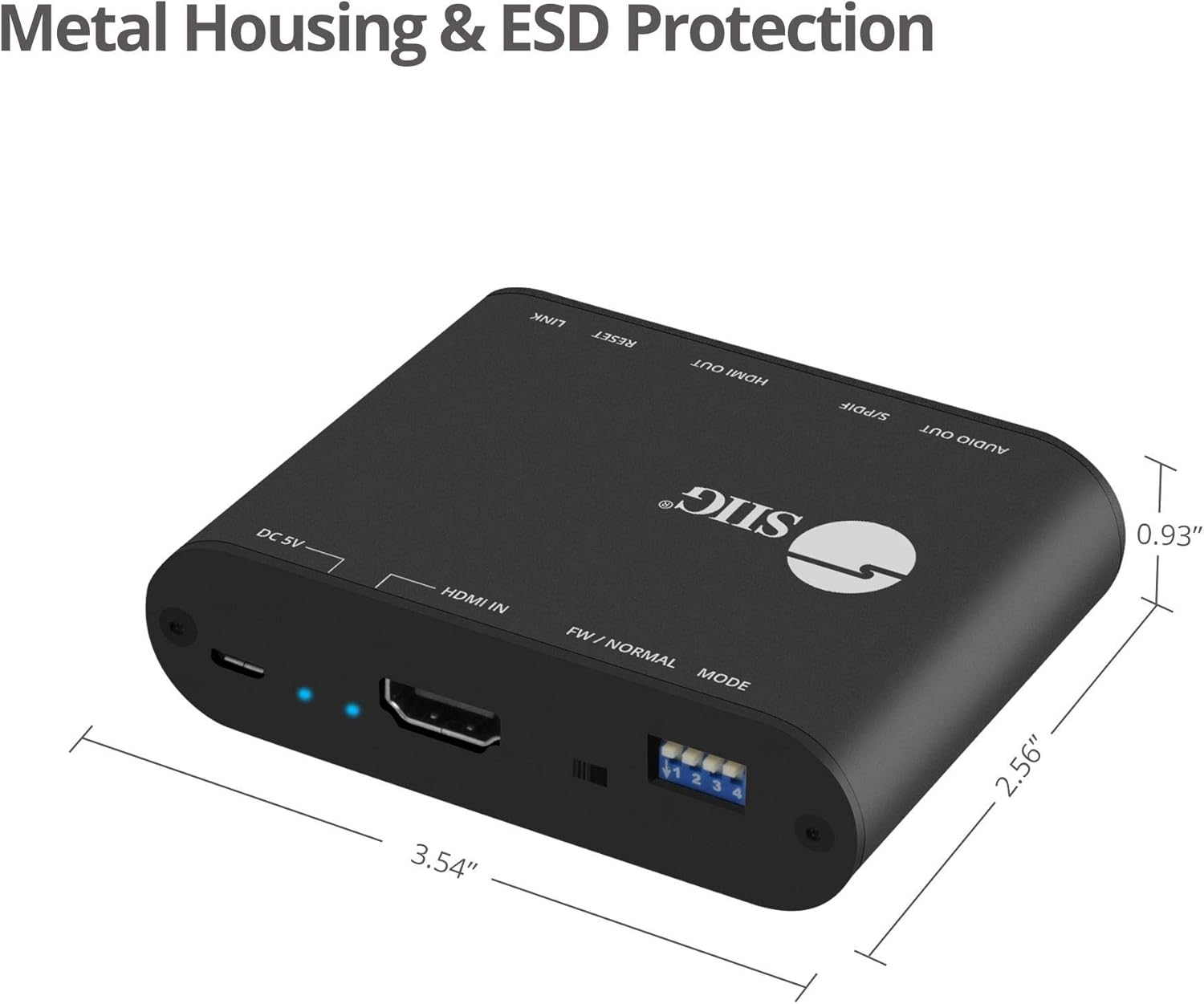
4. Produktas baigtasview and Port Descriptions


Priekinis skydelis:
- 3.5mm Stereo Output: Connect to analog audio devices (e.g., headphones, stereo speakers).
- S/PDIF (Toslink) Output: Connect to digital optical audio receivers or soundbars.
- HDMI išvestis: Connect to an HDMI display (e.g., TV, monitor, projector).
- Output Signal LED Indicator: Illuminates when an HDMI output signal is detected.
- Atkūrimo mygtukas: Naudojamas įrenginiui iš naujo nustatyti.
- Slide Switch (FW/NORMAL Mode):
- Left (FW): Firmware update mode.
- Right (NORMAL): Normal operating mode. Ensure this is set to NORMAL for regular use.
Atgal grupė:
- Micro-USB Port (DC 5V): Connect the provided USB power cable for device power. Also used for firmware updates.
- Maitinimo LED indikatorius: Šviečia, kai prietaisas įjungtas.
- Input Signal LED Indicator: Šviečia, kai aptinkamas HDMI įvesties signalas.
- HDMI įvestis: Connect to an HDMI source device (e.g., Blu-ray player, game console, streaming device).
- 4-pin DIP Switch: Used to configure EDID settings and enable/disable ARC and audio extraction functions.
5. Sąrankos instrukcijos
Follow these steps to set up your SIIG HDMI 2.0 Audio Extractor:
- Išjungimo įrenginiai: Ensure all source devices, displays, and audio systems are powered off before making any connections.
- Prijunkite HDMI įvestį: Connect an HDMI cable from your source device (e.g., Blu-ray player, game console) to the HDMI-IN port on the audio extractor.
- Prijunkite HDMI išvestį: Prijunkite HDMI kabelį nuo HDMI OUT port on the audio extractor to your display device (e.g., TV, monitor, projector).
- Connect Audio Output (Digital): For digital audio, connect a Toslink (optical) cable from the S/PDIF (Toslink) Output port on the extractor to your audio receiver, soundbar, or ampgyvesnis.
- Connect Audio Output (Analog): For analog stereo audio, connect a 3.5mm audio cable from the 3.5 mm stereo išvestis port on the extractor to your headphones or stereo speakers.
- Prijunkite maitinimą: Connect the provided USB Type-A to Micro B cable to the „Micro-USB“ prievadas (DC 5 V) on the extractor and the other end to a USB power source (e.g., USB wall adapter, TV USB port). The Power LED Indicator will illuminate.
- Verify Slide Switch: Ensure the slide switch on the front panel is set to the NORMALUS position (right).
- Įjungiami įrenginiai: Power on your display, audio system, and source device in that order.

6. Naudojimo instrukcijos
6.1 EDID and Function Configuration (DIP Switch)
The 4-pin DIP switch on the back panel allows you to configure the EDID (Extended Display Identification Data) settings and control the ARC and audio extraction functions. Adjust these settings based on your connected devices and desired audio output.

| DIP jungiklio padėtis | Aprašymas |
|---|---|
| PIN1: OFF, PIN2: OFF | EDID apėjimas |
| PIN1: OFF, PIN2: ON | Ultra HD (4K2K@60Hz) – 8/10/12bit, 3D, HDR video & 5.1ch audio |
| PIN1: ON, PIN2: OFF | Ultra HD (4K2K@60Hz) – 8/10/12bit, 3D, HDR video & 2ch audio |
| PIN1: ON, PIN2: ON | Learning EDID from Output |
| PIN3: OFF | Disable ARC Function |
| PIN3: ON | Enable ARC Function |
| PIN4: OFF | Disable Audio Extractor Function |
| PIN4: ON | Enable Audio Extractor Function (via Toslink & 3.5mm) |
Pastaba: After changing DIP switch settings, it is recommended to power cycle the audio extractor and all connected devices to ensure the new settings are applied correctly.
6.2 ARC (Audio Return Channel) Function
When ARC is enabled (PIN3 ON) and your display supports ARC, audio from your TV's internal tuner or smart apps can be sent back to the audio extractor via the HDMI cable and then output through the Toslink (S/PDIF) port to your audio system.

6.3 CEC Bypass
The device supports CEC (Consumer Electronics Control) bypass, allowing CEC commands to pass through the extractor to control connected HDMI devices. This means you can use a single remote to control multiple CEC-enabled devices in your setup.
7. Problemų sprendimas
If you encounter issues with the SIIG HDMI 2.0 Audio Extractor, please refer to the following common troubleshooting steps:
- Nėra vaizdo išvesties:
- Įsitikinkite, kad visi HDMI kabeliai yra tvirtai prijungti.
- Verify the input source is selected correctly on your display.
- Check the power connection to the extractor; the Power LED should be illuminated.
- Išbandykite kitą HDMI kabelį.
- Adjust DIP switch settings for EDID (PIN1 & PIN2) to match your display's capabilities or try "EDID bypass".
- Power cycle all connected devices (source, extractor, display).
- No Audio Output (Toslink/3.5mm):
- Ensure audio cables (Toslink or 3.5mm) are securely connected to the correct output ports on the extractor and input ports on your audio system.
- Verify the audio input is selected correctly on your audio receiver/soundbar.
- Check DIP switch PIN4 is set to ON to enable audio extraction.
- If using ARC, ensure DIP switch PIN3 is set to ON and your TV's ARC function is enabled.
- Confirm the audio format from your source is supported by your audio system and the extractor (refer to "Product Features" for supported formats). Some audio systems may not support certain multi-channel formats.
- Try setting DIP switch PIN1: ON, PIN2: OFF for 2ch audio output if your audio system only supports stereo.
- Power cycle all connected devices.
- Intermittent Video/Audio:
- Patikrinkite, ar nėra laisvų kabelių jungčių.
- Įsitikinkite, kad maitinimo šaltinis yra stabilus.
- Jei įmanoma, sumažinkite laidų ilgį, ypač HDMI.
- Verify that the slide switch is in the NORMALUS padėtis.
- Test with different HDMI cables.
- HDR/4K Issues:
- Ensure all connected HDMI cables are rated for HDMI 2.0 or higher and support 18Gbps bandwidth.
- Verify your source and display devices both support 4K/60Hz and HDR.
- Adjust EDID settings (PIN1 & PIN2) to ensure the correct video mode is selected.
8. Specifikacijos
| Funkcija | Detalė |
|---|---|
| Modelio numeris | CE-H24F11-S1 |
| HDMI atitiktis | HDMI 2.0a |
| HDCP atitiktis | HDCP 2.2 |
| Vaizdo juostos plotis | 18Gbps (600MHz per channel) |
| Palaikomos rezoliucijos | Up to 4Kx2K@60Hz (YUV 4:4:4 8-bit), 4K HDR (YUV 4:2:0 10-bit), 1080p, 1080i, 720p, 480p |
| HDR palaikymas | Yes (4K@60Hz YUV 4:2:0 10-bit) |
| Garso išvestys | 1x Toslink (S/PDIF), 1x 3.5mm Stereo |
| ARC palaikymas | Yes (via Toslink) |
| VRK palaikymas | Apeiti |
| ESD apsauga | ±15kV Air & ±8kV Contact |
| Medžiaga | Metalinis korpusas |
| Gaminio matmenys (ilgis x plotis) | 4.56 colio x 0.78 colio (11.58 cm x 1.98 cm) |
| Prekės svoris | 6.4 uncijos (181.4 gramų) |
| Maitinimo šaltinis | DC 5V (via Micro-USB) |
| Darbinė temperatūra | Iki 104 °F (40 °C) |
| Sertifikatai | FCC, CE, RoHS, TAA compliant |
| Kilmės šalis | Taivanas |
9. Priežiūra
The SIIG HDMI 2.0 Audio Extractor is designed for reliable operation with minimal maintenance.
- Valymas: Use a soft, dry cloth to clean the device. Avoid using liquid or aerosol cleaners, as they may damage the unit.
- Vėdinimas: Įsitikinkite, kad prietaisas yra gerai vėdinamoje vietoje, kad neperkaistų. Neužblokuokite jokių ventiliacijos angų.
- Saugykla: Kai ilgesnį laiką nenaudojate prietaiso, laikykite jį vėsioje, sausoje vietoje, apsaugotoje nuo tiesioginių saulės spindulių ir ekstremalių temperatūrų.
- Firmware atnaujinimai: Periodically check the SIIG website for any available firmware updates for your model. Follow the instructions provided with the firmware update carefully.
10. Saugos informacija
Please observe the following safety guidelines to prevent damage to the device and ensure user safety:
- Saugokite prietaisą nuo vandens ar per didelės drėgmės.
- Nebandykite atidaryti ar modifikuoti įrenginio. Viduje nėra dalių, kurias galėtų aptarnauti vartotojas.
- Use only the provided power cable or a certified 5V USB power adapter.
- Laikykite prietaisą atokiau nuo šilumos šaltinių, tiesioginių saulės spindulių ir degių medžiagų.
- Ensure proper grounding for all connected electrical equipment.
11. Garantija ir techninė pagalba
11.1 Informacija apie garantiją
The SIIG HDMI 2.0 Audio Extractor (CE-H24F11-S1) comes with a 3 metų garantija. This warranty covers defects in materials and workmanship under normal use. For specific terms and conditions, please refer to the warranty documentation provided with your purchase or visit the official SIIG websvetainę.
11.2 Techninė pagalba
For technical assistance, product inquiries, or troubleshooting beyond the scope of this manual, please contact SIIG customer support.
- Websvetainė: Visit the official SIIG websvetainė, kurioje rasite pagalbos išteklių, DUK ir kontaktinės informacijos.
- Susisiekite: Refer to your product packaging or the SIIG website for the most current contact details for technical support.


