1. Įvadas
Ačiū, kad pirkoteasing the Mistral Stand Fan MSF040. This manual provides essential information for the safe and efficient operation, assembly, maintenance, and troubleshooting of your new fan. Please read these instructions thoroughly before use and retain them for future reference.

Figure 1: Fully assembled Mistral Stand Fan MSF040. This image displays the fan's overall design, including the circular base, adjustable stand pole, and the fan head with its protective grille.
2. Svarbios saugos instrukcijos
Kad sumažintumėte gaisro, elektros smūgio ar sužalojimo riziką, visada laikykitės šių pagrindinių saugos priemonių:
- Prieš naudodami šį ventiliatorių, perskaitykite visas instrukcijas.
- Užtikrinkite maitinimo šaltinio ttage atitinka ventiliatoriaus vardinę etiketę.
- Do not operate any fan with a damaged cord or plug. If the cord or plug is damaged, contact qualified service personnel for repair or replacement.
- Atjunkite ventiliatorių nuo elektros lizdo, kai jo nenaudojate, prieš valydami arba prieš jį perkeldami.
- Nemerkite ventiliatoriaus, kištuko ar laido į vandenį ar kitus skysčius.
- Keep the fan out of reach of children and pets. Close supervision is necessary when the fan is used near children.
- Nekiškite pirštų ar jokių daiktų pro groteles, kai ventiliatorius veikia.
- Pastatykite ventiliatorių ant stabilaus, lygaus paviršiaus, kad jis neapvirstų.
- Nenaudokite ventiliatoriaus šlapioje arba damp vietose, pavyzdžiui, vonios kambariuose ar skalbyklose.
- Neužblokuokite oro angų ir nenaudokite įrenginio šalia užuolaidų ar kitų medžiagų, kurios galėtų blokuoti oro srautą.
3. Pakuotės turinys
Atidarius pakuotę, įsitikinkite, kad yra visi šie komponentai:
- Fan Motor Unit with Rear Grille
- Ventiliatorius
- Priekinės grotelės
- Grille Locking Nut
- Ašmenų dangtelis
- Stand Pole (Upper and Lower sections)
- Apvali bazė
- Pagrindo tvirtinimo varžtas
- Maitinimo laidas (integruotas)
- Vartotojo vadovas
4. Surinkimo instrukcijos
Follow these steps to assemble your Mistral Stand Fan MSF040:
- Surinkite pagrindą: Place the stand pole onto the round base. Secure it from underneath the base using the provided base fixing screw. Ensure it is tightened firmly.
- Pritvirtinkite variklio bloką: Insert the fan motor unit onto the top of the stand pole. Secure it with the pole locking screw, if present, or by twisting until it clicks into place.
- Užpakalinių grotelių montavimas: Place the rear grille onto the motor unit, aligning the notches. Secure it with the grille locking nut, turning clockwise until tight.
- Mount the Fan Blade: Slide the fan blade onto the motor shaft, ensuring the pin on the shaft aligns with the groove on the blade. Secure it with the blade cap, turning counter-clockwise until tight.
- Attach the Front Grille: Position the front grille over the rear grille, aligning the clips. Secure the front grille by pressing the clips firmly around the edge until it is fully closed.
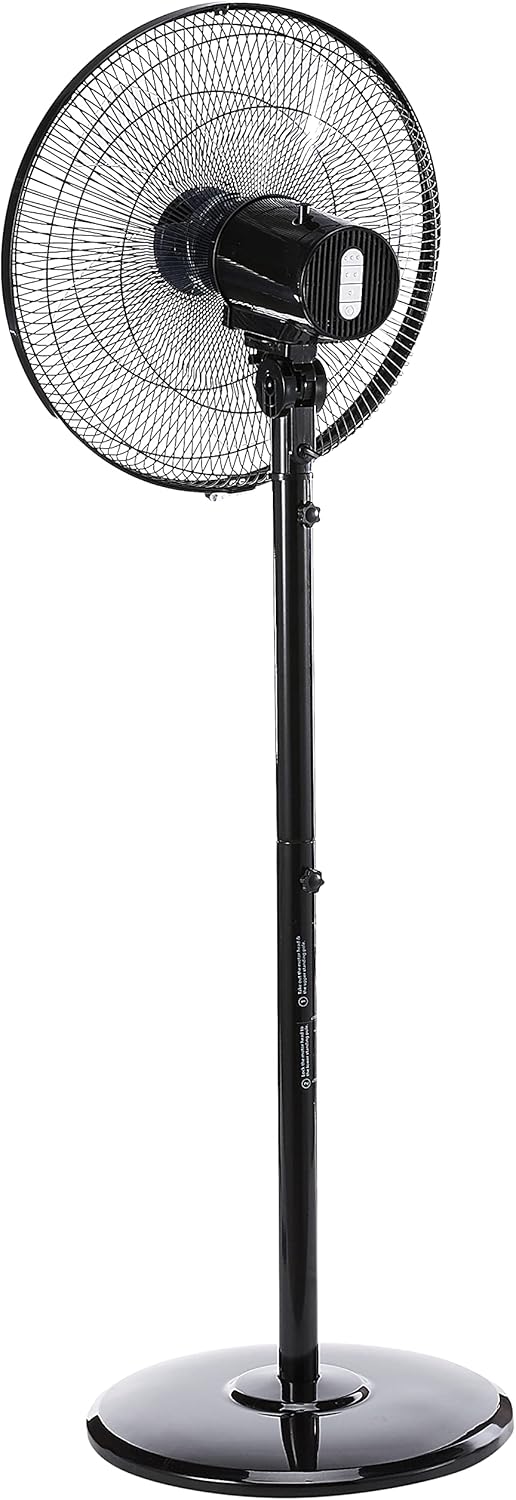
2 pav.: šonas view of the fan, illustrating the adjustable height feature of the stand pole. The pole can be extended or retracted to suit different user preferences.
5. Naudojimo instrukcijos
Once assembled, your Mistral Stand Fan MSF040 is ready for operation:
- Maitinimo jungtis: Įkiškite maitinimo kištuką į tinkamą elektros lizdą.
- Maitinimo įjungimas/išjungimas: Use the power button on the control panel to turn the fan on or off.
- Greičio pasirinkimas: The fan offers 3 speed selections. Press the speed control buttons on the control panel to cycle through low, medium, and high settings.
- Svyravimas: To activate the left and right oscillation, press the oscillation button on the control panel. Press it again to stop oscillation.
- Pakreipimo reguliavimas: The fan head can be tilted 30° up or down. Gently adjust the fan head to your desired angle.
- Aukščio reguliavimas: The stand pole features a convertible height mechanism. Loosen the height adjustment knob on the stand pole, adjust to the desired height, and then tighten the knob firmly.

3 pav. Iš arti view of the fan's control panel, featuring tactile buttons for power, speed selection, and oscillation.
6. Priežiūra ir valymas
Regular cleaning and maintenance will ensure optimal performance and extend the lifespan of your fan:
- Visada atjunkite ventiliatorių nuo elektros tinklo prieš valydami atjunkite nuo elektros lizdo.
- Nuvalykite ventiliatoriaus išorinius paviršius minkšta,amp audinys. Nenaudokite abrazyvinių valiklių ar tirpiklių.
- For thorough cleaning of the fan blades, the front grille can be carefully removed. Refer to the assembly instructions in reverse order for safe disassembly and reassembly.
- Ensure all parts are completely dry before plugging the fan back in and operating it.
- Ilgesnį laiką nenaudojamą ventiliatorių laikykite vėsioje, sausoje vietoje.
7. Problemų sprendimas
Jei kyla problemų dėl ventiliatoriaus, žr. šias dažniausiai pasitaikančias problemas ir sprendimus:
- Ventiliatorius neįsijungia:
- Patikrinkite, ar maitinimo laidas tvirtai įjungtas į veikiantį elektros lizdą.
- Įsitikinkite, kad paspaustas maitinimo mygtukas valdymo skydelyje.
- Verify that the household circuit breaker or fuse has not tripped.
- Fan makes unusual noise:
- Unplug the fan and check for any obstructions (e.g., loose debris, wires) in the fan blades or grilles.
- Ensure all parts are securely assembled and tightened.
- Fan does not oscillate:
- Ensure the oscillation button on the control panel has been pressed.
Jei problema išlieka patikrinus šiuos punktus, susisiekite su klientų aptarnavimo tarnyba.
8. Specifikacijos
| Funkcija | Detalė |
|---|---|
| Prekės ženklas | MISTRAL |
| Modelis | MSF040 |
| Elektrinio ventiliatoriaus dizainas | Grindų ventiliatorius / stovo ventiliatorius |
| Ašmenų tipas | 5 ABS blade |
| Greičio pasirinkimas | 3 greičiai |
| Osciliacija | Left & right oscillation |
| Pasvirimo reguliavimas | 30° up & down |
| Aukščio reguliavimas | Convertible height |
| Valdiklio tipas | Button Control (Tactile) |
| Medžiaga | Plastikiniai |
| Spalva | Juoda |
| Maitinimo šaltinis | Su laidu elektra |
| Prekės svoris | 5.35 kilogramo |
| Įtraukti komponentai | Laidas |

Figure 4: Close-up of the power plug, indicating the corded electric power source for the fan.
9. Garantija ir palaikymas
Your Mistral Stand Fan MSF040 comes with a 2 Year Local (Singapore) WarrantyPrašome išsaugoti pirkimo įrodymą garantiniams reikalavimams.
For technical support, service, or warranty inquiries, please contact Mistral customer service through their official channels. Refer to the product packaging or the official Mistral websvetainė, kurioje rasite kontaktinius duomenis.


