1. Įvadas
This manual provides essential information for the safe and efficient use of your Sharp 40-inch LED TV, model LC-40LE185M. Please read these instructions thoroughly before operating the television and retain them for future reference. This television is designed to provide a high-quality viewing experience with its 1366 x 768 resolution display and various connectivity options.
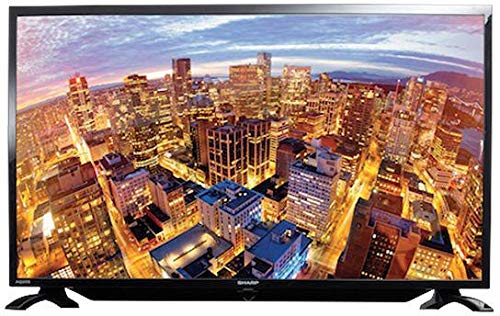
1.1 pav.: priekis view of the Sharp 40-inch LED TV.
2. Saugos informacija
Visada laikykitės šių saugos priemonių, kad išvengtumėte elektros smūgio, gaisro ar sužalojimų:
- Saugokite televizorių nuo lietaus ar drėgmės.
- Neatidarykite televizoriaus korpusoasing. Visus techninės priežiūros darbus patikėkite kvalifikuotiems darbuotojams.
- Užtikrinkite tinkamą vėdinimą; neužblokuokite ventiliacijos angų.
- Pastatykite televizorių ant stabilaus, lygaus paviršiaus, kad jis nenukristų.
- Atjunkite televizorių nuo elektros tinklo žaibuojant arba kai jis ilgą laiką nenaudojamas.
- Laikykite televizorių atokiau nuo tiesioginių saulės spindulių, šilumos šaltinių ir stiprių magnetinių laukų.
3. Pakuotės turinys
Patikrinkite, ar pakuotėje yra visi reikalingi daiktai:
- Sharp 40-inch LED TV (Model LC-40LE185M)
- Nuotolinio valdymo pultas
- Maitinimo laidas
- Table-top Stand (including screws)
- Vartotojo vadovas (šis dokumentas)
4. Sąranka
4.1 Išpakavimas
Atsargiai išimkite televizorių ir visus priedus iš pakuotės. Išsaugokite pakuotės medžiagas būsimam transportavimui ar laikymui.
4.2 Stovo tvirtinimas
Jei naudojate stalo stovą:
- Padėkite televizorių ekranu žemyn ant minkšto, švaraus paviršiaus, kad nepažeistumėte ekrano.
- Sulygiuokite stovą su tvirtinimo angomis televizoriaus apačioje.
- Pritvirtinkite stovą pridėtais varžtais. Įsitikinkite, kad stovas tvirtai pritvirtintas.
If wall-mounting, consult a professional installer. Pastaba: Some users have reported that the lower screw bracket hole for wall mounting may not be firmly attached, and the frame can be flimsy/wobbly. Exercise caution and ensure secure installation if wall mounting.

Figure 4.1: Illustration of the TV with its table-top stand.
4.3 Maitinimo prijungimas
Prijunkite maitinimo laidą prie televizoriaus maitinimo įvesties, o tada – prie sieninio lizdo.
4.4 Išorinių įrenginių prijungimas
Jūsų televizorius palaiko įvairias jungtis:
- HDMI: Connect Blu-ray players, gaming consoles, or set-top boxes using HDMI cables. The TV has HDMI ports for compatible devices.
- USB: Prijunkite USB atmintines prie view photos or other media. The TV has a USB port for compatible devices.
- MHL: Use MHL connectivity to connect your smartphone to the TV.
5. Naudojimo instrukcijos
5.1 Maitinimo įjungimas/išjungimas
Press the Power button on the remote control or on the TV to turn the TV on or off. The TV automatically switches to standby mode when there is no signal, saving power consumption.
5.2 Pagrindiniai valdikliai
Use the remote control to navigate menus, adjust volume, and change channels. Refer to the remote control diagram (not included in this manual) for specific button functions.
5.3 Įvesties pasirinkimas
Press the 'Input' or 'Source' button on your remote to select the desired input source (e.g., HDMI 1, USB, TV).
5.4 Vaizdo ir garso nustatymai
Access the TV's menu to adjust picture settings (brightness, contrast, color, sharpness) and sound settings (bass, treble, balance, sound mode). The Easy Colour Adjustment feature allows you to achieve ideal color tones.
5.5 Ypatingos savybės
- Erelis View Technologija: Enhances your visual experience with improved display quality.
- AquoMotion Lite Technology: Reduces motion blur and distortions, improving transitions during fast-paced movements.
- Photo Frame Mode: Relive your special memories by displaying vibrant photos on the screen.
- USB atkūrimas: Enjoy content stored on compatible USB devices directly on the TV screen.
- HDMI jungtis: Connect various compatible devices for an immersive viewing or gaming experience.
6. Specifikacijos
| Funkcija | Specifikacija |
|---|---|
| Prekės ženklas | Aštrus |
| Modelio numeris | LC-40LE185M |
| Ekrano dydis | 40 colių |
| Ekrano technologija | LED |
| Rezoliucija | 1366 x 768 pikselių |
| Atnaujinimo dažnis | 60 Hz |
| Gaminio matmenys | 40.8 x 29 x 2.8 cm |
| Svoris | 5.8 kg |
| Ryšio technologija | HDMI, USB |
| Krašto santykis | 1.77:1 |
| Palaikomos interneto paslaugos | "YouTube" |
| Ypatinga funkcija | Platus ekranas |
7. Problemų sprendimas
Jei kyla problemų dėl televizoriaus, žr. toliau pateiktas dažniausiai pasitaikančias problemas ir sprendimus:
- Nėra galios: Ensure the power cord is securely connected to both the TV and the wall outlet. Check if the outlet is functional.
- Nėra vaizdo / garso: Verify the correct input source is selected. Check all cable connections (HDMI, antenna).
- Prasta vaizdo kokybė: Sureguliuokite vaizdo nustatymus (ryškumą, kontrastą, ryškumą). Įsitikinkite, kad įvesties šaltinis teikia aukštos kokybės signalą.
- Nuotolinio valdymo pultas neveikia: Patikrinkite baterijas ir įsitikinkite, kad tarp nuotolinio valdymo pulto ir televizoriaus IR jutiklio nėra jokių kliūčių.
- TV Automatically Switches to Standby: This is a power-saving feature that activates when no signal is detected. Ensure your input source is active.
Jei problemos išlieka, kreipkitės į klientų aptarnavimo tarnybą.
8. Priežiūra
- Ekrano valymas: Gently wipe the screen with a soft, lint-free cloth. For stubborn marks, use a screen cleaner specifically designed for LED TVs. Do not spray cleaner directly onto the screen.
- Spintos valymas: Televizoriaus korpusą valykite minkšta, sausa šluoste. Nenaudokite abrazyvinių valiklių ar tirpiklių.
- Vėdinimas: Įsitikinkite, kad televizoriaus gale esančios ventiliacijos angos nėra užblokuotos, kad jis neperkaistų.
9. Garantija ir palaikymas
Your Sharp TV comes with a standard manufacturer's warranty. Please refer to the warranty card included in your product packaging for details regarding coverage, terms, and conditions. For technical support, service, or warranty claims, please contact Sharp customer service through their official websvetainėje arba kontaktinę informaciją, pateiktą kartu su pirkimo dokumentais.


