Įvadas
The Sharp Atomic Clock provides precise timekeeping and temperature monitoring for your home or office. Featuring a large, easy-to-read display, this clock automatically synchronizes with the atomic time signal (WWVB) broadcast from Fort Collins, Colorado, ensuring accuracy without manual adjustments. It also includes a wireless outdoor sensor to display both indoor and outdoor temperatures.
Produkto savybės
- Atomic Time Accuracy: Automatically synchronizes with the WWVB atomic time signal for precise timekeeping.
- Jumbo 3" Easy-to-Read Numbers: Large digital display for clear visibility of time, date, and temperature.
- Indoor/Outdoor Temperature Display: Monitors both indoor ambient temperature and outdoor temperature via a wireless sensor.
- Belaidis lauko jutiklis: Transmits outdoor temperature data to the main unit.
- Maitinamas su baterijomis: Operates on batteries for flexible placement (batteries not included).
- Automatinis vasaros laiko (DST) reguliavimas: Automatically adjusts for daylight saving time changes.
- Pasirenkamos laiko juostos: Allows selection of various US time zones.
- 12/24 valandų formatas: Option to display time in either 12-hour or 24-hour format.
- Celsius/Fahrenheit Display: Switch between Celsius and Fahrenheit temperature units.
Pakuotės turinys
Prieš tęsdami sąranką, įsitikinkite, kad yra visi reikalingi daiktai.
- Sharp Atomic Clock Main Unit
- Belaidis lauko jutiklis
- Instrukcijų vadovas
Note: Batteries are not included. The main unit requires 2 AA batteries, and the outdoor sensor requires 2 AA batteries.
Sąranka
1. Akumuliatoriaus įdėjimas
- Atidarykite baterijų skyrių pagrindinio laikrodžio bloko gale.
- Insert 2 AA batteries, observing the correct polarity (+ and -).
- Uždarykite akumuliatoriaus skyriaus dangtelį.
- Open the battery compartment on the wireless outdoor sensor.
- Insert 2 AA batteries into the outdoor sensor, observing the correct polarity.
- Close the outdoor sensor's battery compartment cover.
2. Pradinis sinchronizavimas ir nustatymai
After battery installation, the clock will attempt to receive the WWVB atomic time signal and connect to the outdoor sensor. This process may take several minutes or up to 24 hours depending on your location and environmental interference.
- Laiko juosta: Press the "TIME ZONE" button (often labeled "UP TIME ZONE") on the back of the clock to cycle through available time zones (PST, MST, CST, EST). Select your desired time zone.
- 12/24 valandų formatas: Press the "12/24" button to switch between 12-hour and 24-hour display.
- Celsijaus/Farenheito: Press the "°C/°F" button to toggle between Celsius and Fahrenheit temperature display.
- Outdoor Sensor Pairing: If the outdoor temperature does not appear, press the "CHANNEL" button on the main unit to search for the sensor signal. Ensure the outdoor sensor is within range and not obstructed.
For optimal signal reception, place the clock away from large metal objects, electronic devices, and areas with heavy concrete or brick walls. The outdoor sensor should be placed in a shaded, dry location, protected from direct sunlight and precipitation, for accurate readings.
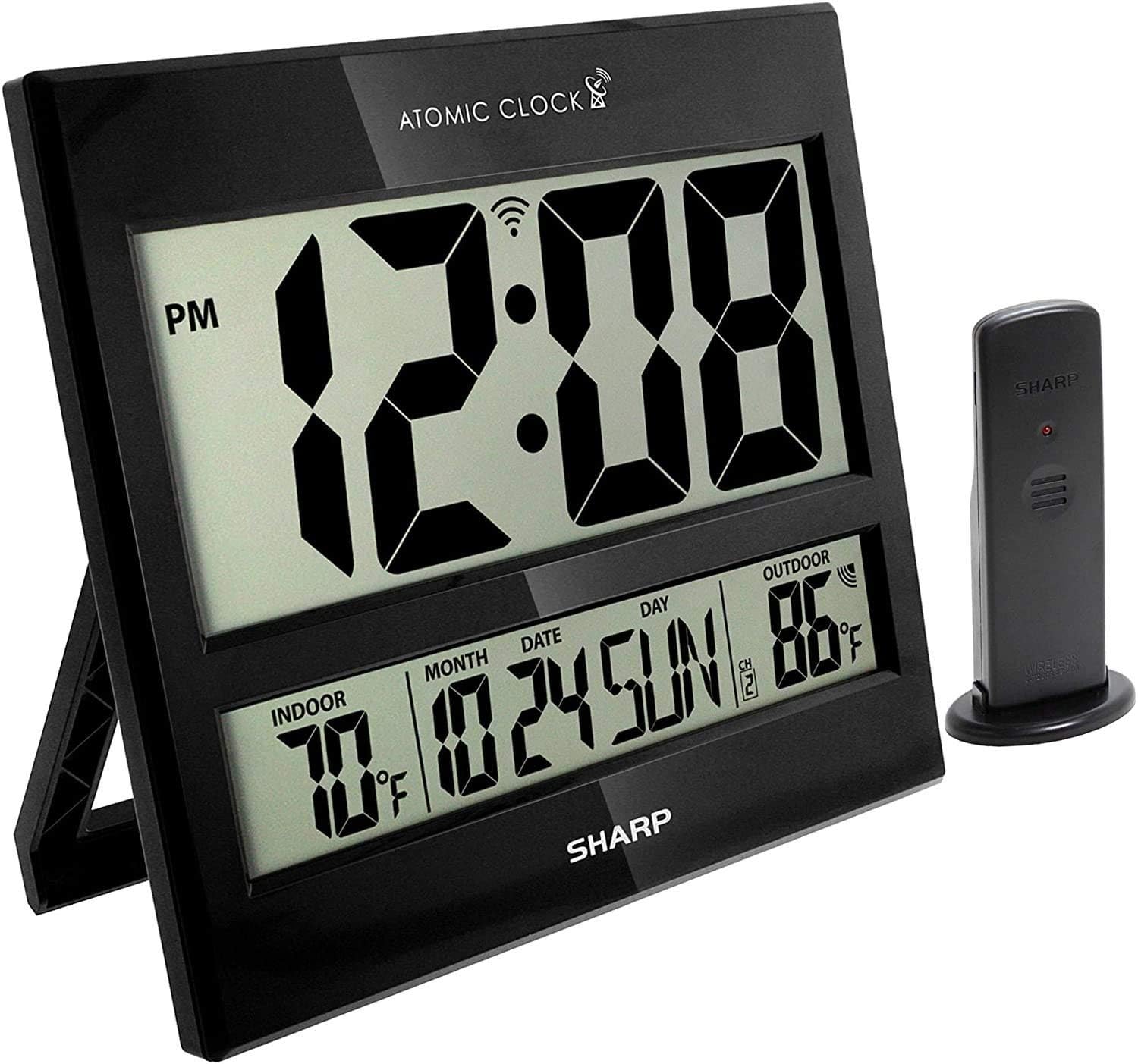
Image: The Sharp Atomic Clock main unit displaying time, indoor temperature, date, and outdoor temperature, alongside its wireless outdoor sensor.
Operacija
Rodyti informaciją
The clock's large LCD screen displays the following information:
- Laikas: Current time in selected 12-hour or 24-hour format.
- PM indikatorius: Displays "PM" for afternoon hours in 12-hour format.
- Atominio signalo indikatorius: Shows the status of the WWVB atomic time signal reception.
- Vidaus temperatūra: Pagrindinio įrenginio išmatuota dabartinė temperatūra.
- Month/Date/Day: Current calendar information.
- Lauko temperatūra: Current temperature measured by the wireless outdoor sensor.
- Outdoor Sensor Channel: Indicates the channel the outdoor sensor is transmitting on.
- Baterijos išsikrovimo indikatorius: An icon will appear when batteries are low and need replacement.
Mygtukų funkcijos (galinis skydelis)
| Mygtukas | Funkcija |
|---|---|
| KALENDORIUS | Press and hold for 2 seconds to manually set calendar (Year, Month, Date, Language). Use UP/DOWN buttons to change values. |
| LAIKAS | Press and hold for 2 seconds to manually set time (DST ON/OFF, Hour, Minute). Use UP/DOWN buttons to change values. |
| 12/24 | Switches between 12-hour and 24-hour time display. |
| KANALAS | Press to switch between outdoor sensor channels (1, 2, 3). Press and hold for 2 seconds to pair with the outdoor sensor. |
| ° C / ° F | Perjungia temperatūros rodymą pagal Celsijų ir Farenheitą. |
| BANGOS | Initiates a manual search for the WWVB atomic time signal. |
| RESET | Resets the clock to factory default settings. Requires a pointed object (e.g., paperclip). |
| UP / TIME ZONE | Increases values during manual setting. Press to cycle through time zones. |
| ŽEMYN | Decreases values during manual setting. |
Priežiūra
- Baterijos keitimas: Replace batteries in both the main unit and outdoor sensor when the low battery indicator appears on the display. Always replace all batteries at the same time with new ones.
- Valymas: Clean the clock and sensor with a soft, dry cloth. Do not use abrasive cleaners or solvents.
- Lauko jutiklių išdėstymas: Periodically check the outdoor sensor's location to ensure it remains protected from extreme weather conditions, direct sunlight, and moisture.
Trikčių šalinimas
- Clock not syncing with atomic time:
- Ensure the clock is placed away from electronic interference (TVs, computers, microwaves).
- Try placing the clock near a window facing Fort Collins, Colorado (if applicable to your region).
- Press the "WAVE" button to initiate a manual signal search.
- Pradinis sinchronizavimas gali užtrukti iki 24 valandų.
- Outdoor temperature not displaying or incorrect:
- Check batteries in the outdoor sensor.
- Ensure the outdoor sensor is within the effective transmission range (typically up to 100 feet, line of sight).
- Press the "CHANNEL" button on the main unit to re-establish connection.
- Verify the outdoor sensor is placed in a location protected from direct sunlight and rain, which can affect readings.
- Ekranas blankus arba tuščias:
- Replace all batteries in the main unit with fresh ones.
- Įsitikinkite, kad baterijos įdėtos teisingu poliškumu.
- Neteisingas laikas arba data:
- Patikrinkite, ar pasirinkta teisinga laiko juosta.
- Check if Daylight Saving Time (DST) setting is correct for your region.
- If atomic signal is not received, manually set the time and date using the "TIME" and "CALENDAR" buttons.
Specifikacijos
| Funkcija | Detalė |
|---|---|
| Prekės ženklas | Aštrus |
| Modelio numeris | 8541848315 |
| UPC | 049353998732 |
| Spalva | Blizgus juodas |
| Ekrano tipas | Skaitmeninis LCD |
| Ypatinga funkcija | Atomic Time Synchronization (WWVB), Indoor/Outdoor Temperature |
| Gaminio matmenys | 13"W x 1.5"H (Main Unit) |
| Maitinimo šaltinis | Maitinamas baterijomis |
| Reikalingas baterijų skaičius | Main Unit: 2 AA; Outdoor Sensor: 2 AA |
| Medžiaga | Plastikiniai |
| Montavimo tipas | Sieninis laikiklis / stalo stovas |
| Naudojimas viduje / lauke | Indoor (Main Unit), Outdoor (Sensor) |
Garantija ir palaikymas
Sharp products are manufactured to high-quality standards. For warranty information, technical support, or service inquiries, please refer to the contact information provided with your product packaging or visit the official Sharp websvetainėje. Išsaugokite pirkimo kvitą kaip pirkimo įrodymą garantiniams reikalavimams.


