1. Saugos informacija
Prieš surinkdami ir naudodami, atidžiai perskaitykite visas instrukcijas. Išsaugokite šį vadovą ateičiai.
- Reikalingas surinkimas: This desk requires self-assembly. Follow the provided assembly instructions meticulously to prevent injuries.
- Svorio limitas: This desk is not designed to carry heavy objects. The maximum weight capacity is approximately 17 kg (37.5 lbs) to ensure stability.
- Priežiūra: Children should be supervised while using the desk, especially during adjustments.
- Vieta: Padėkite stalą ant lygaus, stabilaus paviršiaus.
2. Produktas baigtasview
The TecTake Children's Desk is designed to provide a comfortable and adaptable workspace for various activities such as drawing, homework, and crafts. Its thoughtful design allows for height and tilt adjustments to suit the user's needs.
Pagrindinės funkcijos:
- Tilting Desktop: The work surface can be tilted to provide an ergonomic position for different tasks.
- Reguliuojamas aukštis: The desk legs are adjustable in 7 steps, allowing the desk to grow with your child.
- Integruotas stalčius: A convenient drawer provides storage for school supplies, drawing materials, and other items.
- Removable Stopper Strips: Two removable stopper strips on the lower edge of the desktop prevent materials from sliding off when the surface is tilted.
- Stabili konstrukcija: Built with robust materials for durability and stability during daily use.
- Užapvalinti kampai: The desktop features rounded corners for enhanced safety.
- Lengva valyti: The surface is washable with a damp audinys.

Figure 1: TecTake Children's Desk, showcasing jo dizainą ir savybes.

2 pav. Baigtaview of key features including adjustable height, tilting desktop, and storage.
3. Sąranka
The desk comes with detailed assembly instructions in the package. Please refer to the included manual for step-by-step guidance on assembling your TecTake Children's Desk.
Generalinės asamblėjos žingsniai:
- Išpakuokite visus komponentus ir patikrinkite juos pagal dalių sąrašą, pateiktą pridėtame vadove.
- Surinkite pagrindinę rėmo konstrukciją naudodami pateiktus tvirtinimo elementus.
- Attach the desktop to the frame, ensuring the tilting mechanism is correctly installed.
- Install the storage drawer and stopper strips.
- Prieš naudodami įsitikinkite, kad visi varžtai ir tvirtinimo detalės yra tvirtai priveržtos.

Figure 3: The desk's flexible design allows for various adjustments to suit user needs.
4. Naudojimo instrukcijos
4.1 Stalo aukščio reguliavimas
- Locate the height adjustment mechanisms on the desk legs.
- Carefully loosen the fasteners or pins that secure the legs at their current height.
- Adjust the desk to one of the 7 available height positions (from approximately 63 cm to 94 cm).
- Ensure both sides are adjusted to the same height and securely fasten the mechanisms before use.
4.2 Tilting the Desktop
- The desktop features a tilting mechanism for ergonomic positioning.
- To tilt, lift the desktop slightly and adjust it to the desired angle.
- Ensure the desktop is securely locked into place at the chosen angle.
- Utilize the two removable stopper strips to prevent items from sliding off the tilted surface.
4.3 Using the Storage Drawer
- The integrated drawer provides convenient storage.
- Pull the drawer out to access its contents.
- Push the drawer back in until it is fully closed to keep items secure and maintain a tidy workspace.
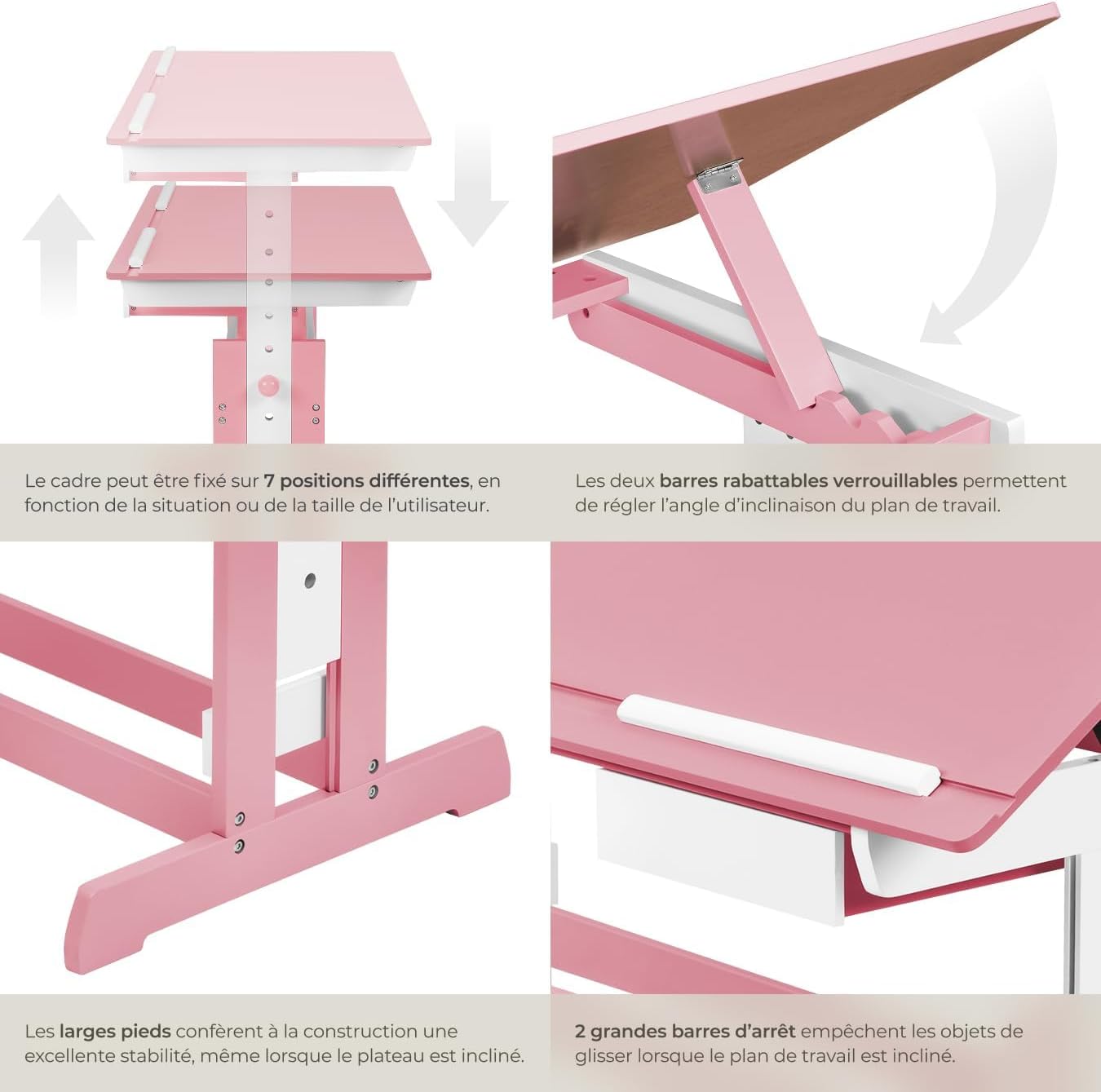
Figure 4: Close-up of the height adjustment and tilting mechanism.
5. Priežiūra
- Valymas: Nuvalykite stalo paviršius reklamaamp šluoste. Venkite abrazyvinių valiklių ar stiprių cheminių medžiagų, kurios gali pažeisti apdailą.
- Patikra: Periodiškai patikrinkite visus varžtus ir tvirtinimo detales, kad įsitikintumėte, jog jie yra tvirtai priveržti. Prireikus priveržkite.
- Venkite per didelės drėgmės: Do not expose the desk to excessive moisture or direct sunlight for prolonged periods to prevent warping or discoloration.
6. Problemų sprendimas
If you encounter any issues with your TecTake Children's Desk, please refer to the following common solutions:
- Stalo virpesiai: Ensure the desk is placed on a level surface. Check that all assembly screws and bolts are securely tightened.
- Difficulty Adjusting Height/Tilt: Verify that no obstructions are present in the adjustment mechanisms. Ensure fasteners are sufficiently loosened before attempting to adjust.
- Trūksta dalių arba jos sugadintos: If any parts are missing or damaged upon arrival, please contact TecTake customer support for assistance.
7. Specifikacijos
| Funkcija | Specifikacija |
|---|---|
| Prekės ženklas | TecTake |
| Modelio numeris | 800117 |
| Darbinio paviršiaus matmenys | Maždaug 109 x 55 cm (43 x 21.7 colio) |
| Aukščio reguliavimo diapazonas | Approx. 63 cm to 94 cm (24.8 to 37 inches) in 7 steps |
| Drawer Interior Dimensions (HxWxD) | Maždaug 6 x 27 x 22 cm (2.4 x 10.6 x 8.7 colio) |
| Svoris | apytiksliai 17 kg (37.5 svaro) |
| Medžiaga | Plywood (lacquered) / Metal |
| Ypatinga funkcija | Adjustable, Tilting Desktop |
| Priežiūros instrukcijos | Nuvalykite su skelbimuamp audeklas |

Figure 5: Detailed dimensions and technical specifications of the desk.
8. Garantija ir palaikymas
For warranty information, product support, or to order replacement parts, please refer to the documentation included with your purchase or visit the official TecTake websvetainę. Kreipdamiesi į palaikymo tarnybą, turėkite po ranka savo modelio numerį (800117) ir pirkimo datą.


