1. Įvadas
The Reloop RP-8000 MK2 is an advanced hybrid torque turntable designed for professional DJ applications and musical performance. It integrates seamlessly with Serato DJ Pro, offering extensive control possibilities and innovative features for creative expression. This manual provides detailed instructions for setting up, operating, and maintaining your RP-8000 MK2 turntable.

1.1 pav.: Iš viršaus į apačią view of the Reloop RP-8000 MK2 Turntable, showcasing its main components including the platter, tone arm, and performance pads.
2. Produkto ypatybės
- Advanced DJ Turntable: Developed in collaboration with renowned international turntable musicians, offering cutting-edge technology.
- Serato DJ Pro Integration: Designed for seamless control of 7 new color-coded performance modes within Serato DJ Pro.
- Platter Play Mode: Performance pads can be utilized to control the platter's rotation speed, enabling melodic and musical live performances.
- Independent Pad Modes: Features independent pad working modes when used in conjunction with the Reloop ELITE mixer.
- Rigid Chassis Construction: Enhanced and heavier design with additional metal, rubber, and molding compound reinforcements for high vibration damping and isolation.
- Skaitmeninis LCD ekranas: Provides information on pitch, BPM, Deck assignment, scales, notes, elapsed/remaining track time, and firmware settings.
- MIDI suderinamumas: Can communicate with any MIDI compatible DJ software.
- S-shaped Tone Arm: Statically balanced S-shaped tone arm with hydraulic lift and anti-skating mechanism.
- Didelio sukimo momento variklis: Fine-tuned, quartz-driven motor with digital pitch correction, operating at a starting torque of 2.8kg/cm, adjustable up to 4.5kg/cm.
- Recessed Rear Connection Panel: Allows for easy mounting in a flight case and convenient positioning next to other DJ gear.
- Dual Mixer Output: An additional output enables connection to two mixers simultaneously, facilitating easy switching between DVS and vinyl setups.
3. Kas yra dėžutėje
Upon unboxing your Reloop RP-8000 MK2, please ensure all the following components are present:
- Reloop RP-8000 MK2 Turntable Unit
- Slipmat
- LED Needle Light
- Atsvara
- Phono RCA Cable with Grounding
- USB kabelis
- Maitinimo laidas
- Naudojimo instrukcijos (šis vadovas)
4. Sąranka
4.1 Įdėjimas
Place the turntable on a stable, level surface away from direct sunlight, heat sources, and excessive vibrations. The robust construction of the RP-8000 MK2 helps minimize external vibrations, but optimal placement is still recommended for best performance.
4.2 Jungtys
Connect the turntable to your mixer or audio interface using the supplied phono RCA cable. Ensure the grounding wire is properly connected to prevent hum. For DVS (Digital Vinyl System) setups, connect the USB cable to your computer. The recessed rear connection panel allows for easy cable management, especially when integrating into a flight case.
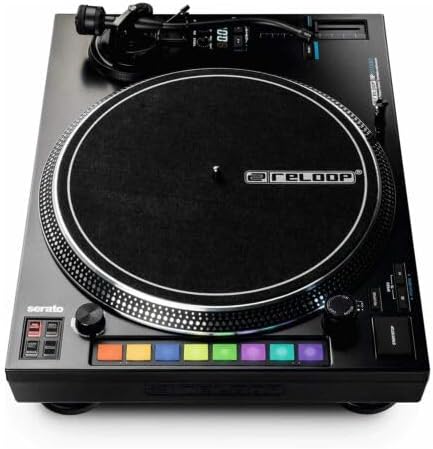
Figure 4.1: Rear connection panel of the RP-8000 MK2, illustrating RCA, USB, and power inputs for easy setup.
The RP-8000 MK2 features an additional output, allowing you to connect the turntable to two mixers simultaneously. This is particularly useful for quick transitions between DVS and traditional vinyl playback.
4.3 Tone Arm and Cartridge Setup
Carefully install your preferred cartridge onto the S-shaped tone arm. Adjust the counterweight to achieve proper tracking force as recommended by your cartridge manufacturer. Utilize the anti-skating mechanism to ensure the stylus tracks evenly across the record groove.

4.2 pav. Išsamus view of the S-shaped tone arm, highlighting the counterweight and anti-skating adjustment.
5. Patefono valdymas
5.1 Pagrindinis atkūrimas
Place a record on the platter and lower the stylus onto the record. Use the START/STOP button to initiate or halt platter rotation. Adjust the pitch slider to control the playback speed. The digital LCD display will show the current pitch and BPM.

Figure 5.1: The digital LCD display showing pitch and BPM information, alongside the pitch adjustment controls.
5.2 Performance Modes (Serato DJ Pro Integration)
The RP-8000 MK2 is optimized for use with Serato DJ Pro. The 8 large, color-coded performance pads on the side of the turntable allow direct control over various Serato DJ Pro functions. These include:
- Užuomina: Trigger cue points.
- Saved Loops: Activate saved loops.
- Sampler: Trigeris samples.
- Pitch Play: Manipulate pitch of cue points.
- Loop Roll: Create momentary loop rolls.
- Pjaustyti: Slice up tracks for creative remixing.
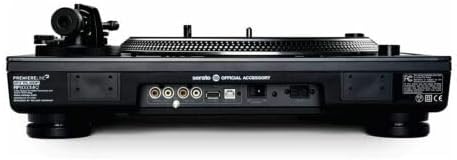
Figure 5.2: The color-coded performance pads, providing direct access to Serato DJ Pro functions.

Figure 5.3: Dedicated Serato control buttons for various modes, enhancing workflow.
5.3 Platter Play Mode
Activate Platter Play mode to use the performance pads to control the platter's rotation speed. This unique feature allows for melodic and musical live performances by triggering different pitch values directly from the pads. The LCD display will show relevant information such as scales and notes when in this mode.
5.4 Torque and Brake Adjustment
The RP-8000 MK2 features adjustable starting torque (2.8kg/cm to 4.5kg/cm) and brake speed. These adjustments allow you to customize the feel of the platter to your preference, whether you prefer a classic turntable feel or a more aggressive, quick-start response.
6. Priežiūra
Regular maintenance ensures the longevity and optimal performance of your Reloop RP-8000 MK2 turntable.
- Valymas: Use a soft, dry cloth to wipe down the turntable chassis. For the platter, use a slightly damp cloth and ensure it is completely dry before use. Avoid abrasive cleaners or solvents.
- Rašiklio priežiūra: Regularly clean your stylus with a dedicated stylus brush to remove dust and debris. Replace the stylus when it shows signs of wear to prevent damage to your records and maintain sound quality.
- Apsauga nuo dulkių: Always use a dust cover (if available) when the turntable is not in use to protect it from dust accumulation.
- Tone Arm Balance: Periodically check and re-balance the tone arm to ensure correct tracking force and prevent excessive record wear.
7. Problemų sprendimas
| Problema | Galima priežastis | Sprendimas |
|---|---|---|
| Nėra galios | Maitinimo laidas neprijungtas; Maitinimo lizdas sugedęs | Įsitikinkite, kad maitinimo laidas yra tvirtai prijungtas. Išbandykite kitą maitinimo lizdą. |
| Nėra garso ar mažas garsumas | RCA cables incorrectly connected; Mixer input incorrect; Cartridge/stylus issues | Check RCA connections to mixer/interface. Ensure phono input is selected on mixer. Verify cartridge is properly installed and stylus is not damaged. |
| Dumbimas garsas | Ground wire not connected; Ground loop | Ensure grounding wire is securely connected to both turntable and mixer. Try connecting to a different power circuit or using a ground loop isolator. |
| Praleidžiantis arba iškraipytas garsas | Improper tone arm balance/tracking force; Damaged stylus; Dirty record | Re-balance tone arm and adjust tracking force. Inspect stylus for damage and replace if necessary. Clean the record thoroughly. |
| Performance pads not responding | USB connection issue; Software not configured correctly | Ensure USB cable is connected and Serato DJ Pro is running. Check MIDI settings within Serato DJ Pro. |
8. Specifikacijos
| Funkcija | Detalė |
|---|---|
| Modelio pavadinimas | RP-8000 MK2 Upper Torque Hybrid Turntable Instrument |
| Prekės modelio numeris | AMS-RP-8000-MK2 |
| Prekės ženklas | Perkelti |
| Prekės svoris | 3.3 svaro (1.5 kilogramo) |
| Gaminio matmenys | 19.94 x 19.09 x 5.69 colio |
| Spalva | Juoda |
| Medžiagos tipas | Plastikiniai |
| Maitinimo šaltinis | Su laidu elektra |
| ttage | 230 voltų |
| Ryšio technologija | RCA |
| Variklio tipas | AC variklis |
| Pirmoji laisva data | 22 m. vasario 2011 d |
9. Garantija ir palaikymas
For warranty information and technical support regarding your Reloop RP-8000 MK2 turntable, please refer to the official Reloop websvetainėje arba susisiekite tiesiogiai su jų klientų aptarnavimo tarnyba. Išsaugokite pirkimo įrodymą, jei prireiktų garantijos.
You can find more information and support resources on the official Reloop websvetainė: www.reloop.com


