Įvadas
This manual provides detailed instructions for the installation, operation, and maintenance of the Hanwha Techwin HCV-6070R 2MP Outdoor Vandal-Resistant Dome Camera. This camera is designed for outdoor security surveillance, offering 2-megapixel resolution, a 2.8-12mm manual varifocal lens, and night vision capabilities with a BNC connection.
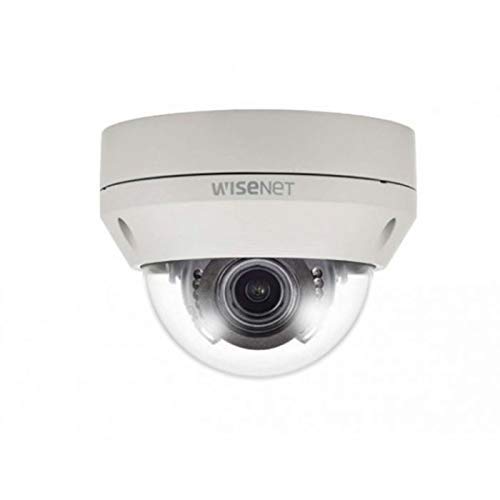
Figure 1: Hanwha Techwin HCV-6070R 2MP Outdoor Vandal-Resistant Dome Camera.
Saugos informacija
Please read all safety instructions carefully before installing or operating the camera. Keep this manual for future reference.
- Ensure the power supply matches the camera's requirements to prevent electrical shock or fire.
- Nelaikykite fotoaparato ekstremalioje temperatūroje, drėgmėje ar korozinėje aplinkoje.
- Montavimą turėtų atlikti kvalifikuoti specialistai, laikydamiesi vietinių elektros kodeksų.
- Venkite ilgalaikio tiesioginio objektyvo poveikio stipriai šviesos šaltiniams.
- Nebandykite ardyti ar modifikuoti kameros. Tai panaikins garantiją.
Pakuotės turinys
Patikrinkite, ar pakuotėje yra visi reikalingi daiktai:
- Hanwha Techwin HCV-6070R Dome Camera (1 unit)
- Montavimo varžtai ir inkarai
- Diegimo šablonas
- Greitos pradžios vadovas
- Waterproof Cap (if applicable)
Sąranka
1. Kameros montavimas
The HCV-6070R is designed for wall mounting. Choose a suitable outdoor location that provides the desired surveillance coverage and is protected from direct impact.
- Use the provided installation template to mark the drilling holes on the wall.
- Drill holes according to the template and insert the wall anchors.
- Secure the camera base to the wall using the mounting screws.
- Sureguliuokite fotoaparato viewing angle as needed before tightening all screws.
2. Laidai ir jungtys
The camera utilizes a BNC connection for video output and requires a separate power supply. Ensure all connections are secure and weatherproof for outdoor use.
- Vaizdo jungtis: Connect a BNC cable from the camera's BNC port to the video input of your DVR (Digital Video Recorder).
- Maitinimo jungtis: Connect a 12V DC power adapter (not included) to the camera's power input. The camera operates at 8 watts.
- Belaidis ryšys: The camera supports Wi-Fi for remote control and monitoring. Refer to the operating section for initial Wi-Fi setup.

2 pav. Pvzample of a BNC coaxial cable for video connection. Ensure a secure connection to the camera and DVR.
3. Pradinė konfigūracija
After physical installation and power-up, access the camera settings via your connected DVR or a compatible mobile application (Android controller type specified).
- Nustatykite datą ir laiką.
- Configure network settings for Wi-Fi connectivity.
- Adjust video quality and recording preferences.
Fotoaparato valdymas
1. Vaizdo stebėjimas ir įrašymas
The camera provides 2MP effective video resolution, capturing video at 1080p and a frame rate of 30 fps. Video is typically recorded in MPEG-4 format.
- Prieiga gyvai view ir įrašytas footage through your connected DVR or the remote control application.
- Ensure your DVR is configured to record from the correct channel.
2. Fokusavimo ir priartinimo reguliavimas
The HCV-6070R features a 2.8-12mm manual varifocal lens with optical zoom. Adjustments are made manually on the camera body.
- Loosen the focus and zoom locking screws on the camera lens assembly.
- Adjust the zoom ring to achieve the desired field of view.
- Adjust the focus ring until the image is clear and sharp.
- Tighten the locking screws to secure the settings.
3. Night Vision and Low Light Performance
Equipped with night vision and "Night Color" low light technology, the camera automatically switches to infrared mode in low light conditions to provide clear surveillance footage. The light source type is LED.
- Ensure no obstructions block the infrared LEDs on the camera.
- The camera will automatically activate its infrared illuminators when ambient light levels drop.
4. Judesio aptikimas
The camera supports motion-only alerts. Configure motion detection zones and sensitivity settings through your DVR or the remote control application.
- Apibrėžkite konkrečias sritis kameros viduje view judesio aptikimui.
- Nustatykite jautrumo lygį, kad sumažintumėte klaidingų aliarmų skaičių.
- Configure alert notifications (e.g., email, push notifications) via your DVR or application.
5. Nuotolinio valdymo pultas
The camera can be controlled remotely using a compatible Android application. Ensure the camera is connected to your Wi-Fi network.
- Download and install the Hanwha Techwin mobile application on your Android device.
- Follow the in-app instructions to add and connect to your HCV-6070R camera.
- Naudodami programą galite view gyvas kvailystage, access recordings, and adjust certain camera settings.
Priežiūra
Reguliarus fotoaparato aptarnavimas užtikrina optimalų veikimą ir ilgaamžiškumą.
- Objektyvo valymas: Gently wipe the camera lens with a soft, clean, lint-free cloth. For stubborn dirt, use a lens cleaning solution specifically designed for optical surfaces.
- Korpuso valymas: Išvalykite fotoaparato išorinį korpusą reklaminiu valikliuamp audinys. Nenaudokite stiprių cheminių medžiagų ar abrazyvinių valiklių.
- Kabelio apžiūra: Periodically check all cables and connections for signs of wear, damage, or corrosion, especially for outdoor installations.
- Firmware atnaujinimai: Patikrinkite „Hanwha Techwin“ website for any available firmware updates to ensure your camera has the latest features and security patches.
Trikčių šalinimas
| Problema | Galima priežastis | Sprendimas |
|---|---|---|
| Nėra vaizdo išvesties | No power; Loose BNC connection; Incorrect DVR input selected. | Check power supply; Secure BNC cable; Select correct channel on DVR. |
| Neryškus arba neryškus vaizdas | Lens out of focus; Dirty lens. | Manually adjust focus (refer to Operating section); Clean the lens. |
| Neveikia naktinis matymas | IR LEDs blocked; Insufficient power; Camera stuck in day mode. | Clear obstructions; Verify power supply; Restart camera. |
| Judesio aptikimas nesuveikia | Incorrect sensitivity settings; Motion detection zone not configured. | Adjust sensitivity; Configure motion detection zones in DVR/app. |
| Cannot connect via Wi-Fi | Incorrect Wi-Fi password; Camera out of range; Network issues. | Verify Wi-Fi credentials; Move camera closer to router; Check network status. |
Specifikacijos
| Modelis | HCV-6070R |
| Prekės ženklas | HANWHA Techwin |
| Efektyvi vaizdo raiška | 2 MP (1080p) |
| Kadrų dažnis | 30 kadrų per sekundę |
| Objektyvo tipas | 2.8-12mm Manual Varifocal Lens |
| Fokusavimo tipas | Rankinis fokusavimas |
| Priartinimo tipas | Optinis priartinimas |
| Ryšio technologija | Wireless (Wi-Fi), BNC Connection |
| Maitinimo šaltinis | Manual (requires external 12V DC power adapter) |
| Vattage | 8 vatų |
| Naudojimas viduje / lauke | Lauke |
| Ypatinga funkcija | Night Vision (Night Color low light technology) |
| Formos faktorius | Kupolas |
| Montavimo tipas | Sieninis laikiklis |
| Suderinami įrenginiai | DVR |
| Kontrolės metodas | Remote (Android Controller Type) |
| Tarptautinis apsaugos įvertinimas | IP54 |
| Nuotraukų jutiklių technologija | CMOS |
| Vaizdo įrašymo formatas | MPEG-4 |
| Įspėjimo tipas | Tik judėjimas |
Garantija ir palaikymas
For warranty information and technical support, please refer to the official Hanwha Techwin websvetainėje arba susisiekite tiesiogiai su jų klientų aptarnavimo tarnyba. Išsaugokite pirkimo kvitą kaip pirkimo įrodymą garantijos pretenzijoms.
Gamintojas: Hanwha
Pirmą kartą pasiekiama data: 19 m. vasario 2019 d


