1. Įvadas
Thank you for choosing the Vocal-Star WM-880 Dual Wireless Microphone System. This manual provides essential information for the proper setup, operation, and maintenance of your new wireless microphone system. Please read this manual thoroughly before use to ensure optimal performance and to prevent damage.
2. Saugos informacija
- Saugokite įrenginį nuo lietaus ar drėgmės, kad išvengtumėte gaisro ar elektros smūgio.
- Neatidarykite casing. Viduje nėra dalių, kurias galėtų aptarnauti vartotojas. Visus techninės priežiūros darbus patikėkite kvalifikuotiems techninės priežiūros darbuotojams.
- Užtikrinkite tinkamą vėdinimą aplink imtuvo įrenginį.
- Use only the specified power adapter for the receiver.
- Atsakingai išmeskite baterijas pagal vietinius reikalavimus.
- Keep the system away from strong electromagnetic fields.
3. Pakuotės turinys
Prašome patikrinti, ar visi daiktai yra ir yra geros būklės:
- 1 x Vocal-Star WM-880 Wireless Receiver
- 2 x Vocal-Star Wireless Microphones
- 1 x Imtuvo maitinimo adapteris
- 1 x Audio Connection Cable (3.5mm Jack)
- 1 x Vartotojo vadovas
4. Produktas baigtasview
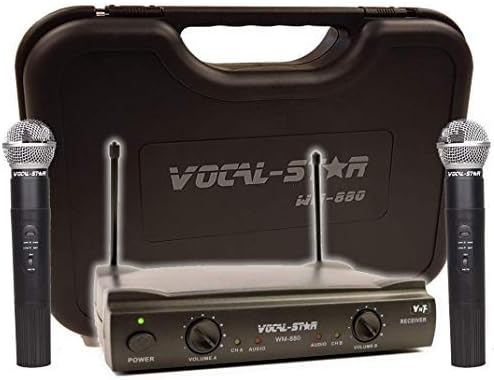
Image: The Vocal-Star WM-880 Dual Wireless Microphone System includes a black receiver unit with two antennas, two black handheld wireless microphones, and a black hard-shell carrying case. The receiver features power and volume controls for each microphone channel.
Imtuvo blokas
- Maitinimo mygtukas: Įjungia/išjungia imtuvą.
- Volume Controls (Volume A, Volume B): Adjusts the output level for each microphone channel independently.
- Antenos: For receiving wireless signals from the microphones.
- Garso išvestis: Prisijungia prie jūsų amplifier, mixer, or speaker system.
Belaidžiai mikrofonai
- Maitinimo jungiklis: Įjungia / išjungia mikrofoną.
- Baterijų skyrius: Houses the batteries (typically AA, not included).
- Mikrofono grotelės: Apsaugo mikrofono kapsulę.
5. Sąranka
- Imtuvo padėtis: Place the receiver unit on a stable surface, away from other electronic devices that may cause interference. Extend the antennas vertically for optimal signal reception.
- Prijunkite maitinimą: Connect the provided power adapter to the DC IN port on the receiver and plug it into a power outlet.
- Prijunkite garso išvestį: Use the audio connection cable to connect the receiver's audio output to the input of your amplifier, mixer, or powered speaker. Ensure the volume on your audio system is initially set to a low level.
- Mikrofono baterijų įdėjimas: Unscrew the bottom part of each microphone to access the battery compartment. Insert the required batteries (e.g., 2x AA per microphone, not included) ensuring correct polarity (+/-). Screw the bottom part back on securely.
- Maitinimas: Press the power button on the receiver. The power indicator light should illuminate. Turn on each microphone using its power switch.
6. Naudojimo instrukcijos
- Garso reguliavimas: Lėtai didinkite garsumą savo amplifier/mixer and then adjust the individual Volume A and Volume B controls on the receiver to achieve the desired sound level for each microphone.
- Mikrofono naudojimas: Hold the microphone approximately 2-6 inches (5-15 cm) from your mouth for optimal sound pickup. Avoid covering the microphone grille with your hand.
- Diapazonas: The effective operating range of the wireless system can vary depending on environmental conditions, obstacles, and interference. Maintain a clear line of sight between the microphones and the receiver whenever possible.
- Išjungimas: When finished, turn off the microphones first, then power off the receiver. This helps prevent unexpected noises through your sound system.
7. Priežiūra
- Valymas: Imtuvą ir mikrofonus valykite minkštu, sausu skudurėliu. Nenaudokite skystų valiklių ar abrazyvinių medžiagų.
- Baterijos keitimas: Replace microphone batteries when the low battery indicator (if present) illuminates or when sound quality degrades. Always replace both batteries in a microphone at the same time.
- Saugykla: When not in use for extended periods, remove batteries from the microphones and store the system in a cool, dry place, preferably in its original packaging or a protective case.
8. Problemų sprendimas
| Problema | Galima priežastis | Sprendimas |
|---|---|---|
| Nėra garso iš mikrofonų | Microphones or receiver not powered on; low batteries; incorrect audio connection; receiver volume too low. | Ensure all units are powered on. Replace batteries. Check audio cable connections. Increase receiver volume. |
| Trikdžiai arba statinė energija | Other wireless devices nearby; receiver too far from microphones; obstacles blocking signal. | Move receiver away from other electronics. Reduce distance between microphones and receiver. Ensure clear line of sight. |
| Mažas garsumas | Receiver volume too low; microphone batteries low; microphone held too far away. | Increase receiver volume. Replace microphone batteries. Hold microphone closer to mouth. |
9. Specifikacijos
- Modelio numeris: WM-880 / VS-UHF
- Prekinis ženklas: Vocal-Star
- Ryšio technologija: UHF
- Kanalų skaičius: 2
- Maitinimo šaltinis: Battery Powered (microphones), AC Adapter (receiver)
- Ypatinga funkcija: Garsumo valdymas
- Jungties tipas: 3.5 mm Jack (audio output)
- Suderinami įrenginiai: Pranešėjas, Ampkeltuvas, maišytuvas
- Poliarinis modelis: Vienakryptis
- Garso jautrumas: 100 decibelų
- Prekės svoris: 1 Kilogram (approximate total system weight)
- Rekomenduojami naudojimo būdai: Karaokė
10. Garantija ir palaikymas
This product is covered by a manufacturer's warranty. Please refer to the warranty card included with your purchase or visit the official Vocal-Star website for detailed warranty terms and conditions. For technical support or service inquiries, please contact Vocal-Star customer service through their official channels.
Websvetainė: www.vocal-star.com (Pvzample link, please verify actual manufacturer websvetainė)


