1. Įvadas
The Samson AirLine 99m AH9 Headset Wireless System is a compact and versatile wireless microphone solution designed for active performers, presenters, and educators. This system provides high-definition audio transmission without the need for cables or belt packs, offering freedom of movement and ease of use. It operates on a frequency-agile UHF band, ensuring reliable performance across 100 selectable channels.
The system comprises three main components:
- AH9 Micro Transmitter: A lightweight, rechargeable transmitter integrated into the headset.
- AR99m Micro Receiver: A compact receiver with multiple output options for versatile connectivity.
- DE10x Headset Microphone: Mažai profesionalusfile, comfortable headset microphone designed for clear vocal reproduction.
2. Sistemos komponentaiview

2.1 paveikslas: The complete Samson AirLine 99m AH9 Headset Wireless System, showing the AR99m receiver, AH9 micro transmitter, and DE10x headset microphone.

2.2 paveikslas: Iš arti view of the AH9 micro transmitter integrated with the DE10x headset microphone. The green light indicates power status.

2.3 paveikslas: Į viršų view of the AR99m micro receiver, showing the volume knob, SET button, channel display, and status indicators (READY, IR, PEAK).
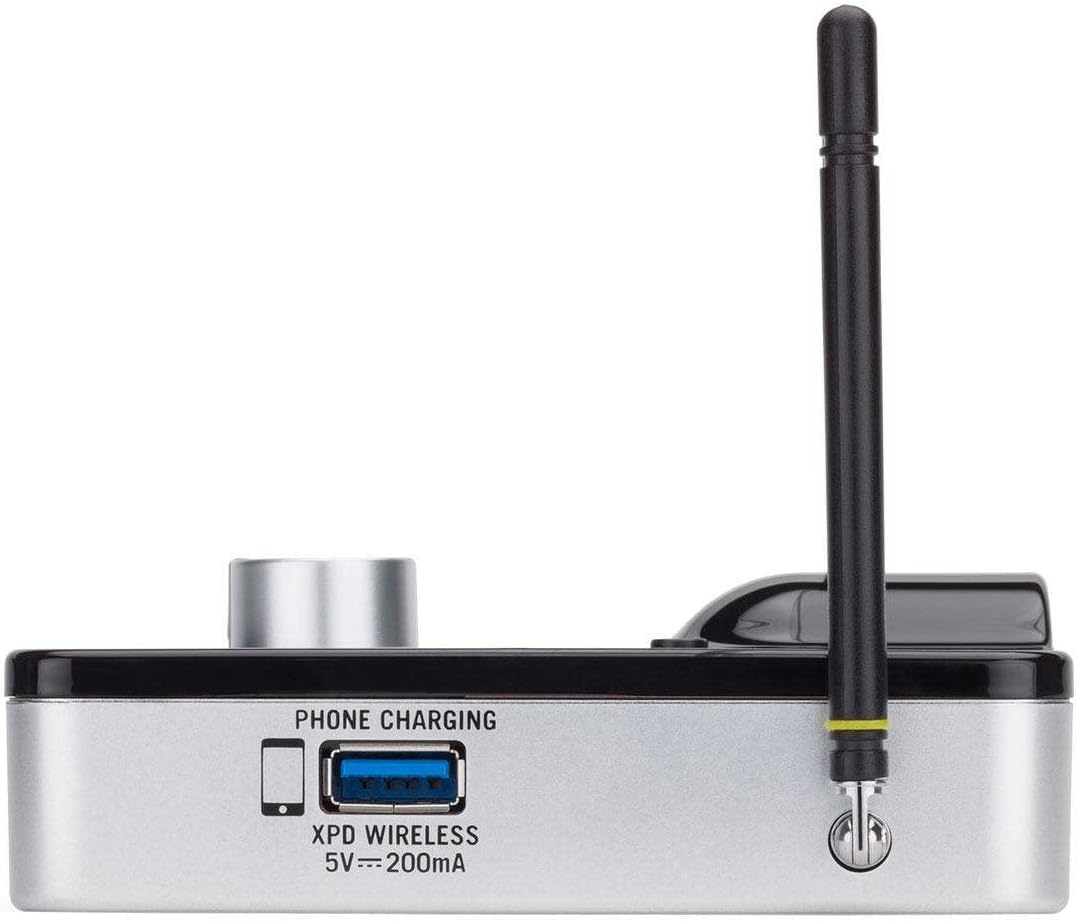
2.4 paveikslas: Šoninė view of the AR99m micro receiver, highlighting the 'PHONE CHARGING' USB port (5V --- 200mA) and antenna connection.

2.5 paveikslas: Kampuotas view of the AR99m micro receiver, showing the DC IN port, 1/8" unbalanced output, and XLR balanced output.

2.6 paveikslas: Galinis view of the AH9 micro transmitter, showing the charging contacts and the integrated headset cable connection.

2.7 paveikslas: Galinis view of the AR99m micro receiver, detailing the DC IN (15V === 600mA), 1/4" unbalanced output, and XLR balanced output ports.

2.8 paveikslas: The DE10x headset microphone, showing its lightweight design and adjustable ear hooks.
3. Sąrankos instrukcijos
3.1. Charging the AH9 Micro Transmitter
- Connect the supplied USB charging cable to the AH9 micro transmitter.
- Kitą USB kabelio galą prijunkite prie standartinio USB maitinimo adapterio (nepridedamas) arba maitinamo USB prievado.
- The LED indicator on the AH9 will show charging status. A full charge provides up to 8 hours of operation.
3.2. Connecting the AR99m Micro Receiver
- Connect the included power adapter to the DC IN port (15V === 600mA) on the AR99m receiver.
- Įjunkite maitinimo adapterį į kintamosios srovės lizdą.
- Connect the AR99m receiver to your audio mixer, PA system, or recording device using one of the following outputs:
- Subalansuota XLR išvestis: Profesionaliai garso įrangai.
- Unbalanced 1/4" Output: For standard instrument inputs or line-level inputs.
- Unbalanced 1/8" Output: For consumer-grade audio devices or computer inputs.
- Extend the antennas on the AR99m receiver for optimal signal reception.
3.3. Wearing the DE10x Headset Microphone
- Carefully place the headset over your ears, ensuring a comfortable and secure fit.
- Position the microphone element approximately 1-2 inches from the corner of your mouth for best sound quality.
- Use the included windscreens to reduce plosives and wind noise, if necessary.
4. Naudojimo instrukcijos
4.1. Įjungimas/išjungimas
- AH9 Micro Transmitter: Press and hold the power button on the transmitter until the LED illuminates. Press and hold again to power off.
- AR99m Micro Receiver: Turn the VOLUME knob clockwise to power on. Turn counter-clockwise until it clicks to power off.
4.2. Kanalų pasirinkimas ir susiejimas
The AirLine 99m system features 100 operating channels across a 24MHz bandwidth.
- Turn on the AR99m receiver. The channel display will show the current channel.
- Paspauskite NUSTATYTI button on the AR99m receiver to cycle through available channels. Select a clear channel with no interference.
- Once a channel is selected on the receiver, turn on the AH9 transmitter.
- The AH9 transmitter will automatically scan and pair with the receiver on the selected channel. The 'READY' indicator on the receiver will illuminate when a successful connection is established.
4.3. Garso reguliavimas
Naudokite TOMAS knob on the AR99m receiver to adjust the output level of the wireless system. Start with a low volume and gradually increase it to avoid sudden loud audio.
4.4. Monitoring Signal Status
- PARUOŠIMO indikatorius: Illuminates when the transmitter and receiver are successfully paired and receiving a signal.
- PEAK Indicator: Illuminates when the audio input from the transmitter is too high, indicating potential clipping. Reduce the input gain on your mixer or adjust the microphone position if this occurs.
- IR indikatorius: Used during initial setup for infrared pairing (if applicable, though this model typically auto-pairs).
5. Priežiūra
- Valymas: Use a soft, dry cloth to clean the surfaces of the transmitter and receiver. Avoid using abrasive cleaners or solvents.
- Akumuliatoriaus priežiūra: Recharge the AH9 transmitter regularly. For long-term storage, ensure the battery is partially charged (around 50%) to prolong its lifespan.
- Saugykla: Sistemą laikykite vėsioje, sausoje vietoje, apsaugotoje nuo tiesioginių saulės spindulių ir ekstremalių temperatūrų.
- Priekiniai stiklai: Replace windscreens on the DE10x headset microphone as needed to maintain hygiene and acoustic performance.
6. Problemų sprendimas
| Problema | Galima priežastis | Sprendimas |
|---|---|---|
| Nėra garso iš imtuvo |
|
|
| Trikdžiai arba signalo praradimai |
|
|
| Iškreiptas garsas |
|
|
| Trumpas baterijos veikimo laikas |
|
|
7. Specifikacijos
| Funkcija | Detalė |
|---|---|
| Modelio numeris | SW9A9SDE10-K |
| Veikiantys kanalai | 100 (across 24MHz bandwidth) |
| Veikimo diapazonas | Iki 300 pėdų (matymo linija) |
| AH9 Transmitter Battery Life | Up to 8 hours (Lithium-Ion, rechargeable) |
| AR99m Receiver Outputs | Balanced XLR, Unbalanced 1/4", Unbalanced 1/8" |
| Mikrofono tipas | DE10x Headset Microphone |
| Pridedami priedai | 4 Windscreens, USB charging cable, Power adapter |
| Prekės svoris | 1 svaras |
| Gaminio matmenys | 3 x 3 x 3 colio |
| Medžiagos tipas | Plastikiniai |
| Maitinimo šaltinis | Maitinamas baterijomis |
| Suderinami įrenginiai | Mixers, Audio Interfaces, PA Systems, Computers, Recording Devices |
8. Garantija ir palaikymas
For warranty information and technical support, please refer to the official Samson Technologies websvetainėje arba susisiekite tiesiogiai su jų klientų aptarnavimo tarnyba. Išsaugokite pirkimo kvitą kaip pirkimo įrodymą bet kokiems garantiniams prašymams.
Internetiniai ištekliai: Aplankykite Samson Brand Store on Amazon dėl papildomos informacijos apie gaminį ir pagalbos.


