1. Įvadas
This instruction manual provides comprehensive guidance for the safe and effective use of your Vocal-Star VS-T200 Portable PA Party Bluetooth Speaker. Please read this manual thoroughly before operating the device and retain it for future reference. The VS-T200 is a versatile audio system designed for various entertainment purposes, offering powerful sound, dynamic light effects, and karaoke capabilities.
2. Saugos informacija
- Saugokite garsiakalbį nuo vandens ar per didelės drėgmės.
- Nestatykite garsiakalbio šalia šilumos šaltinių arba tiesioginiuose saulės spinduliuose.
- Įkrovimui naudokite tik pridedamą maitinimo adapterį.
- Nebandykite patys ardyti ar remontuoti įrenginio. Visus techninės priežiūros darbus patikėkite kvalifikuotiems specialistams.
- Laikyti vaikams nepasiekiamoje vietoje.
- Veikimo metu aplink garsiakalbį užtikrinkite tinkamą vėdinimą.
- Atsakingai išmeskite baterijas pagal vietinius reikalavimus.
3. Pakuotės turinys
Patikrinkite pakuotę, ar joje yra šie daiktai:
- 1 x Vocal-Star VS-T200 Portable PA Speaker
- 2x belaidžiai mikrofonai
- 1 x Power Adapter (AC/DC)
- 1 x Naudotojo vadovas (šis dokumentas)
4. Produktas baigtasview
The Vocal-Star VS-T200 is a powerful 200W portable speaker system featuring dual woofers, integrated LED light effects, and a top-mounted disco ball. It supports multiple audio inputs including Bluetooth, AUX, and USB, and comes with two wireless microphones for karaoke. Its built-in battery and carry handle ensure maximum portability.

Figure 4.1: Vocal-Star VS-T200 Portable PA Speaker with included wireless microphones. The image shows the main speaker unit, two wireless microphones, and a display screen illustrating karaoke functionality.
4.1. Pagrindinės savybės
- 200W Peak Power Output with powerful bass and clear treble.
- Integrated LED light effects on front woofers and a top disco ball.
- Multiple connectivity options: Bluetooth, AUX, USB.
- Two wireless microphones included for karaoke.
- Built-in rechargeable battery for portable use.
- True Wireless Stereo (TWS) function for connecting two VS-T200 units.
- Integrated carry handle for easy transport.
4.2. Komponentai ir valdikliai
Familiarize yourself with the various parts and controls of your VS-T200 speaker.

4.2 pav.: priekis view of the VS-T200 speaker with its LED lights active, showcasing the two illuminated woofers and the top disco ball light projection.

4.3 pav. Išsamus view of the light effects, including the patterns projected by the disco ball and the vibrant colors from the LED woofers.
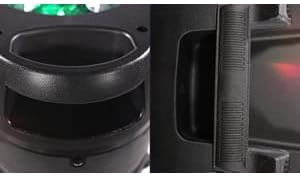
Figure 4.4: Close-up of the robust integrated carry handle, designed for easy and secure transportation of the speaker.
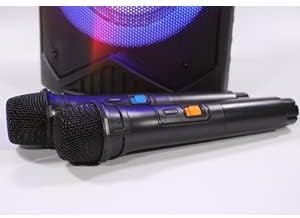
Figure 4.5: The two wireless microphones provided with the VS-T200 speaker, essential for karaoke functionality.
(Note: Specific control panel layout and button functions are typically detailed in a diagram in a physical manual. For this digital format, general functions are described.)
- Pagrindinis garsumo rankenėlė: Reguliuoja bendrą garso išvesties lygį.
- Mikrofono garsumo rankenėlė: Reguliuoja prijungtų mikrofonų garsumą.
- Echo Control Knob: Reguliuoja mikrofonų aidėjimo efektą.
- Režimo mygtukas: Switches between Bluetooth, AUX, and USB input modes.
- Atkūrimo / pristabdymo mygtukas: Valdo medijos atkūrimą.
- Ankstesnio / kito takelio mygtukai: Naviguoja po takelius.
- Šviesos režimo mygtukas: Perjungia skirtingus LED šviesos režimus arba juos išjungia.
- USB prievadas: Skirta garso įrašams leisti iš USB atmintinių.
- AUX įvestis: 3.5 mm lizdas išoriniams garso įrenginiams prijungti.
- Maitinimo įvestis: For connecting the AC/DC power adapter.
5. Sąranka
5.1. Įkraukite garsiakalbį
- Prijunkite pridedamą maitinimo adapterį prie garsiakalbio maitinimo įvesties prievado.
- Įkiškite adapterį į tinkamą maitinimo lizdą.
- The charging indicator light (if present) will illuminate. Allow the speaker to charge fully before first use (typically 4-6 hours).
- Once fully charged, disconnect the power adapter. The speaker can be used while charging.
5.2. Mikrofono baterijų įdėjimas
Each wireless microphone requires 2 x AA batteries (included). Ensure correct polarity when inserting.
- Atsukite kiekvieno belaidžio mikrofono apatinį dangtelį.
- Insert 2 AA batteries into each microphone, observing the correct positive (+) and negative (-) terminals.
- Replace the bottom cap securely.
6. Naudojimo instrukcijos
6.1. Maitinimo įjungimas/išjungimas
Garsiakalbio valdymo skydelyje raskite maitinimo jungiklį. Norėdami įjungti garsiakalbį, perjunkite jungiklį į padėtį „ĮJUNGTA“. Norėdami išjungti garsiakalbį, perjunkite į padėtį „IŠJUNGTA“.
6.2. „Bluetooth“ ryšys
- Power on the VS-T200 speaker. It will automatically enter Bluetooth pairing mode, indicated by a flashing Bluetooth indicator or voice prompt.
- Įrenginyje su „Bluetooth“ ryšiu (išmaniajame telefone, planšetiniame kompiuteryje, nešiojamajame kompiuteryje) įjunkite „Bluetooth“ ir ieškokite galimų įrenginių.
- Select "VS-T200" from the list of devices.
- Once connected, the speaker will confirm with an audible prompt, and the Bluetooth indicator will become solid.
- You can now play audio from your device through the VS-T200 speaker.
6.3. AUX įvestis
- Connect one end of a 3.5mm audio cable (not included) to the AUX input port on the VS-T200 speaker.
- Connect the other end of the cable to the audio output jack of your external device (e.g., MP3 player, TV).
- Press the "Mode" button on the speaker until "AUX" mode is selected.
- Leiskite garsą iš išorinio įrenginio.
6.4. USB atkūrimas
- Įdėkite USB atmintinę, kurioje yra MP3 garso įrašų fileį garsiakalbio USB prievadą.
- The speaker will automatically switch to USB mode and begin playing the first compatible audio file. If not, press the "Mode" button to select USB.
- Atkūrimui valdyti naudokite mygtukus „Paleisti / pristabdyti“ ir „Ankstesnis / kitas takelis“.
6.5. Karaoke funkcija
- Ensure the wireless microphones have batteries installed and are powered on.
- Play your desired karaoke track via Bluetooth, AUX, or USB.
- Adjust the "Microphone Volume" knob on the speaker's control panel to your desired vocal level.
- Use the "Echo Control" knob to add echo effects to your voice.
6.6. TWS (tikrojo belaidžio stereo) funkcija
The TWS function allows you to connect two VS-T200 speakers wirelessly for a stereo sound experience.
- Ensure both VS-T200 speakers are powered on and are NOT connected to any Bluetooth device.
- On one of the speakers (this will be the primary speaker), press and hold the TWS button (or a designated pairing button, refer to speaker's physical controls if available).
- Pagrindinis garsiakalbis ieškos antrinio garsiakalbio. Prijungus abu garsiakalbiai patvirtins garsiniu signalu.
- Now, connect your Bluetooth device to the primary VS-T200 speaker as described in section 6.2.
- Garsas dabar bus grojamas stereo režimu per abu garsiakalbius.
6.7. Light Effects Control
The VS-T200 features dynamic LED light effects and a disco ball. Use the "Light Mode" button on the control panel to cycle through different light patterns or to turn the lights off.
7. Priežiūra
- Valymas: Garsiakalbio išorę valykite minkšta, sausa šluoste. Nenaudokite abrazyvinių valiklių ar tirpiklių.
- Saugykla: Kai garsiakalbio nenaudojate ilgesnį laiką, laikykite jį vėsioje, sausoje vietoje, toliau nuo tiesioginių saulės spindulių ir ekstremalių temperatūrų.
- Akumuliatoriaus priežiūra: To prolong battery life, fully charge the speaker before storing it for long periods. Recharge the battery at least once every 3 months if not in regular use.
8. Problemų sprendimas
| Problema | Galima priežastis | Sprendimas |
|---|---|---|
| Garsiakalbis neįsijungia. | Baterija išsikrovusi; Maitinimo adapteris neprijungtas arba sugedęs. | Charge the speaker's battery; Ensure power adapter is securely connected and working. |
| Iš garsiakalbio nėra garso. | Per mažas garsumas; Neteisingas įvesties režimas; Įrenginys netinkamai prijungtas. | Increase master volume; Press "Mode" button to select correct input (Bluetooth, AUX, USB); Reconnect Bluetooth device or AUX cable. |
| „Bluetooth“ ryšys nepavyksta. | Garsiakalbis neporavimo režime; Įrenginys per toli; Trukdžiai. | Ensure speaker is in pairing mode; Move device closer to speaker; Turn off other Bluetooth devices. |
| Mikrofonai neveikia. | Microphone batteries depleted or incorrectly inserted; Microphone volume too low. | Replace microphone batteries, ensuring correct polarity; Increase microphone volume on speaker. |
| Šviesos efektai neveikia. | Išjungtos šviesos; gedimas. | Press the "Light Mode" button to activate lights; If issue persists, contact customer support. |
9. Specifikacijos
| Funkcija | Detalė |
|---|---|
| Modelio numeris | VS-T200 |
| Prekės ženklas | Vocal-Star |
| Maitinimo išvestis | 200W |
| Ryšys | Bluetooth, USB, AUX |
| Mikrofonai | 2 x Wireless Microphones (requires 2x AA batteries each) |
| Garsiakalbio baterija | Built-in Lithium-ion (rechargeable) |
| Šviesos efektai | LED Woofer Lights, Top Disco Ball |
| Spalva | Juoda |
| Perkeliamumas | Integruota nešiojimo rankena |
| Ypatingos savybės | TWS („True Wireless Stereo“) funkcija |
10. Garantija ir palaikymas
Vocal-Star products are designed for reliability and performance. While specific warranty details are not provided in this manual, Vocal-Star offers dedicated UK customer service to assist with any queries or issues you may encounter.
For support, please refer to the contact information provided on the product packaging or the official Vocal-Star website. When contacting support, please have your product model number (VS-T200) and purchase details ready.


