1. Įvadas
Thank you for choosing the tectake Adjustable Height Tilting Desk. This desk is designed to provide a comfortable and versatile workspace for children, ideal for study and creative activities. Its adjustable features ensure it can adapt to various needs and grow with your child. Please read this manual carefully before assembly and use to ensure safe and proper operation.
Pagrindinės funkcijos:
- Tilting desktop for versatile use, ideal for precision work or reading.
- Legs adjustable to 7 different heights (from approx. 63 cm to approx. 94 cm) for superior comfort and ergonomic adaptation.
- Practical integrated drawer for organized storage of small items.
- Spacious work surface (approx. 109 x 55 cm) with two stopper strips to prevent materials from sliding.
- Robust construction with rounded table edges for enhanced safety.
2. Saugos informacija
Atsargiai:
- Įsitikinkite, kad stalas pastatytas ant lygaus ir stabilaus paviršiaus, kad jis neapvirstų.
- Do not use the desk if the height adjustment mechanism is not correctly secured.
- Keep children away from moving parts when adjusting the desk's height or tilt.
- Do not place excessive weight on the desk, as this may cause instability or damage.
- Reguliariai tikrinkite visus varžtus ir tvirtinimo detales, kad įsitikintumėte, jog jie yra tvirtai priveržti.
3. Gaminio komponentai
Before assembly, ensure all parts are present and undamaged. Refer to the included parts list in your package for detailed identification.

Figure 1: Fully assembled tectake Adjustable Height Tilting Desk.
Pagrindinės dalys:
- Desktop (1 piece)
- Leg frames (2 pieces)
- Crossbars/Support beams (various pieces)
- Drawer unit (1 piece)
- Stopper strips (2 pieces)
- Adjustment knobs and fasteners (various)
4. Surinkimas
Assembly is straightforward. Follow these general steps. For detailed diagrams, please refer to the separate assembly instructions included in your product packaging.
- Pritvirtinkite kojų rėmus: Secure the horizontal crossbars to the vertical leg frames using the provided screws and tools. Ensure all connections are tight and stable.
- Surinkite pagrindinę konstrukciją: Connect the two assembled leg frames with the main support beams to form the desk's base.
- Install Height Adjustment Mechanism: Attach the height adjustment components to the leg frames. These typically involve pins or knobs that lock into pre-drilled holes.
- Mount Desktop Supports: Secure the tilting mechanism and desktop support brackets to the top of the base structure.
- Pridėti darbalaukį: Carefully place the desktop onto the support brackets and secure it using the designated fasteners.
- Install Drawer and Stopper Strips: Slide the drawer into its designated slot. Attach the two stopper strips to the front edge of the desktop.
Once assembled, double-check all connections for tightness and stability before use.
5. Naudojimo instrukcijos
5.1. Adjusting Desk Height
The desk height can be adjusted to 7 different positions, ranging from approximately 63 cm to 94 cm. To adjust the height:
- Loosen the height adjustment knobs located on the side of each leg frame.
- Carefully lift or lower the desktop to the desired height. Ensure both sides are adjusted evenly.
- Align the holes in the leg frames and insert the adjustment pins or tighten the knobs securely into the chosen height setting.
- Verify that the desk is stable at the new height before use.
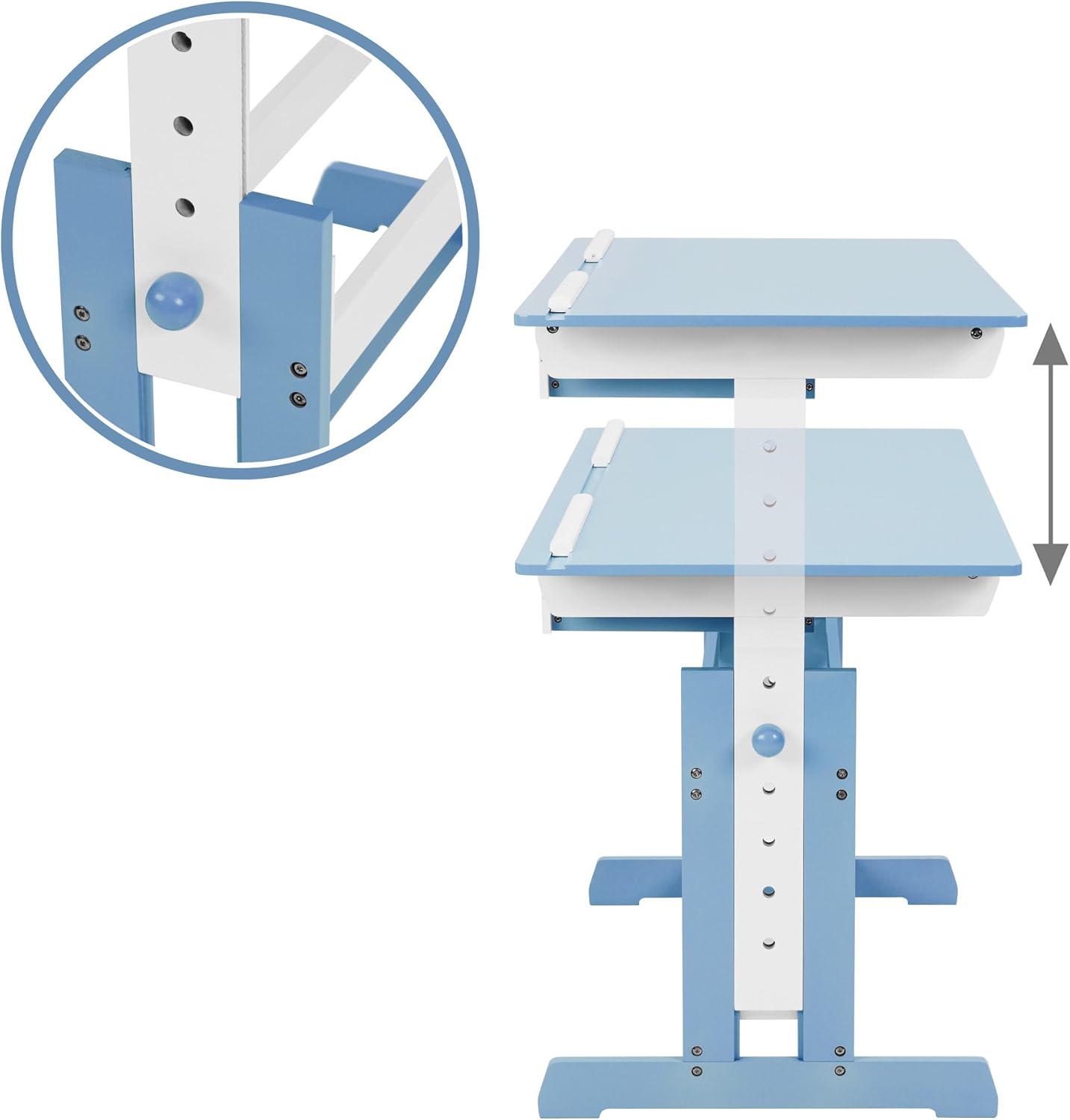
2 pav.: Aukščio reguliavimo mechanizmo detalė.
5.2. Tilting the Desktop
The desktop can be tilted to various angles for comfortable drawing, writing, or reading. To tilt the desktop:
- Ensure there are no items on the desktop that could slide off.
- Locate the tilting mechanism on the underside of the desktop.
- Adjust the locking mechanism (e.g., release levers or knobs) to allow the desktop to tilt.
- Carefully raise the desktop to your preferred angle.
- Secure the desktop in place by engaging the locking mechanism.
- The two stopper strips at the bottom edge of the desktop will help prevent items from sliding when tilted.

Figure 3: Detail of the desktop tilting mechanism.
5.3. Using the Drawer
The integrated drawer provides convenient storage for pens, paper, and other small accessories. Simply pull the drawer out to access its contents and push it back in to close.
6. Priežiūra
To keep your tectake desk in optimal condition:
- Clean the desk surface and frame regularly with a soft, damp cloth. Avoid abrasive cleaners or harsh chemicals that could damage the lacquered MDF wood.
- Reguliariai patikrinkite visus varžtus ir tvirtinimo detales, kad įsitikintumėte, jog jie yra tvirtai priveržti. Jei reikia, priveržkite.
- Saugokite stalą nuo tiesioginių saulės spindulių ar didelių temperatūros pokyčių, nes jis gali deformuotis arba pakeisti spalvą.
- Nedėkite karštų daiktų tiesiai ant darbastalio be apsaugos.
7. Specifikacijos
| Funkcija | Detalė |
|---|---|
| Prekės ženklas | tectake |
| Modelio numeris | 400926 |
| Spalva | Mėlyna |
| Medžiaga | Engineered wood (MDF, lacquered) |
| Darbinio paviršiaus matmenys | Apytiksliai 109 x 55 cm |
| Reguliuojamas aukščio diapazonas | Approx. 63 cm to 94 cm (7 positions) |
| Internal Drawer Dimensions (HxWxD) | Apytiksl. 6 x 27 x 22 cm |
| Stalčių skaičius | 1 |
| Svoris | apytiksliai 17 kg |
| Ypatinga funkcija | Height adjustable, Tilting desktop |
8. Problemų sprendimas
8.1. Desk is Unstable
- Įsitikinkite, kad stalas pastatytas ant lygaus, lygaus paviršiaus.
- Check all assembly screws and fasteners. Tighten any loose connections.
- Verify that the height adjustment pins are fully engaged and secured on both sides.
8.2. Desktop Does Not Tilt Smoothly
- Inspect the tilting mechanism for any obstructions or debris.
- Ensure the locking mechanism is fully disengaged before attempting to tilt.
- Check that all screws related to the tilting mechanism are properly tightened, but not overtightened to restrict movement.
9. Garantija ir palaikymas
For warranty information, product support, or to order replacement parts, please contact tectake customer service. Keep your purchase receipt as proof of purchase. Contact details can typically be found on the product packaging or the official tectake websvetainę.


