1. Įvadas
The Donner Dark Mouse Distortion Pedal is an effect unit designed for electric guitar, providing a range of distortion tones. It features two distinct distortion modes and a true bypass design to maintain signal integrity when the effect is disengaged. This manual provides essential information for setting up, operating, and maintaining your pedal.

Figure 1: The Donner Dark Mouse Distortion Pedal, designed to deliver classic distortion sounds.
2. Produktas baigtasview
The Dark Mouse pedal features intuitive controls for shaping your sound. Understanding these controls is key to utilizing the pedal's full potential.

Figure 2: Control layout of the Dark Mouse Distortion Pedal.
Valdikliai:
- 1. DC 9V Jack: Power input for a 9V DC adapter (center negative).
- 2. Mode Switch (CLASSIC/HYPER): Perjungia tarp dviejų skirtingų iškraipymo charakteristikų.
- 3. LEVEL Knob: Adjusts the overall output volume of the effect.
- 4. FILTER Knob: Controls the tone or brightness of the distortion. Turning clockwise increases treble.
- 5. DIST Knob: Adjusts the amount of distortion or gain.
- 6. Įvesties lizdas: Connect your guitar or previous effect pedal here.
- 7. Output Jack: Prisijunkite prie savo amp„Lifier“ arba „Next“ efektų pedalas.
- 8. LED indikatorius: Šviečia, kai efektas aktyvus.
- 9. Kojinis jungiklis: Įjungia arba išjungia efektą.
3. Sąranka
Follow these steps to connect your Donner Dark Mouse Distortion Pedal:
- Užtikrinkite savo ampPrieš jungdami, lifier yra išjungtas.
- Connect your electric guitar to the Įvesties lizdas (6) of the pedal using a standard 1/4-inch instrument cable.
- Prijunkite Išvesties Džekas (7) pedalo link jūsų amplifier įvesties naudojant kitą standartinį 6,35 mm instrumentinį kabelį.
- Connect a 9V DC power adapter (center negative, 500mA minimum) to the DC 9V lizdas (1). Note: The power supply is not included. Using an incorrect power supply may damage the pedal.
- Once all connections are secure, you may turn on your ampgyvesnis.

Figure 3: Proper connection of the pedal to power and instrument cables.
4. Naudojimo instrukcijos
The Dark Mouse pedal offers two distinct distortion modes and flexible controls to tailor your sound.
Efekto įtraukimas:
Paspauskite Kojinis jungiklis (9) to toggle the effect on or off. The LED indikatorius (8) will illuminate when the effect is active.
Selecting Distortion Modes:
Naudokite Režimo jungiklis (2) to select between the two distortion modes:
- KLASIKA: Gamina šiltą, vintage distortion sound with a subtle fuzz characteristic.
- HYPER: Offers a more powerful and aggressive sound with enhanced edges and low-end response.

Figure 4: The mode switch allows selection between Classic and Hyper distortion.
Adjusting Tone and Gain:
Utilize the three control knobs to fine-tune your distortion sound:
- LEVEL Knob (3): Adjust this to set the overall output volume of the pedal. Start with it at a moderate level and adjust to match your bypassed signal volume.
- DIST Knob (5): Turn this knob clockwise to increase the amount of distortion, from subtle crunch to heavy saturation.
- FILTER Knob (4): This control acts as a tone shaping filter. Turning it clockwise will increase the brightness and treble content of the distortion, while turning it counter-clockwise will result in a darker tone.
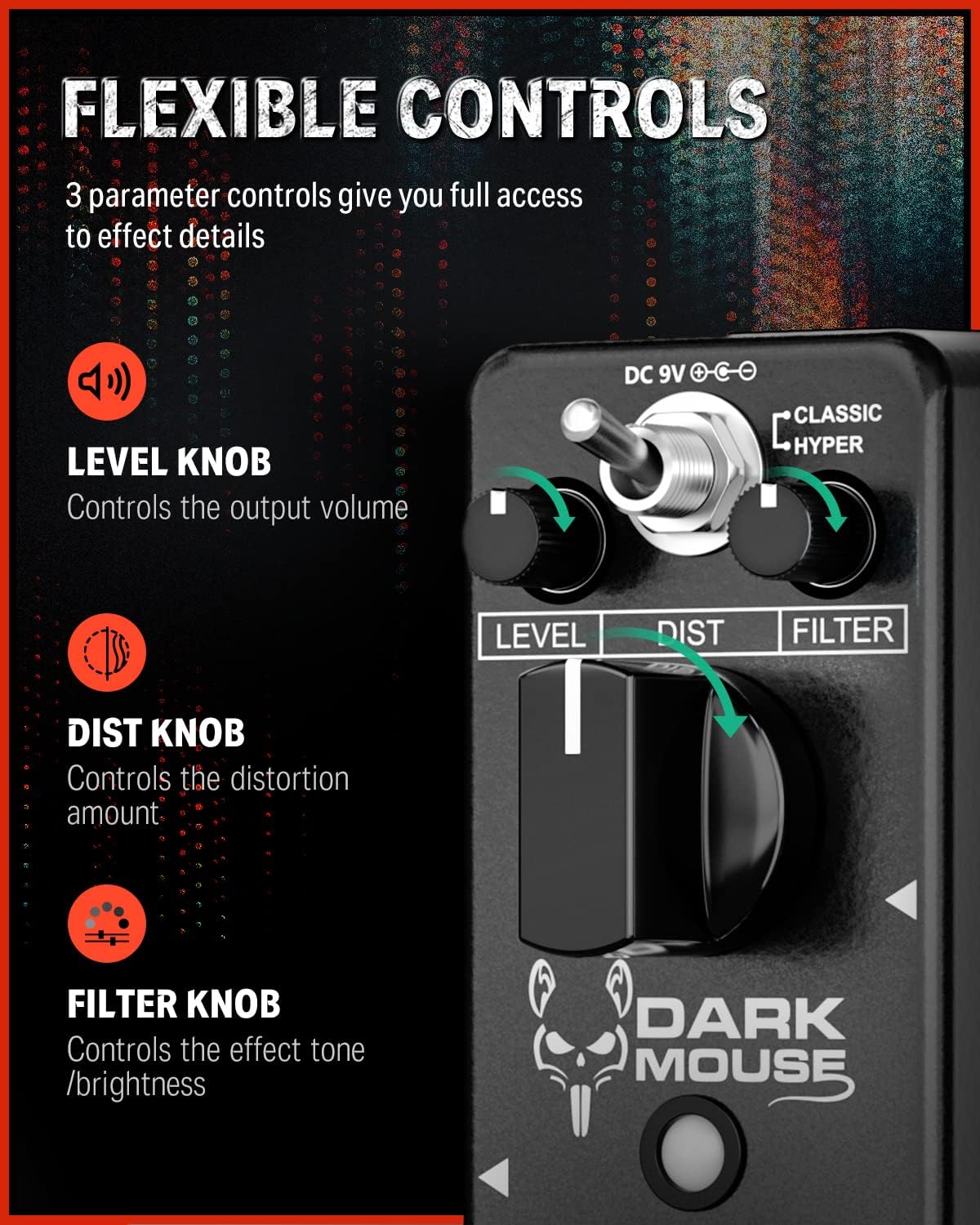
Figure 5: The Level, Dist, and Filter knobs provide flexible control over the effect.
Tikras aplinkkelis:
The pedal features true bypass circuitry. This means that when the effect is disengaged, your guitar signal passes directly through the pedal without any electronic interference, preserving your original tone. The LED indicator will be off when in true bypass mode.

Figure 6: True bypass ensures a clean signal when the effect is off.
5. Priežiūra
- Valymas: Pedalo išorę valykite minkšta, sausa šluoste. Venkite naudoti abrazyvinius valiklius ar tirpiklius.
- Saugykla: Pedalą laikykite sausoje vietoje, atokiau nuo ekstremalių temperatūrų ir tiesioginių saulės spindulių.
- Maitinimas: Always use a 9V DC center-negative power adapter with a minimum of 500mA current. Disconnect the power supply when the pedal is not in use for extended periods.
- Fizinė priežiūra: Pedalą sudaro patvarus aliuminio lydinio laikiklisasing. Avoid dropping the pedal or subjecting it to excessive force.
6. Problemų sprendimas
- Nėra garso:
- Patikrinkite visas kabelių jungtis (gitaros įvestį, išvesties į amp).
- Ensure the power adapter is correctly connected and providing power.
- Patikrinkite, ar jūsų gitara ir amplifier are functioning correctly.
- If the LED is off, press the footswitch to engage the effect.
- Weak or Distorted Sound (when bypassed):
- This pedal features true bypass, so a weak or distorted bypassed signal usually indicates an issue with cables or other equipment in your signal chain, not the pedal itself.
- Nepageidaujamas triukšmas / ūžesys:
- Įsitikinkite, kad naudojate reguliuojamą 9 V nuolatinės srovės maitinimo šaltinį su centriniu neigiamu poliumi. Nereguliuojami maitinimo šaltiniai gali skleisti triukšmą.
- Patikrinkite, ar nėra pažeistų kabelių.
- Move the pedal away from power transformers or other electronic devices that may cause interference.
7. Specifikacijos
| Funkcija | Specifikacija |
|---|---|
| Modelio numeris | EC1178-FBA-US |
| Prekės svoris | 8.8 uncijos (0.25 kilogramo) |
| Gaminio matmenys | 3.7 x 1.69 x 2.01 colio (3.7 colio ilgio x 1.7 colio pločio x 2 colio aukščio) |
| Korpuso Medžiaga | Aliuminio lydinys |
| Maitinimo šaltinis | Adapteris, elektrinis |
| ttage | 9 voltų nuolatinė srovė (centrinis neigiamas polius) |
| Jungties tipas | 1/4" (6.35mm) mono jack |
| Signalo formatas | Analoginis |
8. Kas yra dėžutėje
- 1 x Donner Dark Mouse pedal
9. Garantija ir palaikymas
For warranty information or technical support, please refer to the official Donner websvetainėje arba susisiekite tiesiogiai su „Donner“ klientų aptarnavimo tarnyba. Išsaugokite pirkimo kvitą garantiniams reikalavimams.


