Įvadas
Welcome to the Ipega PG-9033 Bluetooth Gamepad user manual. This guide provides detailed instructions for setting up, operating, maintaining, and troubleshooting your new wireless controller. Please read this manual carefully before use to ensure optimal performance and longevity of your device.
Produktas baigtasview
The Ipega PG-9033 is a versatile Bluetooth gamepad designed for an enhanced gaming experience across multiple platforms, including Android, iOS, and PC. It features an adjustable phone holder, dual analog sticks, a D-pad, and action buttons.

Figure 1: The Ipega PG-9033 Bluetooth Gamepad with a smartphone securely mounted in its adjustable holder, actively displaying a racing game. This illustrates the controller's primary use for mobile gaming.
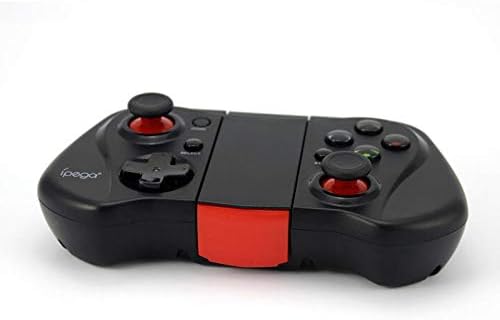
2 pav.: A pusė view of the Ipega PG-9033 Bluetooth Gamepad, showcasing its ergonomic design and compact form factor when not in use. The red accent on the central hinge is visible.
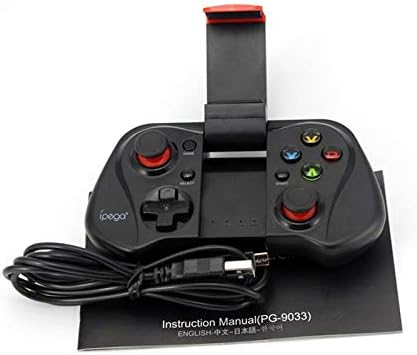
Figure 3: The Ipega PG-9033 Bluetooth Gamepad displayed alongside its USB charging cable and the included instruction manual, which clearly indicates the model number PG-9033.

4 pav.: Galinė dalis view of the Ipega PG-9033 Bluetooth Gamepad, featuring a label with technical details such as "BLUETOOTH CONTROLLER," working voltage, working current, and input specifications.
Sąranka
Žaidimų pulto įkrovimas
Before first use, fully charge the gamepad using the provided USB cable.
- Connect the micro-USB end of the charging cable to the gamepad's charging port.
- Connect the USB-A end to a USB power source (e.g., computer, USB wall adapter).
- The charging indicator light will illuminate. It will typically turn off or change color when fully charged.
Poravimas su įrenginiu
The PG-9033 supports different pairing modes for various operating systems.
Android susiejimas
- Ensure the gamepad is off.
- Paspauskite ir palaikykite NAMAI mygtuką ir X button simultaneously until the indicator light flashes rapidly. This puts the gamepad into Android pairing mode.
- On your Android device, go to Bluetooth settings and search for available devices.
- Select "PG-9033" from the list to pair. The indicator light will become solid when connected.
iOS Pairing (iCade Mode)
- Ensure the gamepad is off.
- Paspauskite ir palaikykite NAMAI mygtuką ir B button simultaneously until the indicator light flashes rapidly. This puts the gamepad into iOS iCade pairing mode.
- On your iOS device, go to Bluetooth settings and search for available devices.
- Select "PG-9033" from the list to pair. The indicator light will become solid when connected.
Note: iCade mode has limited game compatibility. For broader iOS compatibility, check specific game requirements.
Kompiuterio susiejimas
- Ensure the gamepad is off.
- Paspauskite ir palaikykite NAMAI mygtuką ir A button simultaneously until the indicator light flashes rapidly. This puts the gamepad into PC pairing mode.
- On your PC, go to Bluetooth settings and search for available devices.
- Select "PG-9033" from the list to pair. The indicator light will become solid when connected.
Note: A Bluetooth adapter may be required for PCs without built-in Bluetooth.
Naudojimo instrukcijos
Išmaniojo telefono prijungimas
- Gently extend the adjustable phone holder located on the top of the gamepad.
- Carefully place your smartphone into the holder, ensuring it is securely gripped and centered.
- Nustatykite optimalų kampą viewing.
Game Mode Selection
The gamepad automatically enters the last used mode upon reconnection. To switch modes, disconnect the gamepad and re-pair using the desired mode's button combination (HOME + X for Android, HOME + B for iOS, HOME + A for PC).
Maitinimo įjungimas/išjungimas
Norėdami įjungti, paspauskite NAMAI mygtuką. Norėdami išjungti, paspauskite ir palaikykite NAMAI button for approximately 5 seconds until the indicator light turns off. The gamepad will automatically power off after a period of inactivity.
Priežiūra
To ensure the longevity and proper functioning of your Ipega PG-9033 gamepad, follow these maintenance guidelines:
- Laikykite prietaisą sausą. Venkite drėgmės ar skysčių.
- Clean the gamepad with a soft, dry cloth. Do not use harsh chemicals or abrasive cleaners.
- Žaidimų planšetę laikykite vėsioje, sausoje vietoje, toliau nuo tiesioginių saulės spindulių ir ekstremalių temperatūrų.
- Saugokite žaidimų planšetę nuo kritimo ir stiprių smūgių.
- Reguliariai įkraukite akumuliatorių, net jei jo nenaudojate, kad palaikytumėte jo būklę.
Do not attempt to disassemble the gamepad. This will void the warranty and may cause damage.
Trikčių šalinimas
Gamepad not connecting or pairing:
- Įsitikinkite, kad žaidimų pultas yra visiškai įkrautas.
- Patikrinkite, ar jūsų įrenginyje įjungtas „Bluetooth“.
- Make sure the gamepad is in the correct pairing mode for your device (Android, iOS, or PC).
- Pabandykite pamiršti įrenginį „Bluetooth“ nustatymuose ir iš naujo susieti.
- Iš naujo paleiskite žaidimų planšetę ir savo įrenginį.
Mygtukai arba valdymo svirtys nereaguoja:
- Patikrinkite, ar žaidimų pultas tinkamai prijungtas.
- Įsitikinkite, kad žaidimas, kurį žaidžiate, palaiko išorinius valdiklius.
- Some games may require specific controller mapping or settings adjustments within the game.
- If the issue persists, try resetting the gamepad (if a reset button is available, typically a small pinhole).
Vėlavimas arba įvesties uždelsimas:
- Ensure your device is not too far from the gamepad. Maintain a clear line of sight.
- Sumažinkite kitų belaidžių įrenginių keliamus trukdžius.
- Uždarykite nereikalingas fonines programas savo įrenginyje.
Phone not fitting in holder:
- The holder is designed for most smartphones. Ensure your phone's dimensions are within the supported range.
- Nuimkite visus didelius telefono dėklus, kurie gali trukdyti tvirtai pritvirtinti.
Specifikacijos
| Funkcija | Detalė |
|---|---|
| Modelis | PG-9033 |
| Prekės ženklas | Ipega |
| Ryšys | Bluetooth |
| Suderinamumas | Android, iOS (iCade), PC |
| Darbo ttage | DC 3.7V |
| Darbo srovė | 30 mA |
| Įvesties tomastage | DC 5V 500mA |
| ASIN | B07P52YH7M |
Garantija ir palaikymas
For warranty information and technical support, please refer to the official Ipega websvetainėje arba susisiekite su pardavėju. Išsaugokite pirkimo kvitą kaip pirkimo įrodymą.
Šis vadovas skirtas tik informaciniams tikslams. Specifikacijos gali būti keičiamos be įspėjimo.


