Produktas baigtasview
The TOPVISION TOP402 security camera system is a comprehensive surveillance solution designed for both indoor and outdoor monitoring. This kit includes a 4-channel Digital Video Recorder (DVR) and two 1080p lite bullet cameras, providing clear video capture and reliable performance.
Pagrindinės funkcijos:
- Two 1080p 2MP Cameras: Plastic bullet cameras with 2.8mm lenses, suitable for indoor/outdoor use, equipped with infrared LEDs for night vision.
- 4-Channel 1080p Lite DVR: One digital video recorder supporting 4 video channels plus 1 IP channel.
- Išplečiama saugykla: DVR supports up to an 8TB hard drive (HDD not included). A WD Purple hard drive is recommended for recording.
- Plug-and-Play Cables: Two 18-meter pre-terminated cables with BNC connectors for easy installation.
- Sukomplektuoti priedai: Includes power adapters, power splitters, and a USB mouse.
- Versatile Video Output: Supports simultaneous HDMI and VGA video output (cables not included).

Image: The TOPVISION TOP402 kit, showing the 4-channel DVR unit and two 1080p bullet-style security cameras.
Pakuotės turinys
Patikrinkite, ar pakuotėje yra visi toliau išvardyti daiktai. Jei kurių nors daiktų trūksta arba jie pažeisti, susisiekite su klientų aptarnavimo tarnyba.
- 1 x TOPVISION 4-Channel 1080p Lite DVR (Model: XDVR-1004)
- 2 x TOPVISION 1080p 2MP Bullet Cameras
- 2 x 18-meter BNC Video/Power Cables
- 1 x Power Adapter for DVR
- 1 x Power Adapter for Cameras
- 1 x 1–2 maitinimo skirstytuvo kabelis kameroms
- 1 x USB pelė
- 1 x Naudotojo vadovas (šis dokumentas)

Image: All components of the TOPVISION TOP402 security system, including the DVR, two cameras, cables, power supplies, and a mouse.
Saugos informacija
Please read and follow these safety guidelines to prevent damage to the product and ensure user safety.
- Naudokite tik kartu su sistema pateiktus maitinimo adapterius.
- Užtikrinkite tinkamą vaizdo registratoriaus vėdinimą, kad jis neperkaistų.
- Do not expose the DVR or cameras to extreme temperatures, humidity, or direct water.
- Avoid placing the DVR near strong magnetic fields or sources of electrical interference.
- Jei nesate tikri dėl kurių nors veiksmų, montavimą turėtų atlikti kvalifikuotas personalas.
- Prieš atlikdami bet kokias techninės priežiūros ar montavimo procedūras, atjunkite maitinimą.
Sąrankos vadovas
1. Išpakavimas ir paruošimas
- Atsargiai išimkite visus komponentus iš pakuotės.
- Inspect all items for any signs of damage.
- Choose a suitable location for the DVR, ensuring it is dry, well-ventilated, and away from direct sunlight.
- Plan the camera placement to cover desired areas, considering cable length and power access.
2. DVR prijungimas
Connect the necessary peripherals to the DVR before powering it on.
- Monitoriaus jungtis: Connect a monitor to the DVR's HDMI or VGA port using a compatible cable (not included).
- Pelės jungtis: Prijunkite pridedamą USB pelę prie vieno iš DVR USB prievadų.
- Tinklo ryšys (neprivaloma): Nuotoliniam viewing, connect an Ethernet cable from the DVR's LAN port to your router.
- Kietojo disko diegimas (neprivaloma): If you plan to record video, install a compatible 3.5-inch SATA hard drive (up to 8TB, WD Purple recommended) inside the DVR. Refer to the separate HDD installation guide if provided, or consult online resources.

Image: The DVR unit, showing the front panel and the rear panel with various ports including BNC video inputs, audio inputs/outputs, HDMI, VGA, LAN, and USB ports.
3. Kameros montavimas
Mount the cameras in desired locations and connect them to the DVR.
- Montavimas: Use screws and anchors (not included) to securely mount the cameras to a wall or ceiling. Adjust the camera angle as needed.
- Kabelio jungtis: Connect one end of the 18-meter BNC cable to the camera's video and power ports.
- DVR jungtis: Connect the other end of the BNC cable's video connector to an available BNC input port on the DVR (e.g., Video In 1, Video In 2).
- Maitinimo jungtis: Connect the power end of the BNC cable to the 1-to-2 power splitter, then connect the splitter to the camera power adapter.

Image: Two TOPVISION 1080p bullet cameras, highlighting their night vision capability and compatibility with mobile viewprogramoms.
4. Pradinis įjungimas
- Once all connections are secure, plug the DVR power adapter into an electrical outlet.
- Plug the camera power adapter into an electrical outlet.
- The DVR will power on automatically. Follow the on-screen instructions for initial setup, which may include setting the language, date/time, and creating a password.
Naudojimo instrukcijos
1. Basic DVR Operation
- Tiesiogiai View: After booting, the DVR will display the live feed from all connected cameras on the monitor.
- Meniu naršymas: Use the USB mouse to navigate the DVR's on-screen menu. Right-click to access the main menu.
- Sistemos nustatymai: Access the 'System' or 'Configuration' menu to adjust video settings, network settings, user accounts, and other system parameters.
2. Nuotolinis ViewSąranka
Į view your cameras remotely on a smartphone or tablet, follow these general steps:
- Prijunkite vaizdo registratorių prie tinklo: Įsitikinkite, kad vaizdo registratorius (DVR) prie maršrutizatoriaus prijungtas eterneto kabeliu.
- Atsisiųsti programą: Ieškokite the official TOPVISION security app (often named 'XMeye' or similar for generic DVRs) on your smartphone's app store (iOS or Android).
- Registruoti paskyrą: Sukurkite paskyrą programoje.
- Pridėti įrenginį: Use the app to scan the QR code displayed on the DVR's monitor (usually found in the 'Network' or 'P2P' settings) or manually enter the DVR's serial number to add it to your account.
- Tiesiogiai View: Pridėjus, turėtumėte galėti view your camera feeds remotely.
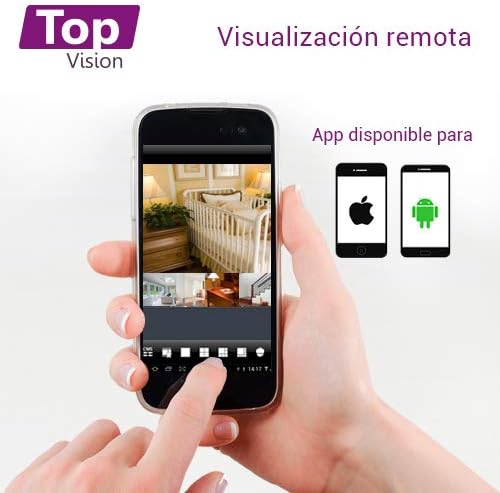
Image: A smartphone screen showing multiple live camera feeds, demonstrating the remote viewing capability of the security system.
3. Įrašymas ir atkūrimas
- Įrašymo nustatymai: Access the 'Record' menu on the DVR to configure recording schedules, motion detection recording, and continuous recording options.
- Atkūrimas: From the main menu, select 'Playback' to review įrašytas footage. You can search by date, time, and event type.
- Atsarginė kopija: Connect a USB flash drive to the DVR's USB port to back up recorded video files.
Priežiūra
Reguliarus aptarnavimas užtikrina optimalų jūsų apsaugos sistemos veikimą ir ilgaamžiškumą.
- Valymas: Periodically clean the camera lenses with a soft, dry cloth to remove dust and smudges. Clean the DVR exterior with a soft, damp audinys. Nenaudokite stiprių cheminių medžiagų.
- Firmware atnaujinimai: Patikrinkite gamintojo website for available firmware updates for your DVR. Firmware updates can improve performance, add features, and fix bugs. Follow update instructions carefully.
- Kietojo disko sveikata: If a hard drive is installed, regularly check its health status through the DVR's system settings. Back up important footage periodiškai.
- Kabelio apžiūra: Periodically inspect all cables for wear, damage, or loose connections.
Trikčių šalinimas
This section addresses common issues you might encounter with your TOPVISION TOP402 system.
| Problema | Galima priežastis | Sprendimas |
|---|---|---|
| Monitoriuje nėra vaizdo rodymo | Atsilaisvinęs vaizdo kabelis, monitoriuje pasirinkta neteisinga įvestis, vaizdo registratorius neįjungtas. | Patikrinkite HDMI/VGA kabelio jungtis. Įsitikinkite, kad monitorius įjungtas į tinkamą įvestį. Patikrinkite vaizdo registratoriaus maitinimą. |
| Kamera nerodo vaizdo įrašo | Loose BNC cable, camera not receiving power, faulty camera/cable. | Check BNC video and power connections for the specific camera. Ensure power adapter and splitter are working. Test with a different cable or camera if possible. |
| Nėra nuotolinio valdymo pulto viewing | DVR not connected to network, incorrect network settings, app not configured correctly. | Verify Ethernet cable connection to router. Check DVR network settings (DHCP enabled). Ensure correct device ID/QR code is added to the mobile app. |
| Nėra įrašymo | Kietasis diskas neįdiegtas, kietasis diskas pilnas, įrašymo grafikas nenustatytas. | Install a compatible hard drive. Check HDD status in DVR settings. Configure recording schedules. |
| Neveikia naktinis matymas | IR LEDs blocked, insufficient power to camera. | Ensure nothing is obstructing the camera's IR LEDs. Verify camera power supply. |
Specifikacijos
| Funkcija | Specifikacija |
|---|---|
| Modelio numeris | TOP402 |
| Prekės ženklas | TOPVIZIJA |
| DVR kanalai | 4 Video Channels + 1 IP Channel |
| Vaizdo įrašymo raiška | 1080p Lite |
| Kameros raiška | 2 Megapixels (1080p) |
| Kameros objektyvas | 2.8 mm |
| Ypatinga funkcija | Night Vision (Infrared LEDs) |
| Ryšio technologija | Laidinis |
| Kietojo disko palaikymas | Up to 8TB (3.5-inch SATA, HDD not included) |
| Vaizdo išvestis | HDMI, VGA (simultaneous) |
| Product Dimensions (DVR) | Apytiksliai 30 x 25 x 7 cm |
| Produkto svoris | Approximately 3.6 kg (total kit) |
Garantija ir palaikymas
TOPVISION products are designed for reliability and performance. For specific warranty details, please refer to the warranty card included with your product or visit the official TOPVISION websvetainę.
If you encounter any issues or require technical assistance, please contact TOPVISION customer support through the contact information provided on the official website or your purchase platform. When contacting support, please have your product model number (TOP402) and purchase details ready.
For the latest drivers, software, and FAQs, please visit the TOPVISION support page online.


