1. Įvadas
This manual provides instructions for the installation, setup, and operation of your Lepro Smart GU10 LED Bulbs. These bulbs offer advanced features including tunable white light, dimming capabilities, and smart control via app or voice assistants.
Pagrindinės funkcijos:
- Reguliuojama balta šviesa: Adjust color temperature from warm white (2700K) to cool white (6500K).
- Pritemdomas: Adjust brightness via the app or voice control. Note: Do not use with external dimmer switches.
- Valdymas balsu: Suderinamas su „Amazon Alexa“ ir „Google Assistant“, kad būtų galima valdyti laisvų rankų įranga.
- Programos valdymas: Manage lights from anywhere using the 'Smart Life' app.
- Planavimas: Set timers and schedules for automatic light control.
- Nereikalingas stebulė: Prisijungia tiesiai prie jūsų 2.4 GHz „Wi-Fi“ tinklo.

1.1 vaizdas: Baigtaview of Lepro Smart GU10 LED Bulb capabilities, including dimming, tunable white light, scheduling, and smart control options.
2. Svarbi saugos informacija
Please read and follow all safety instructions carefully before installation and use. Failure to do so may result in electric shock, fire, or other injuries.
- Elektros sauga: Always turn off power at the circuit breaker before installing or removing the bulb.
- Suderinamumas su reguliatoriumi: These smart bulbs are nesuderinamas su tradiciniais pritemdymo jungikliais. Using them with a dimmer switch will cause flickering and may damage the bulb. Control dimming exclusively through the 'Smart Life' app or voice commands.
- Naudoti tik patalpose: This product is designed for indoor use in dry locations.
- Veiklos ttage: Ensure your fixture provides 120 Volts, 60 Hertz.
- Tinkamas montavimas: Install the bulb securely into a GU10 base fixture.
- Venkite perkaitimo: Do not enclose the bulb in fixtures that restrict airflow excessively, as this can lead to overheating and reduced lifespan.
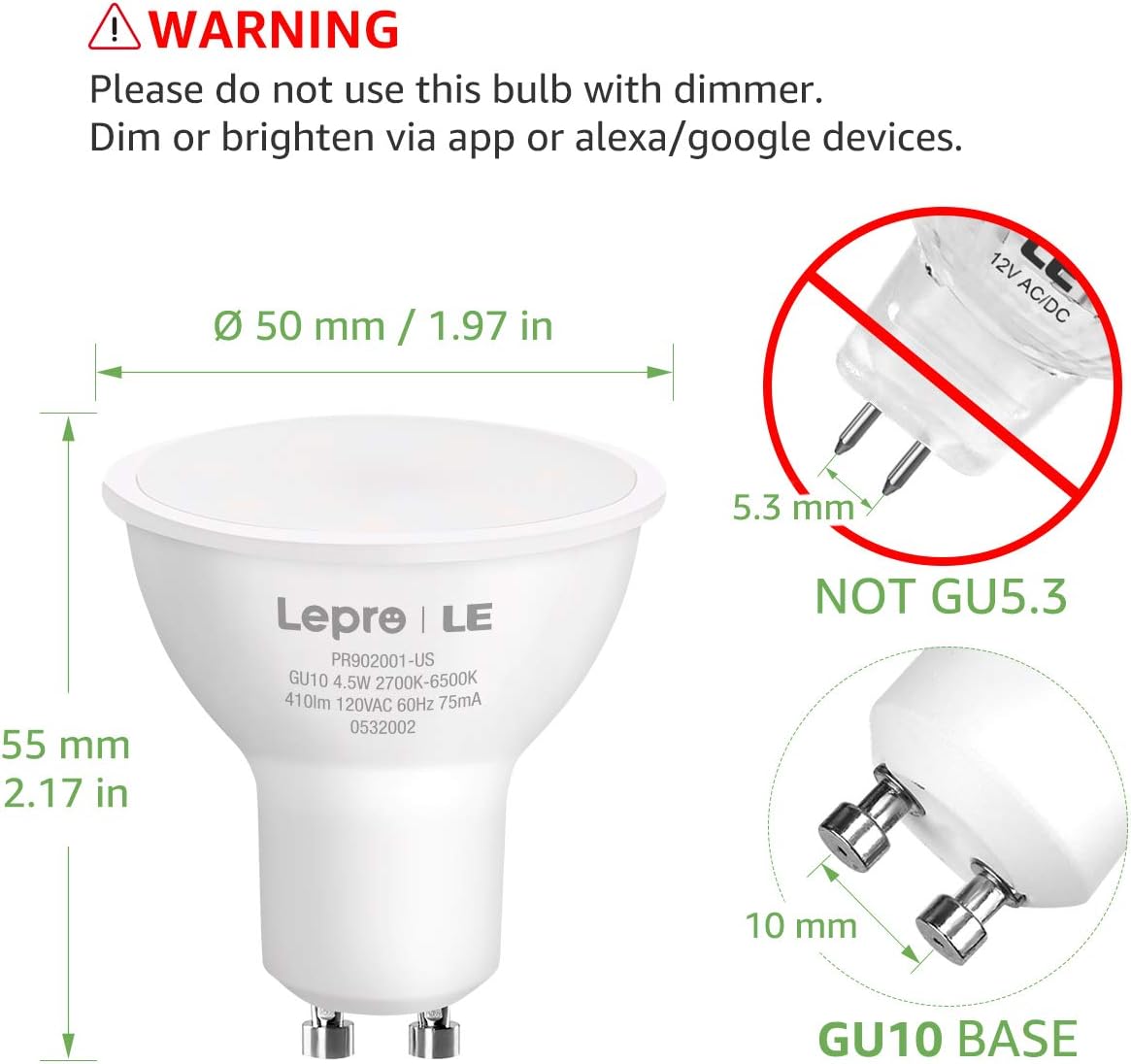
Image 2.1: Important warning regarding dimmer switch incompatibility and correct GU10 base identification.
3. Pakuotės turinys
Patikrinkite, ar pakuotėje yra visi reikalingi daiktai:
- Lepro Smart GU10 LED Bulb(s) (Quantity as purchased, e.g., 2-pack)
- Vartotojo vadovas (šis dokumentas)

Image 3.1: Lepro Smart GU10 LED Bulbs and packaging.
4. Gaminio specifikacijos
| Specifikacija | Detalė |
|---|---|
| Prekės ženklas | Lepro |
| Modelio pavadinimas | LampUX GU10 WiFi Smart Light Bulbs |
| Šviesos tipas | LED |
| Lemputės pagrindas | GU10 |
| Vattage | 4.5 vatų |
| Kaitrinis ekvivalentas | 50 vatų |
| Ryškumas | 350 liumenų |
| Spalvos temperatūra | 2700K–6500K (reguliuojama balta spalva) |
| ttage | 120 voltų |
| Dažnis | 60 hercų |
| Ryšys | Tik 2.4 GHz „Wi-Fi“ |
| Kontrolės metodas | App (Smart Life), Voice (Alexa, Google Assistant) |
| Vidutinis gyvenimas | 25,000 valandų |
| Gaminio matmenys | 1.97 colio pločio x 2.17 colio aukščio |
| Medžiaga | Aliuminis, Plastikas |
| Sertifikavimas | FCC |
5. Sąrankos vadovas
5.1 Fizinis įrengimas
- Išjunkite maitinimą: Before installation, ensure the power to the light fixture is turned off at the circuit breaker to prevent electric shock.
- Pašalinti seną lemputę: Carefully remove the existing GU10 bulb from the fixture.
- Install Smart Bulb: Insert the Lepro Smart GU10 LED Bulb into the GU10 base. Push and twist clockwise until it is securely seated.
- Atkurti maitinimą: Turn the power back on at the circuit breaker. The bulb should flash, indicating it is in pairing mode. If it does not flash, turn the light switch off and on 3-5 times until it begins to flash rapidly.
5.2 Programėlės atsisiuntimas ir paskyros sukūrimas
- Atsisiųsti programą: Scan the QR code provided in the packaging or search for 'Smart Life' in your smartphone's app store (iOS or Android).
- Registruotis / Prisijungti: Open the 'Smart Life' app and register for a new account or log in if you already have one.
5.3 Prisijungimas prie „Wi-Fi“.
Įsitikinkite, kad jūsų „Wi-Fi“ tinklas yra 2.4 GHz. These bulbs do not support 5GHz Wi-Fi networks.
- Pridėti įrenginį: „Smart Life“ programėlėje palieskite „+“ piktogramą viršutiniame dešiniajame kampe, kad pridėtumėte įrenginį.
- Pasirinkite apšvietimą: Choose 'Lighting' or 'Light Source (Wi-Fi)' from the device list.
- Patvirtinkite mirksėjimą: Confirm that the bulb is flashing rapidly. If not, cycle the power (off-on 3-5 times) until it flashes.
- Įveskite „Wi-Fi“ informaciją: Pasirinkite savo 2.4 GHz Wi-Fi tinklą ir įveskite slaptažodį.
- Poravimas: The app will begin connecting to the bulb. Once connected, the bulb will stop flashing and glow steadily.
- Pervardyti įrenginį: You can rename the bulb for easier control (e.g., "Living Room Spotlight 1").

Image 5.1: Illustration of easy setup, highlighting physical installation and 2.4GHz Wi-Fi requirement.
6. Naudojimo instrukcijos
6.1 Programų valdymas
Once connected, you can control your bulb(s) through the 'Smart Life' app:
- Įjungta/Išjungta: Norėdami įjungti arba išjungti lemputę, palieskite maitinimo piktogramą.
- Pritemdymas: Norėdami reguliuoti šviesos intensyvumą, naudokite ryškumo slankiklį.
- Spalvos temperatūra: Select the 'White' mode and use the slider or color wheel to choose any shade from warm white (2700K) to cool white (6500K).
- Scenos: The app offers pre-set scenes for different moods or activities. You can also create custom scenes.

Image 6.1: Adjusting color temperature via the 'Smart Life' app, showing warm, natural, and cool white light examples.
6.2 Balso valdymas („Alexa“ / „Google Assistant“)
Norėdami įjungti balso valdymą:
- Susieti paskyrą: In your Amazon Alexa or Google Home app, enable the 'Smart Life' skill/action and link your 'Smart Life' account.
- Atraskite įrenginius: Paprašykite balso asistento „Atrasti įrenginius“.
- Balso komandos: Naudokite tokias komandas kaip:
"Alexa, turn on Living Room Spotlight."
„Ei, „Google“, pritemdyk virtuvės šviesą iki 50 %.“
"Alexa, set the bedroom light to warm white."
6.3 Planavimas ir laikmačiai
Set up automated schedules for your lights:
- In the 'Smart Life' app, select your bulb and navigate to the 'Schedule' or 'Timer' section.
- Set desired times for turning lights on/off, or for activating specific scenes.
- Repeat for specific days of the week as needed.
6.4 Grupės valdymas
Control multiple bulbs simultaneously:
- In the 'Smart Life' app, select one of your bulbs.
- Tap the pencil icon (edit) or 'Settings' and look for 'Create Group'.
- Select all bulbs you wish to include in the group and confirm.
- You can now control the entire group with a single command or app action.

6.2 pav.: pvz.amples of scheduling and group control features.
7. Priežiūra
To ensure optimal performance and longevity of your Lepro Smart GU10 LED Bulbs:
- Valymas: Prieš valydami, įsitikinkite, kad lemputė išjungta ir atvėsusi. Nuvalykite minkšta, sausa šluoste. Nenaudokite skystų ar abrazyvinių valiklių.
- Saugykla: If storing the bulbs for an extended period, keep them in a cool, dry place away from direct sunlight.
- Venkite atšiaurios aplinkos: Do not expose the bulbs to extreme temperatures, high humidity, or corrosive substances.
8. Trikčių šalinimo vadovas
If you encounter issues with your Lepro Smart GU10 LED Bulbs, refer to the following common problems and solutions:
| Problema | Galima priežastis | Sprendimas |
|---|---|---|
| Lemputė neprisijungia prie „Wi-Fi“ | Incorrect Wi-Fi band (5GHz), incorrect password, bulb not in pairing mode, weak Wi-Fi signal. | Ensure your router is broadcasting a 2.4GHz network. Confirm Wi-Fi password. Cycle power to the bulb (off-on 3-5 times) until it flashes rapidly to enter pairing mode. Move closer to the router. |
| Bulb flickering or not working correctly | Used with a traditional dimmer switch. | Remove the bulb from any fixture connected to a traditional dimmer switch. These bulbs require a constant power supply and are dimmed via the app or voice control. |
| Bulb appears "Offline" in the app | Loss of Wi-Fi connection, power outage., maršrutizatoriaus problemos. | Check your Wi-Fi router and internet connection. Ensure the bulb has constant power. Try restarting the bulb by turning its power off and on at the switch. If the issue persists, re-pair the bulb. |
| Balso valdymas nereaguoja | 'Smart Life' skill/action not enabled or linked, incorrect device name, internet connectivity issues. | Verify that the 'Smart Life' skill/action is enabled and linked in your Alexa/Google Home app. Ensure the device name used in voice commands matches the name in the app. Check your internet connection. |
| Multiple bulbs not working together in a group | One or more bulbs are offline, group not properly configured. | Check individual bulb status in the app. Ensure all bulbs are online. Recreate the group in the 'Smart Life' app. |
9. Garantija ir palaikymas
9.1 Informacija apie garantiją
Lepro Smart GU10 LED Bulbs come with a 2 metų garantija from the date of purchase. This warranty covers manufacturing defects and malfunctions under normal use. It does not cover damage caused by misuse, improper installation, or external factors.
9.2 Pagalba klientams
For technical assistance, warranty claims, or further inquiries, please contact Lepro customer support through their official websvetainėje arba kontaktinę informaciją, pateiktą kartu su pirkiniu. Kreipdamiesi į palaikymo tarnybą, turėkite paruoštą savo produkto modelį ir pirkimo informaciją.


