1. Įvadas
Ačiū, kad pirkoteasing the WamGra BY28 P Bluetooth Speaker Night Light Alarm Clock. This device combines a high-quality Bluetooth speaker, a versatile night light with touch control, a digital alarm clock, and an MP3 player, offering multiple functionalities in one compact unit. Please read this manual carefully to ensure proper use and optimal performance.

1.1 vaizdas: The WamGra BY28 P Bluetooth Speaker Night Light Alarm Clock, showcasing its main design and available color variations.
2. Pakuotės turinys
Patikrinkite pakuotę, ar joje yra šie daiktai:
- WamGra BY28 P Bluetooth Speaker Night Light Alarm Clock x 1
- Vartotojo vadovas x 1
3. Produktas baigtasview
Familiarize yourself with the various parts and controls of your device.

3.1 vaizdas: Baigėsiview of the device's features, including the control panel, Bluetooth connectivity, hands-free call function, and various input ports.
Valdymo skydas (viršuje)
- Touch Mesh Net: Controls light modes and brightness.
- Maitinimo mygtukas: Turns the device on/off, displays time when light is off.
- Režimo mygtukas: Switches between Bluetooth, MP3, AUX, and Clock modes.
- Garsumo didinimo / kito takelio mygtukas: Padidina garsumą, peršoka prie kito takelio.
- Garsumo mažinimo / ankstesnio takelio mygtukas: Sumažina garsumą, peršoka prie ankstesnio takelio.
- Paleidimo / pauzės / skambinimo mygtukas: Groja/pristabdo muziką, atsiliepia/baigia skambučius.
Galiniai uostai
- „Micro SD“ kortelės lizdas: MP3 grojimui files from a micro SD card.
- USB pagrindinio kompiuterio prievadas: MP3 grojimui files iš USB atmintinės.
- AUX įvesties prievadas: Skirta išoriniams garso įrenginiams prijungti per 3.5 mm garso kabelį.
- USB DC 5V Charging Port: Prietaiso įkrovimui.
- ĮJUNGIMO/IŠJUNGIMO jungiklis: Pagrindinis maitinimo jungiklis.
4. Pradinė sąranka
4.1 Įrenginio įkrovimas
- Prieš pirmą kartą naudodami, pilnai įkraukite prietaisą.
- Connect the provided USB charging cable to the USB DC 5V charging port on the back of the speaker.
- Kitą laido galą prijunkite prie USB maitinimo adapterio (nepridedamas) arba kompiuterio USB prievado.
- Užsidegs įkrovimo indikatoriaus lemputė. Pilnas įkrovimas trunka maždaug 6 valandų.
- Once fully charged, the indicator light will turn off or change color.
The built-in rechargeable battery provides approximately 8 hours of operation, depending on usage (volume, light brightness).
4.2 Maitinimo įjungimas/išjungimas
- To power on, slide the ON/OFF switch on the back of the device to the 'ON' position. The display will light up.
- Norėdami išjungti, įjungimo/išjungimo jungiklį perjunkite į padėtį „IŠJUNGTA“.
5. Veikimo režimai
5.1 „Bluetooth“ garsiakalbio režimas
The device functions as a Bluetooth 4.0 speaker, allowing wireless audio streaming from compatible devices up to 10 meters (32.81 feet).
- Įsitikinkite, kad įrenginys įjungtas.
- Paspauskite Režimas button until you hear a voice prompt indicating Bluetooth mode. The Bluetooth indicator will flash.
- Išmaniajame telefone, planšetiniame kompiuteryje ar kitame įrenginyje su „Bluetooth“ ryšiu įjunkite „Bluetooth“ ir ieškokite galimų įrenginių.
- Select "BY28 P" from the list to pair. Once paired, you will hear a confirmation sound, and the Bluetooth indicator will stop flashing.
- Dabar galite leisti garsą iš prijungto įrenginio.
Skambinimas laisvų rankų įranga
- When a call comes in during Bluetooth mode, press the Leisti / pristabdyti / skambinti mygtuką atsakyti.
- Paspauskite Leisti / pristabdyti / skambinti mygtuką, kad baigtumėte skambutį.
- Paspauskite ir palaikykite Leisti / pristabdyti / skambinti mygtuką, norėdami atmesti įeinantį skambutį.
5.2 Nakties šviesos režimas
The device features a touch-activated lamp with warm white and color-changing light options.
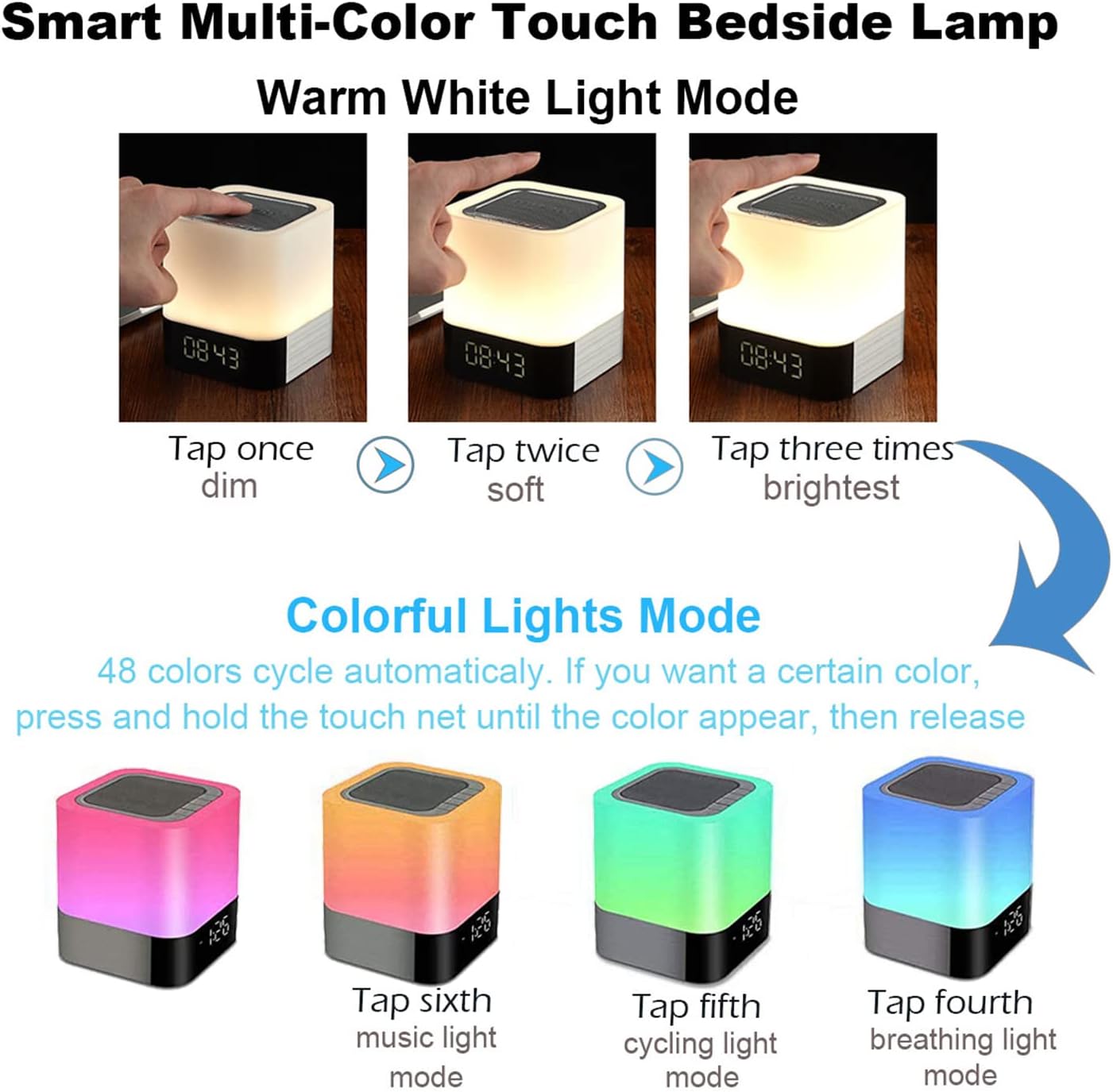
5.1 vaizdas: Visual guide for controlling the warm white and colorful light modes using the touch mesh net.
Šiltos baltos šviesos režimas
- Tap the top mesh net once to turn on the dim warm white light.
- Tap a second time for soft warm white light.
- Tap a third time for the brightest warm white light.
- Tap a fourth time to turn off the warm white light.
Colorful Lights Mode (48 Colors)
- From any warm white light setting, press and hold the top mesh net until the light switches to the colorful mode.
- The colors will cycle automatically.
- To select a specific color, press and hold the touch net again when your desired color appears, then release. The light will stay on that color.
- To switch back to automatic color cycling, tap the mesh net.
- To turn off the colorful light, tap the mesh net until the light turns off.
5.3 Žadintuvo režimas
The device features a digital alarm clock with snooze function and the ability to set custom alarm sounds.
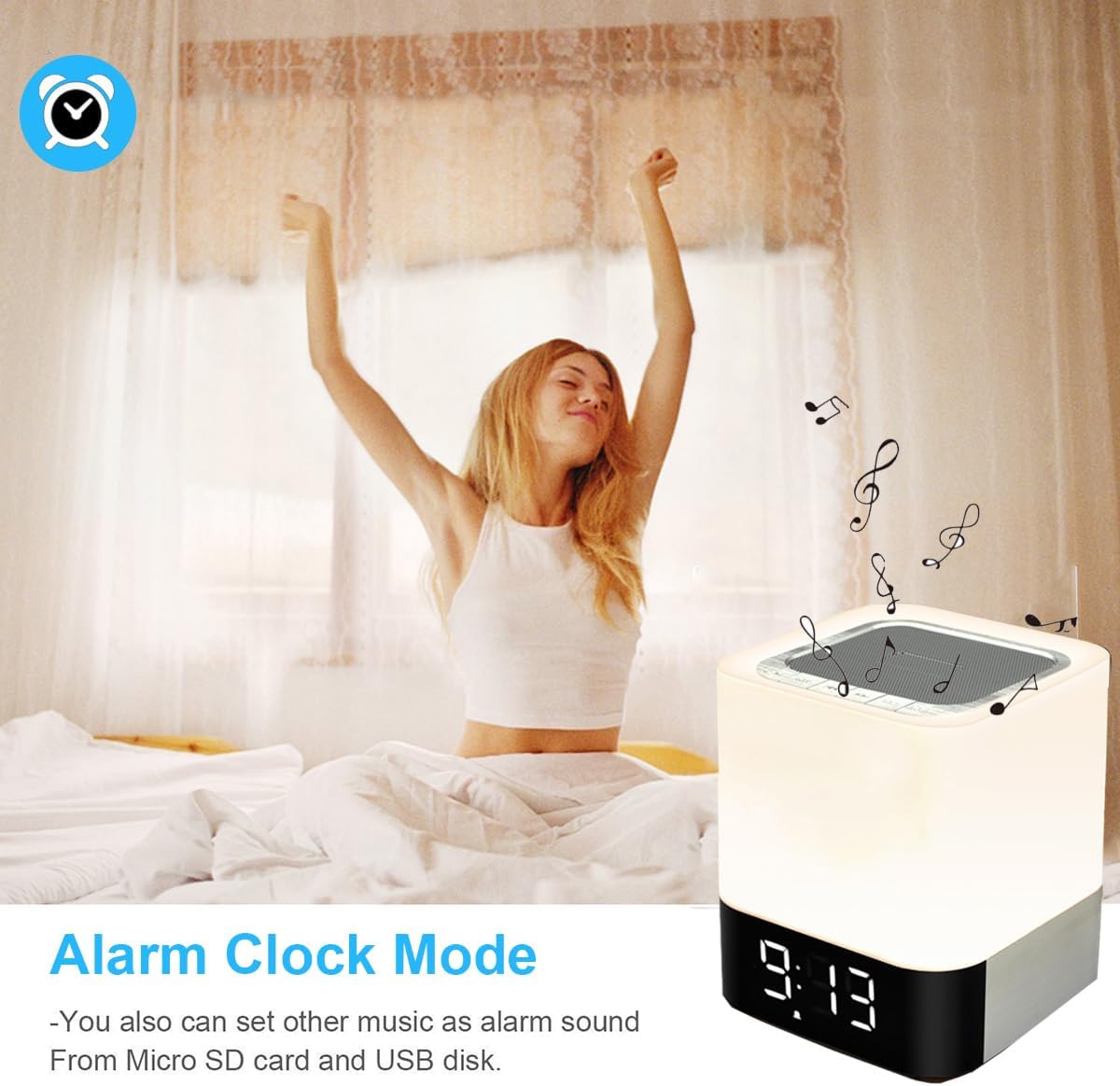
5.2 vaizdas: The alarm clock mode, highlighting the option to use custom MP3 songs as alarm sounds.
Laiko nustatymas
- Paspauskite Režimas button until the clock display is active.
- Paspauskite ir palaikykite Režimas mygtuką, kol pradės mirksėti valandų skaitmenys.
- Naudokite Garsumo didinimas/kitas takelis ir Garsumo mažinimas/ankstesnis takelis mygtukai valandoms reguliuoti.
- Paspauskite Režimas button again to switch to minute adjustment. Adjust minutes using the volume buttons.
- Paspauskite Režimas button a third time to confirm the time setting.
Signalo nustatymas
- In clock display mode, press the Žadintuvas button (usually indicated by an alarm icon, or a long press of the Mode button after time setting).
- The alarm hour digits will flash. Use the Garsumo didinimas/kitas takelis ir Garsumo mažinimas/ankstesnis takelis mygtukai, skirti nustatyti žadintuvo valandą.
- Paspauskite Žadintuvas button again to switch to minute adjustment. Adjust minutes using the volume buttons.
- Paspauskite Žadintuvas button a third time to confirm the alarm setting. The alarm icon will appear on the display.
Custom Alarm Sound (MP3)
- To use your favorite song as an alarm, save an MP3 file to a micro SD card or USB flash drive.
- Create a folder named "ALARM" on the root directory of your micro SD card or USB flash drive and place your desired MP3 file(s) inside.
- Insert the micro SD card or USB flash drive into the corresponding port on the device.
- The device will automatically use the MP3 file(s) in the "ALARM" folder as the alarm sound.
Snaudimo funkcija
- When the alarm rings, tap the top mesh net once to activate the snooze function. The alarm will ring again after 5 minutes.
- To stop the alarm completely, quickly tap the top mesh net twice.
5.4 MP3 Player Mode
Play music directly from a micro SD card or USB flash drive.
- Insert a micro SD card or USB flash drive containing MP3 files į atitinkamą prievadą.
- Paspauskite Režimas button until you hear a voice prompt indicating MP3 mode (or card/USB mode).
- The device will automatically start playing the MP3 files.
- Naudokite Garsumo didinimas/kitas takelis ir Garsumo mažinimas/ankstesnis takelis mygtukus, kad galėtumėte naršyti takelius.
- Naudokite Leisti / pristabdyti mygtuką, norėdami pristabdyti arba tęsti atkūrimą.
5.5 AUX-IN režimas
Prijunkite išorinius garso įrenginius naudodami 3.5 mm garso kabelį.
- Connect one end of a 3.5mm audio cable (not included) to the AUX-IN port on the back of the speaker.
- Kitą galą prijunkite prie išorinio įrenginio (pvz., MP3 grotuvo, nešiojamojo kompiuterio) garso išvesties lizdo.
- Paspauskite Režimas button until you hear a voice prompt indicating AUX mode.
- Leiskite garsą iš išorinio įrenginio. Garsumą galima reguliuoti tiek per garsiakalbį, tiek per išorinį įrenginį.
6. Priežiūra
- Prietaisą valykite minkštu, sausu skudurėliu. Nenaudokite abrazyvinių valiklių ar tirpiklių.
- Keep the device away from water and excessive moisture. Although it has some water resistance, it is not fully waterproof.
- Saugokite, kad prietaisas nepatektų į ekstremalias temperatūras ar tiesioginius saulės spindulius.
- If not used for a long period, charge the battery at least once every three months to prolong its lifespan.
7. Problemų sprendimas
| Problema | Galimas sprendimas |
|---|---|
| Įrenginys neįsijungia. | Ensure the ON/OFF switch is in the 'ON' position. Check battery level and charge the device if necessary. |
| Iš garsiakalbio nėra garso. | Check volume levels on both the speaker and the connected device. Ensure the correct mode (Bluetooth, MP3, AUX) is selected. For Bluetooth, ensure successful pairing. |
| „Bluetooth“ susiejimas nepavyksta. | Ensure the speaker is in Bluetooth mode and discoverable. Turn off and on Bluetooth on your device. Move the speaker closer to your device. |
| Light does not respond to touch. | Ensure the device is powered on. Try tapping the mesh net firmly. |
| Signalizacija neskamba. | Verify the alarm time is set correctly and the alarm function is activated (alarm icon visible). Ensure MP3 files for custom alarms are correctly placed in an "ALARM" folder on the root directory of the storage device. |
8. Specifikacijos
| Funkcija | Detalė |
|---|---|
| Modelio pavadinimas | BY28 P |
| Prekės ženklas | WamGra |
| Gaminio matmenys | 3.9 colio gylis x 3.9 colio plotis x 4.4 colio aukštis (10 cm gylis x 10 cm plotis x 11.2 cm aukštis) |
| Prekės svoris | 1.35 svarų (0.61 kg) |
| Garsiakalbio tipas | Nešiojamas Bluetooth garsiakalbis |
| Didžiausia garsiakalbio išėjimo galia | 5 vatų |
| Belaidžio ryšio technologija | Bluetooth 4.0 |
| Bluetooth diapazonas | 10 metrai (32.81 pėdos) |
| Ryšio technologija | Bluetooth, pagalbinis (3.5 mm), USB |
| Kontrolės metodas | Palieskite |
| Maitinimo šaltinis | Maitinamas su baterijomis (pridedama 1 ličio jonų baterija) |
| Baterijos talpa | 4400 mAh |
| Įkrovimo laikas | Maždaug 6 valandos |
| Ypatingos savybės | Color Changing Light, Dimmable Light, Rechargeable, MP3 Player, Hands-Free Call |
9. Garantija ir palaikymas
This product comes with a limited warranty. Please refer to the warranty information provided at the time of purchase for details regarding coverage and duration.
For technical support, troubleshooting assistance, or warranty claims, please contact your retailer or the manufacturer directly. Contact information can typically be found on the product packaging or the brand's official websvetainę.


