Įvadas
The ViewSonic M1+ is an ultra-portable WVGA (854x480p) LED projector designed for convenient entertainment in various settings. This lightweight projector, weighing less than two pounds, is ideal for use in different rooms or for indoor/outdoor activities. It features an integrated smart stand that allows for 360-degree setup and also functions as a lens cover. The projector automatically powers on with full brightness when the lens is uncovered, providing instant entertainment. A safety auto-off feature powers down the projector if objects are detected too close to the lens. Dual Harman Kardon Bluetooth speakers deliver crisp and clear sound, and a short throw lens enables large image projection in small spaces. Versatile connectivity options include a MicroSD card slot, USB Type-A, and USB Type-C.
Kas yra dėžutėje
Atidarius savo ViewSonic M1+ package, you should find the following items:
- M1+ projector
- Maitinimo laidas
- USB-C laidas
- Nuotolinis
- Vartotojo vadovas

Paveikslėlis: The ViewSonic M1+ projector and its accessories, including the power cable, USB-C cable, remote control, and QuickStart Guide, laid out next to the projector.
Video: An unboxing video of the ViewSonic M1+ Portable Smart LED Projector, demonstrating the contents of the package and initial setup steps.
Produktas baigtasview
The M1+ projector is designed for versatility and ease of use, offering a range of features for an enhanced viewpatirtį.
- Itin nešiojamas dizainas: Compact and lightweight, making it easy to carry and set up anywhere.
- Integrated Smart Stand: Provides simple 360-degree setup and doubles as a lens cover.
- Dual Harman Kardon Bluetooth Speakers: Delivers premium audio quality for an immersive experience.
- Integruota baterija: Offers up to 6 hours of power on full power mode, allowing for extended use without a power outlet.
- Cinema SuperColor+ Technology: Achieves 125% Rec.709 for vibrant and accurate cinematic colors.
- Auto-Focus and Vertical Keystone Correction: Ensures a perfectly proportioned picture from almost any angle.

Paveikslėlis: The ViewSonic M1+ projector is shown in a bedroom setting, projecting a large image onto a wall, highlighting its smart ultra-portable design for various uses.

Paveikslėlis: The ViewSonic M1+ projector is placed on a kitchen counter, projecting an image onto a wall, illustrating its adaptability for different lifestyles.

Image: A visual representation of the projector's battery life in various modes: Full Power Mode (up to 2.5 hours), Eco Mode (up to 3 hours), and Energy Saving Mode (up to 6 hours), with people enjoying content in different settings.
Sąranka
Nustatydami savo ViewSonic M1+ projector is quick and intuitive:
- Išpakuoti: Atsargiai išimkite visus komponentus iš dėžutės.
- Padėties nustatymas: Place the projector on a stable surface. The integrated smart stand allows for flexible positioning, including projecting onto ceilings or walls. Rotate the stand to achieve the desired projection angle.
- Maitinimas: Uncover the lens by rotating the smart stand. The projector will automatically power on.
- Focus ir Keystone: The M1+ features auto-focus and vertical keystone correction to ensure a clear and rectangular image. Adjust manually if needed via the on-screen menu or remote control.
- Prisijungimo šaltinis: Connect your desired media source (e.g., laptop, smartphone, USB drive) using the appropriate port (HDMI, USB-C, USB-A, MicroSD).
Video: An unboxing video of the ViewSonic M1+ Portable Smart LED Projector, demonstrating the contents of the package and initial setup steps.
Veikiantis
The ViewSonic M1+ offers various operating modes and features for a seamless user experience:
- Maitinimo įjungimas/išjungimas: The projector powers on automatically when the smart stand is opened and powers off when closed. You can also use the power button on the device or remote.
- Navigacija: Use the directional buttons on the projector or remote control to navigate the on-screen menu.
- Šaltinio pasirinkimas: Select your input source (HDMI, USB-C, USB-A, MicroSD, or Wi-Fi) from the main menu.
- Garsas: Utilize the built-in dual Harman Kardon Bluetooth speakers for audio. The projector can also function as a standalone Bluetooth speaker.
- Baterijos veikimo laikas: Manage power consumption by selecting different modes. The built-in battery provides up to 6 hours of power in energy-saving mode.
- Išmaniosios funkcijos: Connect to Wi-Fi to stream content directly from supported apps or mirror your mobile device screen.
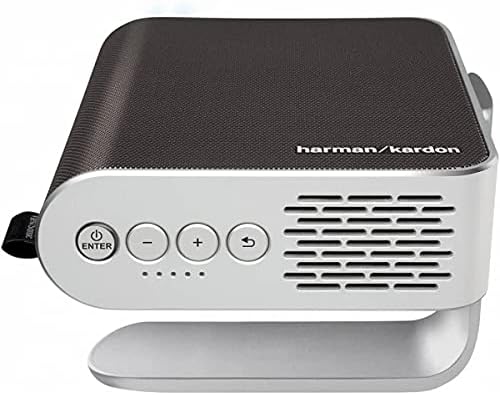
Vaizdas: Stambus planas view of the projector's top panel, showing the power button, volume controls, and navigation buttons for easy operation.
Vaizdo įrašas: reklaminis vaizdo įrašasasing ViewSonic M1+ Portable Smart Wi-Fi Projector, highlighting its portability, smart features, and ease of use in various home and outdoor environments.
Ryšys
The M1+ offers a wide range of connectivity options to suit your needs:
- HDMI 1.4 (HDCP1.4): Connect laptops, gaming consoles, Blu-ray players, and other HDMI-enabled devices.
- USB 3.1 Type C: For direct streaming from compatible devices like smartphones and tablets, and for charging.
- USB 2.0 A tipas: Connect USB flash drives for media playback or to power external devices.
- MicroSD kortelės lizdas: Įdėkite „MicroSD“ kortelę, kad galėtumėte leisti mediją files tiesiai iš projektoriaus.
- „Wi-Fi“: Built-in Wi-Fi allows for wireless screen mirroring from compatible devices and access to smart TV features.
- Bluetooth: Connect to external Bluetooth speakers or use the projector's built-in Harman Kardon speakers as a standalone Bluetooth audio device.

Paveikslėlis: detalus view iš ViewSonic M1+ projector's connectivity panel, showing labeled ports for MicroSD, DC 19V power, USB-C, HDMI, Audio Out, and USB Type A.
Priežiūra
Siekiant užtikrinti jūsų ilgaamžiškumą ir optimalų veikimą ViewSonic M1+ projector, follow these maintenance guidelines:
- Objektyvo valymas: Švelniai nuvalykite projektoriaus objektyvą minkštu, nepūkuotu skudurėliu, skirtu optiniams paviršiams. Venkite abrazyvinių medžiagų ar stiprių cheminių medžiagų.
- Vėdinimas: Įsitikinkite, kad projektoriaus ventiliacijos angos yra švarios ir neuždengtos, kad neperkaistų. Nestatykite projektoriaus ant minkštų paviršių, kurie gali blokuoti oro srautą.
- Saugykla: When not in use, store the projector in a cool, dry place. Use the provided carrying case for protection during transport or storage.
- Lamp Gyvenimas: The M1+ utilizes an LED light source with an impressive operational life of over 30,000 hours, significantly reducing the need for lamp pakeitimas.
- Akumuliatoriaus priežiūra: For optimal battery health, avoid fully discharging the battery frequently. If storing for an extended period, charge the battery to about 50% capacity.
Trikčių šalinimas
Jei kyla problemų dėl jūsų ViewSonic M1+ projector, try the following basic troubleshooting steps:
- Nėra paveiksliuko: Check all cable connections (HDMI, USB-C). Ensure the correct input source is selected in the projector's menu. Verify the lens cover is fully open.
- Neryškus vaizdas: The projector has auto-focus and keystone correction. If the image is still blurry, try moving the projector closer or further from the screen, or manually adjust focus if available in the settings.
- Nėra garso: Ensure the volume is turned up on both the projector and the connected source device. Check if the projector is connected to external Bluetooth speakers and disconnect if you wish to use the internal speakers.
- Maitinimo problemos: If the projector does not turn on, ensure it is charged or connected to the power adapter. If it powers off unexpectedly, check for overheating (ensure vents are clear) or low battery.
- Nuotolinio valdymo pultas neveikia: Patikrinkite nuotolinio valdymo pulto baterijas. Įsitikinkite, kad tarp nuotolinio valdymo pulto ir projektoriaus nėra jokių kliūčių.
For more detailed troubleshooting or persistent issues, please refer to the full user manual or visit the official ViewGarso palaikymas websvetainę.
Specifikacijos
| Funkcija | Detalė |
|---|---|
| Gaminio matmenys | 4.96 x 1.59 x 5.83 colio |
| Prekės svoris | 1.54 svaro |
| Prekės modelio numeris | M1+ |
| Baterijos | Reikalingos 2 AAA baterijos (nuotolinio valdymo pultui) |
| Gamintojas | ViewSonic |
| Rekomenduojami naudojimo būdai | Namų kinas |
| Ypatingos savybės | Auto Focus, Auto Keystone Correction, Built-In Speaker, Ultra-Portable |
| Ryšio technologija | Bluetooth, HDMI 1.4 (HDCP1.4), USB 3.1 Type C, USB 2.0 Type A, Wi-Fi |
| Ekrano raiška | 854 x 480 (WVGA) |

Image: A diagram illustrating the physical dimensions of the ViewSonic M1+ projector, showing its compact size.
Garantija ir palaikymas
For detailed warranty information and customer support, please refer to the warranty card included in your product packaging or visit the official ViewSonic websvetainėje. website provides comprehensive resources, including FAQs, driver downloads, and contact information for technical assistance.


