1. Įvadas
The Refoss Smart Wi-Fi Garage Door Opener (Model MSG100) transforms your traditional garage door into a smart, connected device. This manual provides detailed instructions for installation, operation, and maintenance, ensuring you can fully utilize its features such as remote control, voice commands, and real-time notifications.
2. Produkto ypatybės
- Nuotolinio valdymo pultas: Operate your garage door from anywhere with internet access using the Refoss app. Supports 2.4GHz WiFi networks.
- Valdymas balsu: Seamlessly integrates with Alexa and Google Assistant for hands-free control.
- Platus suderinamumas: Designed to work with over 200 brands of garage door openers.
- Notifications and History: Receive real-time alerts for garage door status (open/close, overtime/overnight reminders) and review operation history within the app.
- Lengvas montavimas: Straightforward setup process, provided a strong WiFi signal is available near the garage door.
3. Pakuotės turinys
Prieš tęsdami montavimą, įsitikinkite, kad yra visi reikalingi elementai:
- Refoss Smart Wi-Fi Garage Door Opener (MSG100)
- Vartotojo vadovas (šis dokumentas)
- Sensor and Signal Control Cable
- Mounting Accessories (screws, adhesive pads, etc. - implied from installation)
4. Specifikacijos
| Atributas | Detalė |
|---|---|
| Modelio numeris | MSG100 |
| Matmenys | 9.4 x 4.57 x 2.29 cm |
| Svoris | 235 g |
| Spalva | Baltas |
| Medžiaga | ABS |
| Diegimo būdas | Montuojamas ant paviršiaus |
| bevielio ryšio standartas | IEEE 802.11 b/g/n, 2.4 GHz |
5. Sąranka ir diegimas
5.1 Pradinė įrenginio sąranka
Before physical installation, ensure your Refoss Smart Wi-Fi Garage Door Opener is connected to your home Wi-Fi network via the Refoss app.

Image: The Refoss Smart Wi-Fi Garage Door Opener module next to a smartphone displaying a "Congratulations! Your wireless configuration is done!" message, indicating successful app setup.
5.2 Fizinis įrengimas
Mount the Refoss device near your garage door opener. Ensure it is within range of your 2.4GHz Wi-Fi network. Connect the sensor and signal control cable to the appropriate ports on the device and your garage door opener.

Image: The Refoss Smart Wi-Fi Garage Door Opener mounted on the ceiling, connected to a standard garage door opener unit, demonstrating its compact size and integration.
The device dimensions are approximately 9.6 cm (3.7 in) in length and 4.7 cm (1.9 in) in height, allowing for discreet installation.

Image: A diagram illustrating the compact dimensions of the Refoss device (3.7 inches by 1.9 inches) next to a garage door opener, highlighting its small footprint.
5.3 Connecting to Garage Door Opener
The Refoss opener connects to your existing garage door opener's control terminals. For specific wiring, refer to your garage door opener's manual. The device supports various learn button colors, which may indicate a need for additional accessories for certain models.

Image: A visual guide showing how to connect the Refoss device to the garage door opener's terminals, along with a chart indicating compatibility based on the color of the opener's "Learn" button (yellow, purple, green, red, orange) and whether accessories are needed.
If your garage door opener requires an accessory based on its learn button color, you may be able to claim it from Refoss support. You will need to provide your garage door opener's brand, model, learn button color, and shipping address.

Image: A close-up of a garage door opener's control panel, with an arrow pointing to the learn button area, accompanied by a checklist for claiming necessary accessories (Brand, Model, Learn Button, Shipping Address).
6. Operacija
6.1 Nuotolinis valdymas per programėlę
Once installed and configured, you can control your garage door from anywhere using the Refoss mobile application. This allows you to open or close the door remotely, grant access to others, or check its status.

Image: A split image showing a delivery person at a garage door and a person using a laptop and smartphone, illustrating the convenience of remote garage door control from anywhere with internet access.
6.2 Valdymas balsu
The Refoss Smart Wi-Fi Garage Door Opener is compatible with Amazon Alexa and Google Assistant. You can use simple voice commands to open or close your garage door, enhancing convenience, especially when your hands are full.

Image: A person speaking into a smartphone, with a speech bubble indicating "Alexa, unlock my garage door," and a garage door opening, demonstrating voice control functionality.
To set up Alexa voice commands, follow these steps:
- Open the Amazon Alexa app and locate your garage door opener device.
- Tap the "Open by Voice" option.
- Create and confirm your voice PIN code for security.
- Use "lock/unlock" voice control commands to control your garage door. For example: "Alexa, lock my garage door."

Image: A four-panel image showing the step-by-step process within the Amazon Alexa app to enable and configure voice control for the garage door opener, including setting a voice PIN code.
6.3 Notifications and Reminders
The Refoss app provides real-time notifications about your garage door's status. You can receive alerts when the door opens or closes, and set reminders for overtime (e.g., door left open for too long) or overnight (e.g., door left open overnight) situations.
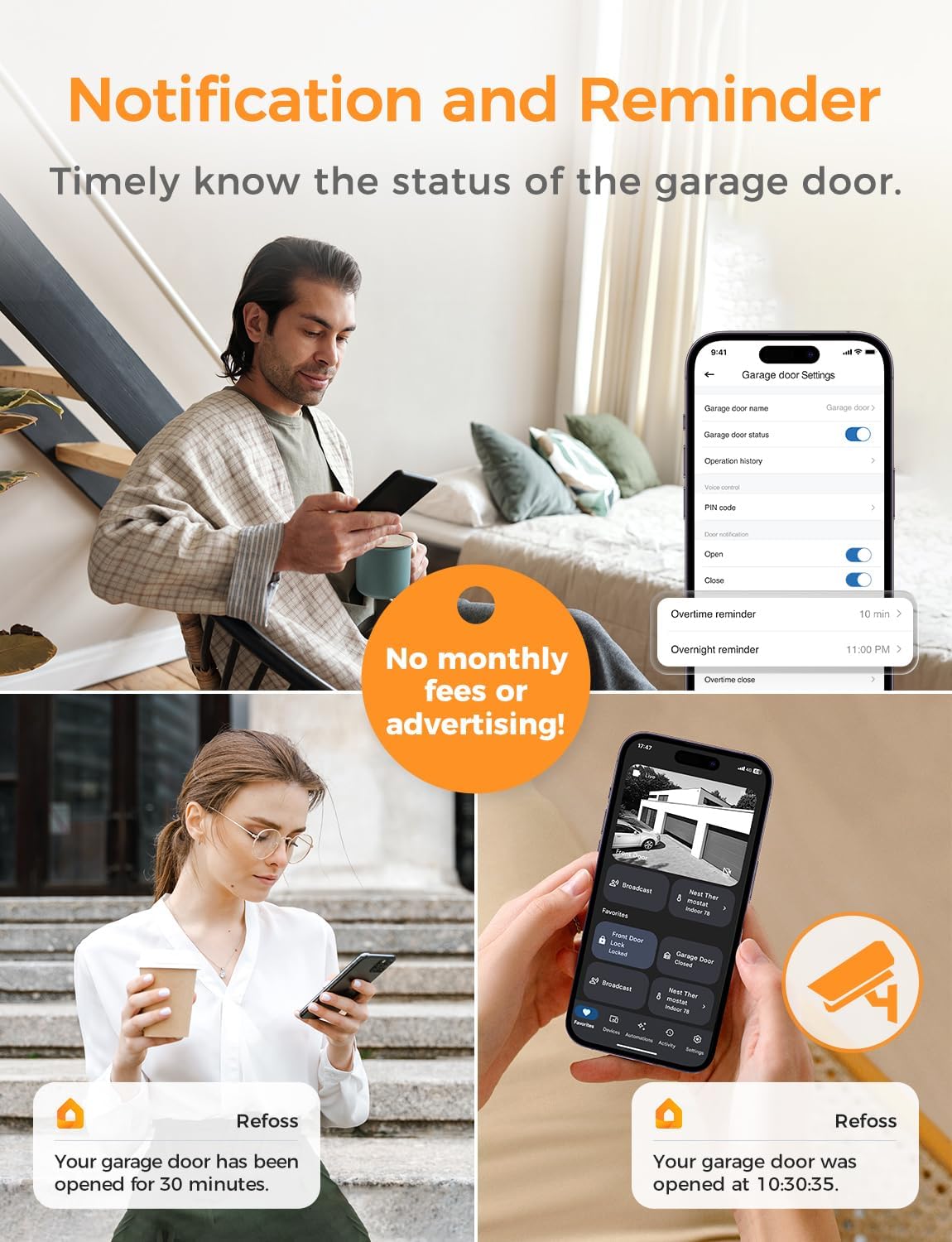
Image: A multi-panel image showing a person checking their phone, with app screenshots displaying garage door status, operation history, and notification settings for open/close, overtime, and overnight reminders. A text bubble indicates "No monthly fees or advertising!"
The app also maintains a detailed history of all garage door operations, allowing you to review past activities.
7. Suderinamumas
The Refoss RSG100 Smart Garage Door Opener boasts wide compatibility, working with over 200 brands and 1600 models of garage door openers. It supports garage door openers with various "Learn" button colors, though some may require additional accessories.

Image: A graphic stating "Compatibility Check" with a QR code. Text advises scanning the code for compatibility check and contacting Refoss support for accessory needs if compatibility issues arise.
For a detailed compatibility check, you can scan the QR code provided in the image above or visit the official Refoss support page: Refoss Support FAQs.
8. Problemų sprendimas
If you encounter issues with your Refoss Smart Wi-Fi Garage Door Opener, consider the following common solutions:
- Nėra ryšio: Ensure your Wi-Fi signal is strong near the garage door opener. The device requires a 2.4GHz Wi-Fi network. Try restarting your Wi-Fi router and the Refoss device.
- Garažo vartai nereaguoja: Verify that the sensor and signal control cables are securely connected to both the Refoss device and your garage door opener. Check if your garage door opener is powered on.
- Suderinamumo problemos: If the device is not working with your specific garage door opener model, refer to the compatibility section (Section 7) and contact Refoss support for potential accessory needs.
- Programos problemos: Ensure your Refoss app is updated to the latest version. Try force-closing and reopening the app, or reinstalling it if problems persist.
For further assistance, please visit the Refoss Support FAQs at https://support.refoss.net/Support/FAQs arba susisiekite su jų klientų aptarnavimo tarnyba.
9. Priežiūra
The Refoss Smart Wi-Fi Garage Door Opener is designed for low maintenance. To ensure optimal performance:
- Laikykite prietaisą švarų ir be dulkių.
- Ensure the sensor and cables are not obstructed or damaged.
- Regularly check for firmware updates through the Refoss app to benefit from new features and improvements.
- Maintain a stable 2.4GHz Wi-Fi connection in your garage area.
10. Garantija ir palaikymas
The Refoss Smart Wi-Fi Garage Door Opener comes with a 1 metų garantija nuo pirkimo datos. Ši garantija apima medžiagų ir gamybos defektus normaliai naudojant.
For warranty claims, technical support, or any product-related queries, please contact Refoss customer support through their official website or the Refoss app. You can also find helpful resources and FAQs at https://support.refoss.net/Support/FAQs.


