1. Įvadas
Ačiū, kad pirkoteasing the JORLAI T316 Record Player. This portable 3-speed turntable combines vintage aesthetics with modern features, allowing you to enjoy your vinyl collection and stream music wirelessly via Bluetooth. This manual provides essential information for setup, operation, and maintenance to ensure optimal performance and longevity of your device.
2. Saugos instrukcijos
- Prieš naudodami atidžiai perskaitykite visas instrukcijas.
- Išsaugokite šį vadovą ateityje.
- Saugokite įrenginį nuo lietaus, drėgmės ar ekstremalių temperatūrų.
- Nestatykite įrenginio šalia šilumos šaltinių, tokių kaip radiatoriai, šildytuvai, viryklės ar kiti šilumą skleidžiantys prietaisai.
- Naudokite tik gamintojo nurodytus priedus/priedus.
- Atjunkite įrenginį žaibuojant arba kai nenaudojate ilgą laiką.
- Visus techninės priežiūros darbus patikėkite kvalifikuotam techninės priežiūros personalui.
3. Pakuotės turinys
Please ensure all items are present upon unpacking:
- JORLAI T316 Record Player
- Maitinimo adapteris (DC 5V)
- Bluetooth receiver (built-in)
- Integruoti garsiakalbiai
- Garantinis talonas
- USB Cable for PC Recording
- Software CD (for PC recording, if applicable)
4. Produktas baigtasview
Familiarize yourself with the components and controls of your JORLAI T316 Record Player.

Image: The JORLAI T316 Record Player in white, open with a pink vinyl record on the platter, showcasing its portable suitcase design.
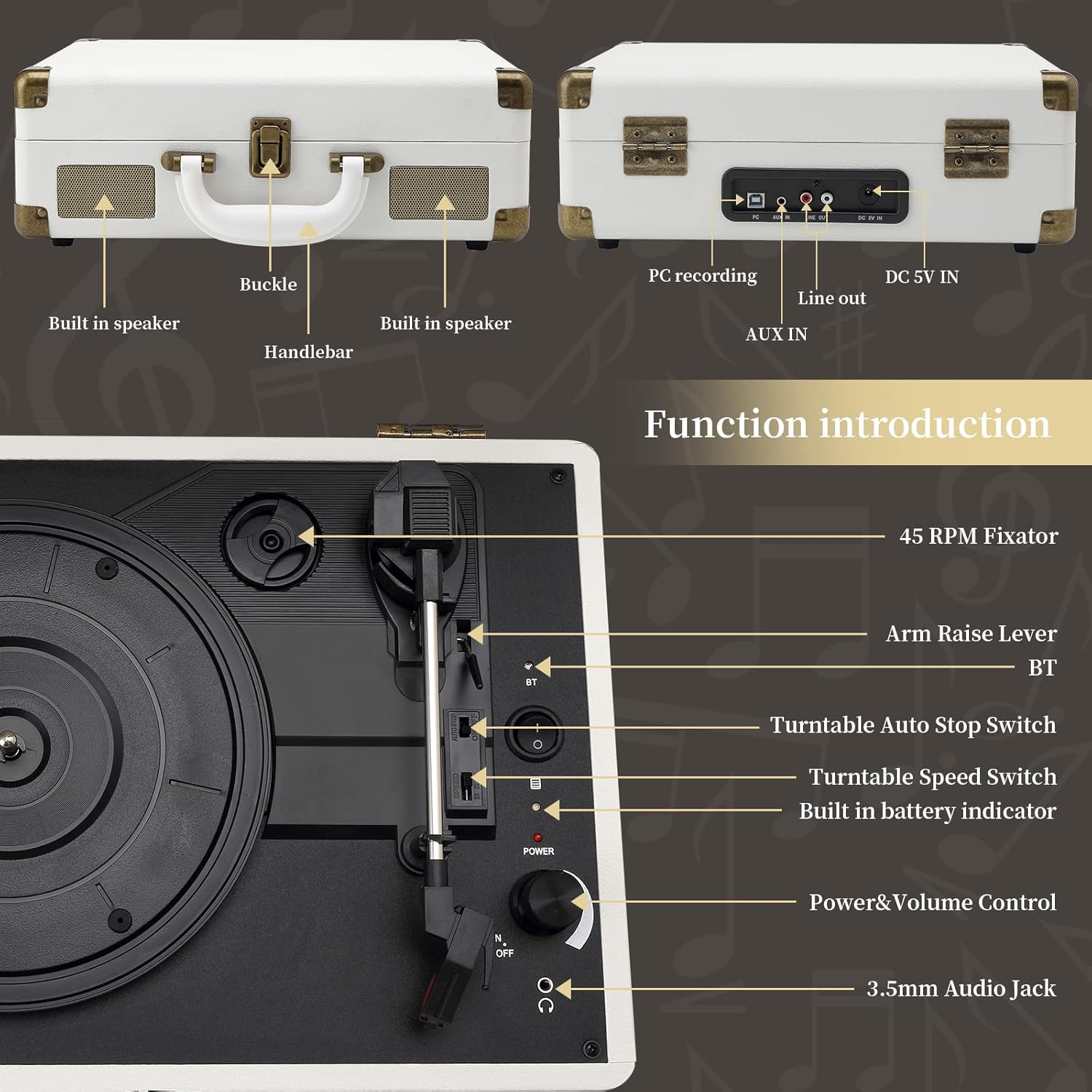
Image: A detailed diagram highlighting the various controls and ports on the JORLAI T316 Record Player, including the 45 RPM fixator, arm raise lever, Bluetooth switch, auto stop switch, speed switch, battery indicator, power/volume control, and 3.5mm audio jack.
Front/Top Panel Controls:
- Sukamojo stalo padėklas: Kur guli vinilo plokštelė.
- Toninė rankena: Laiko rašiklį (adatą) plokštelių grojimui.
- Rašiklis: Adata, kuri skaito plokštelės griovelius.
- Rankenos pakėlimo svirtis: Lifts and lowers the tone arm.
- 45 RPM Fixator: Adapter for 45 RPM records with large center holes.
- Patefono greičio jungiklis: Selects playback speed (33, 45, 78 RPM).
- Patefono automatinio išjungimo jungiklis: Įjungia / išjungia automatinį plokštelės sustabdymą įrašo pabaigoje.
- Maitinimo ir garsumo valdymas: Įjungia / išjungia įrenginį ir reguliuoja garsiakalbio garsumą.
- Bluetooth (BT) Switch: Įjungia „Bluetooth“ susiejimo režimą.
- Built-in Battery Indicator: Shows charging status (Red for charging, Green for fully charged).
- 3.5 mm garso lizdas: Ausinėms prijungti.
Galinio skydelio prievadai:

Vaizdas: Stambus planas view of the rear panel of the JORLAI T316 Record Player, showing the AUX IN, LINE OUT (RCA), and DC 5V IN ports.
- PC Recording Port: USB port for connecting to a computer for recording.
- AUX IN: 3.5mm input for connecting external audio devices (e.g., MP3 player, smartphone).
- LINIJOS IŠVAŽIAVIMAS (RCA): RCA output jacks for connecting to external speakers or an ampgyvesnis.
- DC 5 V IN: Maitinimo įvestis pridedamam adapteriui.
5. Sąranka
5.1 Pradinis įkrovimas
The JORLAI T316 features a built-in rechargeable lithium battery (2100 mAh) providing up to 5 hours of playback. Before first use, fully charge the unit.
- Connect the power adapter to the DC 5V IN port on the rear of the unit.
- Įjunkite adapterį į sieninį lizdą.
- The battery indicator will show red while charging and turn green when fully charged.

Image: A close-up of the record player's side, illustrating the battery indicator light (red for charging, green for fully charged) and indicating a built-in 1800mAh battery with up to 3+ hours of play.
5.2 Įdėjimas
Place the record player on a stable, level surface away from direct sunlight, heat sources, and excessive dust or vibration.
6. Naudojimo instrukcijos
6.1 Vinilinių plokštelių grojimas
- Atidarykite patefono dangtelį.
- Place a vinyl record on the turntable platter. If playing a 45 RPM record with a large center hole, place the 45 RPM fixator on the spindle first.
- Select the appropriate speed (33, 45, or 78 RPM) using the Turntable Speed Switch.
- Set the Turntable Auto Stop Switch to ON if you want the platter to stop automatically at the end of the record, or OFF for continuous play.
- Gently push the Arm Raise Lever backward to lift the tone arm.
- Manually move the tone arm over the desired starting groove of the record.
- Gently push the Arm Raise Lever forward to lower the tone arm onto the record. Playback will begin.
- Adjust the volume using the Power & Volume Control knob.
- To stop playback, lift the tone arm using the Arm Raise Lever and return it to its rest.

Image: A visual representation of the three selectable speeds (33, 45, 78 RPM) for 7-inch, 10-inch, and 12-inch vinyl records.
6.2 „Bluetooth“ atkūrimas
The JORLAI T316 can receive audio wirelessly from your Bluetooth-enabled devices.
- Turn on the record player using the Power & Volume Control knob.
- Slide the Bluetooth (BT) Switch to the 'BT' position. The unit will enter pairing mode, indicated by a flashing light (if applicable, refer to specific model indicator).
- On your external device (smartphone, tablet, etc.), enable Bluetooth and search for available devices.
- Select 'JORLAI T316' (or similar name) from the list to pair.
- Once paired, you can play music from your device through the record player's speakers.
- Adjust volume using both your external device and the record player's Power & Volume Control.

Image: A person's hand holding a smartphone displaying a music app, with a Bluetooth connection icon pointing towards the JORLAI T316 Record Player, illustrating wireless music streaming.
6.3 PC Recording (Vinyl-to-MP3)
You can convert your vinyl records into digital audio files (WAV/MP3) using the PC recording function.
- Install the provided recording software on your computer. If no CD is included, software may be available for download from the JORLAI websvetainę.
- Connect the record player to your computer using the supplied USB cable via the PC Recording Port.
- Follow the instructions within the recording software to capture audio from your vinyl records.

Image: A diagram illustrating the PC recording process, showing a vinyl record connected via USB to a computer, which then converts the audio into MP3/WAV format files.
6.4 AUX IN jungtis
Connect external audio sources to play through the record player's speakers.
- Connect a 3.5mm audio cable from your external device's headphone or line-out jack to the AUX IN port on the rear of the record player.
- Turn on the record player and your external device.
- Select the AUX input mode on the record player (if applicable, otherwise it may automatically detect).
- Leiskite garsą iš išorinio įrenginio.
- Adjust volume using both your external device and the record player's Power & Volume Control.
6.5 LINE OUT Connection
Prijunkite plokštelių grotuvą prie išorinių garsiakalbių arba ampkeltuvas, skirtas pagerinti garsą.
- Connect RCA cables (red and white) from the LINE OUT ports on the rear of the record player to the corresponding audio input jacks on your external ampkeltuvai arba maitinami garsiakalbiai.
- Ensure the record player and external audio system are powered on.
- Select the appropriate input on your external audio system.
- Play a record or stream via Bluetooth. Audio will be routed through your external system.
7. Priežiūra
7.1 Įrenginio valymas
- Nuvalykite įrenginio išorę minkštu, sausu skudurėliu.
- Nenaudokite abrazyvinių valiklių, vaško ar tirpiklių.
7.2 Rašiklio priežiūra
- The stylus is delicate. Handle it with care.
- Periodiškai valykite rašiklį minkštu šepetėliu, braukdami iš galo į priekį.
- Pastebėję garso kokybės pablogėjimą arba matomą nusidėvėjimą, pakeiskite rašiklį.

Vaizdas: Stambus planas view of the ruby stylus making contact with the grooves of a vinyl record, emphasizing its role in sound quality and record protection.
7.3 Įrašų priežiūra
- Laikykite plokšteles švarias ir be dulkių. Prieš kiekvieną grojimą naudokite plokštelių šepetėlį.
- Laikykite plokšteles vertikaliai jų dėkluose, kad jos nedeformuotųsi.
8. Problemų sprendimas
| Problema | Galima priežastis | Sprendimas |
|---|---|---|
| Nėra galios | Unit not plugged in; battery drained; power adapter faulty. | Ensure power adapter is securely connected and plugged into a working outlet. Charge the unit fully. Try a different outlet. |
| Iš garsiakalbių nėra garso | Volume too low; wrong input mode; headphones connected; external speakers not connected/powered. | Increase volume. Ensure no headphones are plugged in. Check AUX/Bluetooth mode if applicable. Verify external speaker connections and power. |
| Patefonas nesisuka | Power off; auto-stop engaged prematurely; tone arm not over platter. | Turn on power. Ensure auto-stop switch is OFF if experiencing issues. Lift tone arm and place it over the record. |
| Praleidžiantis arba iškraipytas garsas | Dirty record; worn/damaged stylus; unit not level; excessive vibration. | Clean record. Inspect and replace stylus if necessary. Place unit on a stable, level surface. Avoid vibrations. |
| Bluetooth poravimo problemos | Bluetooth not enabled; device too far; already paired to another device. | Ensure BT switch is ON. Keep devices within range. Disconnect from other devices. Restart both devices. |
9. Specifikacijos
- Modelis: T316
- Prekinis ženklas: JORLAI
- Gaminio matmenys: 13.9 x 11.2 x 5 colio
- Prekės svoris: 6.53 svaro (2.97 kilogramo)
- Medžiaga: Mediena
- Spalva: Baltas
- Atkūrimo greičiai: 33 1/3, 45, 78 aps./min
- Įrašų dydžiai: 7, 10, 12 colių
- Ypatingos savybės: Built-In Bluetooth Receiver, Built-in Stereo Speakers, PC Recording, AUX In, Line Out, Headphone Jack, Built-in Rechargeable Battery (2100 mAh)
- Maitinimo įvestis: DC 5V
10. Garantija ir palaikymas
The JORLAI T316 Record Player comes with a warranty as detailed on the included warranty card. Please refer to the warranty card for specific terms and conditions.
For technical support, troubleshooting assistance, or warranty claims, please contact JORLAI customer service. Contact information can typically be found on the warranty card or the official JORLAI websvetainę.
Gamintojas: JORLAI
Pirmą kartą pasiekiama data: 10 m. gegužės 2019 d


