Įvadas
The Olafus 30W LED Flood Light is a versatile lighting solution designed for both indoor and outdoor use. Featuring Bluetooth RGBW technology, it offers 16 million colors and 22 dynamic modes, allowing for extensive customization of lighting ambiance. Control is managed via a dedicated mobile application, supporting individual or group control of up to 300 lights. Key features include music synchronization, DIY scene customization, and a convenient timer function with memory recall.
Saugos informacija
- Įsitikinkite, kad maitinimo šaltinis atitinka gaminio galiątage reikalavimai (120 voltų).
- Do not attempt to disassemble or modify the flood light. This may void the warranty and pose a safety risk.
- Laikykite gaminį toliau nuo degių medžiagų.
- For outdoor installation, ensure all connections are waterproof and protected from direct exposure to water, despite the IP66 rating.
- Prieš montuodami, valydami ar atlikdami techninę priežiūrą, visada atjunkite maitinimą.
- Pastebėję kokių nors pažeidimų, nedelsdami nutraukite naudojimą ir susisiekite su klientų aptarnavimo tarnyba.
Kas yra dėžutėje
Kiekvienoje pakuotėje yra šie elementai:
- 2 LED RGBW Flood Lights

Image: Two Olafus 30W LED Flood Lights and the accompanying mobile application interface.
Sąranka
1. Fizinis įrengimas
- Pasirinkite vietą: Select a suitable location for the flood light, considering its intended use (e.g., yard, wall, floor). The light is rated IP66 waterproof for outdoor use.
- Montavimas: The flood light features an adjustable bracket for flexible mounting.

Vaizdas: Išsamus view of the flood light's dimensions, efficient heat dissipation design, and adjustable bracket.
Securely attach the light using appropriate hardware for your chosen surface (floor mount, wall mount). Ensure the bracket is tightened to hold the desired angle. - Maitinimo jungtis: Plug the flood light into a standard 120V AC power outlet. The power cord is approximately 1 meter (3.28 feet) long.
2. Programėlės atsisiuntimas ir susiejimas
- Atsisiųsti programą: Ieškokite the "Mesh RGBW" app (or similar as indicated in the product packaging/QR code) on your smartphone's app store (iOS or Android).
- Įjungti Bluetooth: Įsitikinkite, kad jūsų išmaniajame telefone įjungtas „Bluetooth“.
- Poravimas: Open the app. The app should automatically detect nearby Olafus flood lights. Follow the in-app instructions to pair your lights. If automatic pairing fails, some users have found success by plugging the lights into a power strip and toggling the power off and on several times to initiate pairing mode.
- Grupės valdymas: The Bluetooth Mesh 5.0 technology allows you to control lights individually or group them for synchronized control. You can connect up to 300 lights.

Image: Illustration of Mesh Group Control, showing how multiple lights can be connected and controlled via Bluetooth.
Naudojimo instrukcijos
1. Color and Brightness Control
- 16 milijonų spalvų: Use the color wheel in the app to select from 16 million available colors.
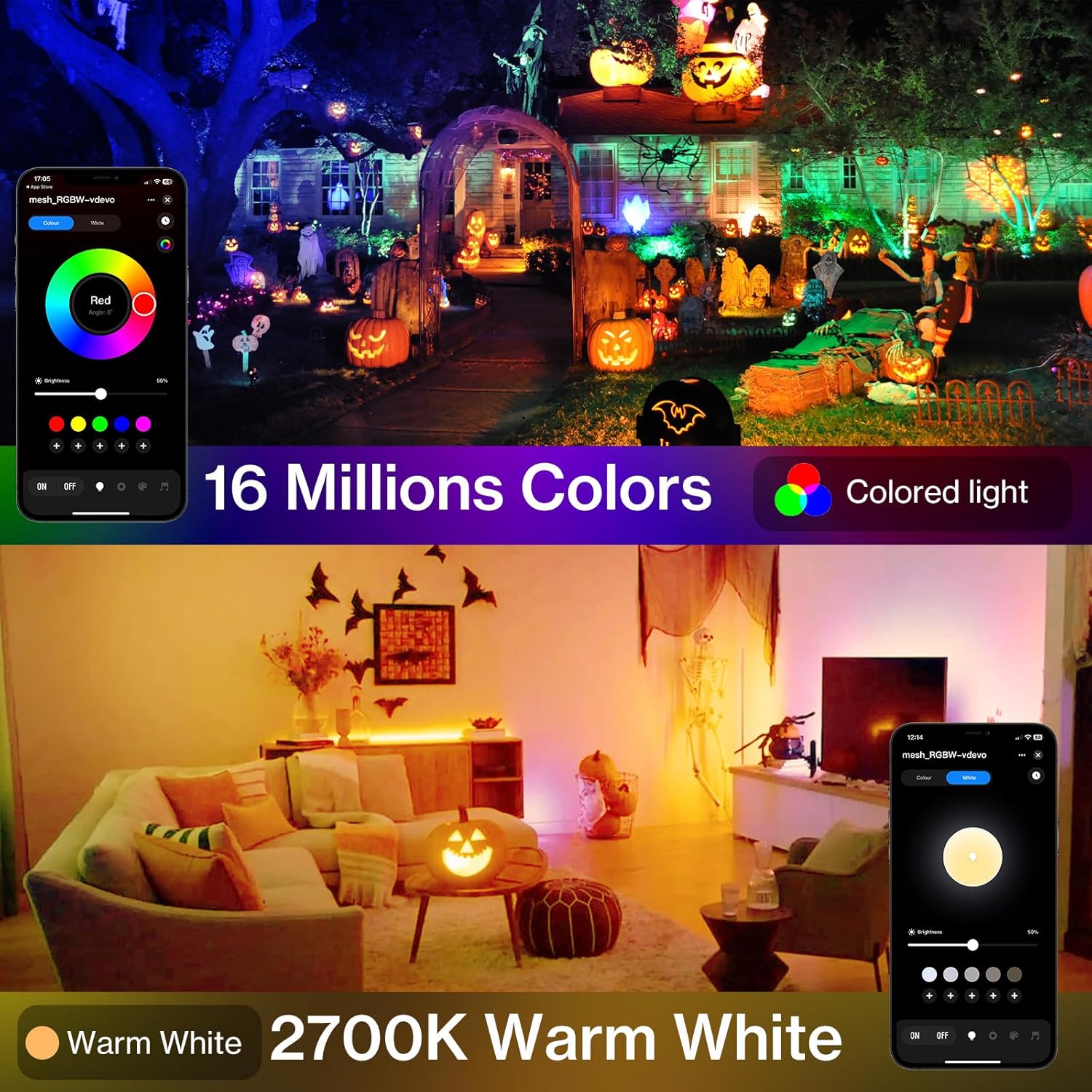
Image: The flood light displaying a range of colors, controlled via the mobile app's color selection interface.
- Šiltai balta (2700K): In addition to RGB colors, the light offers a dedicated 2700K warm white option for traditional lighting.
- Sureguliuokite ryškumą: Use the brightness slider in the app to adjust the light intensity from 0% to 100%.
2. Dynamic Modes and DIY Scenes
- 22 iš anksto nustatyti režimai: The app includes 22 pre-programmed dynamic modes (e.g., flash, fade, jump) for various effects.
- DIY Settings: Create and save your own custom lighting scenes by adjusting color, brightness, mode, and speed. These can be saved and recalled instantly.

Image: A living room illuminated with custom dynamic colors, demonstrating the DIY customization feature via the app.
3. Music Synchronization
- Muzikos sinchronizavimo režimas: Activate the music sync feature in the app to make the lights change color and intensity in rhythm with music played through your smartphone's microphone.
Video: Demonstration of how to use the app and remote control for the flood lights, including music sync functionality.
4. Laikmačio funkcija
- Schedule On/Off: Use the built-in timing chip to set specific times for the lights to automatically turn on or off.

Image: A pool area illuminated by flood lights, with the mobile app displaying timer settings for automatic operation.
- Atminties funkcija: The lights will remember the last used settings (color, brightness, mode) when turned off and back on.
Priežiūra
- Valymas: Regularly wipe the surface of the flood light with a soft, damp šluoste dulkes ir šiukšles pašalinti. Nenaudokite stiprių cheminių medžiagų ar abrazyvinių valiklių.
- Patikra: Periodically check the power cord and housing for any signs of damage. Ensure the mounting bracket remains secure.
- Atsparumo vandeniui įvertinimas: The light is IP66 waterproof, meaning it is protected against powerful water jets. However, avoid submerging the light in water.

Vaizdas: Stambus planas view of the flood light being sprayed with water, highlighting its IP66 waterproof feature.
Trikčių šalinimas
| Problema | Galima priežastis | Sprendimas |
|---|---|---|
| Šviesa neįsijungia. | No power, loose connection, faulty outlet. | Check power plug, ensure outlet is working, try a different outlet. |
| Nepavyksta prisijungti prie programėlės per „Bluetooth“. | Bluetooth not enabled, light not in pairing mode, interference. | Ensure Bluetooth is on. Try unplugging and replugging the light several times to force pairing mode. Reduce distance between phone and light. |
| Spalvos nėra tikslios arba reaguoja į vaizdą. | App glitch, poor Bluetooth signal. | Restart the app. Restart the light by unplugging and replugging. Ensure strong Bluetooth connection. |
| Muzikos sinchronizavimas neveikia. | Microphone access denied, low volume, app issue. | Check app permissions for microphone access. Increase music volume. Restart app. |
Specifikacijos
| Funkcija | Detalė |
|---|---|
| Prekės ženklas | Olafas |
| Modelio pavadinimas | LAB20Z |
| Vattage | 30 vatų |
| Šviesos šaltinio tipas | LED |
| Šviesios spalvos | RGB & 2700K Warm White |
| Ryškumas | 1750 liumenų |
| Kontrolės metodas | App (Bluetooth Mesh 5.0) |
| ttage | 120 voltų |
| Atsparumo vandeniui lygis | IP66 Atsparus vandeniui |
| Medžiaga | Aliuminis |
| Gaminio matmenys | 4.37 colio ilgio x 1.02 colių pločio x 5.35 colio aukščio |
| Prekės svoris | 1.94 svaro |
| Įtraukti komponentai | 2 LED RGBW Flood Lights |
Garantija ir palaikymas
For warranty information, technical support, or any inquiries regarding your Olafus 30W LED Flood Light, please refer to the contact details provided on the official Olafus website or within the product packaging. Keep your purchase receipt for warranty claims.
Visit the official Olafus Store for more information: Olafus Store


