1. Įvadas
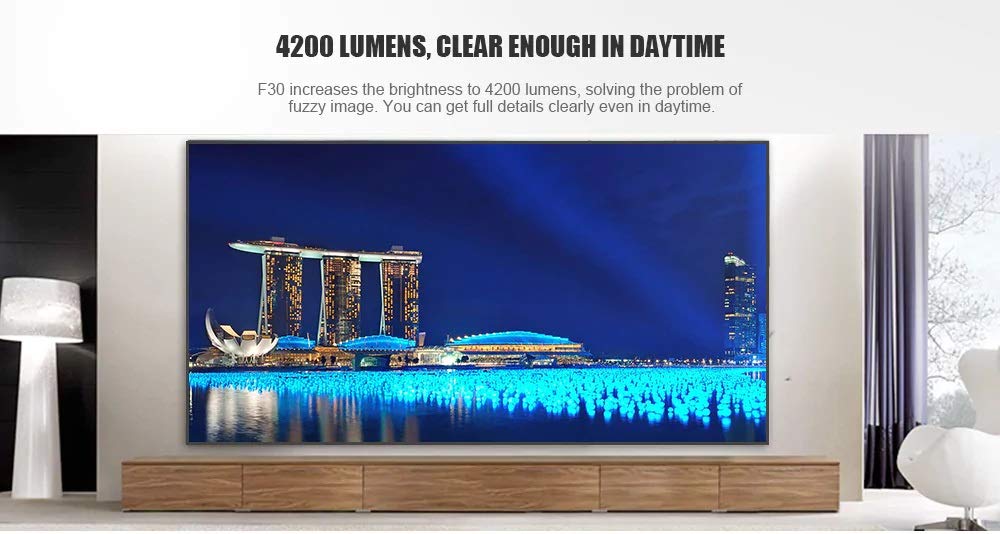
This manual provides essential instructions for the safe and efficient use of your Vivibright F30 Projector. Please read this manual thoroughly before operating the device and retain it for future reference. The Vivibright F30 is a Full HD 1080p LED projector designed for home theater, education, and business presentations, offering 4200 lumens brightness and multiple connectivity options.
2. Saugos informacija
- Maitinimas: Naudokite tik nurodytą maitinimo adapterį. Įsitikinkite, kad įtampatage atitinka projektoriaus reikalavimus.
- Vėdinimas: Neužblokuokite ventiliacijos angų. Užtikrinkite pakankamai vietos aplink projektorių tinkamam oro cirkuliavimui ir neperkaitimui.
- Šiluma: Projektorius lamp generates heat. Avoid touching the lens or vents immediately after use.
- Akių apsauga: Nežiūrėkite tiesiai į projektoriaus objektyvą, kai lamp įjungtas. Ryški šviesa gali sukelti akių nuovargį arba pažeidimus.
- Vieta: Projektorių pastatykite ant stabilaus, lygaus paviršiaus. Venkite jo statyti tiesioginiuose saulės spinduliuose, šalia šilumos šaltinių arba aplinkoje, kurioje yra daug dulkių.
- Valymas: Prieš valydami atjunkite maitinimą. Naudokite minkštą, sausą šluostę. Nenaudokite skystų ar aerozolinių valiklių.
- Aptarnavimas: Do not attempt to service the projector yourself. Refer all servicing to qualified personnel.
3. Pakuotės turinys
Patikrinkite, ar pakuotėje yra visi reikalingi daiktai:
- Vivibright F30 Projector
- Maitinimo kabelis
- Nuotolinio valdymo pultas
- Vartotojo vadovas (šis dokumentas)
- HDMI kabelis (gali skirtis priklausomai nuo regiono / pakuotės)
4. Produktas baigtasview
Susipažinkite su projektoriaus komponentais ir sąsajomis.
4.1 paveikslas: Priekyje view of the Vivibright F30 Projector, showing the lens and ventilation.

4.2 paveikslas: Šoninė view of the Vivibright F30 Projector, highlighting the various input ports.
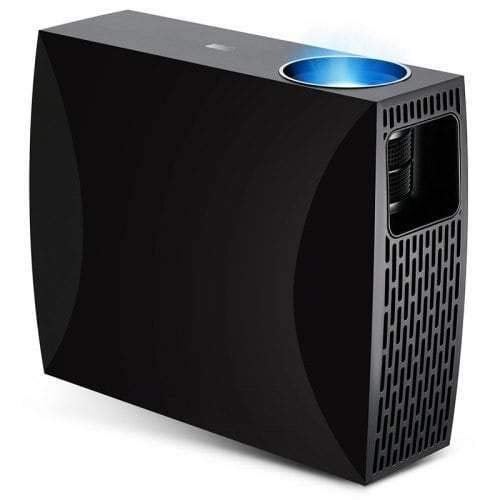
4.3 paveikslas: Top or rear view of the Vivibright F30 Projector, showing control buttons or additional vents.
4.1. Sąsajos
- HDMI prievadai: For connecting devices like laptops, gaming consoles, Blu-ray players, and media players.
- VGA prievadas: For connecting older computers or other VGA-compatible devices.
- USB prievadai: For connecting USB storage devices to play media directly.
- Garso išvestis: Skirta išoriniams garsiakalbiams arba ausinėms prijungti.
- Maitinimo įvestis: Maitinimo kabelio prijungimui.
5. Sąranka
5.1. Įdėjimas
Position the projector on a stable surface or mount it appropriately. Ensure the projector is perpendicular to the projection screen for optimal image geometry. The projection distance can range from 1.2 to 6.8 meters, depending on the desired screen size.
5.2. Maitinimo prijungimas
- Prijunkite maitinimo laidą prie projektoriaus maitinimo įvesties prievado.
- Kitą maitinimo laido galą prijunkite prie įžeminto elektros lizdo.
5.3. Įvesties įrenginių prijungimas
Connect your desired source device (e.g., laptop, media player) to the projector using an appropriate cable (HDMI, VGA, USB). Ensure the cable is securely connected to both the projector and the source device.
5.4. Fokusavimo ir trapecijos koregavimas
- Fokusas: Rotate the focus ring on the projector lens until the image appears sharp and clear on the screen.
- Pagrindinis akmuo: If the projected image is trapezoidal (wider at the top or bottom), use the keystone correction feature (manual or digital, depending on model) to adjust the image to a rectangular shape.
6. Naudojimo instrukcijos
6.1. Įjungimas/išjungimas
- Maitinimas: Press the power button on the projector or the remote control. The indicator light will change, and the lamp apšvies.
- Išjungti: Dar kartą paspauskite maitinimo mygtuką. Jei būsite paraginti, patvirtinkite išjungimą. Prieš atjungdami projektorių nuo elektros tinklo, leiskite jam atvėsti.
6.2. Įvesties šaltinio pasirinkimas
Press the "Source" button on the remote control or the projector's control panel to cycle through available input sources (HDMI1, HDMI2, VGA, USB). Select the input corresponding to your connected device.
6.3. Meniu naršymas
Use the arrow buttons on the remote control or projector to navigate through the on-screen display (OSD) menu. Press "OK" or "Enter" to select an option and "Exit" or "Menu" to go back or close the menu.
6.4. Vaizdo ir garso nustatymai
Adjust picture settings such as brightness, contrast, color, and aspect ratio via the OSD menu to optimize image quality. Adjust volume levels for the built-in speaker or connected external audio devices.
7. Priežiūra
7.1. Objektyvo valymas
Gently wipe the projector lens with a soft, lint-free cloth specifically designed for optical surfaces. Do not use abrasive materials or harsh chemicals.
7.2. Projektoriaus korpuso valymas
Projektoriaus išorę valykite minkšta, sausa šluoste. Įsisenėjusias dėmes galima lengvai nuvalyti.amp galima naudoti sausą šluostę, o po to – sausą. Įsitikinkite, kad į ventiliacijos angas nepatenka skysčio.
7.3. Lamp Gyvenimas
The Vivibright F30 Projector utilizes an LED lamp with an estimated lifespan of up to 50,000 hours, requiring no regular replacement under normal usage conditions.
8. Problemų sprendimas
| Problema | Galima priežastis | Sprendimas |
|---|---|---|
| Vaizdas nerodomas |
|
|
| Vaizdas neryškus |
|
|
| Vaizdas yra trapecijos formos (pagrindinio korektūros efektas) |
|
|
| Nėra garso |
|
|
| Projektorius perkaito arba išsijungia |
|
|
9. Specifikacijos
| Funkcija | Detalė |
|---|---|
| Prekės ženklas | Vivibright |
| Modelis | F30 |
| Gimtoji raiška | 1920 x 1080 (Full HD) |
| Palaikoma rezoliucija | Iki 4 tūkst |
| Ryškumas | 4200 Lumens (LED Luminous) |
| Kontrasto santykis | 2200:1 |
| Ekrano technologija | LCD |
| Lamp Tipas | LED |
| Lamp Gyvenimas | Iki 50,000 valandų |
| Projekcijos atstumas | Nuo 1.2 iki 6.8 XNUMX metrų |
| Triukšmo lygis | 29 decibelų |
| Ryšys | HDMI, VGA, USB |
| Ypatingos savybės | Portable, Built-in Speaker |
| Prekės svoris | 3 kg |
| Montavimo tipas | Stalviršio laikiklis |
10. Garantija ir palaikymas
10.1. Informacija apie garantiją
The Vivibright F30 Projector comes with a 1 metų garantija nuo įsigijimo datos. Ši garantija taikoma gamybos defektams ir gedimams įprasto naudojimo metu. Išsaugokite pirkimo įrodymą, jei galėtumėte pateikti pretenzijas dėl garantijos.
Garantija netaikoma žalai, atsiradusiai dėl netinkamo naudojimo, nelaimingų atsitikimų, neautorizuoto remonto ar įprasto nusidėvėjimo.
10.2. Pagalba klientams
For technical assistance, warranty claims, or further inquiries, please contact Vivibright customer support through their official website or the contact information provided with your purchase documentation. When contacting support, please have your product model (F30) and purchase details ready.


