1. Įvadas
This manual provides essential information for the safe and efficient operation of your Muse M-1990 DJ Bluetooth Party Speaker. Please read these instructions thoroughly before using the device and retain them for future reference.
The Muse M-1990 DJ is a powerful party speaker designed to deliver high-quality audio with dynamic light effects. It features multiple connectivity options including Bluetooth, CD player, USB, and AUX inputs, making it versatile for various audio sources.

Image 1.1: The Muse M-1990 DJ Bluetooth Party Speaker showcasing its integrated light effects.
2. Saugos informacija
Kad išvengtumėte elektros smūgio, gaisro ar įrenginio sugadinimo, laikykitės šių saugos priemonių:
- Saugokite įrenginį nuo lietaus ar drėgmės.
- Neatidarykite casing. Visus techninės priežiūros darbus patikėkite kvalifikuotiems darbuotojams.
- Užtikrinkite maitinimo šaltinio ttage atitinka ant įrenginio esančią vardinę etiketę.
- Laikykite įrenginį atokiau nuo tiesioginių saulės spindulių, šilumos šaltinių ir per didelio dulkių kiekio.
- Užtikrinkite tinkamą vėdinimą aplink įrenginį.
- Nedėkite ant įrenginio sunkių daiktų.
- Atjunkite įrenginį žaibuojant arba kai nenaudojate ilgą laiką.
3. Pakuotės turinys
Patikrinkite, ar pakuotėje yra visi daiktai:
- Muse M-1990 DJ Party Speaker Unit
- Remote Control (requires 2 AA batteries, included)
- Laidinis mikrofonas
- AUX IN Cable (3.5mm jack)
- Maitinimo kabelis (AC 100–240 V, 50/60 Hz)

Image 3.1: Included accessories: remote control, wired microphone, and AUX cable.
4. Produktas baigtasview
Familiarize yourself with the main components and controls of your M-1990 DJ speaker.
4.1 Viršutinis valdymo skydelis
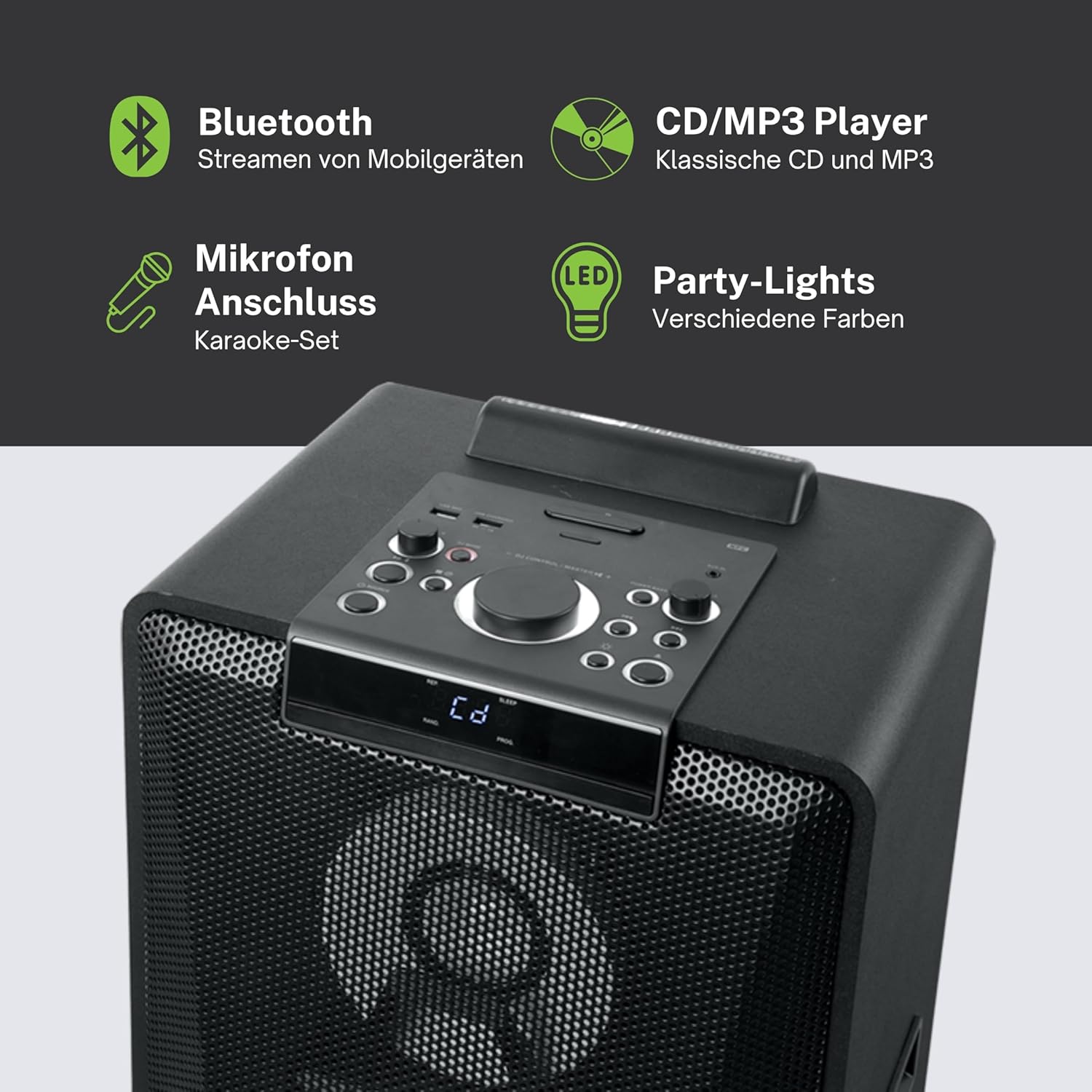
4.1 pav.: Išsamus view of the top control panel, showing various buttons and the LED display.
The top panel features controls for power, volume, source selection, playback, light effects, and a white LED display. It also includes a built-in cradle for a tablet or smartphone.
4.2 Rear Connectivity Ports
The rear panel provides various input and output options:
- USB 2.0 Port (for MP3 playback and charging)
- AUX IN 1 (2 x RCA jacks)
- AUX IN 2 (3.5mm jack)
- Microphone Inputs (2 jacks)
- Guitar Input (1 jack)
- AC Power Input (100-240V, 50/60Hz)
5. Sąranka
5.1 Įdėjimas
Place the speaker on a stable, flat surface. Ensure there is adequate space around the unit for ventilation. The unit is designed for floor mounting.
5.2 Maitinimo jungtis
- Connect the supplied power cable to the AC power input on the rear of the speaker.
- Kitą maitinimo laido galą prijunkite prie standartinio sieninio lizdo (AC 100–240 V, 50/60 Hz).
- The unit does not contain a rechargeable battery and must be connected to a power source for operation.
6. Naudojimo instrukcijos
6.1 Maitinimo įjungimas/išjungimas
Press the Power button on the top control panel or the remote control to turn the unit on or off.
6.2 Bluetooth poravimas
- Press the Source button to select Bluetooth mode. The LED display will show 'BT' and the Bluetooth indicator will flash.
- Įjunkite „Bluetooth“ savo išmaniajame telefone, planšetiniame kompiuteryje ar kitame suderinamame įrenginyje.
- Ieškokite 'M-1990 DJ' in your device's Bluetooth list and select it to pair.
- Once paired, the Bluetooth indicator will stop flashing, and you can begin streaming audio.
- For NFC-enabled devices, simply tap your device on the NFC area of the speaker for automatic pairing.
6.3 CD atkūrimas
- Norėdami pasirinkti CD režimą, paspauskite šaltinio mygtuką.
- Open the CD tray and place a CD (CD, CD-R/RW, MP3 compatible) with the label side up.
- Close the CD tray. Playback will start automatically or can be initiated using the Play/Pause button.
6.4 USB atkūrimas
- Įdėkite USB atmintinę su MP3 files into the USB 2.0 port.
- Press the Source button to select USB mode.
- Playback will start automatically or can be controlled using the playback buttons.
- The USB port also functions as a charging port for external devices.
6.5 AUX įvestis
- Connect your external audio device to either the AUX IN 1 (RCA jacks) or AUX IN 2 (3.5mm jack) using the appropriate cable.
- Press the Source button to select the corresponding AUX input.
- Valdykite atkūrimą iš prijungto įrenginio.
6.6 Mikrofono ir gitaros įėjimai
- Plug your microphone(s) into the Microphone input jacks.
- Plug your guitar into the Guitar input jack.
- Adjust the microphone/guitar volume using the dedicated controls on the top panel.
6.7 Šviesos efektai
The M-1990 DJ features color-changing lights and strobe effects. Use the dedicated Light Effects button on the control panel or remote to cycle through different modes or turn the lights off.
6.8 Stereo Pairing (Dual Bluetooth)
If you have two M-1990 DJ units, you can pair them wirelessly for a stereo sound experience. Refer to the specific instructions for stereo pairing in the full manual (if provided by manufacturer) or on the manufacturer's websvetainę.
7. Priežiūra
7.1 Valymas
- Prieš valydami, visada ištraukite įrenginį iš maitinimo lizdo.
- Išoriniams paviršiams valyti naudokite minkštą, sausą šluostę.
- Nenaudokite abrazyvinių valiklių, vaško ar tirpiklių, nes jie gali pažeisti apdailą.
7.2 Saugykla
Kai garsiakalbio nenaudojate ilgesnį laiką, laikykite jį vėsioje, sausoje vietoje, toliau nuo tiesioginių saulės spindulių ir ekstremalių temperatūrų.
8. Problemų sprendimas
If you encounter issues with your M-1990 DJ speaker, refer to the following common problems and solutions:
| Problema | Galima priežastis | Sprendimas |
|---|---|---|
| Nėra galios | Maitinimo laidas neprijungtas; Maitinimo lizdas neaktyvus | Įsitikinkite, kad maitinimo laidas yra tvirtai prijungtas; Išbandykite kitą lizdą |
| Nėra garso | Volume too low; Incorrect source selected; Audio cable not connected | Increase volume; Select correct input source; Check audio cable connections |
| „Bluetooth“ nesusieja | Garsiakalbis neporavimo režime; įrenginio „Bluetooth“ išjungtas; įrenginys per toli | Ensure speaker is in BT mode and flashing; Enable Bluetooth on device; Move device closer (within 10m) |
| CD negroja | CD inserted incorrectly; CD scratched/dirty; Incorrect format | Reinsert CD correctly; Clean CD; Ensure CD is audio CD or MP3 compatible |
| USB neatkuriama | USB atmintinė netinkamai įdėta; Files not MP3 format; USB drive corrupted | Įdėkite USB atmintinę iš naujo; Įsitikinkite, kad fileyra MP3; Pabandykite kitą USB atmintinę |
Jei problema išlieka ir išbandžius šiuos sprendimus, susisiekite su klientų aptarnavimo tarnyba.
9. Specifikacijos
Detailed technical specifications for the Muse M-1990 DJ Party Speaker:
- Modelio numeris: M-1990 DJ
- Prekinis ženklas: MŪZA
- Išėjimo galia: 1000 vatų
- Kanalų skaičius: 2
- Ryšio technologija: Bluetooth V4.2
- Suderinami įrenginiai: Išmanusis telefonas, planšetinis kompiuteris
- Garso įėjimai: 2 x Microphone jacks, 1 x Guitar jack, 2 x RCA AUX IN, 1 x 3.5mm AUX IN
- USB prievadas: 1 x USB 2.0 (for MP3 playback and charging)
- CD grotuvas: Suderinamas su CD, CD-R/RW, MP3
- Šviesos efektai: Color changing lights, Strobe effects, Light projection
- Maitinimo šaltinis: AC 100-240V, 50/60Hz (Electric Cable)
- Įkraunama baterija: Nr
- Medžiaga: Mediena (spintelė)
- Spalva: Juoda
- Prekės svoris: 17.9 kilogramo
- Matmenys (P x P x A): 35.6 x 34.8 x 105.7 centimetro
- Rekomenduojamas naudojimas: Party and entertainment
- Montavimo tipas: Grindų kalnas
- Pridedamos baterijos: 2 AA (for remote control)

Image 9.1: Dimensional drawing of the Muse M-1990 DJ speaker.
10. Garantija ir palaikymas
10.1 Informacija apie garantiją
Warranty terms and conditions for the Muse M-1990 DJ speaker are typically provided with the product packaging or can be found on the official Muse websvetainėje. Prašome išsaugoti pirkimo įrodymą, jei prireiktų pateikti pretenziją dėl garantijos.
10.2 Pagalba klientams
For further assistance, technical support, or service inquiries, please refer to the contact information provided in your product documentation or visit the official Muse customer support websvetainę.


