1. Produktas baigtasview
The GameMax Optical is a mid-tower ATX PC gaming case designed for system builders. It features transparent acrylic panels on the front and both sides, providing a clear view of internal components. The case supports ATX motherboards and includes four pre-installed Rainbow Dual-Ring ARGB fans for cooling and customizable lighting effects. The design prioritizes effective airflow with multiple air intakes and support for up to eight cooling fans.
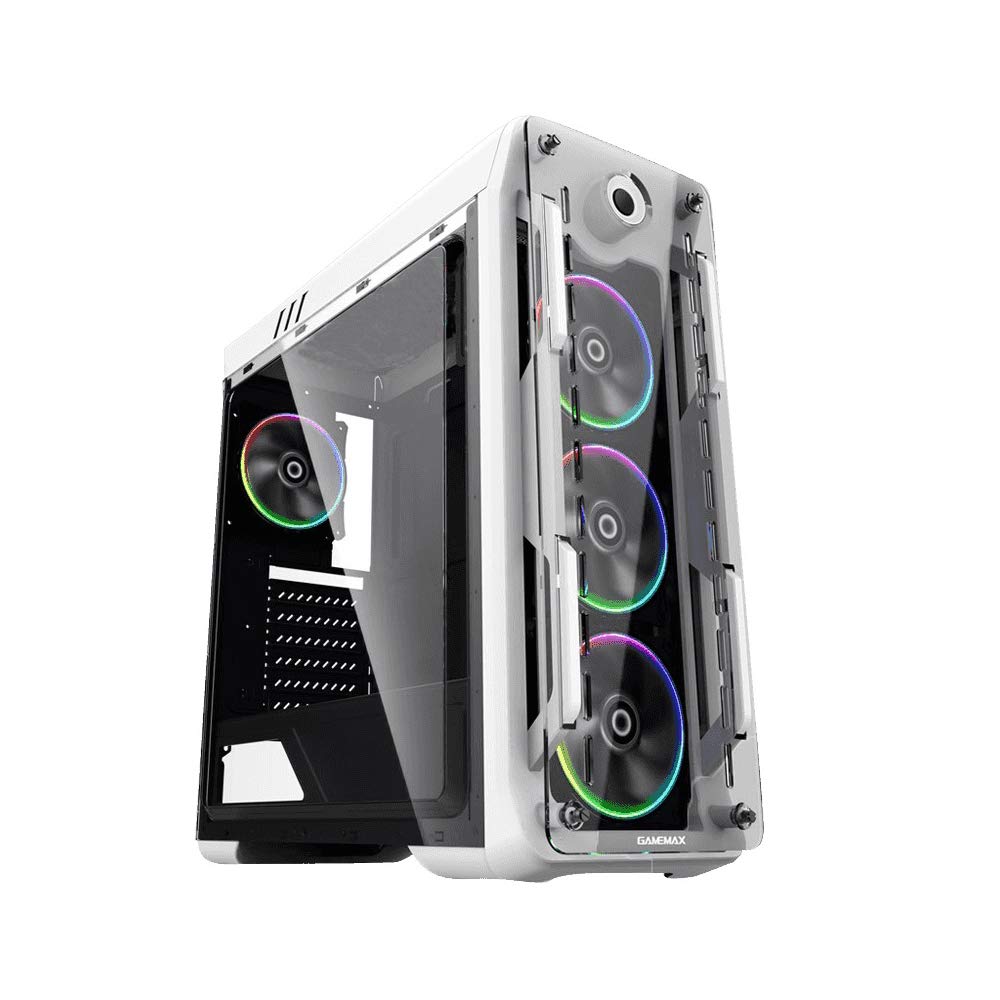
1 pav.: Priekinė ir šoninė dalys view of the GameMax Optical PC Gaming Case.
2. Savybės
- Akrilo konstrukcija: Transparent acrylic panels on the front and both sides for component visibility.
- Optimalus oro srautas: Designed with multiple air intakes and heat dissipation points, supporting up to eight fans for efficient cooling.
- Aušinimo sistema: Includes four pre-installed Rainbow Dual-Ring ARGB fans. Fan speed and ARGB lighting can be controlled via an RF remote or a manual controller on the top I/O panel.
- Vidinė struktūra: Mid-tower chassis compatible with ATX, Micro-ATX, and Mini-ITX motherboards. Supports four internal hard drives, CPU coolers up to 160mm in height, and graphics cards up to 360mm in length.
3. Pakuotės turinys
Patikrinkite, ar pakuotėje yra visi reikalingi daiktai:
- GameMax Optical PC Case
- 4 x Rainbow Dual-Ring ARGB Fans (pre-installed)
- RF Remote Controller for ARGB Fans
- Accessory Kit (screws, standoffs, cable ties)
- Vartotojo vadovas (šis dokumentas)
4. Sąranka ir diegimas
Before beginning installation, ensure your workspace is clean and static-free. Refer to your motherboard and component manuals for specific installation instructions.
4.1. Paruošimas
- Išpakuokite kompiuterio korpusą ir nuimkite visas pakavimo medžiagas.
- Padėkite dėklą ant stabilaus, lygaus paviršiaus.
- Remove the side acrylic panels by unscrewing the thumb screws.
4.2. Pagrindinės plokštės montavimas
- Install the necessary motherboard standoffs into the motherboard tray according to your motherboard's form factor (ATX, Micro-ATX, Mini-ITX).
- Įstatykite įvesties/išvesties skydą į galinę korpuso angą.
- Carefully align your motherboard with the standoffs and I/O shield, then gently lower it into place.
- Pritvirtinkite pagrindinę plokštę varžtais. Neperveržkite.
4.3. Maitinimo šaltinio įrengimas
- Korpuso apačioje, gale, raskite maitinimo šaltinio tvirtinimo vietą.
- Slide the power supply into the designated bay.
- Pritvirtinkite maitinimo šaltinį varžtais nuo korpuso galo.
4.4. Atminties disko diegimas
Install 3.5-inch HDDs and 2.5-inch SSDs into the designated drive bays. Refer to the case's internal structure for specific mounting points and methods (e.g., trays, screw-in mounts).

2 pav. Vidus view showing fan placement and component space.
4.5. Vaizdo plokštės ir išplėtimo plokštės diegimas
- Nuimkite reikiamus PCI-E lizdų dangtelius nuo korpuso galo.
- Įdėkite vaizdo plokštę arba kitas išplėtimo korteles į atitinkamus pagrindinės plokštės PCI-E lizdus.
- Pritvirtinkite korteles varžtais.
4.6. Fan and ARGB Connections
The pre-installed ARGB fans are connected to a fan controller. Connect the fan controller to your power supply (usually via SATA power) and to your motherboard's ARGB header (if desired for software control) or use the included RF remote for control.
4.7. Kabelių valdymas
Route all cables (power, data, front panel I/O) through the designated cutouts and tie-down points behind the motherboard tray to ensure clean aesthetics and unobstructed airflow.

3 pav.: galinis view of the case, showing I/O and expansion slots.
5. Naudojimo instrukcijos
5.1. Įjungimas
- Ensure all components are securely installed and cables are connected.
- Connect the power cable to your power supply and a wall outlet.
- Press the power button on the top I/O panel of the case.
5.2. Fan and ARGB Lighting Control
- RF Remote Controller: Use the included RF remote to change ARGB lighting modes, colors, and fan speeds.
- Manual Fan Controller: A dedicated button on the top I/O panel allows for manual adjustment of fan speed.
- Pagrindinės plokštės programinė įranga: If the fan controller is connected to a compatible motherboard ARGB header, you may be able to control lighting effects via your motherboard's RGB software.
6. Priežiūra
Reguliarus techninis aptarnavimas padeda užtikrinti optimalų kompiuterio korpuso ir komponentų veikimą bei ilgaamžiškumą.
- Dulkių filtrai: Periodically remove and clean any dust filters (e.g., on the top, front, or bottom) to maintain good airflow.
- Akrilo plokštės: Clean acrylic panels with a soft, damp cloth and mild cleaner. Avoid abrasive materials or harsh chemicals that can scratch or damage the acrylic.
- Ventiliatoriaus valymas: Use compressed air to remove dust buildup from fan blades and heatsinks.
- Kabelių valdymas: Retkarčiais patikrinkite laidų išdėstymą, kad įsitikintumėte, jog jie netrukdo oro srautui ar ventiliatoriaus veikimui.
7. Problemų sprendimas
Jei kyla problemų, vadovaukitės toliau pateiktais įprastais trikčių šalinimo veiksmais.
- Nėra galios: Ensure the power supply is switched on, the power cable is securely connected, and all internal power connections (24-pin ATX, 8-pin CPU, GPU power) are firm.
- Fans Not Spinning / ARGB Not Lighting: Check that the fan controller is properly connected to the power supply and that all fans are securely plugged into the controller. Verify ARGB headers are correctly connected to the motherboard or controller.
- Perkaitimas: Ensure all fans are spinning in the correct direction for optimal airflow. Clean any dust filters and fan blades. Verify that CPU and GPU coolers are properly seated.
- Laisvi komponentai: If you hear rattling or experience instability, power down the system and check that all installed components (motherboard, GPU, drives) are securely fastened with screws.
8. Specifikacijos
| Funkcija | Specifikacija |
|---|---|
| Modelio pavadinimas | GMX-OPTICAL-WHT |
| Atvejo tipas | Mid Tower |
| Pagrindinės plokštės suderinamumas | ATX, Micro ATX, Mini ITX |
| Matmenys (I x P x A) | 18.39 x 8.11 x 19.8 colio (467 x 206 x 503 mm) |
| Prekės svoris | 10.12 svaro (4.6 kilogramo) |
| Medžiaga | Akrilas |
| Iš anksto įdiegti ventiliatoriai | 4 x Rainbow Dual-Ring ARGB Fans |
| Maks. CPU aušintuvo aukštis | 160 mm |
| Max. GPU Length | 360 mm |
| Drive Bays | 4 internal (combination of 3.5" HDD and 2.5" SSD) |
| Priekinės įvesties / išvesties prievadai | 2 x USB 2.0, Audio In/Out, Power Button, Reset Button, Fan Controller |
9. Informacija apie garantiją
For detailed warranty terms and conditions, please refer to the official GAMEMAX website or contact your retailer directly. Keep your proof of purchase for warranty claims.
10. Parama
For technical assistance, product inquiries, or further support, please visit the official GAMEMAX websvetainė:
You may also contact GAMEMAX customer support through the channels provided on their websvetainę.


