1. Produktas baigtasview
The Smatree Portable PowerStick is designed to extend the operational time of your DJI Osmo Pocket 1 or Pocket 2 camera and provide a stable handheld solution, often including a smartphone holder for enhanced control and viewing. It integrates a high-capacity power bank within a comfortable grip, ensuring your device remains powered during extended use.

Image 1: Smatree Portable PowerStick with DJI Osmo Pocket and a smartphone attached, demonstrating its primary function as a power bank and holder.
2. Pakuotės turinys ir komponentai
The Smatree PowerStick package includes various components to support different usage configurations:
- PowerStick (Power Bank Grip): The main unit with a built-in 5000mAh battery.
- Convertible Charging Base: For direct attachment and charging of DJI Osmo Pocket 1/2.
- Convertible Knob: Used with the smartphone holder.
- Osmo Pocket Phone Holder Set: A bracket to mount both the Osmo Pocket and a smartphone.
- USB-C įkrovimo laidas: For recharging the PowerStick.

Image 2: All components included in the Smatree PowerStick package, laid out on a white surface.

3 pav.: Išsamus view of the PowerStick with key components labeled, including the phone holder, OSMO Pocket holder, convertible knob, LED indicator, and On/Off button.
3. Sąrankos instrukcijos
The Smatree PowerStick offers two main configurations:
3.1. Combination 1: PowerStick with Convertible Charging Base (for DJI Osmo Pocket 1/2)
- Ensure your DJI Osmo Pocket 1 or 2 is powered off.
- Attach the convertible charging base to the top of the PowerStick. Twist to secure it firmly.
- Carefully insert your DJI Osmo Pocket into the charging base, ensuring it is fully seated for proper connection and charging.

Image 4: Comparison of Combination 1 (PowerStick with charging base) and Combination 2 (PowerStick with phone holder and Osmo Pocket holder).
3.2. Combination 2: PowerStick with Smartphone Holder (for DJI Osmo Pocket 1/2 and Phone)
- Attach the convertible knob to the top of the PowerStick.
- Mount the Osmo Pocket phone holder set onto the convertible knob.
- Secure your smartphone into the adjustable phone clip on one side of the holder.
- Insert your DJI Osmo Pocket into its designated clip on the other side of the holder.
- Connect the short USB-C cable from the PowerStick's output port to your DJI Osmo Pocket for charging.

Image 5: Step-by-step visual guide for assembling the PowerStick with both a smartphone and DJI Osmo Pocket.

Image 6: The Smatree PowerStick fully assembled with a DJI Pocket 2 and a smartphone, ready for use.
3.3. Tripod Attachment
The base of the PowerStick features a 1/4 standard screw port, allowing it to be mounted on any universal tripod for stable, hands-free operation.
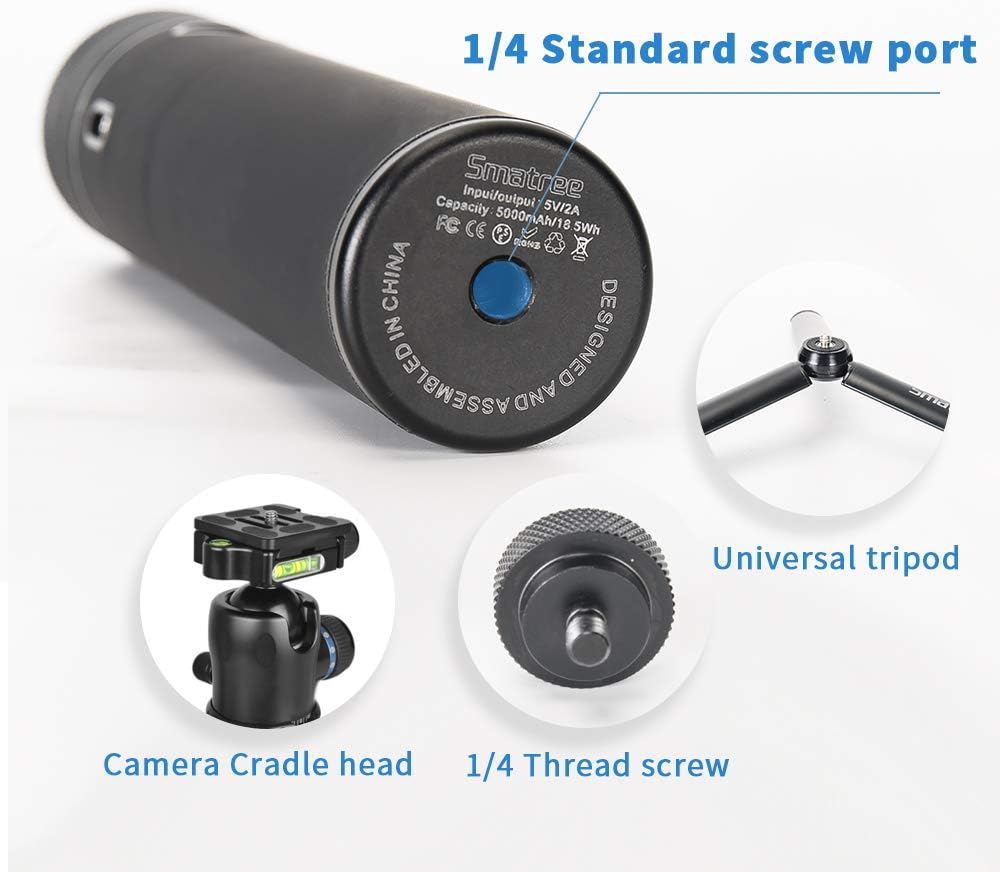
Image 7: The bottom of the PowerStick, highlighting the 1/4 standard screw port for tripod compatibility.
4. Naudojimo instrukcijos
4.1. Įjungimas/išjungimas
Press the On/Off button located on the PowerStick to activate or deactivate the power bank function. LED indicators will show the battery status.
4.2. Charging Your DJI Osmo Pocket
Once your DJI Osmo Pocket is securely attached to the PowerStick (either via the charging base or the phone holder with cable), the PowerStick will begin charging the Osmo Pocket. Ensure the Osmo Pocket is fully inserted into the charger base when using Combination 1.
- The 5000mAh battery can charge a DJI Osmo Pocket approximately 2 times.
- Charging time for the Osmo Pocket is about 90 minutes.
4.3. Charging the PowerStick
To recharge the PowerStick itself, connect the provided USB-C cable to the PowerStick's input port and a suitable USB power source (not included). A full charge takes approximately 4 hours when not simultaneously charging an Osmo Pocket.
4.4. Saugos funkcijos
The PowerStick includes a built-in safety system to protect against short circuits, over-current, low-voltage, and overheating, ensuring safe operation for both the PowerStick and your connected devices.
4.5. Usage Demonstration Video
Video 1: Official Smatree demonstration of the Osmo Pocket 2 Power Stick usage instructions, showing assembly and basic operation.
Video 2: Smatree's official video showcasing the portable power bank with tripod for DJI Osmo Pocket 2, demonstrating its versatility.
Video 3: Smatree's official product video demonstrating the Portable Power Bank compatible with DJI Osmo Pocket 2, highlighting its features and ease of use.
5. Priežiūra
- Keep the PowerStick clean by wiping it with a soft, dry cloth.
- Saugokite, kad prietaisas nepatektų į ekstremalią temperatūrą, drėgmę ar tiesioginius saulės spindulius.
- Store the PowerStick in a cool, dry place when not in use.
- Nebandykite patys ardyti ar taisyti įrenginio, nes tai panaikins garantiją ir galite jį sugadinti.
6. Problemų sprendimas
If you encounter any issues with your Smatree PowerStick, please consider the following:
- Įrenginys neįkraunamas: Ensure the DJI Osmo Pocket is fully and correctly inserted into the charging base or properly connected via the USB-C cable. Verify the PowerStick itself is charged.
- PowerStick not charging: Check the USB-C charging cable and the power source. Ensure the cable is securely connected to both the PowerStick and the power adapter.
- Unstable connection with phone holder: Ensure all knobs and screws on the phone holder set are tightened securely after attaching your devices.
For any persistent problems or further assistance, please contact Smatree customer service.
7. Gaminio specifikacijos
| Funkcija | Detalė |
|---|---|
| Prekės ženklas | Smatree |
| Modelio numeris | DP20 DH5 |
| Suderinami įrenginiai | DJI Osmo Pocket, DJI Pocket 2, Smartphones |
| Baterijos talpa | 5000 mAh (ličio jonų) |
| Įvestis/išvestis | 5 V / 2 A (C tipo) |
| Charging Time (PowerStick) | Approx. 4 hours (without Osmo Pocket) |
| Charging Time (Osmo Pocket) | apytiksliai 90 minučių |
| Gaminio matmenys | 3.15 x 1.97 x 8.27 colio |
| Prekės svoris | 13.4 uncijos (0.84 svaro) |
| Trikojis stovas | 1/4 Standard Screw Port |
8. Pagalba klientams
For any questions, concerns, or technical assistance regarding your Smatree Portable PowerStick, please contact Smatree customer service directly. Refer to the product packaging or the official Smatree websvetainę, kurioje rasite naujausią kontaktinę informaciją.
Gamintojas: Smatree


