1. Įvadas
This manual provides comprehensive instructions for the setup, operation, maintenance, and troubleshooting of your Canyon CNS-SW71SS Smartwatch. Please read this manual carefully before using your device to ensure proper function and longevity.
The Canyon CNS-SW71SS Smartwatch is designed to help you monitor your fitness activities and stay connected. It features a 1.22-inch color screen, multi-sport modes, heart rate monitoring, sleep tracking, and notification alerts. Its IP68 water resistance makes it suitable for various environments.
2. Produktas baigtasview
2.1 Pagrindinės savybės
- 1.22-inch color touch screen display.
- Multi-sport mode for tracking various activities.
- Daily activity monitoring: calories, steps, heart rate, and sleep.
- Notifications for incoming calls, SMS, emails, calendar events, and social media.
- Music control and remote camera function.
- Smart alarm and weather data display.
- Baterijos veikimo laikas iki 7 dienų.
- IP68 water resistance (submersible up to 1 meter for 30 minutes).
- „Bluetooth 4.0“ ryšys.
- Compatible with iOS and Android operating systems.
- Comes with two interchangeable wristbands: metal and TPU.
2.2 Komponentai
The Canyon CNS-SW71SS Smartwatch consists of the main watch unit, interchangeable wristbands, and a charging cable.

1 pav.: priekis view of the Canyon CNS-SW71SS Smartwatch, showing the display with steps, distance, calories, and heart rate data.

2 pav.: Kampinis view of the Canyon CNS-SW71SS Smartwatch, featuring a silver metal mesh strap and a round display.
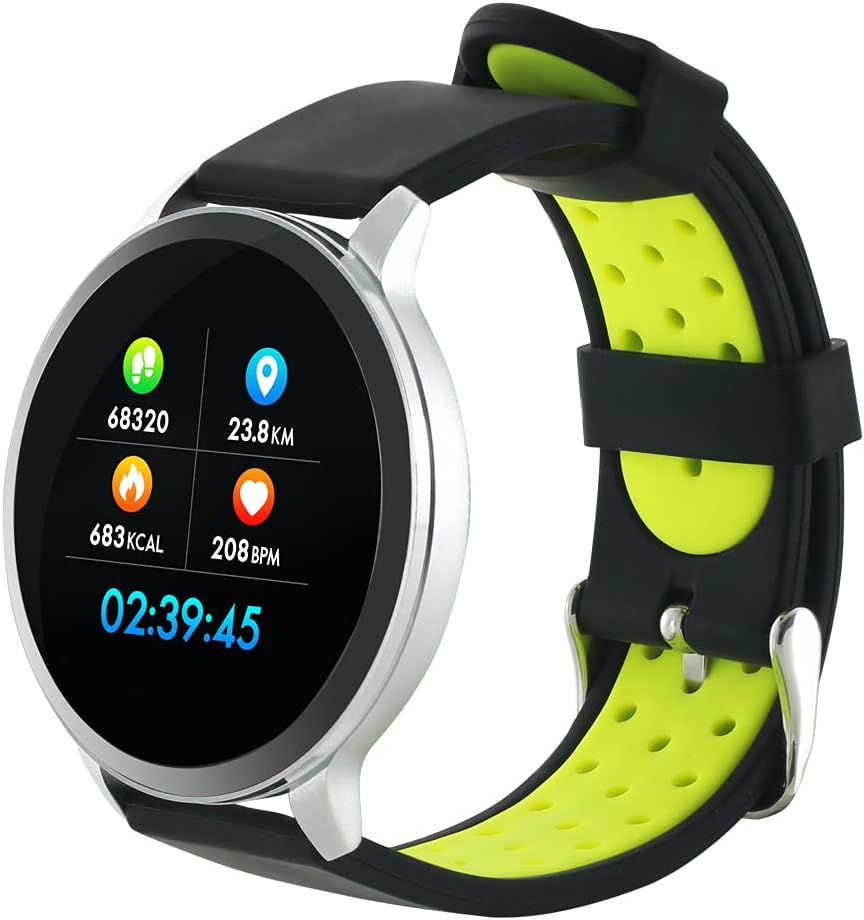
Figure 3: The Canyon CNS-SW71SS Smartwatch shown with an alternative black and lime green TPU strap, highlighting its interchangeable design.

4 pav.: galinis view of the Canyon CNS-SW71SS Smartwatch, displaying the optical heart rate sensor and magnetic charging contacts.

Figure 5: The retail packaging for the Canyon CNS-SW71SS Smartwatch, illustrating key features and the included two straps.
3. Sąranka
3.1 Išmaniojo laikrodžio įkrovimas
- Connect the charging cable to a USB power adapter (not included) or a computer's USB port.
- Align the magnetic charging pins of the cable with the charging contacts on the back of the smartwatch. The watch will vibrate and display a charging icon.
- Allow approximately 2-3 hours for a full charge. A full charge provides up to 7 days of usage.
3.2 Installing the Canyon Fit Application
- Scan the QR code provided in the packaging or search for "Canyon Fit" in your smartphone's app store (Google Play Store for Android, Apple App Store for iOS).
- Atsisiųskite ir įdiekite programą.
- Open the Canyon Fit app and follow the on-screen instructions to create an account and set up your profile.
3.3 Susiejimas su išmaniuoju telefonu
- Įsitikinkite, kad jūsų išmanusis laikrodis yra įkrautas ir įjungtas.
- Įjunkite „Bluetooth“ savo išmaniajame telefone.
- Atidarykite „Canyon Fit“ programėlę.
- Navigate to the device pairing section within the app (usually found under 'Device' or 'Profile').
- Select your smartwatch (e.g., "CNS-SW71SS") from the list of available devices.
- Jei būsite paraginti, patvirtinkite susiejimo užklausą tiek išmaniajame telefone, tiek išmaniajame laikrodyje.
3.4 Attaching/Changing Wristbands
The smartwatch comes with two wristbands (metal and TPU) that can be interchanged. To attach or change a wristband, locate the quick-release pins on the underside of the strap. Slide the pin to detach the current strap and then align and slide the pin of the new strap into the corresponding holes on the watch body until it clicks into place.
4. Naudojimo instrukcijos
4.1 Pagrindinė navigacija
- Jutiklinis ekranas: Swipe left/right to navigate through different functions and menus. Swipe up/down to view pranešimai arba greitieji nustatymai.
- Šoninis mygtukas: Press the side button to return to the main watch face or to wake up the screen. A long press may access power options or specific features depending on the context.
4.2 Fitneso stebėjimas
- Multi-Sport režimas: Access the 'Workout' or 'Sport' menu on your watch. Select your desired activity (e.g., running, cycling, walking) to start tracking. The watch will record duration, distance, calories burned, and heart rate.
- Kasdieninė veikla: The watch automatically tracks your steps, distance, and calories burned throughout the day. View these statistics on the watch face or in the Canyon Fit app.
- Širdies ritmo stebėjimas: The watch continuously monitors your heart rate. You can also manually initiate a heart rate measurement from the heart rate interface.
- Miego stebėjimas: Wear the smartwatch to bed, and it will automatically track your sleep patterns, including deep sleep, light sleep, and wake times. View detailed sleep analysis in the Canyon Fit app.
4.3 Pranešimai
Once paired with your smartphone and with notification permissions granted in the Canyon Fit app, your smartwatch will display alerts for:
- Įeinantys skambučiai
- SMS žinutės
- Laiškai
- Kalendoriaus įvykiai
- Social Media Apps (e.g., WhatsApp, Facebook, Instagavinas)
Braukite aukštyn laikrodžio ciferblatu, kad view recent notifications. You can dismiss notifications from the watch.
4.4 Papildomos funkcijos
- Muzikos valdymas: While music is playing on your phone, you can use the watch to play/pause, skip tracks, and adjust volume.
- Nuotolinis fotoaparatas: Open the camera function in the Canyon Fit app. Use your smartwatch as a remote shutter button to take photos on your phone.
- Išmanusis signalas: Set alarms through the Canyon Fit app. The watch will vibrate to wake you up gently.
- Orų duomenys: Once connected to your phone, the watch will display current weather conditions and forecasts for your location.
5. Priežiūra
5.1 Valymas
- Nuvalykite laikrodžio ekraną ir korpusą minkšta šluosteamp audinys.
- For the metal strap, use a soft brush to gently clean any debris. For the TPU strap, wash with mild soap and water.
- Prieš įkrovimą įsitikinkite, kad įkrovimo kontaktai yra švarūs ir sausi.
- Valymui nenaudokite stiprių cheminių medžiagų ar abrazyvinių medžiagų.
5.2 Atsparumas vandeniui (IP68)
The Canyon CNS-SW71SS Smartwatch is IP68 rated, meaning it is resistant to dust and can be immersed in water up to 1 meter deep for a maximum of 30 minutes. While it can withstand splashes, rain, and brief immersion, it is not recommended for hot showers, saunas, or diving, as steam and high water pressure can compromise the seals.
- Nespauskite jokių mygtukų, kai laikrodis yra panardintas.
- Po sąlyčio su vandeniu laikrodį kruopščiai nusausinkite.
5.3 Akumuliatoriaus priežiūra
- Venkite dažnai visiškai iškrauti akumuliatorių.
- Reguliariai įkraukite įrenginį, net jei jo nenaudojate, kad palaikytumėte akumuliatoriaus būklę.
- Laikykite laikrodį vėsioje, sausoje vietoje, kai ilgesnį laiką jo nenaudojate.
6. Problemų sprendimas
- Laikrodis neįsijungia: Įsitikinkite, kad laikrodis yra visiškai įkrautas. Prijunkite jį prie įkroviklio bent 30 minučių.
- Nepavyksta susieti su išmaniuoju telefonu:
- Įsitikinkite, kad telefone įgalinta „Bluetooth“.
- Ensure the Canyon Fit app has necessary permissions.
- Perkraukite ir telefoną, ir išmanųjį laikrodį.
- Pabandykite atjungti ir iš naujo susieti įrenginį per programėlę.
- Pranešimai nerodomi:
- Check notification settings in the Canyon Fit app and your phone's system settings.
- Įsitikinkite, kad laikrodis prijungtas per „Bluetooth“.
- Netikslūs širdies ritmo / aktyvumo duomenys:
- Įsitikinkite, kad laikrodis tvirtai uždėtas ant riešo – ne per stipriai ir ne per laisvai.
- Nuvalykite jutiklį laikrodžio gale.
- Aplinkos veiksniai arba tam tikri judesiai gali turėti įtakos tikslumui.
- Ekranas nereaguoja: Try restarting the smartwatch by holding down the side button. If unresponsive, allow the battery to fully drain and then recharge.
7. Specifikacijos
| Modelio pavadinimas | CNS-SW71SS |
| Prekės ženklas | CANYON |
| Ekrano dydis | 1.22 colių |
| Operacinės sistemos suderinamumas | Android, iOS |
| Ryšio technologija | Bluetooth 4.0 |
| Atsparumo vandeniui įvertinimas | IP68 |
| Ypatingos savybės | Wireless Charging (implied by product data), Multi-Sport Mode, Heart Rate Monitor, Sleep Tracker, Notifications |
| Suderinami įrenginiai | Išmanusis telefonas |
| Baterija | Įkraunamas (pridedamas 1) |
| Spalvų parinktys | Black, Lime Green, Silver |
8. Garantija ir palaikymas
For warranty information and technical support, please refer to the documentation included with your purchase or visit the official Canyon website. You can also contact Canyon customer service for assistance with product issues or inquiries.
Palaikymas internetu: https://canyon.eu/support/ (Pvzample link, please verify official support page)


