1. Įvadas
This manual provides comprehensive instructions for the operation and maintenance of your Fetcus Universal Remote Control, designed for various Hitachi Air Conditioner models. Please read this manual thoroughly before using the remote control to ensure proper function and longevity.
This remote control is a direct replacement or compatible alternative for original Hitachi air conditioner remote models including RAS-D10EX, RAR-5E1, RAS-10XH1, RAR-5E2, RAR-5E3, RAR-5E4, RAR-5E5, RAR-5E6, and RAS-D14EX2.
2. Produkto ypatybės
- Visuotinis suderinamumas: Designed to work with a wide range of Hitachi air conditioner models.
- Infraraudonųjų spindulių ryšys: Utilizes standard infrared signals for reliable communication with your AC unit.
- Dedicated AC Functions: Includes specific buttons for common air conditioner operations such as power, mode selection, temperature adjustment, fan speed, and more.
- Kompaktiškas dizainas: Ergonomiškas ir lengvai valdomas.
- Nėra programėlių palaikymo: Operates independently without the need for a smartphone application.
- Dažnis: Operates at 433 MHz for signal transmission.
3. Sąranka
3.1 Akumuliatoriaus įdėjimas
The remote control requires appropriate batteries for operation. Follow these steps to install or replace batteries:
- Nuotolinio valdymo pulto gale raskite baterijų skyrių.
- Baterijų skyriaus dangtelį stumkite žemyn arba paspauskite fiksatorių, kad jį atidarytumėte.
- Insert new batteries, ensuring the positive (+) and negative (-) terminals align correctly with the markings inside the compartment. Typically, two AAA batteries are required, though specific battery type should be confirmed by checking the compartment markings.
- Tvirtai uždarykite baterijų skyriaus dangtelį, kol jis spragtelėdamas užsifiksuos vietoje.

3.1 paveikslas: Galinis view of the Fetcus remote control with the battery compartment open, revealing the two battery slots and a label with battery safety warnings. This image illustrates the correct orientation for battery insertion.
Svarbu: Jei nuotolinio valdymo pultas nebus naudojamas ilgesnį laiką, išimkite baterijas, kad išvengtumėte ištekėjimo ir pažeidimų.
4. Naudojimo instrukcijos
Familiarize yourself with the buttons on your remote control. The remote features a main display and various control buttons for your air conditioner.
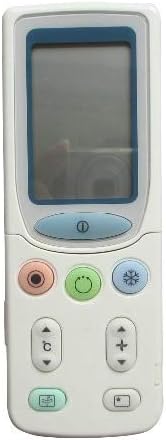
4.1 paveikslas: Priekyje view of the Fetcus remote control, highlighting the LCD screen and the primary control buttons for power, mode, and temperature adjustment.
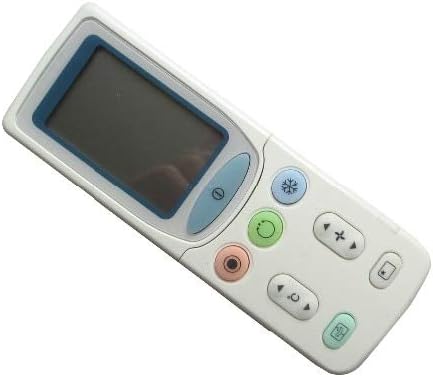
4.2 paveikslas: Kampuotas view of the Fetcus remote control, showing the main display and primary function buttons including power, mode, and fan speed controls.
4.1 Pagrindinės funkcijos
- Įjungimo mygtukas (①): Paspauskite, kad įjungtumėte arba išjungtumėte oro kondicionierių.
- Režimo mygtukas (↻): Press repeatedly to cycle through operating modes: Auto, Cool, Dry, Fan, Heat (if applicable to your AC unit).
- Temperatūros reguliavimo mygtukai (+ / -): Paspauskite, kad padidintumėte arba sumažintumėte norimą temperatūros nustatymą.
- Ventiliatoriaus greičio mygtukas (❄): Press to adjust the fan speed (e.g., Auto, Low, Medium, High).
4.2 Išplėstinės funkcijos (po slankiojančiu dangteliu)
Some advanced functions are accessible by sliding down the cover on the remote control. This reveals additional buttons for more specific controls.

4.3 paveikslas: Kampuotas view of the Fetcus remote control with the sliding cover open, exposing additional advanced function buttons beneath the main display.
- Sukiojimo / žaliuzių valdymas: Adjusts the direction of the airflow (vertical or horizontal swing).
- Timer/Sleep Mode: Sets a timer for the AC unit to turn on or off, or activates a sleep-friendly operating mode.
- C/F Switch (℃): Perjungia temperatūros rodymą tarp Celsijaus ir Farenheito.
- Atkūrimo mygtukas: Used to reset the remote control settings or clear certain functions. Consult your AC unit's manual for specific reset procedures if needed.
- Other Specific Buttons: Depending on your specific Hitachi AC model, other buttons may control functions like Quiet mode, Turbo mode, or Health functions. Refer to your AC unit's original manual for detailed explanations of these specific icons.
5. Priežiūra
- Valymas: Nuotolinio valdymo pultą valykite minkšta, sausa šluoste. Nenaudokite skystų valiklių ar abrazyvinių medžiagų, nes jos gali pažeisti paviršių ar vidinius komponentus.
- Baterijos keitimas: Replace batteries when the remote's range decreases or the display becomes dim. Always replace all batteries at the same time with new ones of the same type.
- Saugykla: Laikykite nuotolinio valdymo pultą vėsioje, sausoje vietoje, apsaugotoje nuo tiesioginių saulės spindulių ir ekstremalių temperatūrų.
6. Problemų sprendimas
| Problema | Galima priežastis | Sprendimas |
|---|---|---|
| Nuotolinio valdymo pultas nereaguoja. | Neišsikrovusios arba neteisingai įdėtos baterijos. | Pakeiskite baterijas, užtikrindami teisingą poliškumą (+/-). |
| Nuotolinio valdymo nuotolis prastas. | Silpnos baterijos; kliūtis tarp nuotolinio valdymo pulto ir kintamosios srovės bloko. | Replace batteries. Ensure a clear line of sight to the AC unit's infrared receiver. |
| AC unit not responding to specific functions. | Remote not fully compatible with all AC unit features; AC unit does not support the function. | Verify the function exists on your specific AC model. This remote is a universal replacement and may not support all obscure functions of every original remote. |
| Ekranas blankus arba tuščias. | Maža akumuliatoriaus energija. | Pakeiskite baterijas. |
7. Specifikacijos
| Funkcija | Detalė |
|---|---|
| Prekės ženklas | plikos dėmės |
| Modelio numeris (vidinis) | CLS-D41D8CD98F00B204E9800998ECF8427E |
| Suderinami įrenginiai | Air Conditioner (Hitachi RAS-D10EX, RAR-5E1, RAS-10XH1, RAR-5E2, RAR-5E3, RAR-5E4, RAR-5E5, RAR-5E6, RAS-D14EX2) |
| Ryšio technologija | Infraraudonųjų spindulių |
| Dažnis | 433 MHz |
| Maksimalus palaikomų įrenginių skaičius | 1 |
| Medžiaga | Other (Durable Plastic) |
| Baterijos aprašymas | Lithium (Typically uses AAA batteries, please check compartment) |
| Ypatingos savybės | Universal, Wireless |
| Prekės pakuotės kiekis | 1 |
| Pasiekiama pirmoji data | 8 m. gegužės 2019 d |
8. Garantija ir palaikymas
This Fetcus Remote Control comes with a 90 dienų garantija nuo įsigijimo datos. Ši garantija taikoma gamybos defektams ir užtikrina, kad gaminys veikia taip, kaip numatyta, įprastai naudojant.
For warranty claims or technical support, please contact your retailer or the manufacturer with your purchase details. Please retain your proof of purchase for warranty validation.


