1. Įvadas
Thank you for choosing the Dacom Athlete G05 Bluetooth Headset. This manual provides comprehensive instructions to help you set up, operate, and maintain your new wireless headphones. Please read this manual carefully before use to ensure optimal performance and longevity of your device.
2. Pakuotės turinys
Patikrinkite, ar pakuotėje yra visi toliau išvardyti daiktai:
- 1 x Dacom Athlete G05 Bluetooth Headset
- 1x USB įkrovimo laidas
- 1 x Naudotojo vadovas (šis dokumentas)
3. Produktas baigtasview
The Dacom Athlete G05 is a wireless stereo earphone designed for sports and running, featuring a comfortable in-ear design with ear hooks for secure fit. It connects via Bluetooth V4.1.
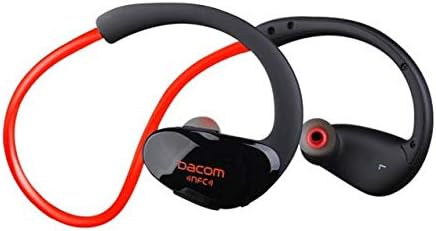
3.1 paveikslas: Priekyje view of the Dacom Athlete G05 Bluetooth Headset, showing the earbud and ear hook design.
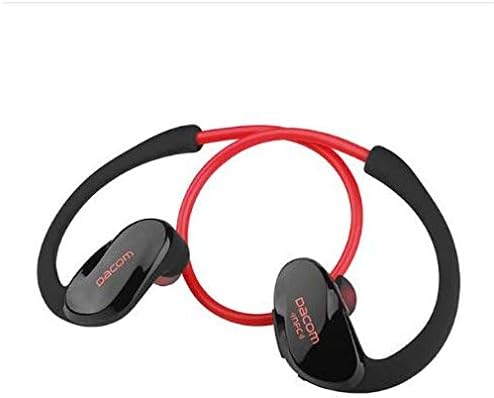
3.2 paveikslas: Galinis view of the Dacom Athlete G05 Bluetooth Headset, illustrating the connecting cable between the two earbuds.
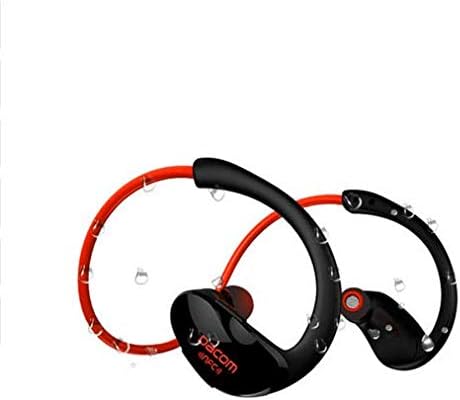
3.3 paveikslas: Dacom Athlete G05 Bluetooth Headset demonstrating water resistance, suitable for sports activities.
4. Sąranka
4.1 Ausinių įkrovimas
Before first use, fully charge your Dacom Athlete G05 headset. A full charge typically takes approximately 1.5 to 2 hours.
- Prijunkite pridedamą USB įkrovimo laidą prie ausinių įkrovimo prievado.
- Connect the other end of the USB cable to a power adapter (DC5V 150mAh output recommended) or a computer's USB port.
- The battery indicator light will illuminate during charging and change color or turn off once fully charged.
A fully charged headset provides approximately 8 hours of talk time or music playback, and up to 180 hours of standby time.
4.2 Bluetooth poravimas
To connect your headset to a Bluetooth-enabled device (e.g., smartphone, tablet):
- Įsitikinkite, kad ausinės yra visiškai įkrautos ir išjungtos.
- Press and hold the multi-function button on the headset until the Bluetooth indicator light flashes red and blue alternately, indicating it is in pairing mode.
- Įrenginyje įjunkite Bluetooth ir ieškokite galimų įrenginių.
- Select "Dacom Athlete G05" (or similar name) from the list of found devices.
- Jei jūsų paprašys slaptažodžio, įveskite „0000“ (keturis nulius).
- Once paired, the Bluetooth indicator light will flash blue slowly or turn solid blue, and you will hear a confirmation tone.
The headset supports Bluetooth V4.1 and profiles such as Headset, Handsfree, A2DP, AVRC, and APT-X.
5. Naudojimo instrukcijos
5.1 Maitinimo įjungimas/išjungimas
- Maitinimas: Press and hold the multi-function button for approximately 3 seconds until the indicator light flashes blue and you hear a power-on tone.
- Išjungti: Press and hold the multi-function button for approximately 5 seconds until the indicator light flashes red and you hear a power-off tone.
5.2 Skambučių valdymas
- Atsiliepti į skambutį: Trumpai paspauskite daugiafunkcį mygtuką, kai gaunate skambutį.
- Baigti skambutį: Skambučio metu trumpai paspauskite daugiafunkcį mygtuką.
- Atmesti skambutį: Kai skambinate, 2 sekundes palaikykite nuspaudę daugiafunkcį mygtuką.
- Perrink paskutinį numerį: Kai nekalbate telefonu, dukart paspauskite daugiafunkcį mygtuką.
5.3 Muzikos atkūrimas
- Leisti / pristabdyti: Trumpai paspauskite daugiafunkcį mygtuką.
- Kitas takelis: Ilgai paspauskite garsumo didinimo mygtuką.
- Ankstesnis takelis: Ilgai paspauskite garsumo mygtuką.
- Pagarsink: Trumpai paspauskite garsumo didinimo mygtuką.
- Patildyti: Trumpai paspauskite garsumo mygtuką.
Note: The headset features touch control for various functions.
6. Priežiūra ir priežiūra
- Keep the headset dry. Do not expose it to extreme temperatures or humidity.
- Reguliariai valykite ausines ir įkrovimo kontaktus minkštu, sausu skudurėliu.
- Venkite ausinių numetimo ir stiprių smūgių.
- Laikykite ausines vėsioje, sausoje vietoje, kai nenaudojate.
- Nebandykite ardyti ar modifikuoti ausinių, nes tai panaikins garantiją.
7. Problemų sprendimas
| Problema | Galimas sprendimas |
|---|---|
| Ausinės neįsijungia. | Įsitikinkite, kad ausinės yra visiškai įkrautos. Prijunkite prie maitinimo šaltinio ir bandykite dar kartą. |
| Nepavyksta susieti su įrenginiu. |
|
| Nėra garso arba garsas per mažas. |
|
| Pertraukiamas ryšys. |
|
8. Specifikacijos
| Funkcija | Detalė |
|---|---|
| Produkto pavadinimas | Athlete sports Bluetooth headset |
| Modelio numeris | G05 |
| Bluetooth versija | V4.1 |
| „Bluetooth“ klasė | 2 klasė |
| Palaikomas „Pro“files | Headset, Handsfree, A2DP, AVRC, APT-X |
| Įkrovimo įvestis | DC5V 150mAh (Power adapter output) |
| Baterijos tipas | High-performance lithium polymer battery |
| Pokalbių laikas | Maždaug 8 val |
| Žaidimo laikas | Maždaug 8 val |
| Budėjimo laikas | Maždaug 180 val |
| Garso dažnių diapazonas | 20Hz-20kHz |
| BT Radio Frequency | 2.400–2.481 GHz |
| Išėjimo varža | 16Ω 3mW |
| Jautrumas | 100-105dB |
| Ausinių formos faktorius | Ausyje |
| Ryšio technologija | Bevielis |
| Kontrolės metodas | Palieskite |
| Medžiaga | Plastikiniai |
| Spalva | Raudona |
9. Garantija ir palaikymas
Dacom products are manufactured to the highest quality standards. For warranty information or technical support, please refer to the warranty card included with your purchase or visit the official Dacom websvetainėje. Prašome išsaugoti pirkimo įrodymą garantiniams reikalavimams.


