Įvadas
This manual provides essential information for the proper use and maintenance of your Kufatec LED Taillight Coding Dongle. This device is designed to facilitate the final coding process when original LED taillights have been installed in a compatible vehicle. Please read this manual thoroughly before use to ensure correct operation and to prevent damage.
Saugos informacija
- Ensure the vehicle's ignition is off before connecting or disconnecting the dongle.
- Do not attempt to disassemble or modify the dongle. This may void the warranty and cause damage.
- Keep the dongle away from moisture, extreme temperatures, and direct sunlight.
- This device is intended for use by qualified individuals or under professional supervision.
- The diagnostic interface can only be used for one vehicle. Once the software has been run, the dongle is only usable on the existing vehicle.
- This dongle is not suitable for vehicles with left-hand traffic configurations.
- This dongle is not suitable for American vehicles.
Pakuotės turinys
Patikrinkite, ar pakuotėje yra visi reikalingi daiktai:
- 1 x Kufatec Diagnostic Coding Interface
Sąranka
The Kufatec LED Taillight Coding Dongle is designed for straightforward setup. Follow these steps to prepare the device for use:
- Suderinamumas su transporto priemone: Įsitikinkite, kad jūsų transporto priemonė yra VW Passat B7 Variant. This dongle is specifically designed for this model.
- Paruoškite transporto priemonę: Ensure the vehicle's ignition is turned off. Locate the OBD-II port, typically found under the dashboard on the driver's side.
- Prisijunkite prie rakto: Carefully connect the Kufatec Coding Dongle to the vehicle's OBD-II interface. Ensure a secure connection.

Figure 1: Kufatec LED Taillight Coding Dongle with its OBD-II connector, ready for vehicle connection.
Once connected, the dongle is ready to perform its function. The interface automatically adapts the upgrade to the existing vehicle coding.
Naudojimo instrukcijos
The Kufatec Coding Dongle simplifies the process of coding original LED taillights. Follow these steps for operation:
- Prisijunkite prie rakto: As described in the Setup section, connect the dongle to the vehicle's OBD-II port.
- Initiate Coding: Turn the vehicle's ignition to the ON position (do not start the engine). The dongle will automatically begin the coding process.
- Automatic Adaptation: The interface will detect the newly installed original LED taillights and automatically adapt the vehicle's existing coding to recognize and properly operate them.
- Užbaigimas: The coding process typically takes a few minutes. Observe any indicator lights on the dongle or vehicle dashboard for completion. Once complete, turn off the ignition and disconnect the dongle.

Figure 2: The Kufatec Coding Dongle is designed for ease of use, saving time and effort during the coding process.
Svarbi pastaba: This dongle is a single-use device per vehicle. Once the coding process is successfully completed for a specific vehicle, the dongle cannot be used on another vehicle.
Priežiūra
The Kufatec LED Taillight Coding Dongle requires minimal maintenance. Follow these guidelines to ensure its longevity:
- Valymas: Use a soft, dry cloth to clean the exterior of the dongle. Do not use liquid cleaners or solvents.
- Saugykla: Store the dongle in a cool, dry place, away from direct sunlight and extreme temperatures, when not in use.
- Programinės įrangos atnaujinimai: While the primary function is a one-time coding, some dongles may support firmware updates via a mini-USB port (see Figure 3). Check the manufacturer's website for any available updates or specific instructions.
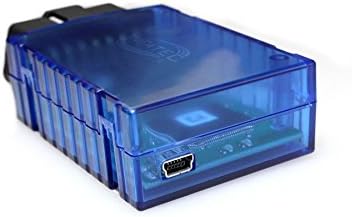
3 pav.: šonas view of the Kufatec Coding Dongle, illustrating the mini-USB port which may be used for future software updates.
Trikčių šalinimas
If you encounter issues during the coding process, consider the following:
- No Response from Dongle:
- Ensure the dongle is securely connected to the OBD-II port.
- Patikrinkite, ar transporto priemonės uždegimo jungiklis yra ON padėtyje.
- Patikrinkite automobilio akumuliatoriaus įkrovątage. A low battery can interfere with diagnostic operations.
- Coding Failure:
- Confirm that the vehicle is indeed a VW Passat B7 Variant. This dongle is not compatible with other models.
- Ensure that the taillights installed are original LED taillights. Aftermarket or non-LED lights may not be compatible.
- Verify that the dongle has not been previously used on another vehicle. It is a single-use device.
- Confirm the vehicle is not a US model or configured for left-hand traffic, as the dongle is not compatible with these.
- Vehicle Error Messages:
- After coding, if error messages persist, disconnect the dongle, turn off the ignition, wait a few minutes, and then restart the vehicle.
- If errors continue, consult a qualified automotive technician.
Specifikacijos
| Funkcija | Detalė |
|---|---|
| Produkto tipas | Diagnostic Coding Interface |
| Modelio numeris | 73910384 |
| Suderinamumas | VW Passat B7 Variant (for original LED taillights) |
| Sąsaja | OBD-II |
| Šviesos šaltinio tipas | LED (for taillights being coded) |
| Naudojimo apribojimas | Single vehicle use only |
| Regional Limitation | Not for left-hand traffic or American vehicles |
Informacija apie garantiją
Specific warranty details for this product are not provided in this manual. Please refer to the original purchase documentation or contact your retailer for information regarding warranty coverage and terms.
Palaikymas
For technical assistance or further inquiries regarding the Kufatec LED Taillight Coding Dongle, please contact the retailer or the manufacturer's customer support. Ensure you have your product model number (73910384) and purchase details available when seeking support.


