Įvadas
This manual provides comprehensive instructions for the setup, operation, and maintenance of your Nilox Barcode 2D USB Scanner. Please read this manual carefully before using the device to ensure proper functionality and longevity.
Pakuotės turinys
- Nilox Barcode 2D USB Scanner
- Reguliuojamas stovas
- 2-meter USB Cable
- Vartotojo vadovas (šis dokumentas)
Sąranka
Follow these steps to set up your Nilox Barcode 2D USB Scanner:
- Išpakuokite visus komponentus iš pakuotės.
- Assemble the adjustable stand if it is not already assembled. The scanner can be placed securely into the stand for hands-free operation.
- Prijunkite USB laidą prie skaitytuvo prievado.
- Plug the other end of the USB cable into an available USB 2.0 port on your computer or host device.
- The scanner is plug-and-play and should be automatically recognized by most operating systems without requiring additional driver installation.
- Once connected, the scanner will emit a short beep, indicating it is ready for use.
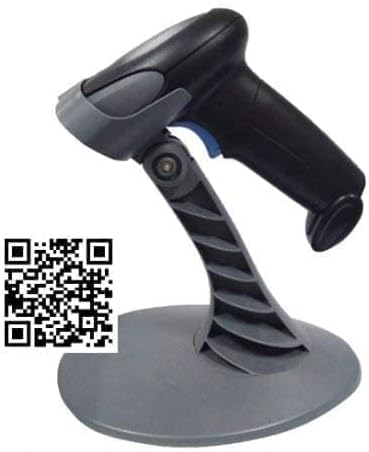
This image displays the Nilox 2D USB Barcode Scanner, a black handheld device, resting on its grey adjustable stand. A QR code is overlaid on the bottom left of the image, which links to product configuration information.
Naudojimo instrukcijos
The Nilox Barcode 2D USB Scanner is designed for efficient and accurate scanning of both 1D and 2D barcodes.
Brūkšninių kodų nuskaitymas
- Hold the scanner with the scanning window facing the barcode.
- Press the trigger button (blue button on the handle) to activate the scanning beam.
- Position the scanner so that the scanning beam covers the entire barcode.
- A successful scan will be indicated by a short beep and/or a visual confirmation (e.g., LED indicator).
- The scanned data will be transmitted to your connected computer or host device as keyboard input.
The scanner features a scan rate of 150 scans per second and a depth of field ranging from 10mm to 400mm, allowing for versatile scanning distances.
Priežiūra
To ensure the optimal performance and longevity of your Nilox Barcode 2D USB Scanner, follow these maintenance guidelines:
- Keep the scanning window clean. Use a soft, lint-free cloth to gently wipe away dust or smudges. Do not use abrasive cleaners or solvents.
- Venkite skaitytuvo numetimo ir stiprių smūgių.
- Store the scanner in a dry environment, away from extreme temperatures and direct sunlight.
- Ensure the USB cable is not bent or crimped excessively to prevent damage.
Trikčių šalinimas
If you encounter issues with your Nilox Barcode 2D USB Scanner, refer to the following common problems and solutions:
| Problema | Galima priežastis | Sprendimas |
|---|---|---|
| Skaitytuvas nereaguoja | USB cable disconnected or faulty. | Įsitikinkite, kad USB laidas yra tvirtai prijungtas prie skaitytuvo ir kompiuterio. Išbandykite kitą USB prievadą. |
| Nepavyksta nuskaityti brūkšninių kodų | Barcode damaged or poorly printed. Scanning window dirty. Incorrect scanning angle. | Try scanning a different, known-good barcode. Clean the scanning window. Adjust the angle and distance of the scanner to the barcode. |
| Scanned data is incorrect | Incorrect symbology settings (less likely for plug-and-play). Partial scan. | Ensure the entire barcode is within the scanning beam. If issues persist, consult the manufacturer's website for advanced configuration options or firmware updates. |
Specifikacijos
| Funkcija | Detalė |
|---|---|
| Modelio numeris | NXBY302 |
| Sąsaja | USB 2.0 |
| Skaitymo technologija | 2D LED Imager |
| Lauko gylis | 10 mm - 400 mm |
| Nuskaitymo greitis | 150 nuskaitymų/sek |
| Kabelio ilgis | 2 metrų |
| Prekės svoris | 1.01 svaro (apie 0.46 kg) |
| Gaminio matmenys (IxPxH) | 8.27 x 5.91 x 4.33 colio (apytiksliai 21 x 15 x 11 cm) |
Informacija apie garantiją
The Nilox Barcode 2D USB Scanner comes with a 2-year on-center guarantee. Please retain your proof of purchase for warranty claims. For detailed warranty terms and conditions, refer to the official Nilox websvetainėje arba susisiekite su klientų aptarnavimo tarnyba.
Palaikymas ir kontaktai
For further assistance, technical support, or product configuration information, please visit the official Nilox websvetainėje arba susisiekite su klientų aptarnavimo skyriumi.
You may also find relevant product configuration details by visiting the link associated with the QR code shown in product imagery: Yashi Product Configurator.


