1. Įvadas
This manual provides essential information for the proper installation, operation, and maintenance of your Pioneer Carrozzeria AVIC-VH09 Hands-Free Voice Recognition Microphone. Please read these instructions carefully before use to ensure optimal performance and safety.
2. Produktas baigtasview
The Pioneer Carrozzeria AVIC-VH09 Hands-Free Voice Recognition Microphone is designed to enable voice control and hands-free communication features on compatible Pioneer Carrozzeria navigation systems, specifically the AVIC-VH09 model. It allows users to issue commands and make calls without diverting attention from the road, enhancing driving safety and convenience.
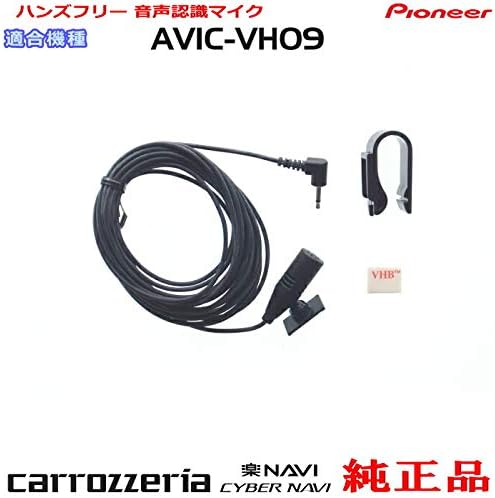
Figure 2.1: Pioneer Carrozzeria AVIC-VH09 Hands-Free Voice Recognition Microphone. This image displays the microphone unit with its attached cable and a clip.
3. Pakuotės turinys
Patikrinkite, ar pakuotėje yra visi toliau išvardyti daiktai:
- Voice Recognition Microphone (black, approximately 4m cable) x 1
- Microphone Clip (black) x 1
- Fixed Double-Sided Tape (white, 15 x 12 mm) x 1
- Laidas Clamp (black) x 3

Figure 3.1: Package contents including the microphone, clip, double-sided tape, and cord clamps, with dimensions indicated for some components.
4. Sąranka ir diegimas
Follow these steps for proper installation of the microphone:
- Identify Input Port: Locate the microphone input port on your Pioneer Carrozzeria AVIC-VH09 navigation system. Consult your navigation system's manual if unsure.
- Maršruto kabelis: Carefully route the microphone cable from the navigation system to your desired mounting location. Ensure the cable does not interfere with vehicle operation, airbags, pedals, or other safety features. Avoid sharp bends or pinching the cable.
- Mikrofono tvirtinimas: Attach the microphone using the provided microphone clip or double-sided tape. Common optimal locations include near the driver's sun visor or rearview mirror for clear voice pickup.
- Prijunkite mikrofoną: Plug the microphone's 3.5mm jack securely into the input port on the navigation system. Ensure a firm connection to prevent poor contact.
- Saugus kabelis: Use the provided cord clamps to secure any loose sections of the cable, preventing tangling, damage, or obstruction.
Atsargiai: The microphone's wiring is delicate. Exercise extreme care during installation to avoid wire breakage or damage to the microphone body. If purchasing a used microphone, inspect the wiring and plastic body for any pre-existing damage, as these can lead to operational issues.
5. Naudojimo instrukcijos
Once installed, the microphone enables voice control and hands-free calling features on your Pioneer Carrozzeria AVIC-VH09 navigation system.
- Balso valdymo aktyvinimas: To activate voice control, typically press the dedicated voice command button on your navigation system or steering wheel. Refer to your navigation system's main instruction manual for specific voice commands and activation procedures.
- Speaking Commands: Speak clearly and directly towards the microphone. Avoid speaking too quickly or too softly.
- Skambinimas laisvų rankų įranga: When making or receiving calls via your navigation system's Bluetooth connection, the microphone will be used for your voice input.
6. Priežiūra
To ensure the longevity and proper functioning of your microphone, follow these maintenance guidelines:
- Valymas: Keep the microphone clean and free from dust. Use a soft, dry cloth to gently wipe the microphone body. Do not use liquid cleaners or abrasive materials.
- Aplinkos sąlygos: Avoid exposing the microphone to extreme temperatures, direct sunlight for prolonged periods, or excessive moisture.
- Kabelio apžiūra: Regularly inspect the microphone cable for any signs of wear, cuts, or damage. A damaged cable can impair performance.
7. Problemų sprendimas
If you experience issues with your microphone, refer to the following troubleshooting steps:
| Problema | Galima priežastis | Sprendimas |
|---|---|---|
| No voice recognition or poor audio quality |
|
|
| Microphone plastic body is damaged | Fizinis poveikis arba susidėvėjimas | If the damage affects internal components or functionality, replacement of the microphone unit is recommended. |
8. Specifikacijos
| Prekės ženklas | Pionierius |
| Compatible Navigation Model | Pioneer Carrozzeria AVIC-VH09 |
| Microphone Model Number | M09-CPM1083-VH09 |
| Kabelio ilgis | Maždaug 4 metrai |
| Jungties tipas | 3.5 mm lizdas |
| Maitinimo šaltinis | Power cord type (supplied by head unit) |
| ASIN | B07SDGLRNX |
9. Saugos informacija
- Always prioritize safe driving. Do not attempt to adjust or troubleshoot the microphone while operating the vehicle.
- Ensure the microphone cable is routed safely and does not obstruct airbags, pedals, or other critical vehicle controls.
- Šį gaminį laikykite vaikams nepasiekiamoje vietoje.
- Do not disassemble or modify the microphone. This may cause damage or malfunction.
10. Garantija ir palaikymas
This product is a genuine Pioneer accessory. For warranty information and technical support, please refer to the documentation provided with your Pioneer Carrozzeria AVIC-VH09 navigation system or contact Pioneer customer service directly. When purchasing used items, be aware that warranty coverage may vary or be void.