1. Įvadas
The DIGITEN WTC200 is a wireless temperature controller thermostat outlet designed to automatically manage heating or cooling devices based on a preset target temperature. This system consists of a remote control unit and a receiver outlet with an integrated temperature sensor. It offers convenient remote operation and precise temperature monitoring for various applications.
Pagrindinės funkcijos:
- Belaidis nuotolinio valdymo pultas: Allows for setting and controlling temperatures from a distance of 50-100 meters in open areas.
- Šildymo ir vėsinimo režimai: Supports both heating and cooling appliances.
- LCD ekranas su foniniu apšvietimu: Provides clear temperature readings and settings, visible even at night.
- Temperatūros jutiklis: An accurate NTC temperature sensor is integrated into the receiver outlet to detect ambient temperature.
- Aukštos/žemos temperatūros signalizacijos: Configurable alarms to alert users of temperature deviations.
- Atminties funkcija: All settings are retained even after a power failure.
- Energijos efektyvumas: Helps save energy by activating connected appliances only when necessary to maintain the target temperature.

Image 1.1: The DIGITEN WTC200 Wireless Temperature Controller, showing the remote control and the receiver outlet with its integrated temperature sensor.
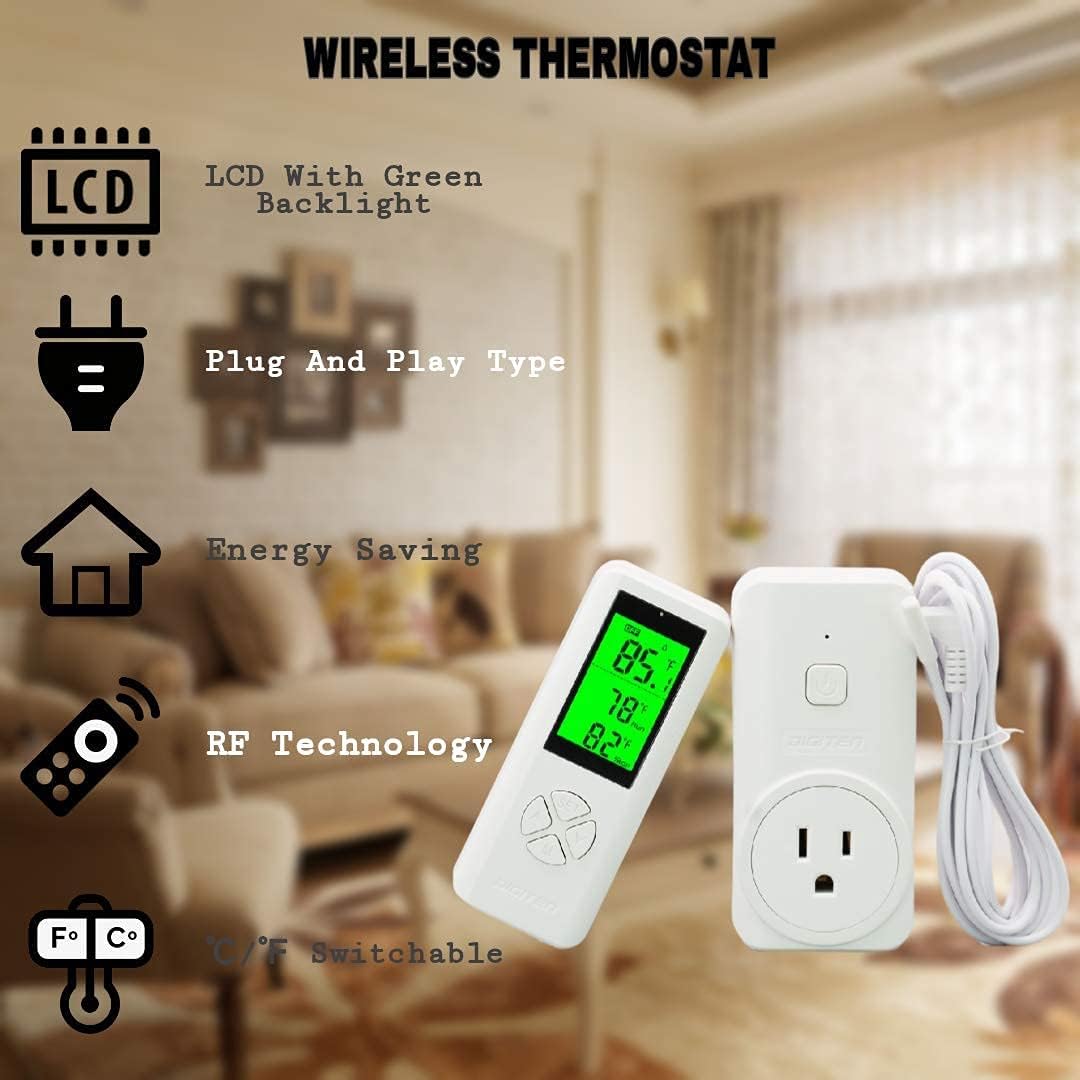
Image 1.2: Visual representation of the wireless thermostat's features, including LCD with green backlight, plug-and-play design, energy saving, RF technology, and switchable Fahrenheit/Celsius units.
2. Sąranka
2.1 Išpakavimas ir komponentų patikrinimas
Prieš pradėdami, įsitikinkite, kad yra visi komponentai:
- DIGITEN WTC200 Remote Control
- DIGITEN WTC200 Receiver Outlet with 2m/6ft NTC Temperature Sensor Probe
2.2 Baterijų įdėjimas (nuotolinio valdymo pultas)
Nuotolinio valdymo pultui reikia two (2) 1.5V AAA batteries (not included). Open the battery compartment on the back of the remote and insert the batteries, observing the correct polarity.
2.3 Connecting the Temperature Sensor
The NTC temperature sensor probe is integrated into the receiver outlet. Ensure the probe is securely connected to the receiver outlet. The temperature is detected by this sensor on the outlet unit.
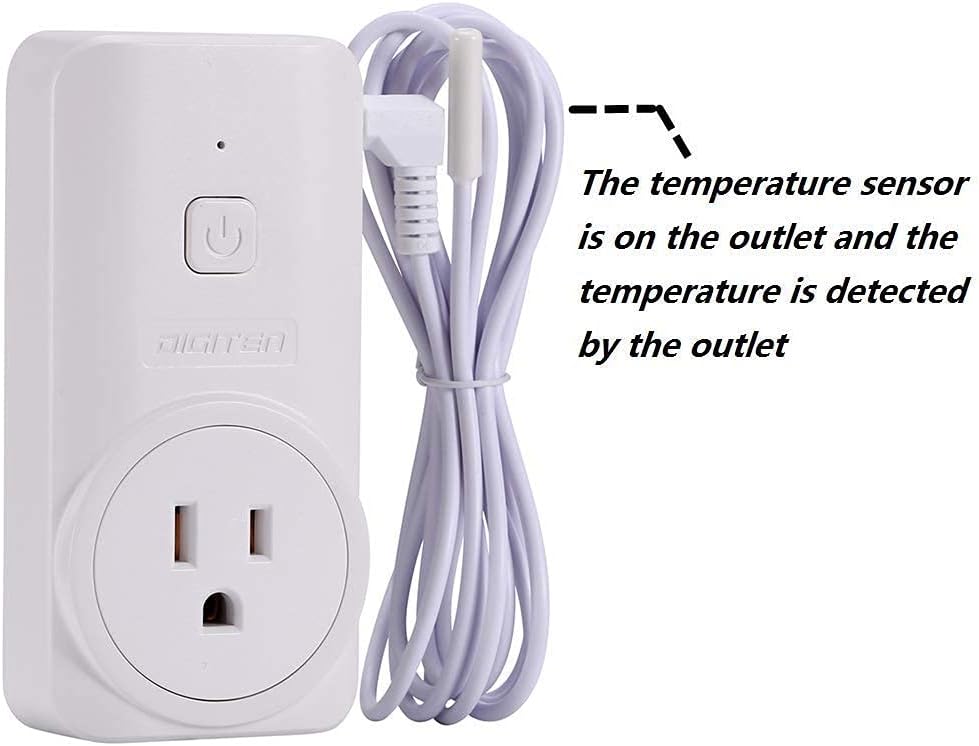
Image 2.1: The receiver outlet unit, highlighting the integrated temperature sensor probe.
2.4 Pradinis susiejimas
The remote control and receiver outlet are typically pre-paired. If re-pairing is necessary or if you are using multiple units:
- Ensure the receiver outlet is plugged into a power source.
- To prevent interference when pairing multiple units, remove batteries from any other remote controls and ensure only one remote is powered on and active during the pairing process.
- Refer to the specific pairing instructions in the full manual if the units do not communicate automatically.

Image 2.2: Diagram illustrating the wireless communication between the remote control and the receiver outlet, allowing monitoring and control in different rooms within a 50-100m range.
3. Naudojimo instrukcijos
3.1 Įjungimas / išjungimas
Press the power button on the remote control to turn the unit on or off. The LCD screen will illuminate when powered on.
3.2 Tikslinės temperatūros nustatymas
- Press the 'SET' button on the remote control. The target temperature display will flash.
- Use the 'Up' and 'Down' arrow buttons to adjust the desired target temperature.
- Press 'SET' again to confirm the setting, or wait a few seconds for it to automatically save.
3.3 Switching Between Heating and Cooling Modes
The WTC200 supports both heating and cooling operations. The mode determines whether the connected appliance turns on when the temperature falls below (heating) or rises above (cooling) the set point.

Image 3.1: The remote control displaying both cooling and heating mode indicators, showing its versatility for different appliances.
3.4 Temperatūros vienetų (Celsijaus/Farenheito) keitimas
The unit can display temperature in either Celsius (℃) or Fahrenheit (℉). Refer to the full manual for specific button combinations to switch between these units. Typically, this involves a long press of a specific button or a combination of buttons.
3.5 Setting High/Low Temperature Alarms
The WTC200 features configurable high and low temperature alarms. When the ambient temperature exceeds the high alarm limit or drops below the low alarm limit, the unit will trigger an alert.
- Access the alarm setting menu (refer to the full manual for specific button presses).
- Adjust the desired high and low temperature thresholds using the arrow buttons.
- Patvirtinkite nustatymus.

Image 3.2: Display showing the high and low temperature alarm settings, indicating when the alarms are active or off.
3.6 LCD Display with Backlight
The remote control's LCD screen features a backlight for improved visibility, especially in low-light conditions or at night.

Image 3.3: The remote control's LCD display with its backlight active, demonstrating ease of viewing and operation in dark environments.
4. Priežiūra
4.1 Valymas
To clean the device, use a soft, dry cloth. Do not use abrasive cleaners, solvents, or immerse the unit in water. Ensure the device is unplugged before cleaning the receiver outlet.
4.2 Akumuliatoriaus keitimas
When the remote control's display indicates low battery, replace the two (2) 1.5V AAA batteries promptly to ensure continuous operation and accurate readings. Using high-quality alkaline batteries is recommended for optimal performance and battery life.
5. Problemų sprendimas
5.1 Nuotolinio valdymo pultas nereaguoja
- Patikrinkite baterijas: Ensure the remote control has fresh 1.5V AAA batteries and they are inserted with correct polarity.
- Diapazonas: Verify the remote is within the effective transmission range (50-100m in open areas) of the receiver outlet. Obstacles like thick walls can reduce this range.
- Trikdžiai: If using multiple WTC200 units, ensure only the remote you intend to pair or use is active during setup to avoid signal interference.
5.2 Netikslūs temperatūros rodmenys
- Jutiklio vieta: Ensure the temperature sensor on the receiver outlet is not obstructed or exposed to direct heat/cold sources that do not reflect the ambient temperature you wish to measure.
- Fahrenheit/Celsius Conversion: Note that while the display can show Fahrenheit, the internal control logic may operate in Celsius. This can lead to slight discrepancies when setting a precise Fahrenheit temperature, as the system converts it to Celsius for control. For example, setting 70.0°F might result in control around 21.0°C (69.8°F).
5.3 Trumpas baterijos veikimo laikas
Some users have reported shorter than expected battery life. To mitigate this:
- Naudokite aukštos kokybės šarmines baterijas.
- Avoid using rechargeable NiMH batteries, as their voltage characteristics may not be optimal for this device.
5.4 Ekrano orientacija
The remote control's display may appear inverted depending on how it is held or mounted. This is a design characteristic; the display is optimized for viewing when placed on a flat surface or mounted at a certain height.
6. Specifikacijos
| Prekės ženklas | SKAITMENINĖ |
| Modelis | WTC200 |
| Apkrova | 100-240VAC 15A, 1650W@110VAC, 3300W@220VAC |
| Nuotolinės baterijos | 2 x 1.5 V AAA (neįtraukta) |
| Perdavimo atstumas | 50–100 m (atvira erdvė) |
| Matavimo temperatūros diapazonas | -10 ℃ iki 80 ℃ (14 ℉ iki 176 ℉) |
| Temperatūros tikslumas | ±0.1 ℃/℉ |
| High/Low Temperature Alarm Range | nuo 0 ℃ iki 80 ℃ (32 ℉ iki 176 ℉) |
| Remote Refresh Frequency | 20 sekundės |
| Temperatūros zondas | Integrated NTC Sensor (2m/6ft cable) |
| Ekrano tipas | LCD su foniniu apšvietimu |
| Kontrolės metodas | Remote, Button Control |
| Ryšio technologija | RF Technology (Wireless) |
| Kištuko formatas | B - JAV tipo su įžeminimo kištuku |
| Diegimo būdas | Plug-in or Wall Mounted |
| Prekės svoris | 227 gramų (8 uncijos) |
| Pakuotės matmenys | 4.72 x 4.21 x 2.52 colio |
7. Garantija ir palaikymas
7.1 Informacija apie garantiją
DIGITEN provides a vienerių metų garantija for any product-related issues. Please retain your proof of purchase for warranty claims.
7.2 Pagalba klientams
For further assistance, technical support, or warranty claims, please contact DIGITEN customer service through the retailer where the product was purchased or refer to the official DIGITEN websvetainė kontaktinei informacijai.