1. Įvadas
This manual provides detailed instructions for the installation, operation, maintenance, and troubleshooting of your TMEZON 4-channel 1080P HD-TVI Digital Video Recorder (DVR) and accompanying 4-camera CCTV security system. This system is designed for both indoor and outdoor surveillance, offering high-definition video recording and remote monitoring capabilities.

Image: Comparison illustrating the enhanced clarity of 1080P resolution over 720P, highlighting the high-definition capability of the system.
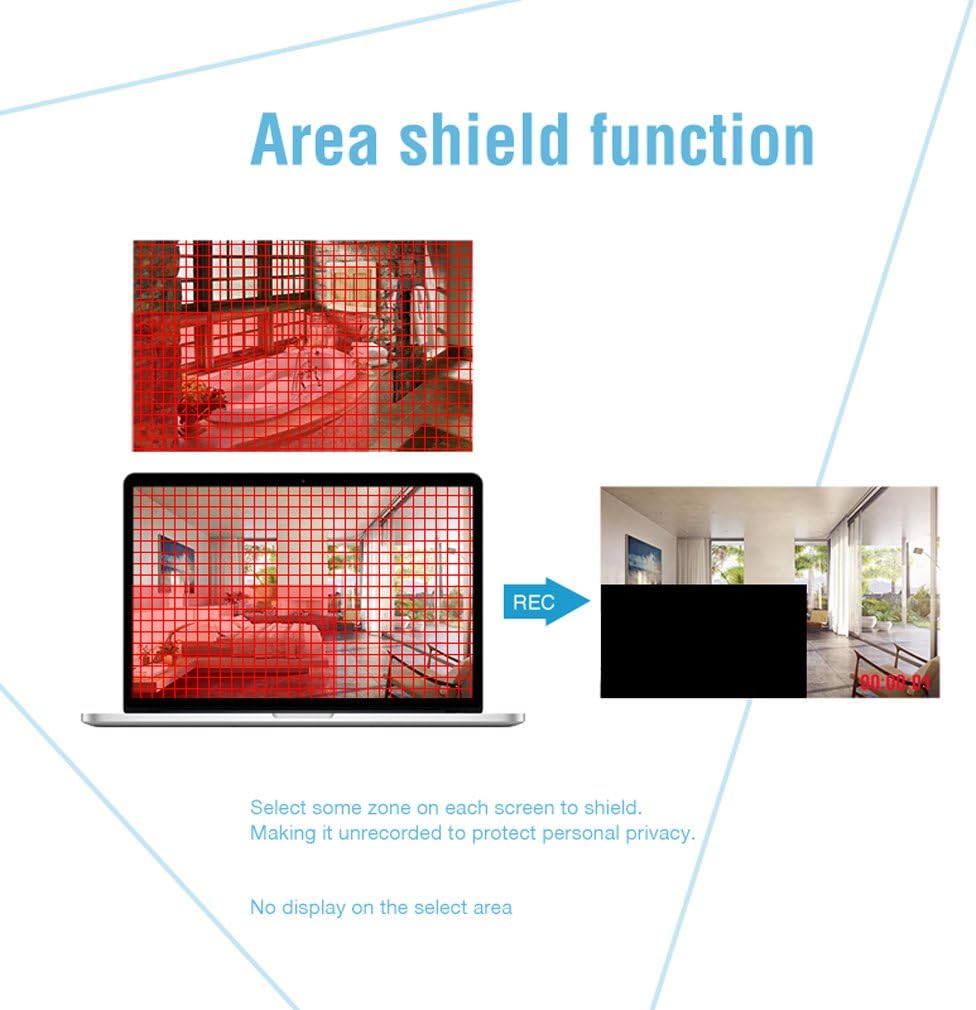
Image: An outdoor camera demonstrating its night vision and rainproof design, suitable for various weather conditions.
2. Pakuotės turinys
Patikrinkite, ar pakuotėje yra visi toliau išvardyti daiktai. Jei kurių nors daiktų trūksta arba jie pažeisti, susisiekite su klientų aptarnavimo tarnyba.
- 1 x 4-Channel HD-TVI DVR
- 4 x 1080P atsparios oro sąlygoms vaizdo stebėjimo kameros
- 4 x 18.3m BNC Cables
- 1 x USB pelė
- 1 x 4-Way Power Splitter Cable
- 1 x Power Adapter for DVR
- Tvirtinimo varžtai ir sieniniai kaiščiai
- Vartotojo vadovas (šis dokumentas)

Image: Visual representation of the complete package contents, including the DVR, cameras, cables, mouse, and power accessories.
3. Saugos informacija
- Prieš montuodami ir naudodami atidžiai perskaitykite visas instrukcijas.
- Naudokite tik kartu su sistema pateiktus maitinimo adapterius.
- Užtikrinkite tinkamą vaizdo registratoriaus vėdinimą, kad jis neperkaistų.
- Avoid placing the DVR in direct sunlight, near heat sources, or in areas with high humidity.
- Nebandykite ardyti ar modifikuoti gaminio. Tai panaikins garantiją.
- Keep cables organized and secured to prevent tripping hazards and accidental disconnections.
- For outdoor camera installation, ensure all connections are waterproofed and protected from environmental elements.
- Consult a qualified professional for complex installations or wiring.
4. Sąranka
4.1 Hard Disk Drive (HDD) Installation (HDD Not Included)
This system requires a 3.5-inch SATA HDD (500GB to 2TB) for video recording. Follow these steps to install the HDD:
- Atjunkite DVR nuo maitinimo šaltinio.
- Nuimkite viršutinį DVR dangtelį, atsukdami varžtus gale ir šonuose.
- Connect the SATA data cable and power cable from the DVR to the HDD.
- Secure the HDD to the bottom of the DVR casing using the provided screws.
- Uždėkite viršutinį dangtelį ir pritvirtinkite jį varžtais.
4.2 DVR prijungimas
Connect the DVR to your monitor, power, and network as follows:
- Vaizdo įrašo išvestis: Prijunkite vaizdo registratorių prie monitoriaus arba televizoriaus naudodami HDMI arba VGA kabelį.
- Tinklas: Connect the DVR to your router using an Ethernet cable for remote access.
- USB: Connect the included USB mouse to a USB port on the DVR for navigation.
- Galia: Prijunkite maitinimo adapterį prie DVR, o tada – prie elektros lizdo.

Vaizdas: Galinis view of the DVR, detailing connection points for cameras, monitor, network, and peripherals.
4.3 Fotoaparato diegimas
Mount the cameras in desired locations, ensuring optimal viewing angles and coverage. The cameras feature a 3-axis mounting bracket for flexible adjustment.
- Montavimas: Cameras can be wall-mounted or ceiling-mounted. Use the provided screws and wall plugs.
- Kampo reguliavimas: Adjust the camera angle using the 3-axis bracket to cover the desired area. Ensure the bracket screws are tightened after adjustment to prevent movement.
- Kabelio jungtis: Prijunkite kiekvieną kamerą prie vaizdo registratoriaus naudodami pateiktus BNC laidus. Įsitikinkite, kad jungtys yra tvirtos.

Vaizdas: pvzamples of camera mounting options (wall and ceiling) and the flexibility of the 3-axis mounting bracket for precise positioning.
5. Naudojimo instrukcijos
5.1 Pradinė sąranka
Upon first power-on, the DVR will guide you through an initial setup wizard. This includes setting the language, date/time, and creating a password for the administrator account. It is crucial to set a strong password for security.
5.2 Tiesiogiai View
After initial setup, the system will display the live feed from all connected cameras on the monitor. You can switch between single-camera view ir kelių kamerų tinklelis view naudojant DVR sąsają.
5.3 Įrašymas
DVR palaiko įvairius įrašymo režimus:
- Nepertraukiamas įrašymas: Įrašai visą parą.
- Judesio aptikimo įrašymas: Įrašo tik aptikus judesį.
- Suplanuotas įrašymas: Įrašai konkrečiais laikotarpiais.
Recording settings can be configured in the DVR's menu. The DVR can be set to automatically overwrite older footage, kai kietasis diskas yra pilnas.
5.4 Judesio aptikimas ir įspėjimai
Configure motion detection to trigger recording and send alerts when unexpected activity occurs. You can customize detection zones to minimize false alarms.
- Pritaikomos zonos: Apibrėžkite konkrečias sritis kameros viduje view where motion detection is active.
- Įspėjimai: Receive push notifications on your smartphone via the app or email alerts when motion is detected.
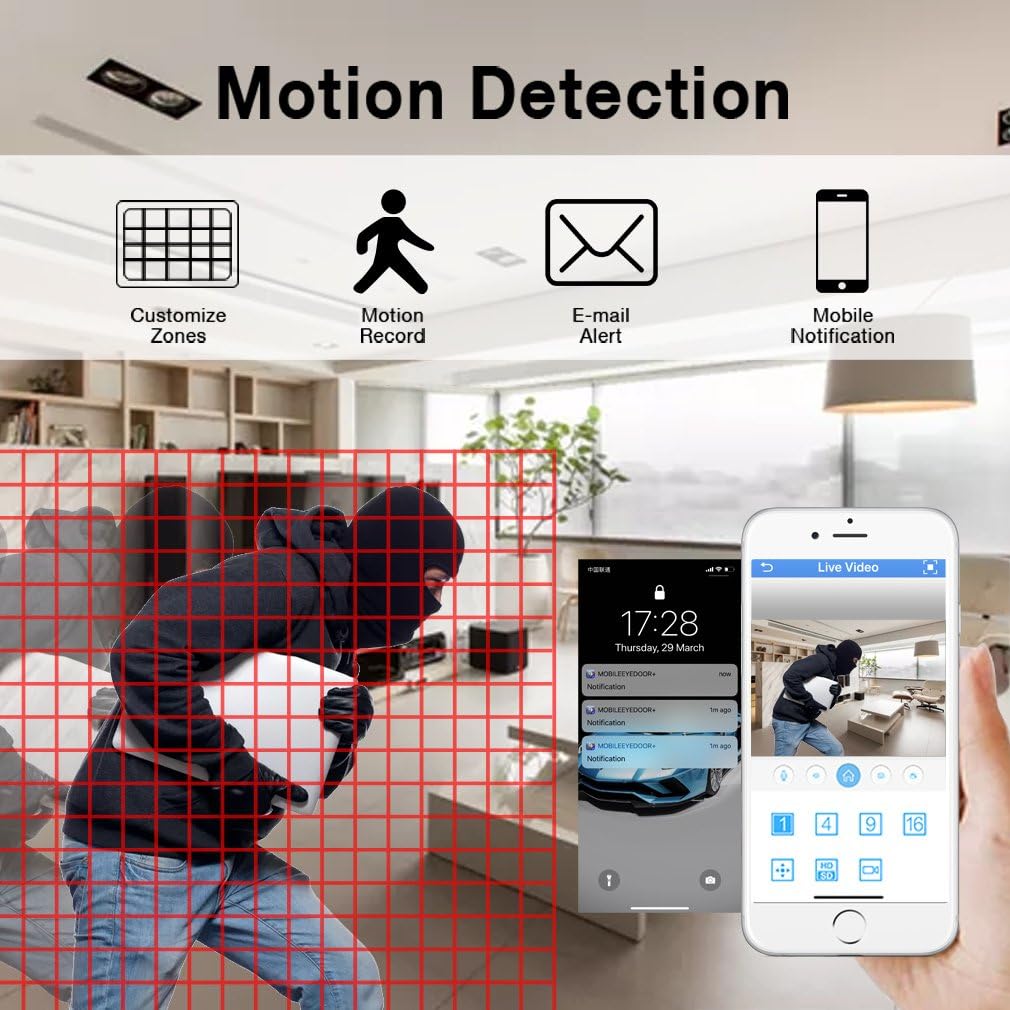
Image: Motion detection interface, demonstrating how to set custom zones and receive alerts on a mobile device.
5.5 Nuotolinė prieiga
Monitor your property from anywhere using the free mobile application "XMEYE" on your smartphone or tablet, or via PC software.
- Programėlė mobiliesiems: Download the "XMEYE" app from your device's app store. Register an account and add your DVR using its unique ID.
- Prieiga prie kompiuterio: Install the client software on your computer for remote viewvaldymas.
- Ryšys: Ensure your DVR is connected to the internet. Remote access is supported over WiFi, 2G, 3G, or 4G networks.

Image: Remote access capabilities, allowing live viewing and playback on smartphones, tablets, and personal computers.
5.6 Atkūrimas ir atsarginių kopijų kūrimas
Prieiga įrašyta footage and back up important video files.
- Atkūrimas: Navigate to the playback menu on the DVR to review recorded video by date and time.
- Atsarginė kopija: Connect a USB memory stick or external hard drive to the DVR's USB port to transfer and back up video files.
5.7 Privacy Masking (Area Shield Function)
To protect personal privacy, you can define specific areas within the camera's view that will not be recorded or displayed.

Image: The area shield function, showing how to select and mask specific zones to ensure privacy by preventing their recording.
5.8 Day and Night Monitoring
The cameras are equipped with automatic IR-cut filters, providing clear images both day and night.

Image: Day and night monitoring, illustrating the system's ability to capture clear video in varying light conditions.
6. Priežiūra
- Valymas: Regularly clean camera lenses and DVR surfaces with a soft, dry cloth. Avoid abrasive cleaners.
- Firmware atnaujinimai: Patikrinkite TMEZON website or contact support for available firmware updates to ensure optimal performance and security.
- Kabelio apžiūra: Reguliariai tikrinkite visus kabelius, ar nėra susidėvėjimo, pažeidimų ar atsilaisvinusių jungčių, ypač jei jie montuojami lauke.
- Kietojo disko būklė: Monitor the health of your installed HDD through the DVR's system settings. Replace if signs of failure appear.
7. Problemų sprendimas
| Problema | Galima priežastis | Sprendimas |
|---|---|---|
| Monitoriuje nėra vaizdo rodymo | Loose video cable connection; Incorrect input source on monitor; DVR not powered on. | Check HDMI/VGA cable connections; Select correct input on monitor; Ensure DVR power adapter is connected and power light is on. |
| Nėra įrašymo | No HDD installed; HDD full; Recording schedule not set; HDD not initialized. | Install a compatible HDD; Check HDD status and format if necessary; Configure recording schedule/mode. |
| Nuotolinė prieiga neveikia | DVR not connected to network; Incorrect network settings; Firewall blocking connection; App not configured correctly. | Ensure Ethernet cable is connected to router; Check DVR network settings (DHCP enabled); Verify router firewall settings; Reconfigure app with correct DVR ID. |
| Camera angle cannot be adjusted | Mounting screws are too tight or stuck. | Loosen the adjustment screws on the 3-axis bracket. If screws are seized, apply a small amount of penetrating oil carefully. Do not force adjustment as this may damage the bracket. |
| Prasta vaizdo kokybė | Dirty lens; Low light conditions; Cable interference. | Clean camera lens; Ensure adequate lighting or verify night vision is active; Check BNC cable connections for damage or interference. |
8. Specifikacijos
| Funkcija | Detalė |
|---|---|
| Prekės ženklas | TMEZONAS |
| Modelio numeris | MZ-HD1004M-K4 |
| DVR kanalai | 4 kanalai |
| Kameros raiška | 1080P (2 megapikseliai) |
| Vaizdo įrašymo raiška | 1080p |
| Kameros tipas | Outdoor/Indoor Weatherproof CCTV |
| Ryšio technologija | Wired (Cameras to DVR), Wireless (Remote Access via App) |
| Maitinimo šaltinis | Su laidu elektra |
| Kietojo disko palaikymas | 3.5-inch SATA, 500GB to 2TB (HDD not included) |
| DVR Product Dimensions | 30 x 30 x 30 cm (apytiksliai) |
| Prekės svoris | 3.88 kilogramo |
| Spalva | Juoda |
| Ypatingos savybės | Motion Alert, Smartphone/PC Remote Monitoring, Night Vision, Weatherproof |
9. Garantija ir palaikymas
TMEZON offers comprehensive support for its products:
- Garantija: Šiam gaminiui suteikiama 2 metų garantija.
- Grąžinimo politika: A 30-day money-back guarantee is provided.
- Klientų aptarnavimas: For any issues or inquiries, please contact TMEZON customer service.
- Pagalba el. paštu: Galite susisiekti su mūsų palaikymo komanda adresu tmezoncctvsystem@yahoo.com.
- Bulk Purchase: For purchases of 2 sets or more, please contact us for special discounts.