1. Įvadas
Thank you for choosing the Nexus Revo Stealth 2.0 Remote Control Prostate Massager. This device is designed to provide targeted stimulation to the prostate and perineum. This manual provides essential information for the safe and effective use, maintenance, and care of your product. Please read it thoroughly before first use and retain it for future reference.
2. Saugos informacija
Jūsų saugumas yra svarbiausias. Prašome laikytis šių atsargumo priemonių:
- Kreipkitės į gydytoją: If you have any pre-existing medical conditions, are pregnant, or have concerns about using this product, consult a healthcare professional before use.
- Tik asmeniniam naudojimui: This product is intended for personal use. Do not share to prevent the spread of infections.
- Higiena: Always clean the device thoroughly before and after each use with warm water and a mild, toy-safe soap or specialized toy cleaner. Ensure it is completely dry before storage.
- Tepimas: Use only water-based lubricants with this product. Oil-based lubricants can damage silicone materials.
- Prieš naudodami patikrinkite: Before each use, inspect the device for any signs of damage, tears, or degradation. Discontinue use if any damage is observed.
- Įkrovimas: Use only the provided charging cable and pad. Do not use the device while it is charging. Keep charging components dry.
- Saugykla: Store the device in a clean, dry place, away from direct sunlight and extreme temperatures. Keep out of reach of children.
- Diskomfortas: If you experience any pain, discomfort, or irritation during use, stop immediately and consult a healthcare professional.
- Panardinimas į vandenį: While the device is waterproof, ensure the charging port is completely dry before connecting the magnetic charging pad.
3. Produktas baigtasview
The Nexus Revo Stealth 2.0 features a bi-rotational shaft and a multi-function perineum massager, controllable independently via the device or the included remote control.
3.1 Pakuotės turinys
- Nexus Revo Stealth 2.0 Prostate Massager
- Nuotolinio valdymo pultas
- Magnetinis įkrovimo padas
- Universal USB Cable
- Vartotojo vadovas (šis dokumentas)
3.2 Įrenginio komponentai

Image 1: Nexus Revo Stealth 2.0 Prostate Massager and Remote Control. The massager is black, L-shaped, with a curved shaft and a textured base. The remote is a small black rectangle with three buttons: rotation, vibration, and power.
- Pagrindinis blokas: Ergonomically designed, made from high-quality, hypoallergenic, non-porous silicone. Features a bi-rotational shaft and a perineum massager.
- Control Buttons (on device): Power button, rotation control, vibration control.
- Įkrovimo prievadas: Magnetic contact points for the charging pad.
3.3 Nuotolinis valdymas
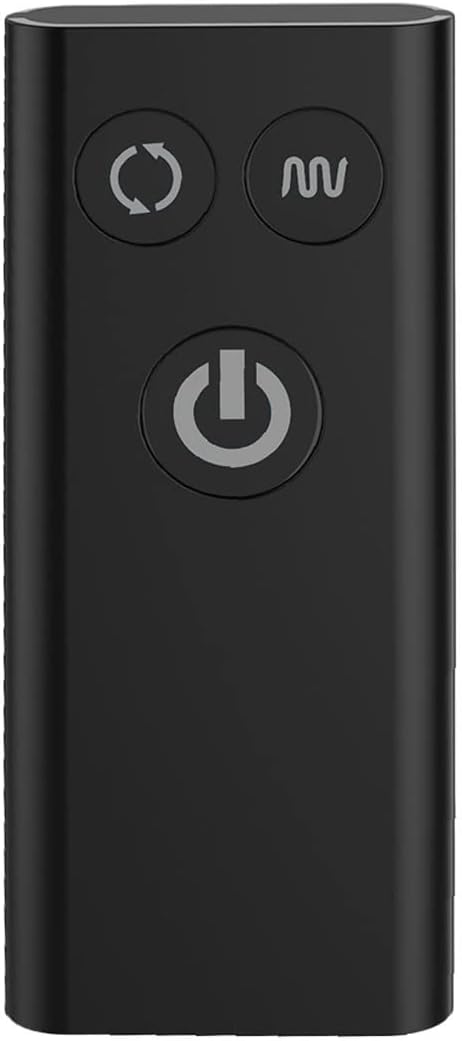
2 paveikslėlis: Stambus planas view of the black remote control. It has three circular buttons: a rotation icon (two arrows forming a circle), a vibration icon (wavy lines), and a power icon (circle with a vertical line).
- Maitinimo mygtukas: Įjungia/išjungia įrenginį.
- Rotation Control Button: Cycles through rotation modes.
- Vibration Control Button: Cycles through vibration modes.
- Diapazonas: Operates up to 15 meters (approximately 49 feet).
4. Sąranka ir įkrovimas
The Nexus Revo Stealth 2.0 is fully rechargeable and does not require batteries.
4.1 Pradinis mokestis
- Prieš pirmą kartą naudodami, pilnai įkraukite prietaisą.
- Connect the universal USB cable to the magnetic charging pad.
- Attach the magnetic charging pad to the charging points on the device. Ensure a secure connection.
- Plug the USB cable into a compatible USB power source (e.g., computer, USB wall adapter).
- The indicator light on the device will illuminate during charging and change when fully charged (refer to device-specific light indicators if available, otherwise assume a general charging behavior).
- A full charge typically takes [X] hours (Note: specific charging time not provided in JSON, user should refer to packaging or manufacturer webtikslios trukmės svetainė).
Pastaba: The remote control is also rechargeable. Follow the same charging procedure if it has a magnetic charging port, or refer to its specific instructions if it uses a different method.
4.2 Įjungimas / išjungimas
- Norėdami įjungti: Press and hold the power button on the device or remote control for 2-3 seconds until the indicator light illuminates.
- Norėdami išjungti: Press and hold the power button on the device or remote control for 2-3 seconds until the indicator light turns off.
5. Operacija
The Nexus Revo Stealth 2.0 offers independent control over its rotation and vibration functions, providing 34 combinations of stimulation.
5.1 Using the Device Controls
- Power on the device as described in Section 4.2.
- Sukimosi valdymas: Press the rotation button (circular arrows icon) to cycle through the 2 rotation speeds.
- Vibracijos valdymas: Press the vibration button (wavy lines icon) to cycle through the 6 vibration patterns: Slow, Medium, High, Low Pulsating, High Pulsating, and Escalating.
- Press the respective buttons repeatedly to find your preferred setting.
5.2 Nuotolinio valdymo pulto naudojimas
The remote control allows for discreet operation from a distance of up to 15 meters.
- Ensure both the device and the remote control are charged and powered on.
- Maitinimo mygtukas: Paspauskite norėdami įjungti arba išjungti įrenginį.
- Rotation Control Button: Press to cycle through the 2 rotation speeds.
- Vibration Control Button: Press to cycle through the 6 vibration patterns.
- The remote control mirrors the functions of the buttons on the main device.
6. Priežiūra ir priežiūra
Proper care ensures the longevity and hygiene of your Nexus Revo Stealth 2.0.
- Valymas: Clean the device thoroughly before and after each use. Wash with warm water and a mild, toy-safe soap or a dedicated toy cleaner. Rinse thoroughly to remove all soap residue.
- Džiovinimas: Pat dry with a lint-free cloth or allow to air dry completely before storage.
- Saugykla: Store in a clean, dry, and dust-free environment. Keep away from direct sunlight, extreme temperatures, and other toys made of different materials to prevent material degradation.
- Tepalai: Only use water-based lubricants. Avoid oil-based, silicone-based, or petroleum-based lubricants as they can damage the silicone material.
7. Problemų sprendimas
If you encounter any issues with your Nexus Revo Stealth 2.0, please refer to the following common solutions:
| Problema | Galima priežastis | Sprendimas |
|---|---|---|
| Įrenginys neįsijungia. | Išsikrovusi baterija; netinkamai įjungtas. | Visiškai įkraukite įrenginį. Paspauskite ir palaikykite maitinimo mygtuką 2–3 sekundes. |
| Nuotolinio valdymo pultas neveikia. | Low battery in remote; out of range; interference. | Charge the remote control. Ensure you are within 15 meters of the device. Reduce potential interference. |
| Device functions intermittently or stops. | Low battery; internal issue; water ingress (if not dried properly). | Recharge the device. Ensure the charging port was dry before charging. If issues persist, contact customer support. |
| Įkrovimo indikatoriaus lemputė neveikia. | Loose connection; faulty cable/pad. | Ensure the magnetic charging pad is securely connected. Try a different USB power source. |
If these solutions do not resolve the issue, please contact Nexus customer support for further assistance.
8. Specifikacijos
| Funkcija | Detalė |
|---|---|
| Modelio numeris | 138190 |
| Medžiaga | Silikonas |
| Spalva | Juoda |
| Matmenys (I x P x A) | 7.09 x 7.09 x 1.97 colio |
| Svoris | 12.7 uncijos |
| Sukimosi režimai | 2 greičiai |
| Vibracijos režimai | 6 patterns (Slow, Medium, High, Lo Pulsating, Hi Pulsating, Escalating) |
| Nuotolinio valdymo pulto diapazonas | Iki 15 metrų |
| Maitinimo šaltinis | Rechargeable Lithium Ion battery (1 required) |
| Atsparus vandeniui | Taip |
9. Garantija ir palaikymas
Nexus products are manufactured to high standards. For warranty information, product support, or to report any issues, please contact Nexus customer service directly. Details can typically be found on the product packaging or the official Nexus websvetainę.
Please note that statements regarding this product have not been evaluated by the FDA and are not intended to diagnose, treat, cure, or prevent any disease or health condition.


