1. Įvadas
Ačiū, kad pirkoteasing the VIVIBRIGHT GP100UP LED Projector. This manual provides essential information for the safe and efficient operation of your device. Please read it thoroughly before use and retain it for future reference.
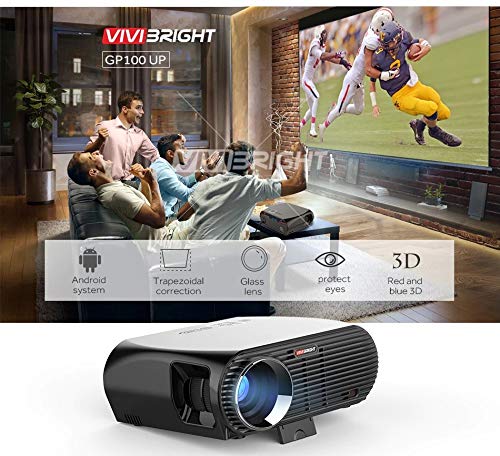
The VIVIBRIGHT GP100UP is an Android 6.0-based LED projector featuring built-in Wi-Fi and Bluetooth, designed for home theater and office presentations. It supports Full HD content and offers a bright projection experience.
2. Saugos informacija
- Maitinimas: Naudokite tik nurodytą maitinimo adapterį. Įsitikinkite, kad įtampatage atitinka jūsų vietinį maitinimo šaltinį.
- Vėdinimas: Neužblokuokite ventiliacijos angų. Užtikrinkite pakankamą oro cirkuliaciją aplink projektorių, kad jis neperkaistų.
- Skysčio ekspozicija: Projektorių laikykite atokiau nuo vandens ar kitų skysčių. Nenaudokiteamp aplinkos.
- Valymas: Prieš valydami atjunkite maitinimą. Naudokite minkštą, sausą šluostę. Venkite skystų ar aerozolinių valiklių.
- Objekto įterpimas: Never insert objects of any kind into the projector openings as they may touch dangerous voltage taškai arba trumposios dalys.
- Aptarnavimas: Nemėginkite patys aptarnauti šio gaminio. Visą techninę priežiūrą patikėkite kvalifikuotam aptarnavimo personalui.
- Akių apsauga: Nežiūrėkite tiesiai į projektoriaus objektyvą, kai lamp įjungtas. Ryški šviesa gali pažeisti akis.
3. Pakuotės turinys
Patikrinkite, ar pakuotėje yra visi toliau išvardyti daiktai:
- VIVIBRIGHT GP100UP Projector
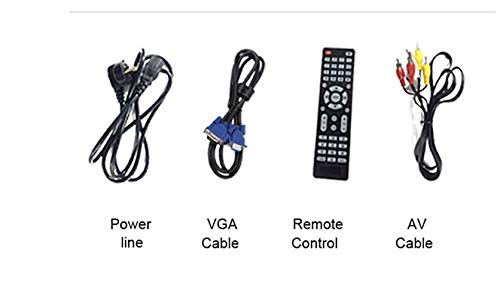
- Maitinimo kabelis
- VGA laidas
- AV kabelis
- Nuotolinio valdymo pultas
- Vartotojo vadovas (šis dokumentas)
3.1 paveikslas: Included accessories with the VIVIBRIGHT GP100UP projector, including power cable, VGA cable, remote control, and AV cable.
4. Produktas baigtasview
4.1. Projector Dimensions
4.1 paveikslas: Priekyje ir viršuje view of the VIVIBRIGHT GP100UP projector with approximate dimensions: 11 inches (length), 8.85 inches (width), and 4 inches (height).
4.2. Įvesties / išvesties prievadai
The projector features various ports for connecting external devices:
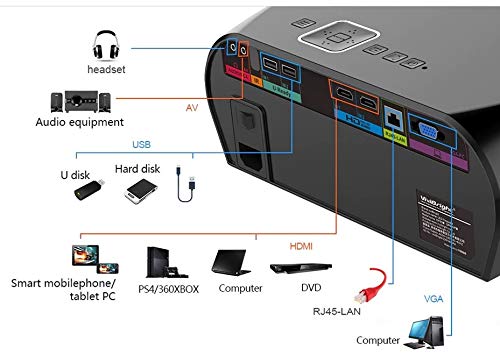
4.2 paveikslas: Detailed diagram of the projector's rear panel, illustrating connectivity options including headset, audio equipment (AV), USB ports for U disk and hard disk, HDMI ports, RJ45-LAN, and VGA port.
- HDMI: Connect to Blu-ray players, gaming consoles, laptops, or other HDMI-enabled devices.
- USB: For connecting USB drives (U disk) or external hard drives.
- APIE: Skirta senesniems įrenginiams prijungti naudojant kompozicinį vaizdo ir stereo garsą.
- VGA: For connecting to computers or laptops with a VGA output.
- RJ45-LAN: Laidinio tinklo ryšiui.
- Ausinių lizdas: Skirta išorinėms ausinėms arba garsiakalbiams prijungti.
4.3. Nuotolinio valdymo pultas
Pridedamas nuotolinio valdymo pultas leidžia patogiai valdyti projektorių.
4.3 paveikslas: Remote control layout with key functions: ON/OFF, Volume Up/Down, OK, Menu, Home, Speed, Mute, Back, Mouse Mode, and the USB receiver.
- ĮJUNGTA/IŠJUNGTA: Power on or off the projector.
- Tūris +/-: Sureguliuokite garso garsumą.
- GERAI: Patvirtinkite pasirinkimą.
- Meniu: Access projector settings.
- Pagrindinis puslapis: Return to the main Android interface.
- Atgal: Grįžkite į ankstesnį ekraną.
- Pelės režimas: Activate/deactivate air mouse function (if applicable).
- Nutildyti: Nutildyti arba įjungti garsą.
5. Sąranka
5.1. Įdėjimas
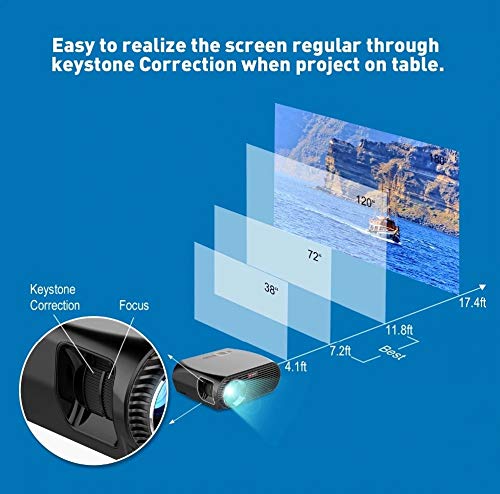
Place the projector on a stable, flat surface or mount it to the ceiling. Ensure there are no obstructions to the lens or ventilation ports. The optimal projection distance for a clear image is between 1 to 5 meters.
5.1 paveikslas: Illustration of projection distances and corresponding screen sizes, along with the location of the keystone correction and focus rings on the projector.
- For a 72-inch screen, the recommended distance is approximately 7.2 feet (2.2 meters).
- For a 120-inch screen, the recommended distance is approximately 11.8 feet (3.6 meters).
5.2. Maitinimo prijungimas
- Prijunkite maitinimo laidą prie projektoriaus maitinimo įvesties.
- Kitą maitinimo laido galą prijunkite prie tinkamo elektros lizdo.
- Projektoriaus maitinimo indikatoriaus lemputė turėtų užsidegti.
5.3. Fokusavimas ir trapecijos korekcija
After powering on, adjust the image for clarity and proper geometry.
- Fokusas: Sukite fokusavimo žiedą šalia objektyvo, kol projektuojamas vaizdas taps ryškus ir aiškus.
- Keystone korekcija: If the projected image appears trapezoidal (wider at the top or bottom), use the keystone correction ring or lever (usually located near the focus ring) to adjust the image until it is rectangular. The GP100UP supports +/- 15 degrees vertical keystone correction.
6. Naudojimo instrukcijos
6.1. Initial Power On and Android Interface
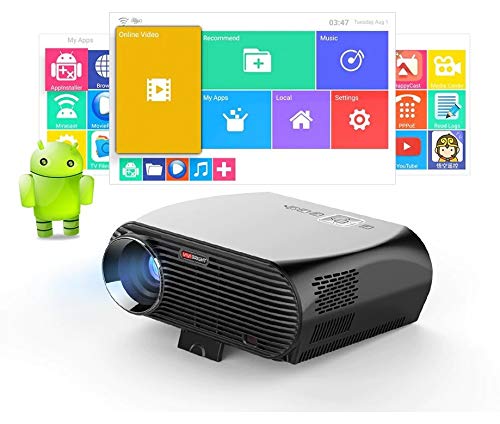
Press the power button on the projector or remote control to turn on the device. The projector will boot into its Android 6.0 operating system interface.
6.1 paveikslas: The VIVIBRIGHT GP100UP projector in operation, highlighting its Android system capabilities and other features.
Navigate the Android interface using the remote control. You can access pre-installed applications, settings, and media files.
6.2. Išorinių įrenginių prijungimas
Norėdami projektuoti turinį iš išorinių šaltinių:
- Connect your device (e.g., laptop, gaming console, USB drive) to the appropriate port on the projector (HDMI, USB, AV, VGA).
- On the projector's Android interface, navigate to the "Input Source" or "Source" option.
- Select the corresponding input source (e.g., HDMI1, USB, AV, VGA) to display content from your connected device.
6.3. Wireless Connectivity (Wi-Fi, Bluetooth, Screen Mirroring)
The GP100UP supports various wireless functions:
- „Wi-Fi“:
- Go to "Settings" on the Android interface.
- Pasirinkite „Wi-Fi“ ir įjunkite.
- Choose your desired network and enter the password to connect.
- Bluetooth:
- Go to "Settings" on the Android interface.
- Select "Bluetooth" and turn it on.
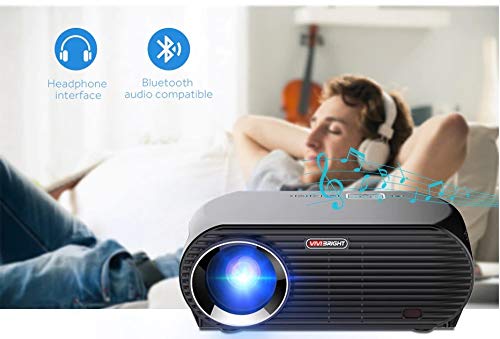
- Pair with Bluetooth audio devices like headphones or speakers.
6.2 paveikslas: The projector's Bluetooth audio compatibility, allowing connection to wireless headphones or speakers.
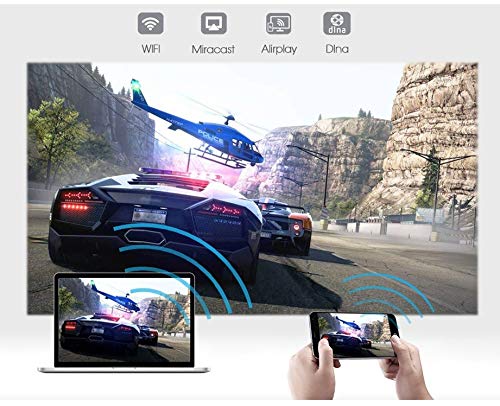
- Screen Mirroring (Miracast/Airplay/DLNA):
The projector supports mirroring content from compatible smartphones, tablets, and laptops via Wi-Fi, Miracast, Airplay, and DLNA.
- Įsitikinkite, kad ir jūsų įrenginys, ir projektorius prijungti prie to paties „Wi-Fi“ tinklo.
- On the projector's Android interface, open the relevant screen mirroring application (e.g., Miracast, Airplay, DLNA).
- On your smartphone/tablet/laptop, activate its screen mirroring function (e.g., "Screen Mirroring," "Smart View," "Cast," "AirPlay").
- Select the projector from the list of available devices to begin mirroring.

6.3 paveikslas: Wireless screen mirroring capabilities, enabling content from mobile devices and laptops to be displayed on the projector.
7. Priežiūra
7.1. Objektyvo valymas
Naudokite minkštą, nepūkuotą šluostę, specialiai skirtą optiniams lęšiams. Švelniai nuvalykite lęšį, kad pašalintumėte dulkes ar dėmes. Venkite naudoti abrazyvines medžiagas ar stiprias chemines medžiagas.
7.2. Projektoriaus C valymasasing
Projektoriaus išorę nuvalykite minkšta, sausa šluoste. Įsisenėjusioms dėmėms šiek tiek nuvalykite.amp galima naudoti sausą šluostę, o po to – sausą. Įsitikinkite, kad į ventiliacijos angas nepatenka skysčio.
7.3. Air Filter (if applicable)
While LED projectors typically have sealed optical engines, regularly check ventilation openings for dust accumulation. Use a soft brush or compressed air to clear any blockages.
8. Problemų sprendimas
| Problema | Galima priežastis | Sprendimas |
|---|---|---|
| Vaizdas nerodomas |
|
|
| Vaizdas neryškus |
|
|
| Vaizdas yra trapecijos formos |
|
|
| Nėra garso |
|
|
| „Wi-Fi“ / „Bluetooth“ ryšio problemos |
|
|
9. Specifikacijos
| Funkcija | Detalė |
|---|---|
| Modelio numeris | GP100UP |
| Ekrano technologija | LCD |
| Gimtoji raiška | 1280x800dpi (WXGA) |
| Ryškumas | 3500 liumenų |
| Kontrasto santykis | 1000:1-2000:1 |
| Šviesos šaltinis | LED |
| Šviesos šaltinio gyvenimas | Not specified (typically 20,000+ hours for LED) |
| Projekcijos atstumas | 1-5 m |
| Prognozuojamas matmuo | 40-300 inches (Best image size: 72-120 inches) |
| Ekrano skalė | 4:3/16:9 |
| Keystone Korekcija | Manual Correction, +/- 15 degrees (vertical) |
| Sistema | Android 6.0.1, CPU: Quad core ARM Cortex-A53 |
| Atmintis (RAM / ROM) | RAM: 1G / ROM: 8G |
| Belaidis ryšys | Wi-Fi, Bluetooth, DLNA, Miracast, Airplay |
| Įvesties prievadai | HDMI, USB, AV, VGA, RJ45-LAN |
| Maitinimo šaltinis | AC 90-240V, 50/60Hz |
| Energijos suvartojimas | 140W |
| Matmenys (apytiksliai) | 37 x 30.5 x 15.9 cm |
| Svoris (apytiksliai) | 2.6 kg |
| 3D funkcija | Red-blue 3D |
10. Garantija ir palaikymas
The VIVIBRIGHT GP100UP Projector comes with a 1 metų garantija nuo įsigijimo datos. Ši garantija taikoma gamybos defektams, atsiradusiems įprasto naudojimo sąlygomis.
For technical support, warranty claims, or service inquiries, please contact your retailer or the official VIVIBRIGHT customer service channel. Please have your product model number (GP100UP) and proof of purchase ready when contacting support.


