Įvadas
This user manual provides detailed instructions for the proper use and maintenance of your AUTOPHIX OM123 OBD2 Scanner. The OM123 is a universal automotive diagnostic scan tool designed to read and clear engine fault codes, view live data, and retrieve vehicle information for OBDII/EOBD+CAN compliant vehicles. Please read this manual thoroughly before operating the device.
Produktas baigtasview
The AUTOPHIX OM123 OBD2 Scanner is a compact and user-friendly diagnostic tool. It features a large LCD display with backlight for clear readability and intuitive navigation buttons.
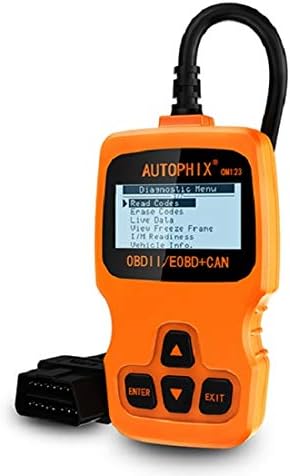
1 paveikslas: Priekyje view of the AUTOPHIX OM123 OBD2 Scanner, showing the display and control buttons.
Pagrindinės funkcijos:
- Diagnostinės funkcijos: Reads and clears Diagnostic Trouble Codes (DTCs), turns off the Malfunction Indicator Lamp (MIL), views live data streams, and displays freeze frame data.
- I/M pasirengimas: Checks the status of emission-related monitors to ensure vehicle readiness for emissions testing.
- Transporto priemonės informacijos gavimas: Accesses Vehicle Identification Number (VIN), Calibration ID (CIN), and Calibration Verification Number (CVN).
- Platus suderinamumas: Supports all OBDII protocols, including CAN, J1850 PWM, J1850 VPW, ISO9141, and KWP2000. Compatible with most vehicles manufactured from 1996 onwards.
- Patogi vartotojo sąsaja: Features a large 128 x 64 pixel LCD display with white backlight and contrast adjustment. Built-in OBD2 fault code definitions eliminate the need for external lookup.
- Nereikia baterijų: Powered directly via the detachable OBDII cable from the vehicle's OBDII port.
- Kelių kalbų palaikymas: Available in English, French, German, Spanish, Dutch, Finnish, Portuguese, and Russian.

2 paveikslas: The OM123 scanner's display showing the main diagnostic menu options: Read Codes, Erase Codes, Live Data, View Freeze Frame, I/M Readiness, and Vehicle Info.
Įrenginio matmenys:

3 paveikslas: Dimensions of the AUTOPHIX OM123 scanner: approximately 125mm (height), 70mm (width), and 22mm (thickness).
Sąranka
- Raskite OBDII prievadą: OBDII prievadas paprastai yra po prietaisų skydeliu, vairuotojo pusėje. Tikslią vietą rasite savo transporto priemonės naudojimo vadove.
- Prijunkite skaitytuvą: With the vehicle's ignition off, firmly plug the OM123 scanner's OBDII connector into the vehicle's OBDII port.
- Maitinimas: Turn the vehicle's ignition to the "ON" position (do not start the engine). The scanner will automatically power on and display the main menu.
- Language Selection (if needed): If the device is not in your preferred language, navigate to the "Settings" or "System Setup" menu (if available) to select the desired language.
Naudojimo instrukcijos
Once the scanner is connected and powered on, use the UP ir ŽEMYN arrow buttons to navigate through the menu options, the ENTER button to confirm a selection, and the EXIT mygtuką, norėdami grįžti į ankstesnį ekraną.
1. Skaityti kodus
This function retrieves Diagnostic Trouble Codes (DTCs) from the vehicle's computer. These codes indicate specific issues detected by the vehicle's onboard diagnostic system.
- Pagrindiniame meniu pasirinkite „Skaityti kodus“ ir paspauskite ENTER.
- The scanner will communicate with the vehicle and display any stored DTCs.
- Naudokite UP ir ŽEMYN buttons to scroll through multiple codes if present. The built-in DTC library provides definitions for common codes.
2. Ištrinkite kodus
This function clears all Diagnostic Trouble Codes (DTCs) from the vehicle's computer and turns off the Malfunction Indicator Lamp (MIL), also known as the "Check Engine" light. Ensure any underlying issues are resolved before clearing codes, as they may reappear if the problem persists.
- Pagrindiniame meniu pasirinkite "Ištrinti kodus" ir paspauskite ENTER.
- Kai būsite paraginti, patvirtinkite savo pasirinkimą.
- The scanner will clear the codes and the MIL should turn off.
3. Tiesioginiai duomenys
This function displays real-time operational parameters from the vehicle's sensors and modules. This data can be useful for diagnosing intermittent problems or verifying repairs.
- Pagrindiniame meniu pasirinkite „Tiesioginiai duomenys“ ir paspauskite ENTER.
- The scanner will display a list of available data parameters.
- Naudokite UP ir ŽEMYN buttons to scroll through the data.
4. View Fiksuotas rėmelis
When an emission-related fault occurs, the vehicle's computer stores a "freeze frame" of data, capturing the engine conditions at the moment the fault was detected. This snapshot can help in diagnosing the cause of the problem.
- Pagrindiniame meniu pasirinkite "View Užšaldyti kadrą" ir paspauskite ENTER.
- The scanner will display the stored freeze frame data.
5. I/M parengtis
I/M Readiness (Inspection/Maintenance Readiness) indicates whether the various emission-related systems on the vehicle are functioning correctly and have completed their self-tests. This is crucial for emissions testing.
- Pagrindiniame meniu pasirinkite „Aš/M pasirengimas“ ir paspauskite ENTER.
- The scanner will display the status of various monitors (e.g., Catalyst Monitor, O2 Sensor Monitor). "OK" or "Complete" indicates the test has passed; "INC" or "Not Complete" indicates the test has not yet run or failed.
6. Informacija apie transporto priemonę
Ši funkcija leidžia gauti svarbią transporto priemonės identifikavimo informaciją.
- Pagrindiniame meniu pasirinkite "Informacija apie transporto priemonę". ir paspauskite ENTER.
- The scanner will display information such as VIN (Vehicle Identification Number), CIN (Calibration Identification Number), and CVN (Calibration Verification Number).
Priežiūra
- Valymas: Use a soft, dry cloth to clean the scanner's casing and screen. Avoid using abrasive cleaners or solvents.
- Saugykla: Laikykite prietaisą švarioje, sausoje vietoje, atokiau nuo ekstremalių temperatūrų ir tiesioginių saulės spindulių.
- Kabelio priežiūra: Ensure the OBDII cable is not kinked or damaged. Always grasp the connector when plugging or unplugging, not the cable itself.
- Programinės įrangos atnaujinimai: Patikrinkite gamintojo websvetainėje, ar nėra galimų programinės įrangos atnaujinimų, kad būtų užtikrintas optimalus našumas ir suderinamumas.
Trikčių šalinimas
| Problema | Galima priežastis | Sprendimas |
|---|---|---|
| Scanner does not power on or screen is blank. |
|
|
| Ryšio su transporto priemone klaida. |
|
|
| Codes cannot be cleared. |
|
|
Specifikacijos
| Funkcija | Detalė |
|---|---|
| Modelio numeris | OM123 |
| Ekranas | 128 x 64 pixel LCD with white backlight and contrast adjustment |
| Veiklos ttage | 9-16V (via OBDII port) |
| Palaikomi protokolai | CAN, J1850 PWM, J1850 VPW, ISO9141, KWP2000 |
| Darbinė temperatūra | nuo 0°C iki 60°C (32°F iki 140°F) |
| Laikymo temperatūra | -20°C iki 70°C (nuo -4°F iki 158°F) |
| Matmenys | apytiksliai 125 mm x 70 mm x 22 mm |
| Svoris | Maždaug 10.4 uncijos (295 gramų) |
| Sertifikatai | FCC, CE, RoHS |
Garantija ir palaikymas
The AUTOPHIX OM123 OBD2 Scanner comes with a one-year warranty from the date of purchase, covering manufacturing defects. For technical support, warranty claims, or further assistance, please contact AUTOPHIX customer service through their official websvetainę arba mažmenininką, iš kurio buvo pirktas produktas.
Norėdami gauti daugiau informacijos, apsilankykite oficialioje svetainėje AUTOPHIX Store.


