1. Įvadas
This user manual provides comprehensive instructions for the operation, setup, maintenance, and troubleshooting of your TOPVISION Portable Projector, model TP-98. Please read this manual thoroughly before using the projector to ensure proper functionality and to maximize your viewpatirtį. Išsaugokite šį vadovą ateityje.
2. Produktas baigtasview
The TOPVISION TP-98 projector is designed to deliver a high-quality visual experience with its advanced features and versatile connectivity. It is suitable for both home entertainment and professional presentations.
2.1 Pagrindinės savybės
- Native 1080P Full HD Resolution: Provides clear and detailed images, supporting 4K video input.
- Aukštos Ryškumas: 9500 Lumens for vibrant and bright projections.
- Didelis ekrano dydis: Capable of projecting images up to 350 inches for an immersive viewpatirtį.
- Built-in Hi-Fi Stereo Speakers: Dual integrated speakers with SRS sound for enhanced audio.
- Prailgintas Lamp Gyvenimas: LED lamp designed for up to 150,000 hours of use.
- Kelios ryšio parinktys: Includes HDMI, USB, AV, and 3.5mm audio output ports.
- Efektyvi aušinimo sistema: Designed for low power consumption and reduced fan noise.
2.2 Produkto komponentai

2.1 vaizdas: The TOPVISION TP-98 Portable Projector shown with its included carrying case. The projector is white with a black control panel on top and a prominent lens on the front. The carrying case is black with the TOPVISION logo.

2.2 vaizdas: Iš arti view of the TOPVISION projector's control panel located on the top surface. It features buttons for power, menu navigation, source selection, and volume control, designed for intuitive operation.
3. Sąranka
3.1 Įdėjimas
For optimal projection, place the projector on a stable, flat surface. Ensure there is adequate ventilation around the unit. The distance from the screen will determine the image size. Refer to the "Display Adjustment" section for recommended projection distances.

3.1 vaizdas: Diagram illustrating the relationship between projection distance and screen size. It shows that a 45-inch display requires approximately 2 meters, a 120-inch display requires 3.5 meters, a 240-inch display requires 5 meters, and a 350-inch display requires 8 meters.
3.2 Maitinimo jungtis
- Prijunkite maitinimo laidą prie projektoriaus maitinimo įvesties prievado.
- Kitą maitinimo laido galą prijunkite prie standartinio elektros lizdo.
- The power indicator light on the projector will illuminate, indicating it is ready for use.
4. Naudojimo instrukcijos
4.1 Maitinimo įjungimas/išjungimas
- To power on the projector, press the power button on the control panel or the remote control.
- Norėdami išjungti, dar kartą paspauskite maitinimo mygtuką. Jei būsite paraginti, patvirtinkite išjungimą.
4.2 Šaltinio pasirinkimas
After powering on, select your desired input source (HDMI, USB, AV) using the 'Source' button on the control panel or remote. Navigate through the options using the arrow keys and confirm with 'OK'.
4.3 Meniu naršymas
Use the 'Menu' button to access settings such as picture mode, sound settings, and system preferences. Use the arrow keys to navigate and 'OK' to select. 'Exit' or 'Return' button to go back.
5. Ryšys
The TOPVISION projector offers a variety of ports for connecting different devices:
- HDMI (x2): For connecting laptops, game consoles (PS4, Xbox), TV boxes, and other HDMI-enabled devices.
- USB (x2): Skirta prijungti USB atmintines medijos atkūrimui files tiesiogiai.
- APIE: Skirta senesniems įrenginiams prijungti naudojant AV kabelį.
- 3.5 mm garso išvestis: Skirta išoriniams garsiakalbiams arba ausinėms prijungti.

5.1 vaizdas: An illustration demonstrating the various connectivity options of the TOPVISION projector. It highlights HDMI, USB, and AV inputs, along with a line out. Below, icons show compatibility with mobile phones/tablets, USB disks, laptops, Chromecast, audio devices, Fire TV Stick, Xbox/PS4, and DVD players.

5.2 vaizdas: A visual guide detailing how to connect various devices to the projector. It shows: (a) iOS devices requiring a Lightning to HDMI adapter, (b) iOS devices using an Airplay/Miracast dongle for wireless connection, (c) Android phones using a Miracast dongle for wireless connection, and (d) PCs/laptops/PS4/TV Boxes connecting directly via an HDMI cable.
Note on Streaming Services: Due to copyright restrictions, direct streaming of content from apps like Netflix, Prime Video, or Hulu is not supported via direct phone connection. To view these services, connect a laptop, Chromecast, wireless dongle, TV Stick, or Roku device to the projector's HDMI port.
6. Ekrano reguliavimas
6.1 Fokuso reguliavimas
Rotate the focus ring located near the projector lens until the projected image appears sharp and clear. This adjustment compensates for different projection distances.
6.2 Keystone koregavimas
If the projected image appears trapezoidal (wider at the top or bottom), use the keystone correction dial (usually located near the focus ring) to adjust the image geometry. This corrects the distortion when the projector is not perfectly perpendicular to the screen. The projector supports ±30 degrees keystone correction.
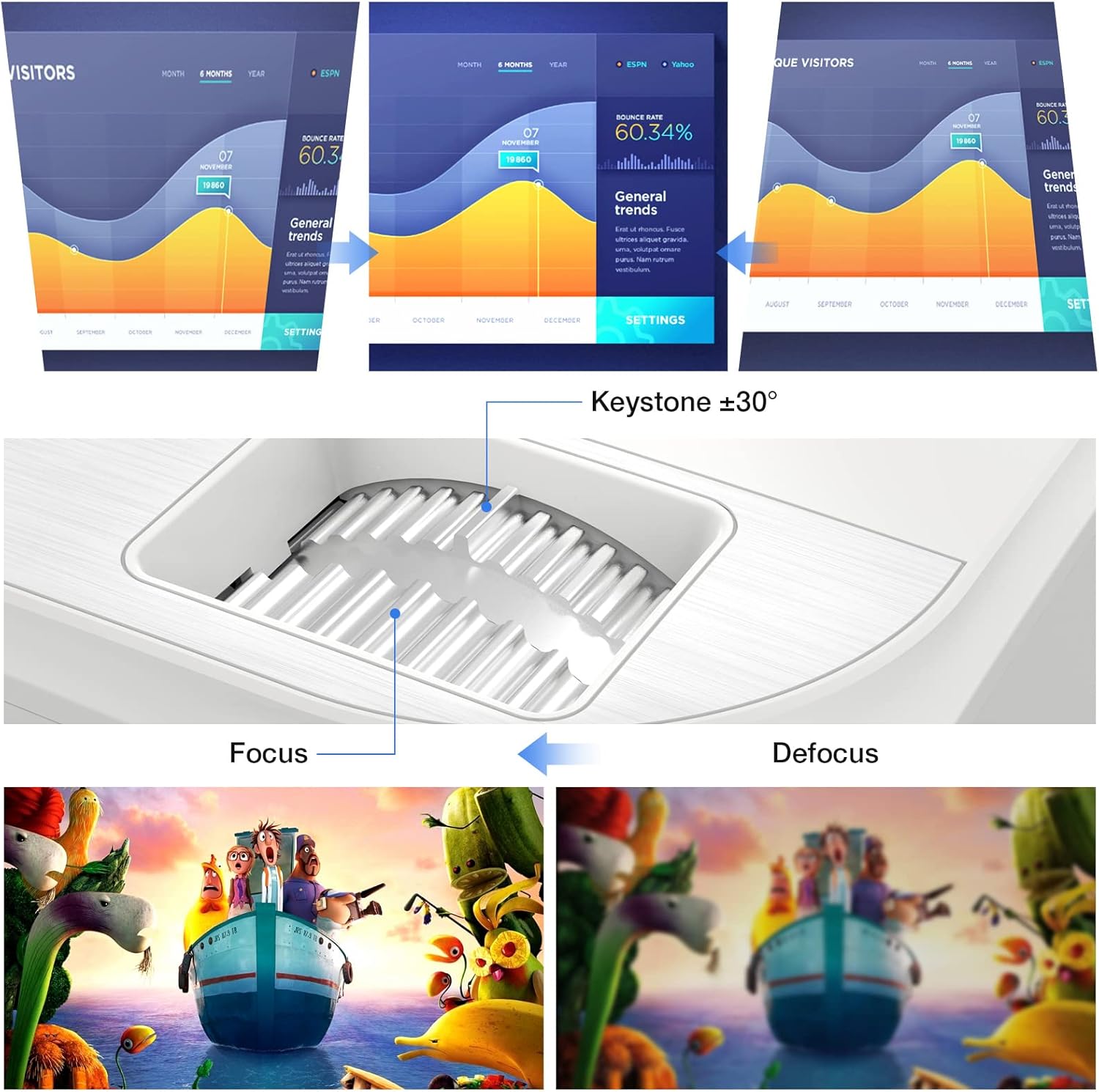
6.1 vaizdas: A diagram illustrating the focus and keystone adjustment mechanisms on the projector. It shows the keystone dial for correcting trapezoidal distortion (up to ±30 degrees) and the focus ring for sharpening the image, with visual examples of focused versus defocused projections.
7. Priežiūra
7.1 Valymas
- Objektyvas: Naudokite minkštą, nepūkuotą šluostę, specialiai skirtą optiniams lęšiams. Nenaudokite abrazyvinių valiklių.
- Projektoriaus korpusas: Nuvalykite paviršių minkšta, sausa šluoste. Įsisenėjusioms dėmėms šiek tiek nuvalykite.amp Galima naudoti šluostę, tačiau įsitikinkite, kad į įrenginį nepatektų skysčio.
- Ventiliacijos angos: Regularly check and clean the ventilation ports to prevent dust buildup, which can affect cooling performance. Use a soft brush or compressed air.
7.2 Lamp Gyvenimas
Projektoriaus LED lamp has an estimated lifespan of 150,000 hours, providing long-term, consistent performance without frequent lamp pakaitalai.
7.3 Aušinimo sistema
The projector features an optimized cooling system to maintain stable operating temperatures and minimize fan noise. Ensure proper airflow around the projector by not blocking the ventilation openings.
8. Problemų sprendimas
| Problema | Galima priežastis | Sprendimas |
|---|---|---|
| Neprojektuojamas vaizdas | Atsilaisvinęs maitinimo laidas; Neteisingas įvesties šaltinis; Įrenginys netinkamai prijungtas. | Check power connection; Select correct input source (HDMI, USB, AV); Ensure source device is powered on and connected securely. |
| Vaizdas neryškus | Nenustatytas fokusavimas; projektorius per arti/per toli nuo ekrano. | Adjust the focus ring; Adjust projection distance. |
| Vaizdas yra trapecijos formos | Projektorius nėra statmenas ekranui. | Use keystone correction dial to adjust. |
| Nėra garso | Volume too low; Muted; External speakers not connected; Source device audio settings. | Increase volume; Unmute projector; Connect external speakers if desired; Check audio output settings on source device. |
| Nuotolinio valdymo pultas neveikia | Baterijos išsikrovė / neteisingai įdėtos; kliūtis tarp nuotolinio valdymo pulto ir projektoriaus. | Replace batteries; Ensure clear line of sight to IR receiver on projector. |
9. Specifikacijos
| Funkcija | Detalė |
|---|---|
| Prekės ženklas | TOPVIZIJA |
| Modelio numeris | TP-98 |
| Gimtoji raiška | 1920 x 1080P Full HD |
| Maksimali ekrano raiška | Supports 4K UHD |
| Ryškumas | 9500 liumenų |
| Kontrasto santykis | 12000:1 |
| Lamp Gyvenimas | 150,000 valandų |
| Projekcijos dydis | 45–350 colio |
| Keystone Korekcija | ± 30 laipsniai |
| Ryšys | 2x HDMI, 2x USB, 1x AV, 1x 3.5mm Audio Out |
| Gaminio matmenys | 30 L x 25 W x 11 A cm |
| Svoris | 4.3 kg |
| Ekrano tipas | LCD |
| Ypatingos savybės | Built-in Stereo Speakers, Touch Sensitive Panel |
10. Garantija ir palaikymas
TOPVISION provides a 3-year free repair service for this product. Additionally, lifetime professional technical support is available. If you encounter any issues or require assistance, please do not hesitate to contact TOPVISION customer service.
For support, please refer to the contact information provided on the TOPVISION official websvetainėje arba pirkimo dokumentuose.