1. Įvadas
The eKids Frozen 2 Bluetooth Karaoke Machine with Light Show is designed to provide an interactive music experience. This portable device allows users to stream audio wirelessly via Bluetooth, sing along with the included wired microphone, and expand content through a USB port. It features a multi-colored LED light show and built-in memory for storing music.
2. Kas yra dėžutėje
- Bluetooth MP3 Karaoke Machine
- Laidinis mikrofonas
- USB įkrovimo laidas
3. Produkto ypatybės
- Bluetooth ryšys: Connect to any compatible Bluetooth device to stream audio wirelessly.
- Laidinis mikrofonas: Includes one real working wired microphone for singing along. An additional mic jack is available for a second microphone (sold separately).
- USB Audio Player: Features a USB port to play MP3 files from a USB flash drive (not included).
- Įrašymo funkcija: Record performances while singing along to streaming music. Requires a USB flash drive (not included).
- Multi-colored LED Light Show: Integrated light show to enhance the performance experience.
- Integruota atmintis: Store hours of music directly on the device.
- Įkraunama baterija: Nešiojamas dizainas su įmontuota įkraunama baterija, skirta naudoti kelyje.

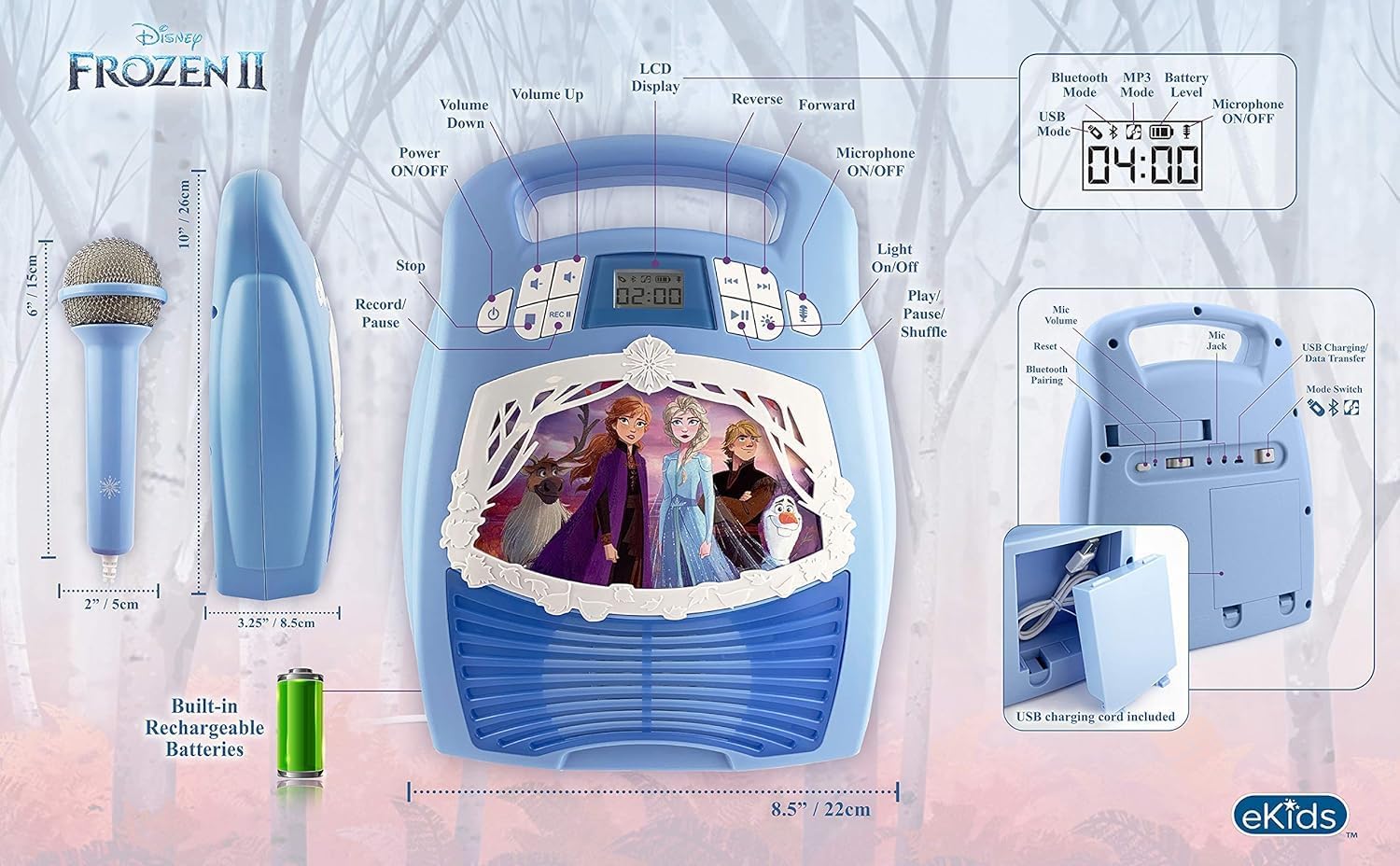
1 pav. Baigtaview of the Karaoke Machine's Controls and Features.

Figure 2: Bluetooth Compatibility with various devices.
4. Sąranka
4.1 Įrenginio maitinimas
The karaoke machine operates on a built-in rechargeable battery. Ensure the unit is fully charged before first use for optimal performance.
- Connect the supplied USB charging cable to the USB charging port on the back of the unit.
- Connect the other end of the USB cable to a standard USB power adapter (not included) or a powered USB port.
- The charging indicator will illuminate. Allow sufficient time for a full charge.
4.2 Mikrofono prijungimas
The wired microphone connects to the microphone jack on the unit.
- Locate the microphone jack on the side or back of the karaoke machine.
- Tvirtai įkiškite mikrofono kištuką į lizdą.

Figure 3: Karaoke Machine with Microphone Connected.
5. Naudojimo instrukcijos
5.1 Maitinimo įjungimas/išjungimas
Paspauskite ir palaikykite Galia button located on the control panel to turn the unit on or off.
5.2 Bluetooth poravimas
- Turn on the karaoke machine. The Bluetooth indicator on the display will flash, indicating it is in pairing mode.
- „Bluetooth“ palaikančioje įrangoje (išmaniajame telefone, planšetiniame kompiuteryje ir kt.) eikite į „Bluetooth“ nustatymus ir įjunkite „Bluetooth“.
- Select "eKids Frozen 2 Karaoke" (or similar name) from the list of available devices.
- Once paired, the Bluetooth indicator will stop flashing and remain solid. You can now stream audio from your device.
5.3 Playing Music via USB
- Įdėkite USB atmintinę su MP3 files į įrenginio USB prievadą.
- The unit should automatically switch to USB mode and begin playing music. If not, press the Režimas mygtuką, norėdami pasirinkti USB režimą.
- Naudokite Leisti / pristabdyti, Kitas takelis, ir Ankstesnis takelis mygtukai, skirti valdyti atkūrimą.
5.4 Mikrofono naudojimas
- Ensure the microphone is securely plugged into the mic jack.
- Paspauskite Mikrofonas įjungtas / išjungtas button to activate the microphone.
- Adjust the microphone volume using the dedicated volume controls if available, or the main volume controls.
5.5 Šviesos šou
Paspauskite Šviesa ON/OFF button to activate or deactivate the multi-colored LED light show.
5.6 Įrašų atlikimas
To record your singing, a USB flash drive (not included) must be inserted into the USB port.
- Ensure a USB flash drive is inserted.
- Start playing your desired music (via Bluetooth or USB).
- Paspauskite REC mygtuką, kad pradėtumėte įrašymą.
- Dainuokite į mikrofoną.
- Paspauskite REC button again to stop recording. Your performance will be saved to the USB flash drive.
6. Priežiūra
- Prietaisą valykite minkštu, sausu skudurėliu. Nenaudokite abrazyvinių valiklių ar tirpiklių.
- Laikykite įrenginį atokiau nuo tiesioginių saulės spindulių, šilumos šaltinių ir drėgmės.
- Store the microphone in its designated compartment on the back of the unit when not in use to prevent loss or damage.
4 pav.: galinis view with microphone storage compartment.
7. Problemų sprendimas
- Nėra galios: Ensure the unit is charged. Connect the USB charging cable and allow it to charge.
- Nėra garso: Check the volume levels on both the karaoke machine and your connected Bluetooth device. Ensure the microphone is turned on if using it.
- „Bluetooth“ neprisijungia: Make sure Bluetooth is enabled on your device and the karaoke machine is in pairing mode. Try restarting both devices. Ensure no other devices are currently connected to the karaoke machine.
- Mikrofonas neveikia: Verify the microphone is securely plugged into the correct jack and the microphone ON/OFF button is activated.
- Įrašymo problemos: Ensure a compatible USB flash drive is inserted and has sufficient free space.
8. Specifikacijos
| Funkcija | Detalė |
|---|---|
| Gaminio matmenys | 8 x 3 x 10 colio |
| Prekės svoris | 2.64 svaro |
| Modelio numeris | FR-553v9M |
| Rekomenduojamas amžius | 3–35 mėnesių |
| Baterijos | 3 AA batteries required (included) - Note: Product description also mentions built-in rechargeable battery. Please refer to packaging for exact battery type. |
| Ypatinga funkcija | Nešiojamas, įkraunamas |
| Spalva | Older Version |
| Gamintojas | KIDdesigns |
9. Saugos informacija
Please read and follow all safety instructions provided with the product packaging. This product is intended for use by children aged 3 and up, under adult supervision.
10. Garantija ir palaikymas
Šis produktas tiekiamas su a Vienerių metų ribota garantija. For warranty claims or technical support, please refer to the contact information provided in your product packaging or visit the eKids official websvetainę.
11. Produkto vaizdo įrašas
Video 1: An official product video from KIDdesigns, Inc. showcasing the eKids Frozen 2 Bluetooth Karaoke Machine with Light Show, highlighting its features and design.


