1. Įvadas
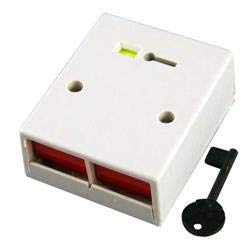
Šiame vadove pateikiamos išsamios instrukcijos, kaip įrengti, naudoti ir prižiūrėti CQR Hold-up PA Double Push Panic Button. This device is designed to provide a reliable and immediate alert in emergency situations, integrating seamlessly with compatible alarm control panels. It features a double-press activation mechanism and a key-reset function to prevent accidental activation and ensure secure operation.
Prieš įdiegdami ir naudodami atidžiai perskaitykite šį vadovą, kad užtikrintumėte tinkamą veikimą ir saugą.
2. Saugos informacija
- Elektros sauga: Installation should only be performed by qualified personnel in accordance with all local and national electrical codes. Ensure power to the alarm control panel is disconnected before wiring.
- Montavimas: Mount the device securely on a stable surface to prevent accidental dislodgement.
- Aplinka: Do not expose the device to extreme temperatures, humidity, or direct water. It is designed for indoor use only.
- Priežiūra: Nebandykite patys atidaryti ar taisyti įrenginio. Visus techninės priežiūros darbus patikėkite kvalifikuotiems techninės priežiūros specialistams.
- Testavimas: Regularly test the panic button's functionality in conjunction with your alarm system to ensure it is operating correctly.
3. Pakuotės turinys
Patikrinkite, ar jūsų pakuotėje yra visi toliau išvardyti daiktai:
- CQR Hold-up PA Double Push Panic Button Unit
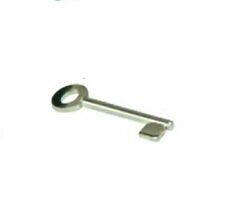
- Key for Reset Function
- Mounting Screws (may vary)
- Šis vartotojo vadovas
4. Sąranka ir diegimas
The CQR Hold-up PA Double Push Panic Button is designed for surface mounting and integration with a compatible alarm control panel.
4.1. Montavimo vieta
Choose a discreet yet easily accessible location for mounting, such as under a counter, desk, or near a point of sale. Ensure the surface is clean, dry, and structurally sound.
4.2. Wiring to Alarm Control Panel
- Atjunkite maitinimą: Before beginning any wiring, ensure the alarm control panel is completely powered off and disconnected from its main power source and backup battery.
- Access Wiring Terminals: Atidarykite casing of the panic button (if applicable) to expose the wiring terminals. Refer to your alarm control panel's manual for specific zone input terminals for panic devices.
- Prijunkite laidus: Connect the panic button's output wires to the designated panic zone input terminals on your alarm control panel. This device typically operates as a Normally Closed (NC) contact, opening upon activation. Consult the wiring diagram provided with your alarm control panel for correct polarity and connection points.
- Saugus laidas: Įsitikinkite, kad visos laidų jungtys yra tvirtos ir tinkamai izoliuotos.
- Uždaryti Casing: Carefully close the panic button casing.
4.3. Įrenginio montavimas
- Pažymėkite skyles: Use the panic button unit as a template to mark the drilling locations for the mounting screws on your chosen surface.
- Gręžimo bandomosios skylės: Drill pilot holes if necessary, appropriate for the mounting screws.
- Saugus įrenginys: Align the panic button with the drilled holes and secure it firmly using the provided mounting screws. Do not overtighten.
4.4. Power On and Test
Once installation is complete, restore power to the alarm control panel. Perform a functional test of the panic button as described in the "Operating Instructions" section to ensure it triggers the alarm system correctly.
5. Naudojimo instrukcijos
5.1. Activating the Panic Button
To activate the panic alarm, simultaneously press both red push buttons on the front of the unit. The double-press mechanism is designed to minimize accidental activations while ensuring quick response in an emergency.
Upon successful activation, the panic button will latch, and the alarm control panel will initiate the programmed panic response (e.g., siren activation, silent alarm, notification to monitoring station).
5.2. Resetting the Panic Button
After activation, the panic button will remain in a latched state until manually reset. To reset the device:
- Insert the provided key into the keyhole located on the top surface of the panic button.
- Turn the key clockwise (or counter-clockwise, depending on the specific mechanism) until the buttons release and return to their original position.
- Remove the key. The panic button is now reset and ready for re-activation.
Svarbu: Always keep the reset key in a secure and accessible location known only to authorized personnel.
6. Priežiūra
The CQR Hold-up PA Double Push Panic Button requires minimal maintenance to ensure reliable operation.
- Valymas: Periodically wipe the exterior of the unit with a soft, dry cloth. Do not use abrasive cleaners, solvents, or excessive moisture.
- Testavimas: It is recommended to test the panic button's functionality at least once a month to confirm its connection to the alarm system and proper activation/reset.
- Patikra: Visually inspect the unit for any signs of damage, loose wiring, or tamperingas.
7. Problemų sprendimas
If you encounter issues with your CQR Hold-up PA Double Push Panic Button, refer to the following common problems and solutions:
| Problema | Galima priežastis | Sprendimas |
|---|---|---|
| Panic button does not activate alarm. |
|
|
| Panic button does not reset with key. |
|
|
| Accidental activations. |
|
|
If the problem persists after attempting these solutions, please contact your alarm system installer or the manufacturer's technical support.
8. Specifikacijos
| Funkcija | Detalė |
|---|---|
| Modelis | Hold-up PA Double Push |
| ASIN | B07WWCXZC9 |
| Prekės ženklas | CQR |
| Gamintojas | Security Components LTD |
| Spalva | Baltas |
| Aktyvinimo tipas | Double Press Latching |
| Atstatymo mechanizmas | Rakto atstatymas |
| Suderinamumas | Universal operation with Alarm control panel |
| Pasiekiama pirmoji data | 22 m. rugpjūčio 2019 d |
9. Garantija ir palaikymas
Specific warranty information for the CQR Hold-up PA Double Push Panic Button is not provided within this manual. For details regarding warranty coverage, terms, and conditions, please refer to the documentation included with your purchase or contact the retailer or manufacturer directly.
For technical support, installation assistance, or troubleshooting beyond the scope of this manual, please contact your alarm system installer or the manufacturer, Security Components LTD, through their official channels.
You can visit the CQR Store on Amazon for more information: CQR Store


