Įvadas
This manual provides comprehensive instructions for the safe and effective use of your BEREST A13 White Noise Machine and Baby Sleep Soother. Please read this manual thoroughly before operation and retain it for future reference.
Svarbi saugos informacija
For the safety of your child and to ensure proper device function, please adhere to the following guidelines:
- Do not use the device in the bath or near water.
- Do not use the USB cable while the machine is in use.
- Šis prietaisas nėra žaislas. Laikykite jį vaikams nepasiekiamoje vietoje.
- Use the device within recommended noise levels to prevent hearing damage.
Pakuotės turinys
Patikrinkite, ar pakuotėje yra visi reikalingi daiktai:
- BEREST A13 White Noise Machine & Baby Sleep Soother
- Maitinimo laidas (USB)
- Built-in Rechargeable Battery (pre-installed)
Sąranka
- Pradinis mokestis: Before first use, fully charge the device using the provided USB cable. Connect the cable to the device and a compatible USB power adapter (not included). The red charging indicator light will turn off when charging is complete.
- Vieta: Place the device on a stable surface or attach it to a crib, stroller, or diaper bag using its integrated clip. Ensure it is securely fastened and out of direct reach of the child.
- Maitinimas: Press and hold the power button (usually located on the top right) to turn on the device.
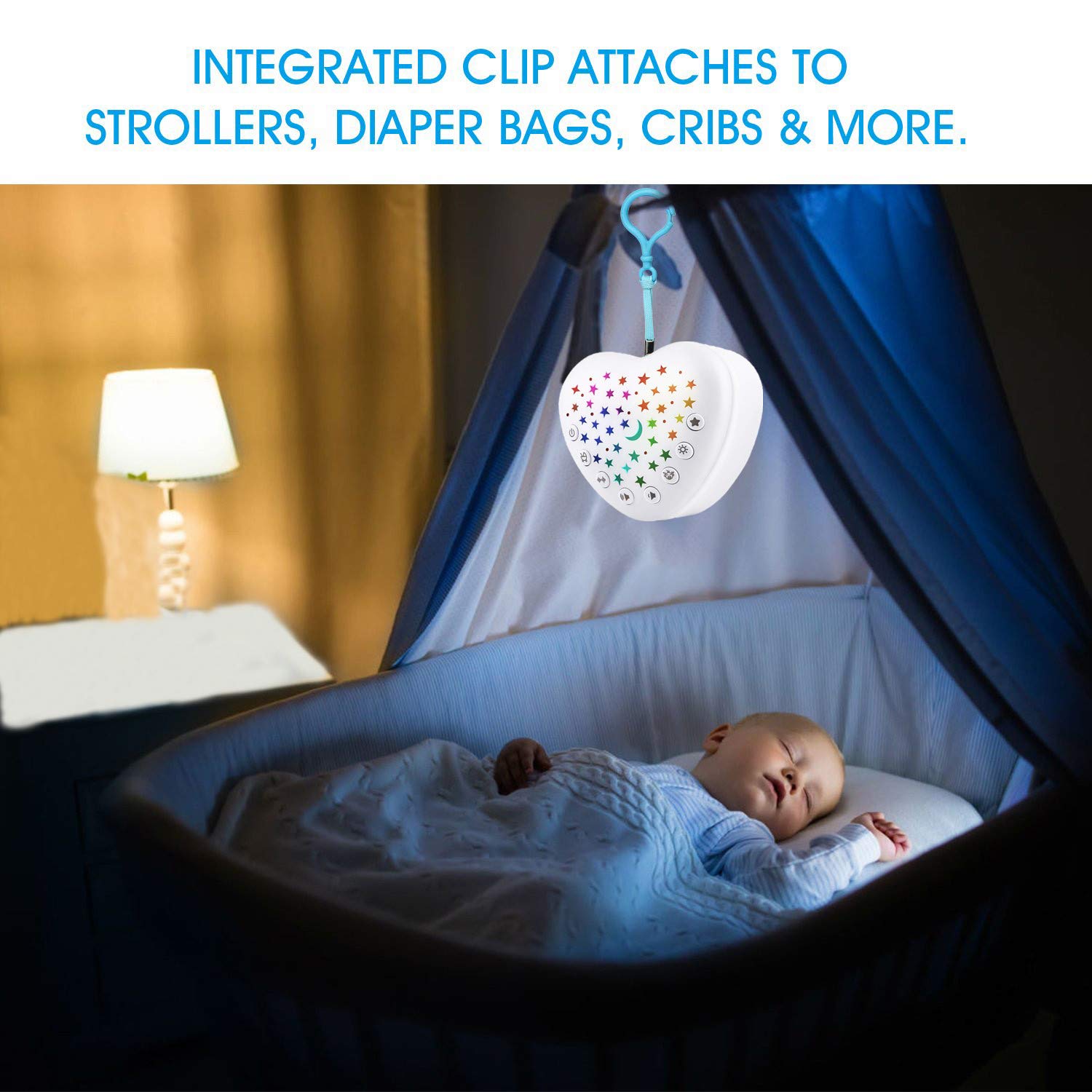
Image: The BEREST A13 device securely attached to the side of a baby's crib, demonstrating its portability and attachment feature.
Naudojimo instrukcijos
Familiarize yourself with the device controls for optimal use.
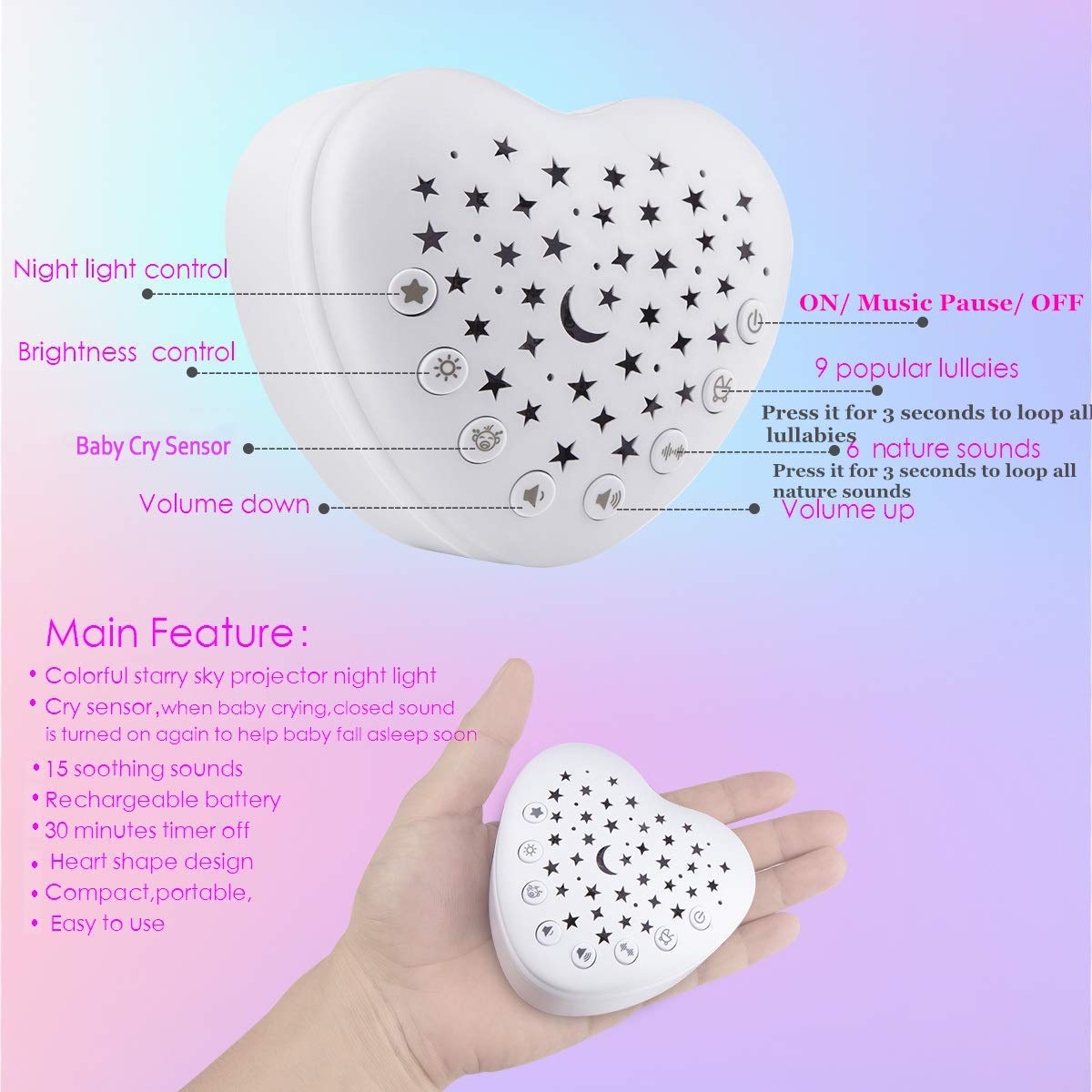
Paveikslėlis: detalus view of the BEREST A13 device, highlighting the various control buttons for night light, brightness, cry sensor, volume, and sound selection.
Power and Sound Selection
- Maitinimo įjungimas/išjungimas: Press and hold the power button (labeled with a power icon) for 3 seconds to turn the device on or off.
- Leisti / pristabdyti muziką: A short press of the power button will play or pause the selected sound.
- Keisti garsus: Press the music note button to cycle through the 15 available soothing sounds. These include mom's heartbeat, white noise, baby shush sound, ocean wave, bird song, and 9 different lullabies.
- Loop All Sounds: Press and hold the music note button for 3 seconds to activate a continuous loop of all available lullabies or nature sounds.
- Garso reguliavimas: Naudokite garsumo didinimo mygtuką (+) ir garsumo mažinimas (-) buttons to adjust the sound level to a comfortable and safe volume.

Image: The BEREST A13 device next to a sleeping baby, illustrating the variety of 15 high-quality soothing sounds available, including lullaby, white noise, heartbeat, shushing, and ocean sounds.
Žvaigždžių projektoriaus naktinė šviesa
- Projektoriaus aktyvavimas: Press the light projector button (labeled with a sun/star icon) to activate the colorful moon and starry night light display. The light will slowly fade through different colors.
- Sureguliuokite ryškumą: Use the brightness control button (labeled with a light bulb icon) to cycle through 3 adjustable brightness levels for the projected light.

Image: The BEREST A13 device placed inside a baby's crib, projecting a starry night light display onto the crib canopy, with a sleeping baby visible.
Išmanusis kūdikio verksmo jutiklis
- Enable Cry Sensor: Press the baby cry sensor button (labeled with a baby icon) to activate this feature. When enabled, the device will automatically detect a baby's crying and play music for 30 minutes to help soothe the baby back to sleep.
- Continuous Operation with Cry Sensor: To allow the machine to operate all night, ensure the cry sensor is enabled and no auto-off timer is set. The device will reactivate when it detects sound.

Image: A graphic illustrating the BEREST A13 device's cry sensor feature, showing sound waves emanating from the device towards a crying baby, with a sleeping baby below.
Automatinio išjungimo laikmatis
- Nustatyti laikmatį: Press the timer button (labeled with a clock icon) to select an auto-off duration of 20, 40, or 60 minutes. The device will automatically shut off after the selected time.
- Disable Timer for All-Night Play: If continuous operation is desired, ensure no timer setting is active.

Image: The BEREST A13 device next to a sleeping child, displaying icons for 20, 40, and 60-minute auto-off timer options.
Priežiūra
- Valymas: Nuvalykite prietaisą minkštu, sausu skudurėliu. Nenaudokite abrazyvinių valiklių ir nemerkite jo į vandenį.
- Saugykla: Nenaudojamą prietaisą laikykite vėsioje, sausoje vietoje.
- Akumuliatoriaus priežiūra: The built-in lithium-ion battery is rechargeable. Recharge when the power is low. Avoid fully depleting the battery frequently to prolong its lifespan.

Image: The BEREST A13 device connected to a USB charging cable, with an illustration of a battery charging and a crossed-out image of disposable AA batteries, emphasizing its rechargeable nature.
Trikčių šalinimas
| Problema | Galima priežastis | Sprendimas |
|---|---|---|
| Įrenginys neįsijungia. | Išsikrovęs akumuliatorius arba įrenginys išjungtas. | Visiškai įkraukite įrenginį. Norėdami įjungti, 3 sekundes palaikykite nuspaudę maitinimo mygtuką. |
| No sound or projector light. | Volume too low, light off, or device paused. | Increase volume. Press the light button to activate. Press the power button to unpause. |
| Auto-off timer not working as expected. | Incorrect timer setting or cry sensor interference. | Ensure the desired timer setting (20/40/60 min) is selected. If continuous play is desired, ensure no timer is set. Note that the cry sensor may reactivate the device if it detects sound, overriding a set timer for continuous soothing. |
| Cry sensor not activating or too sensitive. | Sensor not enabled or environmental factors. | Ensure the cry sensor button is pressed to enable it. The sensor is sensitive; ensure the device is placed in a quiet environment to avoid false triggers. |
| Projected stars are dim. | Brightness setting is low or room is too bright. | Adjust brightness using the brightness control button. Ensure the room is sufficiently dark for optimal projection. |
Specifikacijos
| Funkcija | Detalė |
|---|---|
| Modelio numeris | A13 |
| Gaminio matmenys | 2.76 x 2.76 x 1.97 colio (apytiksliai 7.01 x 7.01 x 5.00 cm) |
| Prekės svoris | 4 uncijos |
| Maitinimo šaltinis | Maitinamas baterijomis (įkraunamas ličio jonų) |
| Medžiagos tipas | Plastikiniai |
| Raminantys garsai | 15 (including heartbeat, white noise, shush, ocean, bird song, lullabies) |
| Projektoriaus šviesa | Colorful Moon & Starry Night Light with 3 brightness levels |
| Verksmo jutiklis | Automatic music playback for 30 minutes upon detection of crying |
| Automatinio išjungimo laikmatis | 20, 40, or 60 minutes options |
Garantija ir palaikymas
For warranty information or technical support, please refer to the product packaging or contact BEREST customer service through the retailer where the product was purchased. Keep your purchase receipt as proof of purchase.


