1. Įvadas
The TechniSat TECHNIRADIO RDR is a portable digital and FM radio designed for on-the-go listening. It features DAB+ digital radio reception for clear, noise-free audio, as well as traditional FM radio with RDS. The device supports MP3 playback from USB storage devices and includes an AUX-IN interface for connecting external audio sources. Its compact design, replaceable battery, and integrated LED torch make it a versatile companion for various environments.
2. Kas yra dėžutėje
- TechniSat TECHNIRADIO RDR Portable Radio
- Mini USB Charging Cable
- Rechargeable Lithium-Ion Battery (3.7 V / 800 mAh)
- Instrukcijų vadovas
3. Produkto ypatybės
- DAB+ skaitmeninis radijas: Enjoy a wide range of digital radio programs with robust, noise-free reception.
- FM radijas su RDS: Tune into traditional FM stations and receive broadcast information via RDS.
- LCD ekranas: A two-line LCD provides information about the current radio program and settings.
- Favorite Memory: Išsaugokite iki 20 DAB+ ir 20 FM stočių, kad galėtumėte jas greitai pasiekti.
- Tiesioginio rinkimo mygtukai: Four freely assignable buttons for instant access to preferred stations.
- USB atkūrimas: Groti MP3 muziką files directly from a connected USB data carrier.
- AUX-IN Interface: Connect external audio sources like smartphones or MP3 players.
- Ausinių lizdas: Privačiam pasiklausymui.
- Integrated LED Torch: Užtikrina apšvietimą tamsioje aplinkoje.
- Changeable and Rechargeable Battery: Offers up to 10 hours of portable music enjoyment.
- Kompaktiškas ir nešiojamas dizainas: Easy to carry with dimensions of 12.7 cm x 2.3 cm x 5.8 cm and a weight of 124g.
4. Valdikliai ir jungtys
Priekinio skydelio valdikliai

Vaizdas: priekis view of the TechniSat TECHNIRADIO RDR. This image displays the LCD screen, the speaker grille on the left, and the control buttons on the right. Buttons include navigation arrows (<, OK, >), numbered direct dial buttons (1-4), and function buttons (MOD, M, I, LED).
- LCD ekranas: Rodo stoties informaciją, laiką ir meniu parinktis.
- Pranešėjas: Garso išvestis.
- < / > Buttons: Navigate menus, change stations, or adjust settings.
- Gerai mygtukas: Patvirtinkite pasirinkimus.
- 1–4 mygtukai: Direct access to preset favorite stations.
- MOD (režimo) mygtukas: Switch between DAB+, FM, USB, and AUX modes.
- M (Menu/Memory) Button: Access menu options or save/recall presets.
- I (Info) Button: Display additional information (e.g., RDS data).
- LED mygtukas: Activate/deactivate the LED torch.
Side and Rear Connections

Vaizdas: kampuotas view of the TechniSat TECHNIRADIO RDR, highlighting the side panel. This image shows the USB port, AUX-in jack, and headphone jack. The wrist strap attachment point is also visible.
- USB prievadas (A tipo): For connecting USB storage devices to play MP3 files.
- AUX-IN lizdas (3.5 mm): Prijunkite išorinius garso įrenginius.
- Ausinių lizdas (3.5 mm): Privataus garso klausymosi.
- Mini-USB Port (DC 5V): Skirta vidinei baterijai įkrauti.
- Baterijų skyrius: Located on the rear, for the replaceable Li-ion battery.
5. Sąranka
5.1. Baterijos įdėjimas ir įkrovimas
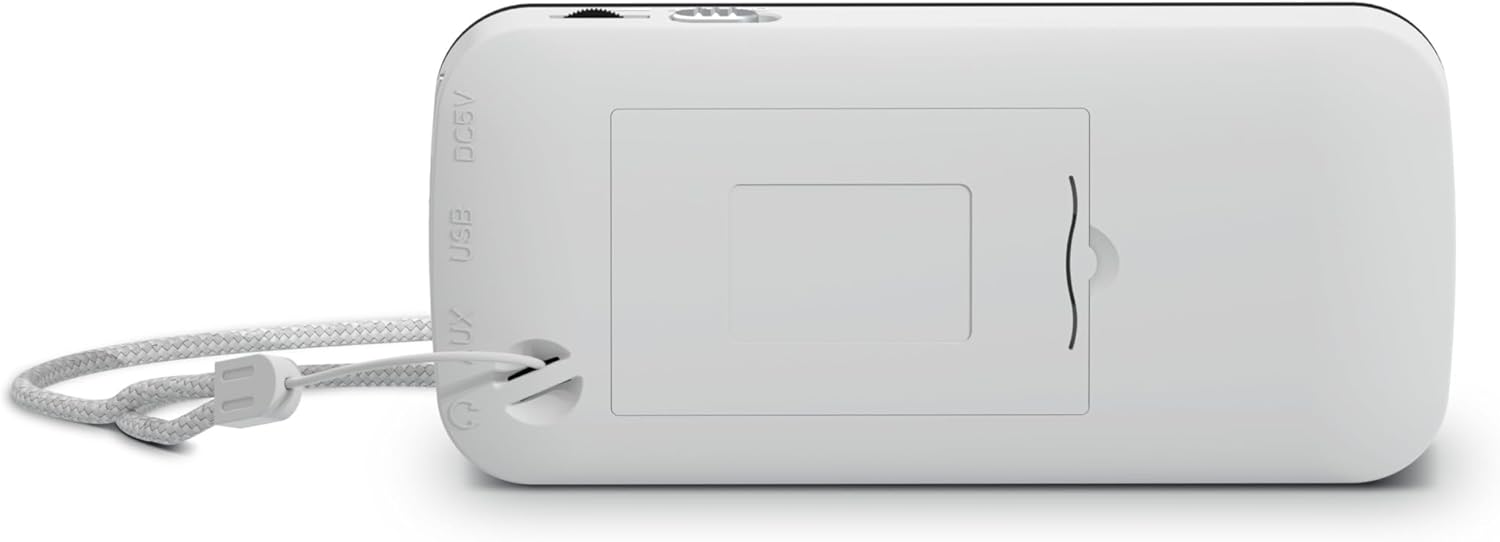
Vaizdas: Galinis view of the TechniSat TECHNIRADIO RDR. This image shows the battery compartment cover, which can be opened to insert or replace the rechargeable Lithium-Ion battery. The DC 5V and USB labels are also visible on the side.
- Raskite baterijų skyrių įrenginio gale.
- Atidarykite akumuliatoriaus skyriaus dangtelį.
- Įdėkite pateiktą ličio jonų bateriją, užtikrindami teisingą poliškumą.
- Saugiai uždarykite akumuliatoriaus skyriaus dangtelį.
- Connect the mini USB charging cable to the mini-USB port on the side of the radio and to a suitable USB power adapter (not included) or a computer USB port.
- Ekrane esantis akumuliatoriaus indikatorius rodys įkrovimo būseną. Visiškas įkrovimas paprastai trunka kelias valandas.
5.2. Pradinis įjungimas
- After charging, disconnect the USB cable.
- Press and hold the power button (usually integrated with the MOD button or a dedicated button, refer to specific button layout if available) to turn on the radio.
- Upon first use, the radio may automatically initiate a DAB+ scan.
6. Naudojimo instrukcijos
6.1. Režimo pasirinkimas
Paspauskite MOD button repeatedly to cycle through available modes: DAB+, FM, USB, and AUX.
6.2. DAB+ radijo valdymas
- Perjunkite į DAB+ režimą naudodami MOD mygtuką.
- If it's the first time or if stations need to be updated, perform a full scan:
- Paspauskite M (Meniu) mygtuką.
- Naudokite </> mygtukais pereikite prie „Pilnas nuskaitymas“ ir paspauskite OK.
- The radio will scan for available DAB+ stations and store them.
- To select a station, use the </> buttons to browse the station list. Press OK patvirtinti.
- Norėdami išsaugoti mėgstamiausią stotį:
- Nustatykite norimą stotį.
- Paspauskite ir palaikykite M mygtuką, kol pasirodys „Preset Store“ (Išankstinių nustatymų saugojimas).
- Naudokite </> to select a preset number (1-20) and press OK.
- Norėdami iškviesti mėgstamą stotį, trumpai paspauskite M mygtuką, naudokite </> to select the preset, and press OK. Alternatively, use the direct dial buttons 1-4 if assigned.
- Paspauskite I (Info) button to cycle through different information displays (e.g., program type, signal strength).
6.3. FM radijo veikimas
- Perjunkite į FM režimą naudodami MOD mygtuką.
- To auto-scan for stations:
- Paspauskite ir palaikykite < or > button to automatically search for the next available station.
- Norėdami rankiniu būdu derinti, trumpai paspauskite < or > button to adjust the frequency step by step.
- To save a favorite station, follow the same procedure as DAB+ (press and hold M, select preset, OK).
- To recall a favorite station, briefly press M, select preset, OK, or use direct dial buttons 1-4.
- The radio supports RDS (Radio Data System), which displays station name and other information. Press the I (Info) button to cycle through available RDS data.
6.4. MP3 atkūrimas per USB
- Įdėkite USB atmintinę (pvz., USB atmintinę), kurioje yra MP3 failų. fileį USB A tipo prievadą.
- Perjunkite į USB režimą naudodami MOD mygtuką.
- The radio will automatically detect and start playing MP3 files.
- Naudokite </> mygtukai, norėdami praleisti takelius.
- The OK button may function as Play/Pause.
6.5. AUX-IN Usage
- Connect an external audio device (e.g., smartphone, MP3 player) to the AUX-IN jack using a 3.5mm audio cable (not included).
- Perjunkite į AUX režimą naudodami MOD mygtuką.
- Valdykite atkūrimą ir garsumą tiesiai iš prijungto išorinio įrenginio.
6.6. LED Torch Function
Paspauskite LED button to turn the integrated LED torch on or off.
7. Informacija apie akumuliatorių
- The TECHNIRADIO RDR uses a replaceable 3.7V / 800 mAh Lithium-Ion battery.
- A fully charged battery provides up to 10 hours of operation, depending on usage and volume level.
- Charge the battery using the supplied mini USB cable connected to a 5V USB power source.
- Norėdami pailginti akumuliatoriaus veikimo laiką, venkite dažnai visiškai iškrauti akumuliatorių ir, jei nenaudojate ilgą laiką, laikykite įrenginį su daliniu įkrovimu.
- If the battery needs replacement, use only genuine TechniSat replacement batteries or compatible alternatives with the same specifications.
8. Priežiūra
- Valymas: Radijo imtuvo išorę valykite minkštu, sausu skudurėliu. Nenaudokite abrazyvinių valiklių, vaško ar tirpiklių.
- Saugykla: Radijo imtuvą laikykite vėsioje, sausoje vietoje, toliau nuo tiesioginių saulės spindulių ir ekstremalių temperatūrų.
- Vandens ekspozicija: Šis prietaisas nėra atsparus vandeniui. Venkite sąlyčio su vandeniu ar didele drėgme.
- Akumuliatoriaus priežiūra: Refer to Section 7 for battery maintenance guidelines.
9. Problemų sprendimas
| Problema | Galima priežastis / sprendimas |
|---|---|
| Nėra maitinimo / Įrenginys neįsijungia. |
|
| No DAB+ stations found. |
|
| Poor FM reception / Static. |
|
| USB atkūrimas neveikia. |
|
| Nėra garso iš AUX-IN. |
|
10. Specifikacijos
Generolas
- Modelio pavadinimas: TECHNIRADIO RDR
- Modelio numeris: 0001/3922
- Prekinis ženklas: TechniSat
- Spalva: Baltas
- Ekrano tipas: LCD (dviejų eilučių)
Garsas
- RMS galia: 1 vatų
- Speaker Output Channel Quantity: 1 (mono)
- Headphone Connectivity: 3.5 mm lizdas
Derintuvas
- Tuner technologija: DAB+ / FM
- Palaikomos radijo juostos: DAB+, UKW (FM)
- Savybės: RDS (Radio Data System) for FM, Favourite Memory (20 DAB+/20 FM)
Ryšys
- USB jungtis: Yes (USB Type-A for MP3 playback, Mini-USB for charging)
- AUX įvestis: Yes (3.5 mm Jack)
- Iš viso USB prievadų: 1 (Type-A for media, Mini-USB for power)
Galia
- Maitinimo šaltinis: Maitinamas baterijomis
- Baterijos tipas: Lithium Ion (3.7 V / 800 mAh)
- Įtrauktos baterijos: Taip
- Įkraunama baterija: Taip
- Veikimo laikas: Iki 10 valandų (apytiksliai)
Fizinis
- Gaminio matmenys (P x G x A): 12.7 cm x 2.3 cm x 5.8 cm
- Prekės svoris: 124 gramų
- Ypatingos savybės: LED žibintuvėlis
11. Garantija ir palaikymas
For warranty information and technical support, please refer to the warranty card included with your product or visit the official TechniSat websvetainėje. Išsaugokite pirkimo įrodymą, jei prireiktų pateikti garantinį ieškinį.


