Įvadas
This manual provides essential instructions for the safe and efficient operation of your Powertech UPS Line Interactive PT-950C. Please read this manual thoroughly before installation and use, and retain it for future reference. The Uninterruptible Power Supply (UPS) is designed to protect your electronic equipment from power outages, surges, and sags, ensuring continuous operation and data integrity.
Svarbios saugos instrukcijos
- Neatidarykite UPS korpuso.asing. Viduje nėra dalių, kurias galėtų aptarnauti vartotojas. Kreipkitės į kvalifikuotus techninės priežiūros darbuotojus.
- Do not install the UPS in direct sunlight, near heat sources, or in environments with excessive dust, moisture, or flammable liquids.
- Ensure adequate ventilation around the UPS. Do not block ventilation openings.
- UPS junkite tik prie įžeminto kintamosios srovės lizdo.
- Do not connect appliances that could overload the UPS, such as laser printers, heaters, or vacuum cleaners.
- In case of fire, use a dry chemical extinguisher. Water can be dangerous near electrical equipment.
- Disconnect the UPS from the AC power outlet before cleaning. Use a dry cloth.
Produktas baigtasview ir komponentai
The Powertech PT-950C UPS features a compact design with multiple Schuko outlets for connecting your devices. Below is an illustration of the unit's main features.
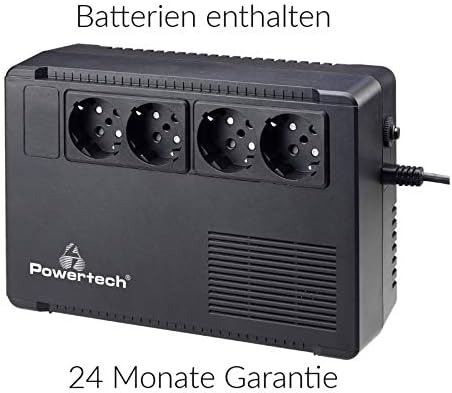
1 paveikslas: Priekyje view of the Powertech PT-950C UPS, showing four Schuko-type power outlets. The Powertech logo is visible on the lower left, and ventilation grilles are on the right side. A power cord is connected to the right side of the unit.
Pagrindiniai komponentai:
- Schuko Outlets (4x): Provide battery backup and surge protection for connected equipment.
- Maitinimo mygtukas: Controls the UPS power on/off status.
- Kintamosios srovės įvesties laidas: Connects the UPS to the wall power outlet.
- LED indikatoriai: (Typically located on the front panel, exact position may vary) Display operational status such as AC mode, battery mode, and fault conditions.
Sąrankos instrukcijos
- Išpakavimas: Atsargiai išimkite UPS iš pakuotės. Patikrinkite, ar nėra jokių transportavimo pažeidimų.
- Vieta: Place the UPS on a flat, stable surface in a well-ventilated area, away from direct sunlight, heat, dust, and moisture. Ensure there is sufficient space around the unit for airflow.
- Pradinis įkrovimas: Connect the UPS to a standard grounded AC wall outlet using its integrated power cord. Allow the unit to charge for at least 8 hours before connecting any equipment to ensure optimal battery performance. The UPS will charge whether it is turned on or off.
- Prijungimo įranga: After the initial charge, connect your computer, monitor, and other critical electronic devices to the Schuko outlets on the UPS. Ensure the total power consumption of connected devices does not exceed the UPS's capacity (570W).
- Maitinimas: Press the power button on the UPS to turn it on. The indicator light should illuminate, confirming operation.
UPS valdymas
- Įjungimas / išjungimas: Press and hold the power button for approximately 2-3 seconds to turn the UPS on or off.
- AC režimas: When connected to a stable AC power source, the UPS operates in AC mode, providing power to connected devices and charging its internal battery. An indicator light (e.g., green LED) typically confirms this status.
- Baterijos režimas: Per galios outage arba reikšmingas tūristage fluctuation, the UPS automatically switches to battery mode, providing power from its internal battery. An audible alarm may sound, and an indicator light (e.g., flashing green or amber LED) will signal this mode.
- Įspėjimas apie senkantį akumuliatorių: If the battery level becomes critically low during battery mode, the UPS will emit a more frequent alarm, indicating that connected devices should be safely shut down.
- Įspėjimas apie perkrovą: If the connected load exceeds the UPS's capacity, an alarm will sound, and a fault indicator may illuminate. Disconnect non-essential equipment immediately to prevent damage.
Priežiūra
- Akumuliatoriaus priežiūra: To maximize battery life, ensure the UPS is always connected to an AC power source. If the UPS is stored for an extended period, recharge it every three months for at least 8 hours.
- Valymas: Disconnect the UPS from the wall outlet and all connected devices before cleaning. Use a soft, dry cloth to wipe the exterior. Do not use liquid or aerosol cleaners.
- Baterijos keitimas: The internal battery is not user-replaceable. Contact qualified service personnel for battery replacement. Improper replacement can lead to hazards.
Trikčių šalinimas
| Problema | Galima priežastis | Sprendimas |
|---|---|---|
| UPS neįsijungia. | No AC input power; Low battery; UPS fault. | Check AC power connection; Allow UPS to charge for 8 hours; Contact support if fault persists. |
| UPS nuolat pypsi kintamosios srovės režimu. | Perkrovos būklė. | Disconnect non-essential equipment until the alarm stops. Ensure total load is within 570W. |
| Trumpas atsarginės kopijos laikas. | Baterija nėra visiškai įkrauta; Baterijos tarnavimo laikas artėja prie pabaigos; Perkrova. | Ensure initial 8-hour charge; Reduce connected load; Consider battery replacement by service personnel. |
| UPS netiekia maitinimo prijungtiems įrenginiams. | UPS is off; Battery discharged; Fault condition. | Turn on UPS; Allow battery to charge; Check for fault indicators and contact support. |
Specifikacijos
- Modelis: PT-950C
- Talpa: 950 570 VA / XNUMX W
- Tipas: Interaktyvi linija
- Įvesties tomastage: 220-240 VAC
- Išėjimas ttage (Battery Mode): 220-240 VAC (simulated sine wave)
- Išparduotuvės: 4 x Schuko (baterijos atsarginis maitinimas ir apsauga nuo viršįtampių)
- Perkėlimo laikas: Įprastai 2-6 ms
- Baterijos tipas: Sealed Lead-Acid, Maintenance-Free (Batteries included)
- Įkrovimo laikas: 6-8 valandos iki 90% pajėgumo
- Apsauga: Overload, Discharge, Overcharge, Short Circuit
Garantija ir palaikymas
The Powertech UPS Line Interactive PT-950C comes with a 24 mėnesių garantija nuo pirkimo datos, apimanti gamybos defektus. Prašome išsaugoti pirkimo įrodymą garantiniams reikalavimams.
For technical support, troubleshooting assistance beyond this manual, or warranty service, please contact your retailer or the Powertech customer service department. Refer to the product packaging or Powertech's official websvetainė kontaktinei informacijai.


