Įvadas
This manual provides detailed instructions for the Bluedio Bluetooth 5.0 Over-Ear Headphones. It covers product features, setup, operation, maintenance, and troubleshooting to ensure optimal performance and user experience.
Kas yra dėžutėje
- Bluedio HT wireless headphones
- Mikro USB įkrovimo laidas
- 3.5 mm garso kabelis
- Vartotojo vadovas
Produktas baigtasview
Familiarize yourself with the various components and controls of your Bluedio headphones.

Figure 1: Headset Overview su pažymėtais komponentais.
- Garsumo didinimo mygtukas: Padidina garso garsumą.
- Garsumo mažinimo mygtukas: Sumažina garso garsumą.
- LED indikatorius: Displays device status (e.g., pairing, connected, charging).
- Power/MF Button (Multi-Function Button): Powers on/off, controls playback, answers/ends calls.
- Wheel Switch: Used for previous/next track selection.
- USB įkrovimo lizdas: Ausinėms įkrauti.
- Mikrofonas: Integruota skambučiams ir balso komandoms.
- Garso lizdas (3.5 mm): Laidiniam garso prijungimui.
Sąranka
Ausinių įkrovimas
Before first use, fully charge your headphones. Use the provided Micro USB charging cable to connect the headphones to a power source.

Figure 2: Long Working Time and Battery.
- Baterijos talpa: 650 mAh
- Įkrovimo laikas: Apytiksliai 1 valanda pilnai įkrauti.
- Muzikos atkūrimo laikas: Iki 40 valandų visiškai įkrovus.
- Pokalbio laikas: Iki 45 valandų visiškai įkrovus.
- Budėjimo laikas: Iki 30 dienų.
Pairing with Your Mobile Phone
Follow these steps to pair your Bluedio headphones with your device via Bluetooth:

Figure 3: Bluetooth Pairing Guide.
- Laikykitės atstumo tarp laisvų rankų įrangos ir mobiliojo telefono per 1 metrą. Kuo arčiau, tuo geriau.
- When the headset is off (if not, turn off the headphones first), press and hold the Power/MF Button for 5 seconds or so, only when you see the blue light stays on (instead of blinking), can you release the button. The headset is in pairing mode.
- Įjunkite savo mobiliojo telefono „Bluetooth“, pridėkite / ieškokite įrenginių.
- When "H" or "Bluedio" appears, select it. If asked for a pass code: Enter "0000".
Dėmesio:
If pairing is not successful within 60 seconds, the LED goes out and the headset is out of pairing mode. Repeat the pairing procedure.
Naudojimo instrukcijos
Muzikos atkūrimas
The headphones feature a Hurricane turbine housing design for powerful bass resonance and CD lossless sound with SNR up to 98dB for crystal-clear audio.

Figure 4: High-Fidelity Audio Experience.
- Leisti / pristabdyti: Paspauskite Power/MF Button vieną kartą.
- Kitas takelis: Naudokite Ratų jungiklis pirmyn.
- Ankstesnis takelis: Naudokite Ratų jungiklis atgal.
- Garsumo valdymas: Naudokite garsumo didinimo / mažinimo mygtukus.
- Dalijimasis muzika: Connect another headphone (e.g., Bluedio Shooting Brake) via the 3.5mm audio cable to share music instantly. (Recommended to use earphones with impedance of at least 32Ω).
Skambučių valdymas
The built-in microphone and echo suppression ensure clear communication during calls.
- Atsiliepti / Baigti skambutį: Paspauskite Power/MF Button vieną kartą.
- Atmesti skambutį: Paspauskite ir palaikykite Power/MF Button 2 sekundes.
- Perrink paskutinį numerį: Du kartus paspauskite Power/MF Button.
Voice Prompts and Smart Features
The headphones offer voice prompts in multiple languages and integrate with cloud services for enhanced functionality.

Figure 5: Voice Prompt and Bluetooth 5.0 Features.
- Voice Prompt Languages: English, Chinese, Spanish, French. Switch by pressing the Power/MF Button ir Garsumo mažinimo mygtukas vienu metu.
- Debesijos paslaugų integracija: Supports Baidu Cloud Engine and Amazon Cloud. Download the Bluedio APP to access your AWS account for music, weather, news, and agenda.
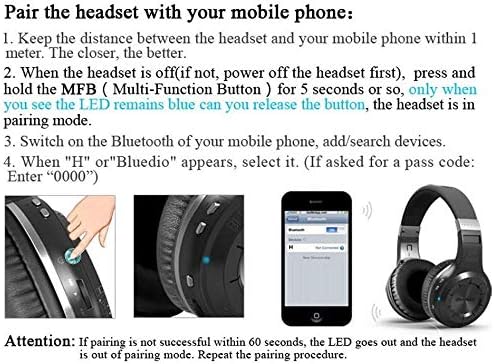
Figure 6: Smart Features with Cloud Service.
Specifikacijos
| Funkcija | Detalė |
|---|---|
| Bluetooth versija | 5.0 |
| „Pro“ palaikymasfiles | A2DP, AVRCP, HTSP, HTFP |
| Bendravimo atstumas | 10 metrai |
| Dinaminis diapazonas | 118 dB |
| Pavaros blokas | 57 mm |
| Rago varža | 16 Ω |
| Totalus harmoninis iškraipymas (THD) | <0.5 % |
| Baterijos talpa | 650 mAh |
| Muzikos atkūrimo laikas | 40 valandos |
| Pokalbių laikas | 45 valandos |
| Budėjimo laikas | 30 dienų |
| Įkrovimo laikas | 1 valandos |
| Matmenys | 7.09 x 6.69 x 1.97 colio |
| Prekės svoris | 15.5 uncijos |
| Triukšmo valdymas | Aktyvus triukšmo slopinimas |
| Ausinės Jack | 3.5 mm lizdas |
| Valdymo tipas | Medijos valdymas, balsas |
Priežiūra
Tinkama priežiūra užtikrina ausinių ilgaamžiškumą ir našumą.
- Valymas: Gently wipe the earcups and headband with a soft, dry cloth. Do not use harsh chemicals or abrasive materials.
- Saugykla: Store the headphones in a cool, dry place away from direct sunlight and extreme temperatures. When not in use, it is recommended to store them in a protective case to prevent damage.
- Akumuliatoriaus priežiūra: Venkite dažnai visiškai iškrauti akumuliatorių. Ilgalaikio sandėliavimo metu įkraukite akumuliatorių maždaug iki 50 % kas kelis mėnesius.
- Kabelių valdymas: Handle the charging and audio cables carefully to prevent kinks or damage.
Trikčių šalinimas
Jei kyla problemų dėl ausinių, žr. šiuos dažniausiai pasitaikančius sprendimus:
- Nepavyksta sujungti:
- Įsitikinkite, kad ausinės yra visiškai įkrautos.
- Make sure the headphones are in pairing mode (blue LED stays on).
- Išjunkite ir įjunkite „Bluetooth“ savo įrenginyje.
- Ištrinkite ankstesnius „Bluetooth“ ryšius savo įrenginyje.
- Pabandykite susieti su kitu įrenginiu, kad atmestumėte su įrenginiu susijusias problemas.
- Nėra garso:
- Patikrinkite garsumo lygį tiek ausinėse, tiek prijungtame įrenginyje.
- Įsitikinkite, kad ausinės yra tinkamai susietos ir prijungtos.
- If using a wired connection, ensure the 3.5mm audio cable is fully inserted into both the headphones and the audio source.
- Pabandykite iš naujo paleisti ausines ir garso šaltinio įrenginį.
- Prasta garso kokybė:
- Move closer to your connected device to avoid interference or being out of range.
- Ensure there are no physical obstructions between the headphones and the device.
- Patikrinkite, ar garso šaltinio kokybė yra aukšta.
- Ausinės neįsijungia:
- Įsitikinkite, kad ausinės yra visiškai įkrautos.
- Press and hold the Power/MF button for a longer duration (e.g., 5-7 seconds).
Garantija ir palaikymas
Bluedio offers a comprehensive warranty and support for your product.
- Grąžinimo politika: 30 days with no reason to return for your Bluedio Bluetooth headphone.
- Garantija: 12 Months worry-free warranty.
- For further assistance or warranty claims, please refer to the contact information provided in your product packaging or visit the official Bluedio support websvetainę.


