1. Svarbios saugos instrukcijos
Please read all instructions carefully before using the V-Guard VIC-07 V3 Induction Cooktop. Retain this manual for future reference.
- Nemerkite prietaiso, laido ar kištuko į vandenį ar kitus skysčius.
- Užtikrinkite maitinimo šaltinio ttage atitinka prietaiso vardinę etiketę.
- Prietaisą laikykite atokiau nuo vaikų ir naminių gyvūnėlių.
- Nenaudokite prietaiso su pažeistu laidu ar kištuku. Dėl remonto kreipkitės į įgaliotąjį techninės priežiūros personalą.
- Place the cooktop on a stable, flat, heat-resistant surface, away from walls or other appliances to ensure proper ventilation.
- Do not place metallic objects such as knives, forks, spoons, lids, cans, or aluminum foil on the induction cooktop surface, as they can become hot.
- Avoid touching the hot surface immediately after cooking. The ceramic plate may retain residual heat.
- Neužblokuokite ventiliacijos angų veikimo metu.
- Unplug the cooktop when not in use and before cleaning.
- Individuals with pacemakers or similar medical devices should consult their doctor before using an induction cooktop.
2. Produktas baigtasview
Familiarize yourself with the components and control panel of your V-Guard VIC-07 V3 Induction Cooktop.

2.1 paveikslas: Control Panel Layout of the V-Guard VIC-07 V3 Induction Cooktop. This image displays the various buttons and the 4-digit LED display, including the Timer Button, Power ON/OFF, Menu Selector, Auto Indian Cooking Modes, Power Level Increase/Decrease, and Voltage Indikacija.
- 4 skaitmenų LED ekranas: Shows power level, temperature, timer, and error codes.
- Įjungimo/išjungimo mygtukas: To switch the appliance on or off.
- Laikmačio mygtukas: Activates the timer function.
- Menu Selector: Cycles through various cooking modes.
- Aukštyn/žemyn mygtukai (+/-): Adjusts power, temperature, or time settings.
- Volt/Units Button: Rodo ttage or power consumption.
3. Sąranka ir diegimas
Norėdami paruošti indukcinę kaitlentę pirmajam naudojimui, atlikite šiuos veiksmus.
- Išpakavimas: Carefully remove the cooktop from its packaging. Inspect for any damage. Keep packaging materials for future transport or disposal.
- Vieta: Place the cooktop on a dry, stable, and heat-resistant surface. Ensure there is at least 10-15 cm of clear space around the appliance for adequate ventilation. Do not place it near heat sources or on metallic surfaces.
- Maitinimo jungtis: Plug the power cord into a grounded electrical outlet. Ensure the outlet rating matches the cooktop's requirements (1600 Watts).
4. Naudojimo instrukcijos
This section details how to use your V-Guard VIC-07 V3 Induction Cooktop for various cooking needs.
4.1. Pagrindinė operacija
- Place suitable cookware (refer to Section 5) with food on the center of the ceramic plate.
- Plug the appliance into a power outlet. The cooktop will emit a beep, and the display will show '----'.
- Paspauskite Maitinimas ON/OFF button. The cooktop will enter standby mode.
- Select a cooking mode or adjust power/temperature.
- Norėdami išjungti, paspauskite Maitinimas ON/OFF button again. The display will show '----' and then turn off.
4.2. Auto Indian Cooking Modes
The cooktop features 5 pre-programmed auto Indian cooking modes for convenience.
4.1 paveikslas: Illustration of the 5 Auto Indian Cooking Modes (Dosa/Roti, Idli, Milk, Boil, Warm) and 3 Manual Operation Functions (Deep Fry, Fry, Manual) available on the V-Guard VIC-07 V3 Induction Cooktop.
- Dosa/Roti: Optimized for flatbreads.
- Idli: Suitable for steaming idlis.
- Pienas: Gentle heating for milk to prevent boiling over.
- Virti: High power for boiling water or other liquids.
- Šiltas: Palaiko maistą šiltoje temperatūroje.
To select an auto mode, press the Menu Selector button repeatedly until the desired mode is displayed. The cooktop will automatically adjust power and temperature.
4.3. Rankinis valdymas
For precise control, use the manual cooking functions:
- Deep Fry: High power for deep frying.
- Kepti: Medium to high power for general frying.
- Rankinis: Allows full control over power and temperature settings.
After selecting a manual mode, use the Aukštyn/Žemyn (+/-) buttons to adjust the power level (from 120W to 1600W) or temperature (from 80°C to 240°C).

4.2 paveikslas: The V-Guard VIC-07 V3 Induction Cooktop offers a power range of 120W to 1600W and variable temperature settings from 80°C to 240°C for precise cooking control.
4.4. Laikmačio ir išankstinių nustatymų funkcijos
The cooktop includes a timer and preset function for delayed cooking.
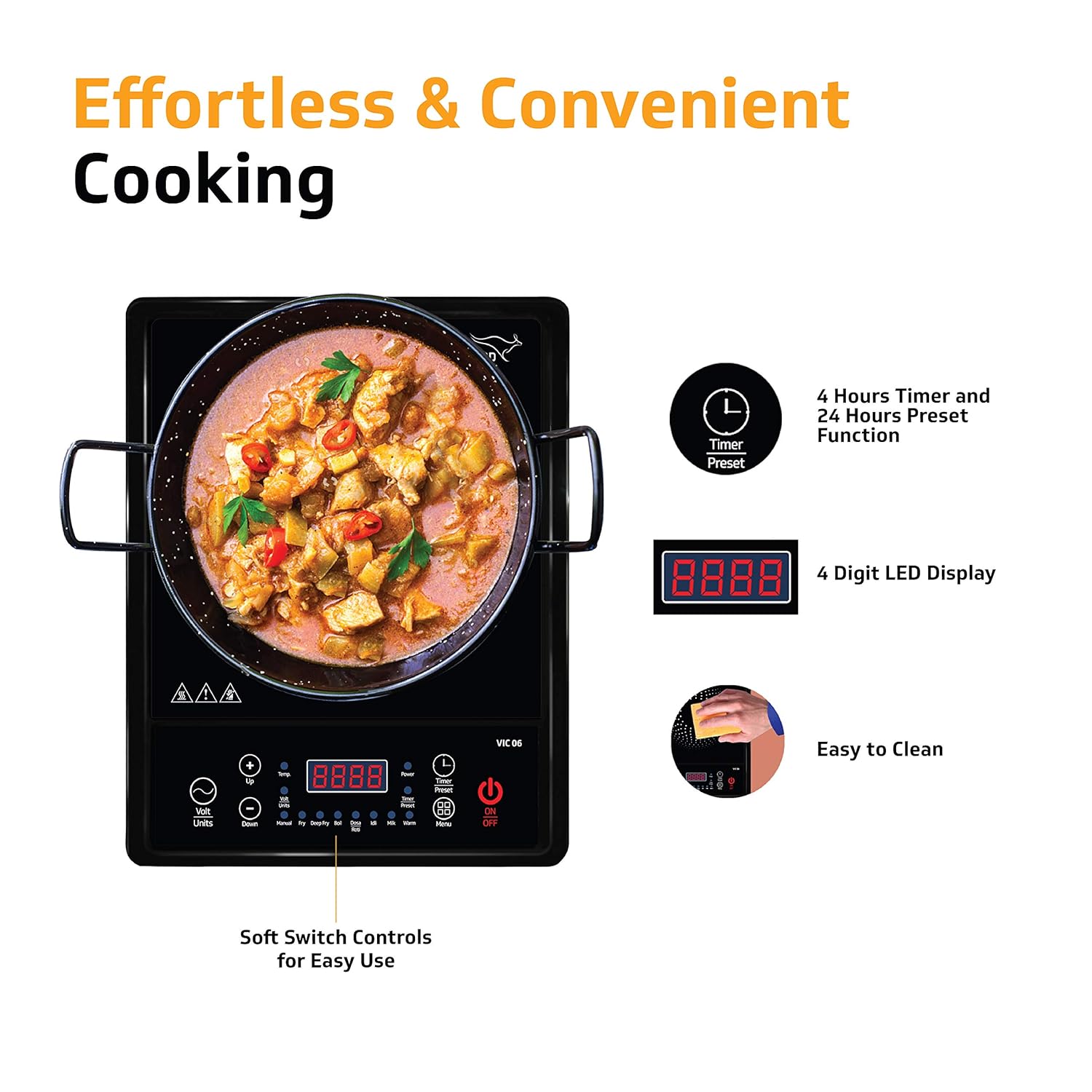
4.3 paveikslas: The V-Guard VIC-07 V3 Induction Cooktop features a 4-hour timer and a 24-hour preset function, along with a 4-digit LED display for easy monitoring.
- Laikmatis: Paspauskite Laikmatis button after selecting a cooking mode. Use the Aukštyn/Žemyn (+/-) buttons to set the desired cooking duration (up to 4 hours). The cooktop will automatically switch off when the timer expires.
- Iš anksto nustatytas: This function allows you to set a delayed start time (up to 24 hours). Consult the full manual for detailed instructions on setting the preset function.
4.5. ttage Indikacija
Paspauskite Volt/Units mygtuką prie view dabartinis ttage or power consumption on the LED display.
5. Virtuvės reikmenų suderinamumas
For efficient and safe operation, only use induction-compatible cookware.
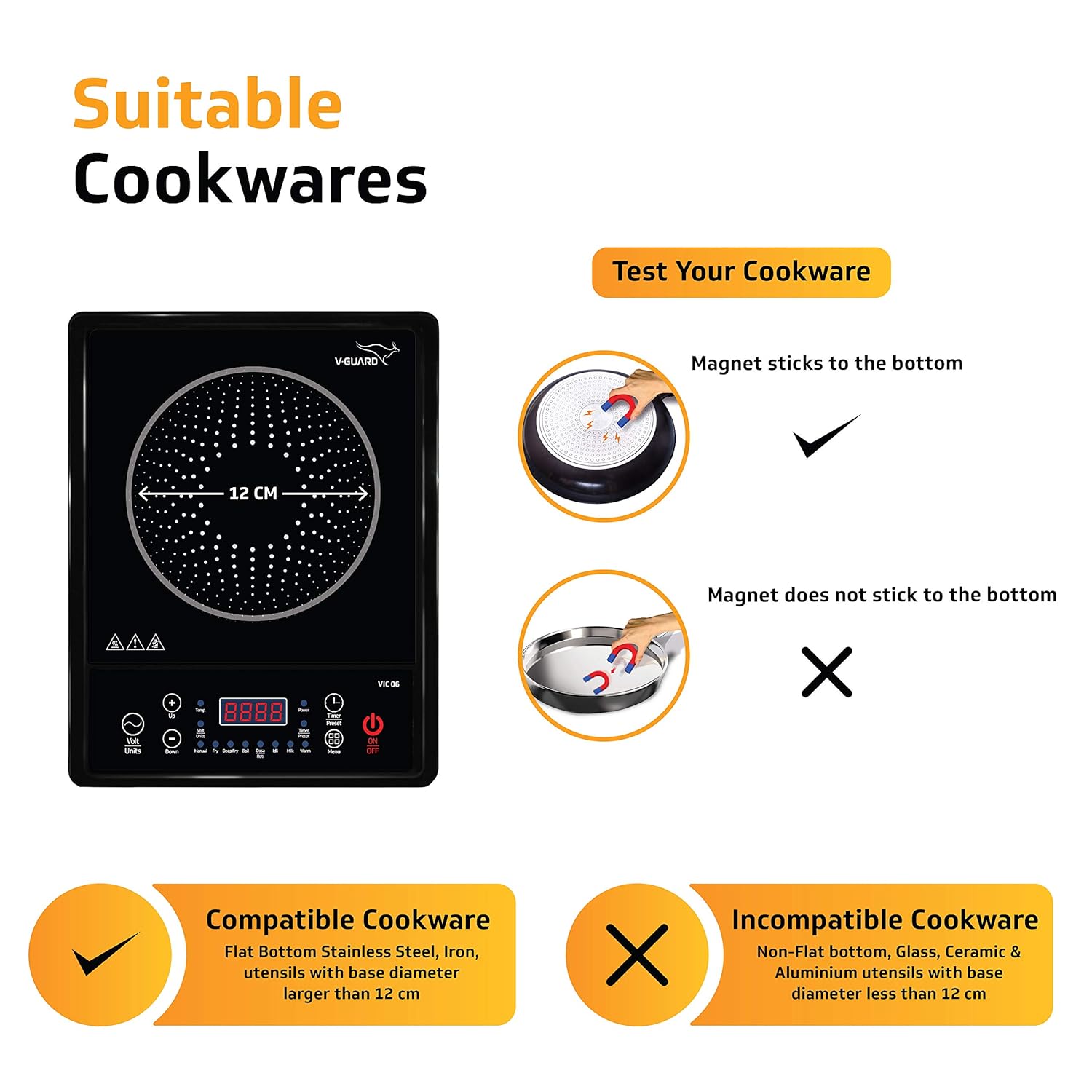
5.1 paveikslas: Guide to suitable and incompatible cookware for the V-Guard VIC-07 V3 Induction Cooktop. Compatible cookware has a flat, magnetic bottom (e.g., stainless steel, iron) with a base diameter larger than 12 cm. Incompatible cookware includes non-magnetic materials like glass, ceramic, or aluminum, or those with a base diameter less than 12 cm.
- Suderinami indai: Use pots and pans made of magnetic materials such as cast iron, enameled iron, stainless steel (with a magnetic bottom), or flat-bottomed utensils with a base diameter larger than 12 cm. A simple magnet test can confirm compatibility: if a magnet sticks to the bottom of the cookware, it is suitable.
- Nesuderinami indai: Do not use cookware made of non-magnetic materials like glass, ceramic, copper, aluminum, or those with a concave bottom or a base diameter less than 12 cm.
6. Priežiūra ir valymas
Tinkama priežiūra užtikrina indukcinės kaitlentės ilgaamžiškumą ir optimalų veikimą.
6.1 paveikslas: The smooth surface of the V-Guard VIC-07 V3 Induction Cooktop makes it easy to clean with a damp audinys.
- Prieš valydami, visada atjunkite viryklę nuo elektros tinklo ir leiskite jai visiškai atvėsti.
- Keraminio stiklo paviršių nuvalykite minkšta,amp cloth and a mild detergent. For stubborn stains, use a specialized induction cooktop cleaner.
- Nenaudokite abrazyvinių valiklių, šiurkščių kempinių ar stiprių cheminių medžiagų, nes jos gali subraižyti arba pažeisti paviršių.
- Clean the air inlet/outlet vents regularly to prevent dust accumulation, which can affect performance. Use a soft brush or vacuum cleaner.
- Never immerse the cooktop in water or spray water directly onto it.
7. Problemų sprendimas
Dažniausiai pasitaikančias problemas ir jų sprendimus rasite šiame skyriuje.
| Problema | Galima priežastis | Sprendimas |
|---|---|---|
| Kaitlentė neįsijungia. | No power supply; loose plug; power outage. | Patikrinkite maitinimo laido jungtį; įsitikinkite, kad lizdas veikia; patikrinkite grandinės pertraukiklį. |
| Cooktop beeps and displays an error code (e.g., E0, E1). | Incompatible cookware; no cookware on surface; overheating. | Use induction-compatible cookware; place cookware on surface; allow cooktop to cool down. |
| Cooking process is slow or inefficient. | Incorrect power setting; unsuitable cookware; insufficient ventilation. | Increase power level; ensure cookware is fully compatible; clear ventilation openings. |
| Ventiliatorius toliau veikia po išjungimo. | Įprastas aušinimo procesas. | This is normal. The fan will stop automatically once the internal components have cooled. |
If the problem persists after attempting these solutions, please contact V-Guard customer service.
8. Specifikacijos
Technical details of the V-Guard VIC-07 V3 Induction Cooktop.
- Modelio numeris: VIC07
- Prekinis ženklas: V-Guard
- Galia: 1600 vatų
- Maitinimo šaltinis: Su laidu elektra
- Medžiaga: Acrylonitrile Butadiene Styrene (ABS Top Frame, PP Bottom Frame)
- Spalva: Juoda
- Prekės svoris: 2 kg 300 g
- Prekės matmenys (PxPxH): 35x29x6 cm
- Įtraukti komponentai: Stalviršio degiklis

8.1 paveikslas: Dimensions of the V-Guard VIC-07 V3 Induction Cooktop, showing its compact design for easy storage and a 1.3m cord length for convenient usage.
9. Garantija ir palaikymas
V-Guard products are built for durability and performance. For warranty information, service requests, or technical support, please refer to the warranty card included with your product or visit the official V-Guard websvetainę.
Išsaugokite pirkimo kvitą kaip pirkimo įrodymą garantiniams reikalavimams.
V-Guard Customer Service: For assistance, please contact V-Guard customer support through their official channels.


