Įvadas
Ačiū, kad pirkoteasing the Vocal-Star PA Speaker System. This powerful 1000W active and passive speaker set is designed for various audio applications, including DJ setups, public address, parties, and karaoke. It features Bluetooth connectivity, MP3 input via USB/SD, AUX input, and microphone inputs, offering versatile audio playback and amplification. This manual provides detailed instructions for setup, operation, and maintenance to ensure optimal performance and longevity of your system.
Saugos informacija
- Prieš naudodami sistemą, perskaitykite visas instrukcijas.
- Keep the system away from water, moisture, and extreme temperatures.
- Neuždenkite vėdinimo angų.
- Naudokite tik šiam įrenginiui nurodytą maitinimo šaltinį.
- Do not attempt to service this unit yourself. Refer all servicing to qualified personnel.
- Venkite ilgai klausytis dideliu garsumu, kad nepažeistumėte klausos.
- Ensure speakers are securely placed on stands to prevent tipping.
Pakuotės turinys
Pažymėkite langelį prie šių elementų:
- 1 x Active PA Speaker (VS-MA121)
- 1 x Passive PA Speaker (VS-MA121)
- 2 x Speaker Stands with Carry Bag
- 1 x Connecting Cable (10m) for Passive Speaker
- 1x maitinimo laidas
- 1x nuotolinio valdymo pultas
- 1 x Microphone (optional, depending on package)
- 1 x Microphone Cable (optional, depending on package)
- Vartotojo vadovas (šis dokumentas)

Image: Complete Vocal-Star PA Speaker System package contents, including active and passive speakers, speaker stands, connecting cable, microphone, and carry bag.
Produktas baigtasview
Active Speaker (Rear Panel)

Vaizdas: Išsamus view of the active speaker's control panel, showing input jacks for XLR, 1/4" Jack, AUX, and RCA, along with volume controls for two channels and High/Low EQ knobs.
- Volume 1 & 2: Individual volume controls for microphone/line inputs.
- Aukšta / žema: Treble and Bass equalization controls.
- Maitinimo / klipo šviesos diodas: Indicates power status and signal clipping.
- XLR/Jack Microphone Input: For connecting microphones or line-level devices.
- AUX įvestis (3.5 mm): For connecting external audio devices like smartphones or tablets.
- RCA įvestis (K/D): For connecting devices like CD players or mixers.
- Garsiakalbio išvestis: Jungiamas prie pasyvaus garsiakalbio.
- USB/SD/BT Digital Player: Integrated media player with LCD display.
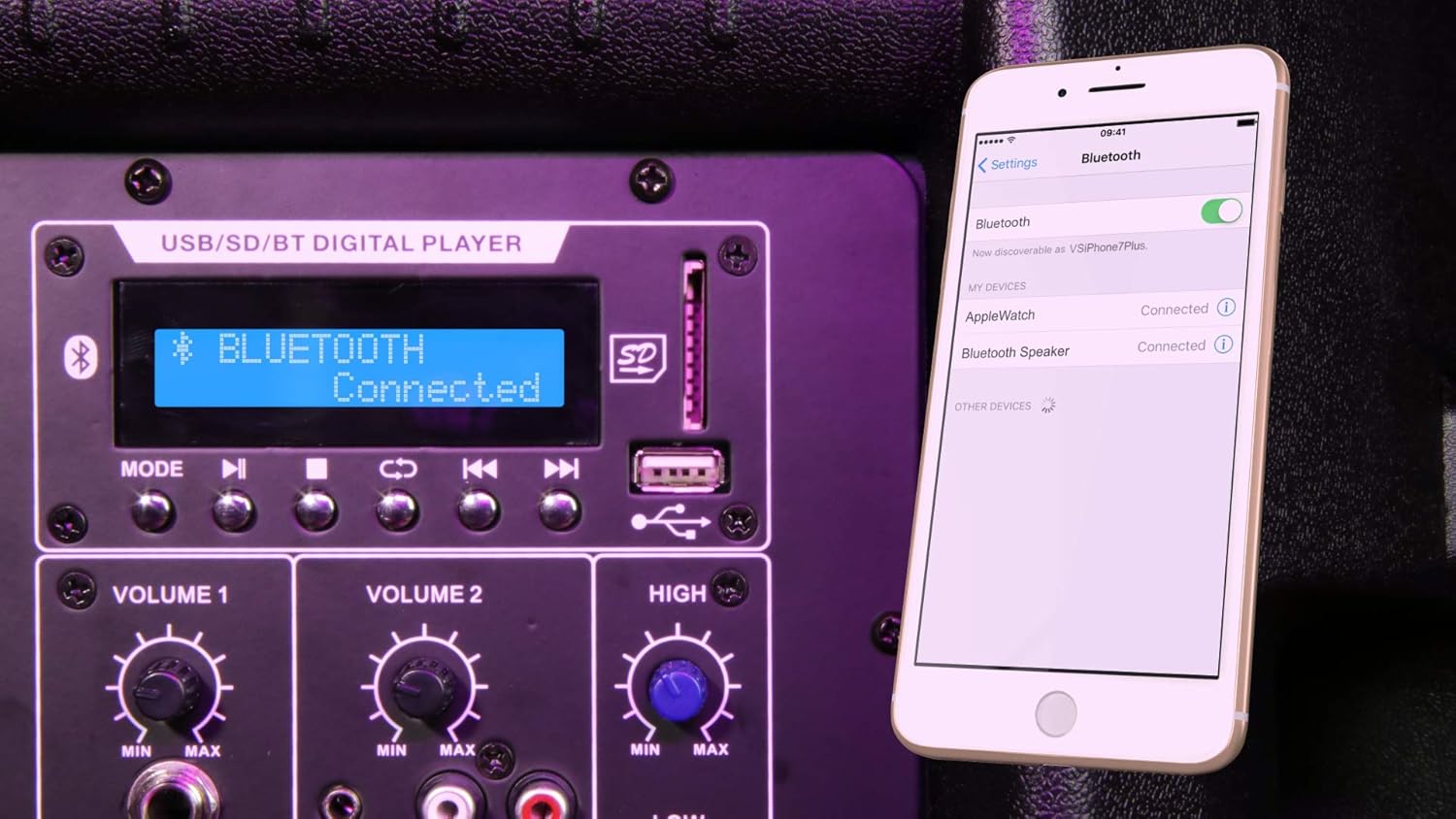
Image: Close-up of the digital media player section, showing the LCD screen, USB port, SD card slot, and control buttons, with a remote control being held above it.
- LCD ekranas: Shows current mode, track information, and status.
- Režimo mygtukas: Switches between Bluetooth, USB, SD, and FM radio.
- Play/Pause, Skip/Rewind Buttons: Medijos atkūrimo valdikliai.
- USB prievadas: USB atmintinėms.
- SD kortelės lizdas: Skirta SD atminties kortelėms.
Sąranka
1. Garsiakalbio stovo surinkimas
Unfold the speaker stands and extend them to the desired height. Ensure all locking mechanisms are securely fastened. Place one speaker stand for each speaker.
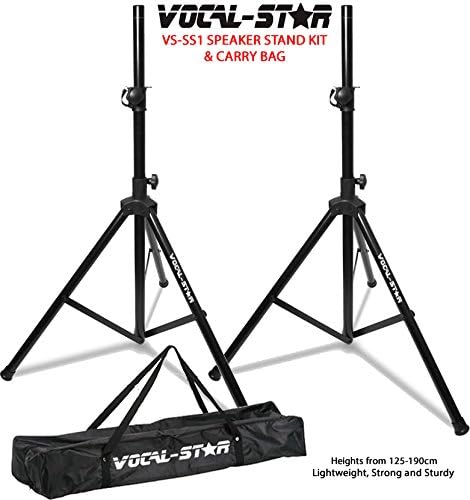
Image: Two Vocal-Star speaker stands with their carry bag, illustrating the stand setup.
2. Garsiakalbio išdėstymas
Carefully lift each speaker and place it onto the top pole of a speaker stand. Ensure the speaker is stable and centered on the stand. The speakers feature a 35mm top hat mount for secure placement.

Vaizdas: View of the bottom of a Vocal-Star speaker, highlighting the 35mm pole mount for stand attachment and integrated wheels for portability.
3. Garsiakalbių prijungimas
Connect the active speaker to the passive speaker using the provided 10m connecting cable. Plug one end into the "Speaker Output" on the active speaker and the other end into the input on the passive speaker.

Image: A coiled 10-meter speaker connecting cable with blue and black connectors, used to link the active and passive speakers.
4. Maitinimo prijungimas
Ensure the power switch on the active speaker is in the OFF position. Connect the power cable to the active speaker and then plug it into a suitable power outlet.
5. Garso šaltinių prijungimas
- Mikrofonas: Connect a microphone to the XLR or 1/4" Jack input.
- AUX/RCA: Connect external audio devices (e.g., mixer, HiFi, CD player) using appropriate cables to the AUX (3.5mm) or RCA (L/R) inputs.
Naudojimo instrukcijos
1. Įjungimas/išjungimas
Flip the power switch on the active speaker to the ON position. The Power LED will illuminate. To turn off, flip the switch to the OFF position.
2. Volume and EQ Adjustment
Adjust the "Volume 1" and "Volume 2" knobs for the microphone/line inputs. Use the "High" and "Low" knobs to adjust the treble and bass frequencies to your preference.
3. „Bluetooth“ poravimas
- Press the "Mode" button on the digital player until "Bluetooth" is displayed on the LCD screen.
- Išmaniajame telefone arba planšetiniame kompiuteryje įjunkite Bluetooth ir ieškokite galimų įrenginių.
- Select "Vocal-Star" (or similar name) from the list to pair. The speaker will indicate successful pairing.
- Dabar galite belaidžiu būdu transliuoti garsą iš savo įrenginio.

Image: The speaker's digital display showing "Bluetooth Connected" while a smartphone screen in the foreground shows its Bluetooth settings, indicating a successful connection.
4. USB/SD atkūrimas
- Įkiškite USB atmintinę į USB prievadą arba SD kortelę į SD kortelės lizdą.
- Sistema automatiškai persijungs į USB arba SD režimą ir pradės leisti suderinamą garso įrašą files. If not, press the "Mode" button to select the correct source.
- Use the Play/Pause, Skip/Rewind buttons on the panel or remote control to manage playback.

Image: The speaker's digital display showing "USB ALL" and track information, with a USB flash drive inserted into the USB port, indicating active USB playback.
5. FM Radio (if applicable)
If your model supports FM radio, press the "Mode" button until FM mode is selected. Use the skip buttons to scan for stations.
6. Nuotolinio valdymo pulto naudojimas
The included remote control allows for convenient operation of the digital media player, including mode selection, track control, and volume adjustment.
Priežiūra
- Valymas: Wipe the speaker cabinets with a soft, dry cloth. Do not use abrasive cleaners or solvents.
- Saugykla: When not in use, store the speakers and accessories in a cool, dry place, away from direct sunlight and extreme temperatures.
- Kabeliai: Regularly check all cables for damage. Replace any frayed or damaged cables immediately.
- Vėdinimas: Ensure the speaker's ventilation openings are clear of dust and debris to prevent overheating.
Trikčių šalinimas
| Problema | Galima priežastis | Sprendimas |
|---|---|---|
| Nėra galios | Power cable not connected; Power switch off; Power outlet faulty. | Check power cable connection; Turn power switch ON; Try a different power outlet. |
| Iš garsiakalbių nėra garso | Per mažas garsumas; pasirinkta netinkama įvestis; netinkamai prijungti laidai; atsilaisvinęs pasyviojo garsiakalbio laidas. | Increase volume; Press "Mode" to select correct input; Check all audio connections; Ensure passive speaker cable is secure. |
| Bluetooth neprisijungia | Garsiakalbis ne „Bluetooth“ režimu; Įrenginys per toli; Įrenginys jau prijungtas prie kito garsiakalbio. | Press "Mode" to select Bluetooth; Move device closer; Disconnect from other devices and try again. |
| USB / SD atkūrimo problemos | Nepalaikoma file format; USB/SD card faulty; Incorrect mode selected. | Užtikrinti files are MP3 or WAV; Try a different USB/SD card; Press "Mode" to select USB/SD. |
| Iškraipytas garsas | Volume too high (clipping); EQ settings incorrect; Faulty cable. | Reduce volume (check Clip LED); Adjust High/Low EQ; Try a different audio cable. |
Specifikacijos
- Modelis: VS-PA-SPEAKER-SYSTEM-SET (VS-MA121)
- Galia: 1000W maks
- Garsiakalbio tipas: 12" Active & Passive Speaker Boxes
- Įėjimai: XLR, 1/4" Jack, AUX (3.5mm), RCA (L/R)
- Medijos grotuvas: USB, SD, Bluetooth, FM Radio
- Ryšio technologija: Aux, XLR, USB, Bluetooth
- Valdikliai: Volume 1, Volume 2, High, Low, Mode, Playback controls
- Garsiakalbio laikiklis: 35mm Top Hat
- Matmenys (vieno garsiakalbio): Apytiksliai 90 x 25 x 15 cm
- Spalva: Juoda
Garantija ir palaikymas
Vocal-Star products are designed for reliability and performance. For warranty information and technical support, please refer to the warranty card included with your purchase or visit the official Vocal-Star website. You can also contact Vocal-Star customer service through their „Amazon“ prekės ženklo parduotuvė už pagalbą.


