1. Įvadas
The SMPL One-Touch Music Player & Radio is designed to provide an easy and enjoyable audio experience, particularly for seniors. Its simple, one-touch operation and durable wooden enclosure make it a user-friendly device for listening to music and radio broadcasts.

Figure 1.1: The SMPL One-Touch Music Player & Radio, showcasing its compact design and included USB stick.
This player supports MP3 audio files via an included 8GB USB drive and features an FM radio tuner. It comes pre-loaded with 75 nostalgic hits, offering immediate entertainment. The device can be powered by batteries for portability or via an AC adapter for continuous use.
1.1 vaizdo įrašas: metimas per sekundęview of the SMPL brand and its commitment to simple, user-friendly technology for caregivers and their loved ones.
2. Produkto ypatybės
- Valdymas vienu paspaudimu: Designed for simplicity, allowing users to play music or radio with minimal effort.
- Aukštos kokybės garsas: Equipped with a powerful speaker for clear and room-filling audio.
- Universalus muzikos atkūrimas: Groja MP3 files from an included 8GB USB drive, pre-loaded with 75 nostalgic songs. Users can also add their own music.
- FM radijo imtuvas: Provides access to local radio stations.
- Dvi maitinimo parinktys: Operates on battery power for portability or plugs into a wall outlet for continuous use.
- No Wi-Fi, No Fees: A standalone device that does not require internet connectivity or subscription fees.
- Durable & Retro Design: Features a sturdy wooden enclosure with a classic, nostalgic appearance.

Figure 2.1: Key features of the SMPL Music Player, emphasizing its ease of use and versatile playback options.

Figure 2.2: The player's design focuses on simplicity and accessibility for senior users, promoting engagement through music.
3. Sąranka
3.1 Įrenginio maitinimas
The SMPL Music Player can be powered in two ways:
- Kintamosios srovės adapteris: For continuous use, plug the provided AC adapter into the DC IN port on the back of the unit and into a wall outlet.
- Baterijos: For portable use, open the battery compartments on the back of the unit. Insert 6 x D-size batteries (not included) into each compartment, ensuring correct polarity. Close the battery covers securely.
3.2 Inserting the USB Drive
The player comes with an 8GB USB drive pre-loaded with 75 songs. To use the music player function:
- Locate the USB port on the back of the unit.
- Carefully insert the provided USB drive into the port. Ensure it is fully seated.
3.3 Extending the Antenna
For optimal FM radio reception, extend the telescopic antenna located on the back of the unit. Adjust its position for the best signal.
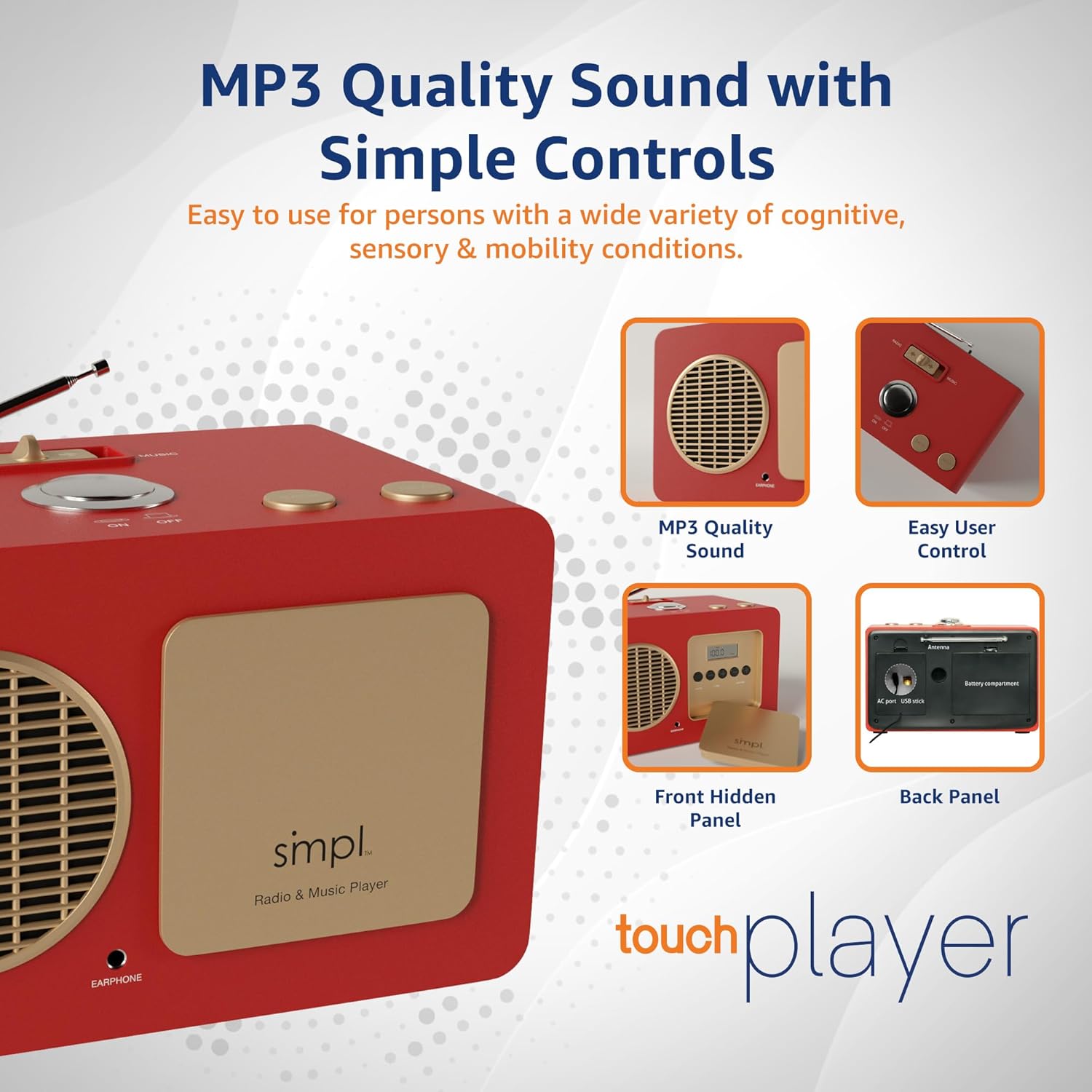
3.1 pav.: galinis view of the player, illustrating the battery compartments and USB input for music playback.
Video 3.1: A demonstration of how to set up and use the SMPL Music Player, including power options and basic controls.
4. Naudojimo instrukcijos
4.1 Maitinimo įjungimas/išjungimas
Norėdami pasukti įrenginį ON or IŠJUNGTA, press the large central button on the top panel.
4.2 Switching Between Radio and Music Modes
Use the slider switch located on the top panel to select between "RADIO" and "MUSIC" modes.
4.3 Music Playback (MUSIC Mode)
When in "MUSIC" mode:
- The player will automatically begin playing songs from the inserted USB drive.
- Paspauskite KITAS mygtuką, norėdami pereiti prie kitos dainos.
- Paspauskite ATGAL mygtuką, norėdami pereiti prie ankstesnės dainos.
4.4 Radio Operation (RADIO Mode)
When in "RADIO" mode:
- The player will tune into FM radio stations.
- Norėdami pakeisti stotis, naudokite KITAS or ATGAL buttons on the top panel.
- For fine-tuning or to switch between AM/FM bands, open the hidden front panel. Use the "AM/FM" button to select the band and the "TUNE" buttons (+/-) for precise station selection.
4.5 Garsumo reguliavimas
The main volume control is located behind the hidden front panel. Open the panel and use the "VOLUME" buttons (+/-) to adjust the sound level.
Video 4.1: A demonstration of the one-touch controls and how to switch between music and radio modes on the player.
5. Priežiūra
- Valymas: Išorinį įrenginio paviršių valykite minkštu, sausu skudurėliu. Venkite abrazyvinių valiklių ar tirpiklių.
- Baterijos keitimas: If using battery power, replace all 6 D-size batteries when the sound becomes distorted or the unit stops functioning. Ensure proper polarity when inserting new batteries.
- Saugykla: When not in use for extended periods, remove batteries to prevent leakage and store the unit in a cool, dry place.
- USB Drive Care: Handle the USB drive carefully. Avoid exposing it to extreme temperatures, moisture, or physical impact.
6. Problemų sprendimas
| Problema | Galima priežastis | Sprendimas |
|---|---|---|
| Music not playing continuously from USB. | Nesuderinamas file format (not MP3) or presence of metadata files. | Ensure all music files are in MP3 format. If transferring from a Mac, delete any hidden metadata files (pvz., files starting with "._"). Reformat the USB drive to FAT32 if issues persist, then re-add MP3s. |
| USB diskas neatpažintas. | Incorrect USB format or faulty drive. | Ensure the USB drive is formatted to FAT32. Try a different USB drive to rule out a faulty drive. |
| Prastas radijo priėmimas. | Antena nėra ištiesta arba silpnas signalo lygis. | Fully extend the telescopic antenna. Try repositioning the unit or the antenna for better signal reception. |
| Nėra garso ar iškreipto garso. | Volume too low, batteries low/dead, or power issue. | Check and adjust the volume using the controls behind the hidden front panel. If on battery power, replace batteries. If using AC adapter, ensure it is securely plugged in. |
| Mygtukai nereaguoja. | Laikinas programinės įrangos triktis arba maitinimo problema. | Turn the unit off and then on again. If on battery power, replace batteries. If using AC adapter, unplug and replug. |
7. Specifikacijos
| Funkcija | Detalė |
|---|---|
| Prekės ženklas | smpl |
| Modelio numeris | 57025 |
| Gaminio matmenys | 12.17 x 8.15 x 7.91 colio (apytiksliai 10 colių ilgio x 5.75 colio pločio x 6 colių aukščio) |
| Prekės svoris | 4.86 svaro |
| Spalva | Raudona |
| Ryšio technologija | USB |
| Ypatinga funkcija | FM radijas |
| Maitinimo šaltinis | Battery Powered (6 x D-size batteries, not included) or AC Adapter |
| Palaikomos radijo juostos | AM/FM |
| Included USB Drive | 8GB with 75 pre-loaded nostalgic hits |
8. Garantija ir palaikymas
For any questions, technical assistance, or warranty inquiries, please contact SMPL Technology directly. The product is designed with "Live Support" in mind to ensure a smooth user experience.
Please refer to the product packaging or the official SMPL Technology websvetainėje rasite naujausią kontaktinę informaciją ir garantijos sąlygas.
Pastaba: Konkrečios garantijos sąlygos gali skirtis. Prašome išsaugoti pirkimo įrodymą, jei norėtumėte pateikti pretenzijas dėl garantijos.


