1. Įvadas
The DJI Mini 4 Pro is a compact and advanced folding drone designed for aerial photography and videography. Weighing under 249 grams, it offers a user-friendly experience without requiring registration in many regions. Key features include a 4K HDR video camera, omnidirectional obstacle sensing for enhanced safety, and intelligent flight modes.
2. Kas yra dėžutėje
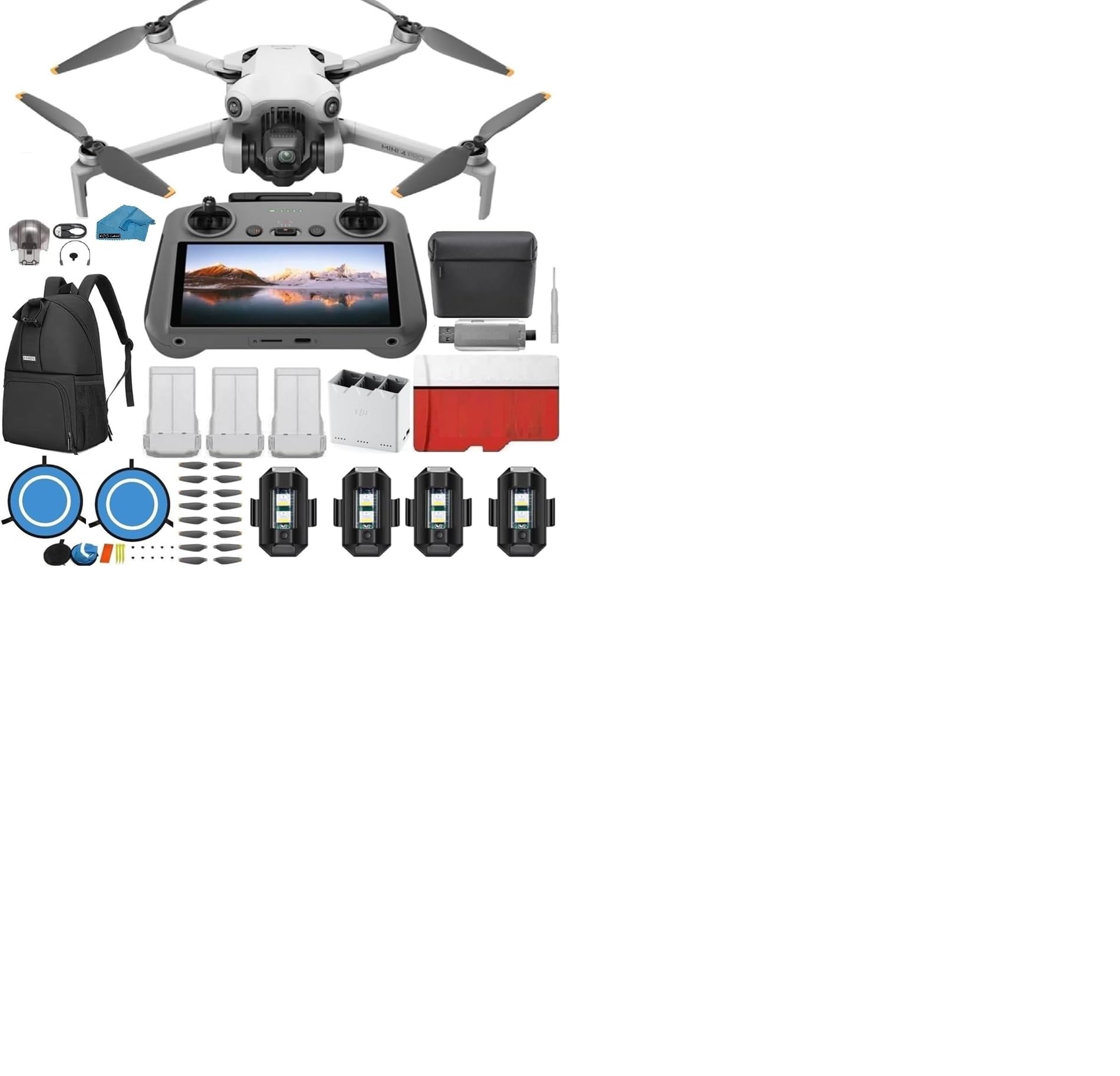
The DJI Mini 4 Pro (DJI RC) package includes the following components:
- 1x DJI Mini 4 Pro (DJI RC2) with Built-In Monitor Controller
- 3x DJI Batteries
- 1x Two-way Charging Hub
- 1x Shoulder Bag
- 1x Battery charger with AC cable
- 2 Pairs (10 pieces) of propellers
- 1x Gimbal holder
- Kabeliai ir adapteriai
- Quick Start Manuals
- 1x 128GB SD kortelė
- 1x USB 3.0 SD Card Reader (For video/photo transfer)
- 1x Micro Fiber Cleaning Cloth
- 1x dėklas
- 1x Landing Pad
- 1x Atsuktuvas
- 6x Varžtai
- 4x Strobe Lights


3. Sąranka
3.1 Drono išskleidimas
Carefully unfold the drone arms. The front arms unfold outwards, and the rear arms unfold backwards. Ensure all arms are fully extended before flight.

3.2 Baterijos įdėjimas ir įkrovimas
Insert a fully charged battery into the drone until it clicks securely into place. Use the provided charging hub and AC cable to charge the intelligent flight batteries. Ensure batteries are fully charged before each flight.
3.3 Nuotolinio valdymo pulto sąranka
The DJI RC 2 remote controller features a built-in screen. Extend the antennas for optimal signal. Power on the remote controller by pressing the power button once, then pressing and holding it until it powers on. The remote will automatically connect to the drone once both are powered on and within range.

3.4 Gimbal Protector and Memory Card
Always remove the gimbal protector before powering on the drone. Failure to do so can damage the gimbal. Insert the 128GB SD card into the drone's designated slot for recording footage. Ensure the drone is powered off when inserting or removing the SD card.

4. Drono valdymas
4.1 Įjungimas / išjungimas
To power on or off the drone and remote controller, press the power button once, then press and hold it for a few seconds until the device powers on or off.
4.2 Basic Flight and Safety Features
The DJI Mini 4 Pro features automatic takeoff and landing. It is equipped with omnidirectional obstacle sensing, which helps prevent collisions by detecting obstacles in all directions. Always ensure you are flying in a safe and legal area.
4.3 Išmanieji skrydžio režimai
Utilize various flight modes for different scenarios:
- Įprastas režimas: Standard flight for general use.
- Kinematografinis režimas: Slows down movements for smoother, more cinematic footage.
- Sporto režimas: Increases drone speed and responsiveness for dynamic shots.
- „ActiveTrack 360°“: Allows the drone to automatically follow and orbit a selected subject.
- Advanced Return-to-Home (RTH): The drone can automatically return to its takeoff point, avoiding obstacles along the way.
4.4 Kameros veikimas
The drone features a 4K/60fps HDR video camera capable of true vertical shooting and 48 MP RAW photos. Adjust camera settings via the remote controller's screen to optimize for lighting conditions and desired effects.

5. Priežiūra
- Reguliariai valykite: Use the micro fiber cleaning cloth to gently clean the drone, camera lens, and remote controller.
- Patikrinkite sraigtus: Before each flight, check propellers for any cracks, bends, or damage. Replace damaged propellers immediately using the provided spare parts and screwdriver.
- Akumuliatoriaus priežiūra: Store batteries in a cool, dry place. Do not overcharge or fully discharge batteries.
- Kardaninio stabilizatoriaus apsauga: Transportuodami arba sandėliuodami droną, visada pritvirtinkite stabilizatoriaus apsaugą, kad išvengtumėte pažeidimų.
6. Problemų sprendimas
- Dronas neįsijungia: Ensure the battery is fully charged and correctly installed. Press the power button once, then press and hold.
- Nuotolinio valdymo pultas neprisijungia: Ensure both the drone and remote controller are powered on and within range. Check for any interference.
- Poor Video Feed: Check the connection between the remote controller and the drone. Ensure antennas are properly positioned.
- Įspėjimai dėl kliūčių vengimo: The drone will provide warnings in restricted flight zones or near obstacles. Always adhere to local regulations and fly responsibly.
- Kardaninio veleno gedimas: Ensure the gimbal protector was removed before powering on. If issues persist, refer to the official DJI support resources.
7. Specifikacijos
| Funkcija | Detalė |
|---|---|
| Prekės ženklas | DJI |
| Modelio pavadinimas | Mini 4 Pro |
| Prekės svoris | Under 249g (with standard battery) |
| Vaizdo įrašymo raiška | 4K/60fps HDR, 2.7K: 2720×1530 25/30p, FHD: 1920×1080 25/30/50/60p |
| Veiksminga nejudančioji raiška | 12 MP (48 MP RAW photos) |
| Ypatinga funkcija | Omnidirectional Obstacle Sensing, 4K HDR Video Camera, Three Batteries Bundle |
| Ryšio technologija | Lightning, Micro USB (Type-B), USB Type-C, Wi-Fi |
| Valdymo tipas | Remote Control (DJI RC 2 with Built-In Monitor) |
| Baterijos elementų sudėtis | Lithium Ion (3 batteries included) |
| Gaminio matmenys | 4 colio ilgio x 4 colio pločio x 4 colio aukščio (sulankstyta) |
8. Garantija ir palaikymas
Išsamesnės informacijos apie garantiją ieškokite oficialiame DJI website or the warranty card included with your product. For technical support, firmware updates, or service inquiries, visit the official DJI support page or contact their customer service.
You can visit the official DJI Store for more information and accessories: DJI parduotuvė „Amazon“ svetainėje


