1. Produktas baigtasview
The GUESS Bounce U1281L4 is a multifunction digital watch designed for daily use. It features a clear digital display for easy readability, a backlight for low-light conditions, and essential functions such as a stopwatch, alarm, and countdown timer to assist with time management and fitness activities.
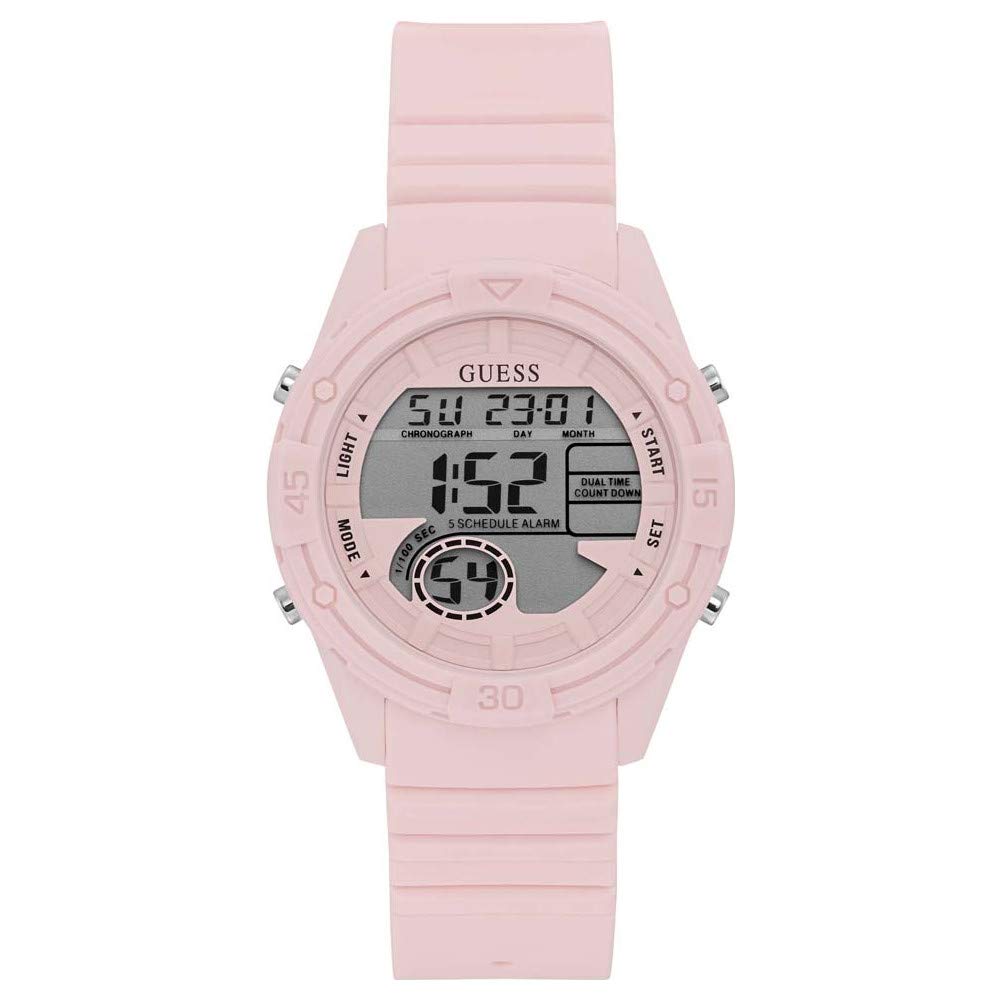
1 pav.: priekis view of the GUESS Bounce U1281L4 Digital Watch, showcasing the digital display and pink silicone strap.
2. Pradinė sąranka
2.1. Laiko ir datos nustatymas
- Locate the "MODE" button (usually on the bottom left) and the "SET" button (usually on the top left).
- Press the "MODE" button repeatedly until the time setting mode is displayed (e.g., flashing hours).
- Use the "START/STOP" button (usually top right) to adjust the flashing value (hours, minutes, year, month, day).
- Press the "SET" button to move to the next setting parameter.
- Once all settings are complete, press the "MODE" button to exit the setting mode.
2.2. Dirželio reguliavimas
The silicone strap features a tang buckle clasp for secure and comfortable wear. Adjust the strap by inserting the buckle pin into the appropriate hole that provides a snug fit without being too tight. Ensure the watch is positioned correctly on your wrist for optimal comfort.

Figure 2: Close-up of the watch strap and tang buckle, illustrating the adjustment mechanism.

3 pav.: šonas view of the watch, showing the control buttons for various functions.
3. Naudojimo instrukcijos
3.1. Ekrano režimai
Press the "MODE" button to cycle through different display modes: Time, Stopwatch, Alarm, and Countdown Timer.
3.2. Foninio apšvietimo funkcija
To illuminate the display in low-light conditions, press the "LIGHT" button (usually on the bottom right). The backlight will remain active for a few seconds.
3.3. Chronometras
- Navigate to the Stopwatch mode using the "MODE" button.
- Press the "START/STOP" button to begin timing.
- Press "START/STOP" again to pause the stopwatch.
- Press the "RESET" button (usually top right, or "SET" in some models) to clear the stopwatch to zero.
3.4. Signalizacija
- Enter Alarm mode by pressing the "MODE" button.
- Press the "SET" button to activate the alarm setting. The hour digits will flash.
- Use the "START/STOP" button to adjust the hour.
- Press "SET" to move to minutes and adjust using "START/STOP".
- Press "MODE" to exit alarm setting.
- To turn the alarm ON/OFF, press the "START/STOP" button while in Alarm mode (without entering setting mode).
3.5. Atgalinis laikmatis
- Switch to Countdown Timer mode using the "MODE" button.
- Press the "SET" button to set the desired countdown time. Adjust hours, minutes, and seconds using the "START/STOP" button and "SET" to move between values.
- Press "MODE" to exit setting.
- Press "START/STOP" to begin the countdown.
- Laikrodis skleis įspėjamąjį garsą, kai atgalinis skaičiavimas pasieks nulį.
4. Priežiūra
4.1. Valymas
Norėdami išvalyti laikrodį, švelniai nuvalykite jį minkšta šluoste.amp cloth. Avoid using harsh chemicals, solvents, or abrasive cleaners, as these can damage the watch case, crystal, or silicone strap. For the silicone strap, mild soap and water can be used, ensuring it is thoroughly rinsed and dried.
4.2. Atsparumas vandeniui
This watch is water-resistant up to 30 meters (3 ATM). This means it is suitable for everyday use and can withstand splashes or brief immersion in water. It is ne suitable for swimming, showering, or diving. Avoid pressing any buttons while the watch is wet to prevent water ingress.
4.3. Baterijos keitimas
The watch uses 1 Lithium Ion battery (included). When the display dims or functions become erratic, the battery may need replacement. It is recommended to have the battery replaced by a qualified watch technician to ensure proper sealing and maintain water resistance.
5. Problemų sprendimas
- Watch not displaying time or functions: Patikrinkite, ar nereikia pakeisti baterijos. Jei neseniai ją pakeitėte, įsitikinkite, kad ji buvo tinkamai įdėta.
- Neteisingas laikas / data: Refer to Section 2.1 "Setting Time and Date" to reset the watch.
- Mygtukai nereaguoja: Ensure the watch is not wet. If it is, dry it thoroughly. If the issue persists, contact customer support.
- Alarm/Timer not sounding: Verify that the alarm/timer function is activated and the volume (if adjustable) is set appropriately.
Jei susiduriate su čia nepaminėtomis problemomis arba jei trikčių šalinimo veiksmai problemos neišsprendžia, kreipkitės pagalbos į klientų aptarnavimo tarnybą.
6. Specifikacijos
| Funkcija | Detalė |
|---|---|
| Modelio pavadinimas | Atšokti |
| Modelio numeris | U1281L4 |
| Prekės ženklas | GUESS |
| Judėjimo tipas | Kvarcas |
| Ekrano tipas | Skaitmeninis |
| Korpuso skersmuo | 41 milimetrų |
| Korpuso storis | 13.7 milimetrų |
| Juostos medžiaga | Silikonas |
| Juostos spalva | Rožinė |
| Užsegimo tipas | Tang sagtis |
| Vandens atsparumo gylis | 30 Metres (3 ATM) |
| Krištolo medžiaga | Mineralinis stiklas |
| Baterijos | 1 ličio jonų baterija (pridedama) |
| Prekės svoris | 113 g |
| Gaminio matmenys (IxPxH) | 8 x 9 x 9 cm |
| UPC | 091661507748 |
7. Informacija apie garantiją
This GUESS Bounce U1281L4 watch comes with a 1 metų garantija nuo gamintojo defektų. This warranty covers defects in materials and workmanship under normal use. It does not cover damage resulting from accidents, improper use, unauthorized repairs, or normal wear and tear.
For warranty claims or service, please retain your proof of purchase and contact the authorized service center or retailer.
8. Pagalba klientams
For further assistance, technical support, or inquiries regarding your GUESS Bounce U1281L4 watch, please contact the manufacturer or authorized service provider.
- Gamintojas: Spėk
- Importuotojas / Pakuotojas: Timex Group India Limited
- Adresas: Plot No. 10, Industrial Area- Katha, Bhatoli Kalan, Baddi, Himachal Pradesh – 173205
- GUESS Store: Visit the Official GUESS Store on Amazon.in


