1. Produktas baigtasview
The Leviton LB260-ES is a 60A, 2-Pole Plug-On Smart Ground Fault Protection of Equipment (GFPE) Branch Circuit Breaker. This hydraulic magnetic breaker is designed for 120/240 VAC systems with a 10KA Interrupt Rating. It is suitable for applications up to 60A when using copper wire or 50A when using aluminum wire.
This smart circuit breaker integrates with the My Leviton app, providing advanced features for home energy management and enhanced safety.
2. Saugos informacija
ĮSPĖJIMAS: Installation and servicing of this circuit breaker must be performed by a qualified electrician in accordance with all national and local electrical codes. Failure to follow these instructions may result in serious injury or death.
- Always turn off the main power supply at the service panel before working on electrical circuits.
- Montavimo metu naudokite tinkamas asmenines apsaugos priemones (AAP).
- Įsitikinkite, kad visos jungtys atitinka tinkamus laidų dydžius ir sukimo momento specifikacijas.
- Šiame produkte yra cheminių medžiagų, kurios, kaip žinoma Kalifornijos valstijoje, sukelia vėžį, apsigimimus ar kitokią reprodukcinę žalą (65 pasiūlymo įspėjimas).
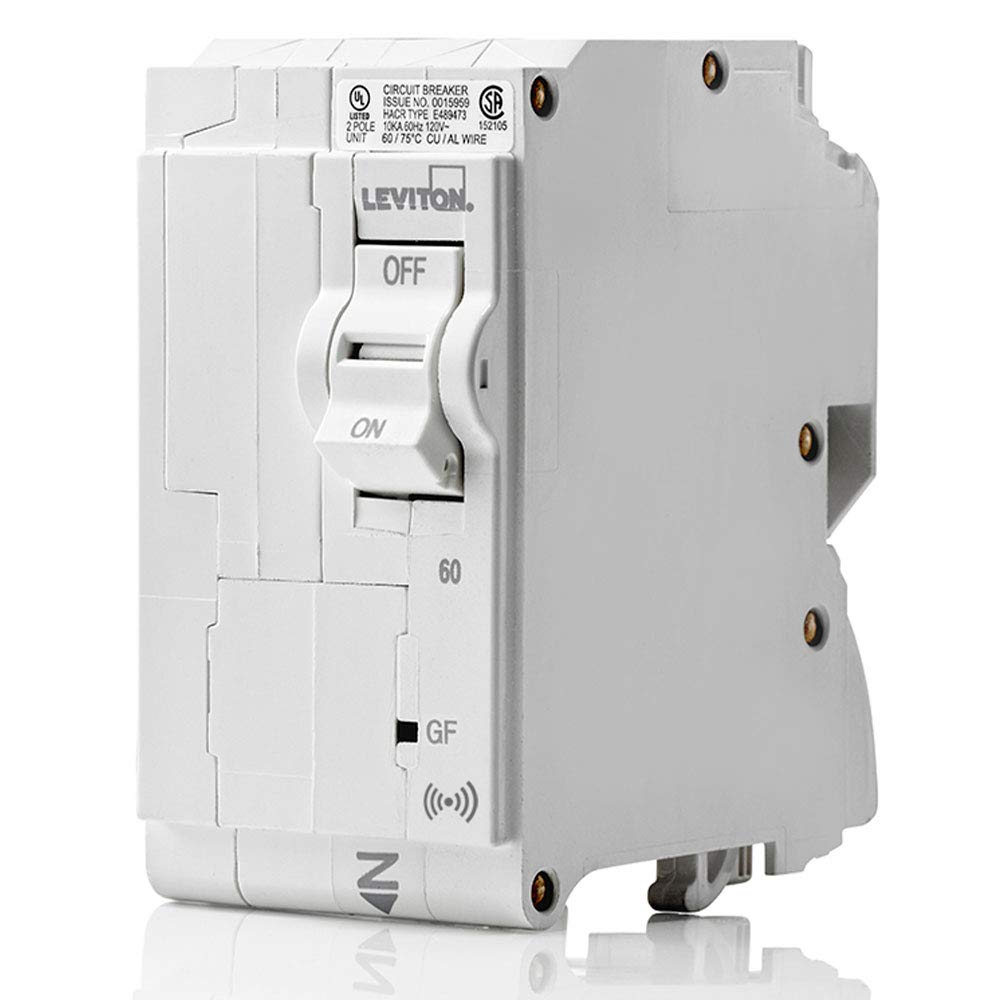
1 pav.: priekis view of the Leviton LB260-ES circuit breaker.
3. Produkto ypatybės
- Išmanioji integracija: Integrated with the My Leviton app, this breaker provides insightful data on home energy consumption, enhanced safety, and whole-home solutions in conjunction with other smart Leviton products.
- Lengvas montavimas: Leviton's design allows the entire Load Center to be wired at rough-in without any circuit breakers present. The plug-on design simplifies installation.
- Hidraulinė magnetinė technologija: Precision trip technology ensures consistent operation from -40°C to 85°C (-40°F to 185°F) without re-rating.
- Padidintas saugumas: Turi patentuotą atstatymo blokavimo technologiją, neleidžiančią jungikliui atsistatyti, jei pažeidžiama įžeminimo ar lanko apsaugos nuotėkio apsauga.
4. Sąranka ir diegimas
The Leviton LB260-ES circuit breaker is designed for quick and secure installation within a compatible Leviton Load Center. The plug-on design eliminates the need for additional wiring to the breaker itself, as connections are made directly on the panel's bus bars.
Diegimo žingsniai:
- Ensure the main power to the load center is OFF.
- Prepare branch circuit wires (phase and neutral) by stripping insulation to the recommended length.
- Connect the branch phase and neutral wires directly to the designated terminals on the load center panel. This allows for neat wiring at rough-in without breakers in the way.
- Align the LB260-ES breaker with the appropriate slot in the load center.
- Firmly push the breaker onto the bus bar until it snaps securely into place. No additional wiring to the breaker is required.
- Verify all connections are secure and the breaker is properly seated.
- Once all breakers are installed and the panel cover is secured, restore main power.

2 pav.: šonas view illustrating the plug-on mechanism of the circuit breaker.
Diegimo vaizdo įrašas:
Video 1: This official Leviton video demonstrates the installation process and features of the Leviton Load Center and its plug-on circuit breakers, including wiring and smart capabilities.
5. Naudojimo instrukcijos
The Leviton LB260-ES circuit breaker operates like a standard circuit breaker but includes smart functionalities accessible via the My Leviton app.
Rankinis valdymas:
- ĮJUNGIMO/IŠJUNGIMO jungiklis: To turn a circuit ON, push the switch to the 'ON' position. To turn it OFF, push the switch to the 'OFF' position.
- Suveikė jungiklis: If the breaker trips due to an overload or fault, the switch will move to a central, tripped position. To reset, first move the switch fully to the 'OFF' position, then to the 'ON' position. If the breaker immediately trips again, there is still a fault on the circuit that needs to be addressed.
Smart Features (via My Leviton App):
To utilize the smart features, download the My Leviton app and connect your Leviton Load Center and smart breakers according to the app's instructions.
- Energijos stebėjimas: View real-time energy consumption for individual circuits or the entire home. Track usage patterns over time to identify energy-saving opportunities.
- Nuotolinio valdymo pultas: Remotely turn circuits ON or OFF from your smartphone or tablet.
- Anomaly Notifications: Receive alerts for electrical anomalies, such as unexpected power draws or circuit trips, directly to your device.
- Savęs patikrinimo funkcija: GFPE breakers feature self-test capabilities to ensure proper operation. The app may provide status updates on these tests.
6. Priežiūra
Leviton circuit breakers are designed for long-term reliability with minimal maintenance. However, periodic checks are recommended.
- Vizuali apžiūra: Periodically inspect the circuit breaker and load center for any signs of damage, discoloration, or loose connections.
- GFPE Test: GFPE devices should be tested monthly. Press the 'TEST' button on the breaker. The breaker should trip immediately. Reset the breaker by moving the switch to 'OFF' then 'ON'. If the breaker does not trip or reset, it may be faulty and should be replaced by a qualified electrician.
- Valymas: Keep the load center area clean and free from dust and debris. Do not use liquids to clean inside the load center.
7. Problemų sprendimas
If you encounter issues with your Leviton LB260-ES circuit breaker, refer to the following common troubleshooting steps:
| Problema | Galima priežastis | Sprendimas |
|---|---|---|
| Breakeris dažnai keliauja | Perkrova, trumpasis jungimas arba įžeminimas. | Unplug appliances from the circuit. Reset the breaker. If it trips again, consult a qualified electrician to identify and fix the fault. |
| Jungiklis neatstato | Persistent fault, or patented reset lockout engaged. | Ensure the switch is moved fully to 'OFF' before attempting to reset to 'ON'. If it still doesn't reset, a fault is present or the breaker is damaged. Consult a qualified electrician. |
| No energy data in My Leviton app | No internet connection, app not configured, or data hub issue. | Check your home's internet connection. Ensure the Leviton Load Center data hub is properly installed and connected. Verify app configuration and breaker pairing. |
| GFPE test button does not trip breaker | Faulty GFPE mechanism. | The breaker may be defective. It should be replaced immediately by a qualified electrician. |
For further assistance, refer to the My Leviton app's help section or contact Leviton customer support.
8. Specifikacijos
| Specifikacija | Vertė |
|---|---|
| Prekės ženklas | Levitonas |
| Modelio numeris | LB260-ES |
| Dabartinis reitingas | 60 Amps |
| Lenkų skaičius | 2 |
| ttage | 120/240 voltų kintamoji srovė |
| Grandinės pertraukiklio tipas | GFPE (Ground Fault Protection of Equipment) |
| Montavimo tipas | Įkišamas laikiklis |
| Pertraukimo įvertinimas | 10KA |
| Darbinė temperatūra | -40°C iki 85°C (nuo -40°F iki 185°F) |
| Prekės svoris | 13.4 uncijos |
| Gaminio matmenys | 4 x 2.5 x 3.9 colio |
9. Garantija ir palaikymas
Informacija apie garantiją:
This Leviton LB260-ES circuit breaker is covered by a 10 metų ribota garantija. For specific terms and conditions, please refer to the warranty documentation included with your product or visit the official Leviton websvetainę.
Klientų aptarnavimas:
For technical assistance, troubleshooting, or warranty claims, please contact Leviton Customer Support. You can find contact information on the official Leviton website or within the My Leviton app.
Leviton oficialus Websvetainė: www.leviton.com


