1. Įvadas
Ačiū, kad pirkoteasing the NEDIS PASH120BKA4 Paper Shredder. This device is designed to securely dispose of sensitive documents, such as letters, files, invoices, and bank cards, by shredding them into small, unreadable particles. Its compact design allows for convenient placement on or under your desk, making it an ideal solution for home or small office use. This manual provides essential information for safe operation, setup, maintenance, and troubleshooting to ensure optimal performance and longevity of your shredder.
The PASH120BKA4 features a DIN P-4 security level, producing 4x38 mm cross-cut strips, which makes reconstruction of shredded documents extremely difficult. It also includes a reverse function to help clear paper jams.
2. Svarbios saugos instrukcijos
Please read these safety instructions carefully before using the appliance. Keep this manual for future reference.
- Laikyti vaikams ir naminiams gyvūnėliams nepasiekiamoje vietoje: This shredder contains sharp blades and moving parts.
- Avoid loose clothing, jewelry, and long hair: Keep these away from the paper entry slot to prevent entanglement.
- Laikykite rankas ir pirštus atokiau: Niekada nelaikykite rankų ar pirštų šalia popieriaus įvedimo angos.
- Atjunkite, kai nenaudojate: Prieš perkeldami, valydami ar ištuštindami šiukšliadėžę, visada atjunkite smulkintuvą nuo elektros tinklo.
- Do not shred metal objects: Staples and small paper clips are generally acceptable, but avoid large paper clips, binder clips, or other metal objects as they can damage the blades.
- Do not shred adhesive materials: Avoid shredding labels, envelopes with adhesive strips, or other sticky materials as they can gum up the blades.
- Do not exceed sheet capacity: Refer to the specifications for the maximum number of sheets that can be shredded at once (6 sheets for this model). Overloading can cause jams and damage the motor.
- Use only indoors: Šis prietaisas skirtas naudoti tik patalpose.
- Do not expose to water or moisture: Keep the shredder away from water and humid environments.
- Do not open the shredder head: There are no user-serviceable parts inside. Refer servicing to qualified personnel.
- Teisingai pozicionuokite: Ensure the shredder head is securely seated on the waste bin before operation.
3. Produktas baigtasview ir komponentai
Familiarize yourself with the main parts of your NEDIS PASH120BKA4 Paper Shredder.

3.1 vaizdas: Į viršų view of the shredder head, showing the control switch (AUTO, OFF, REV), paper entry slot, and power cord. The power cord is visible on the right side, coiled. The brand name "nedis" is printed on the top right.

3.2 vaizdas: The shredder head is separated from the waste bin, illustrating the two main components. The waste bin is black with a clear window, and the shredder head is also black with the control panel visible.
- Shredder Head: Contains the motor, cutting blades, and control panel.
- Popieriaus įvedimo anga: Where paper and cards are inserted for shredding.
- Valdymo jungiklis: Used to select operating modes (AUTO, OFF, REV).
- Šiukšlių dėžė: Collects shredded material. Features a clear window to monitor fill level.
- Maitinimo laidas: Connects the shredder to an electrical outlet.
4. Sąrankos instrukcijos
Follow these steps to set up your paper shredder for first use.
- Išpakuokite smulkintuvą: Atsargiai išimkite visus komponentus iš pakuotės. Išsaugokite pakuotę būsimam saugojimui ar transportavimui.
- Position the Waste Bin: Pastatykite šiukšliadėžę ant lygaus, stabilaus paviršiaus.
- Attach the Shredder Head: Carefully place the shredder head onto the waste bin, ensuring it is securely seated. The shredder will not operate if the head is not correctly positioned.
- Prijunkite maitinimą: Prijunkite maitinimo laidą į standartinį elektros lizdą.
- Pasirinkite veikimo režimą: Move the control switch to the "AUTO" position. The shredder is now ready for use.

4.1 vaizdas: The shredder fully assembled with a sheet of paper inserted into the entry slot, demonstrating its operational readiness.
5. Naudojimo instrukcijos
This section details how to use your shredder for various materials.
5.1. Shredding Paper
- Ensure the shredder is plugged in and the control switch is set to "AUTO".
- Insert up to 6 sheets of A4 paper (or equivalent) into the paper entry slot. The shredder will automatically start and shred the paper.
- Once the paper has passed through, the shredder will stop automatically.
- For continuous shredding, allow a brief pause between batches to prevent overheating.

5.1 vaizdas: Priekyje view of the shredder showing paper being fed into the top slot for shredding.
5.2. Shredding Bank Cards
- Ensure the shredder is plugged in and the control switch is set to "AUTO".
- Insert one bank card at a time into the designated card entry slot (if separate, otherwise use the main paper slot).
- The shredder will process the card and stop automatically.
5.3. Using the Reverse Function (REV)
The reverse function is useful for clearing paper jams or retrieving accidentally inserted items.
- If a paper jam occurs, immediately move the control switch to "REV". This will reverse the shredding mechanism, pushing the paper back out.
- Once the paper is clear, move the switch back to "OFF" or "AUTO".
- If the jam persists, unplug the shredder and carefully remove the paper manually (refer to Troubleshooting).
5.4. Turning Off the Shredder
When you are finished shredding or need to empty the waste bin, move the control switch to the "OFF" position. For extended periods of non-use, it is recommended to unplug the shredder from the power outlet.
6. Priežiūra
Regular maintenance ensures the longevity and efficient operation of your shredder.
6.1. Emptying the Waste Bin
- Before emptying, ensure the shredder is turned "OFF" and unplugged from the power outlet.
- Atsargiai nukelkite smulkintuvo galvutę nuo šiukšliadėžės.
- Dispose of the shredded paper.
- Uždėkite smulkintuvo galvutę atgal ant šiukšliadėžės, įsitikindami, kad ji tvirtai pritvirtinta.
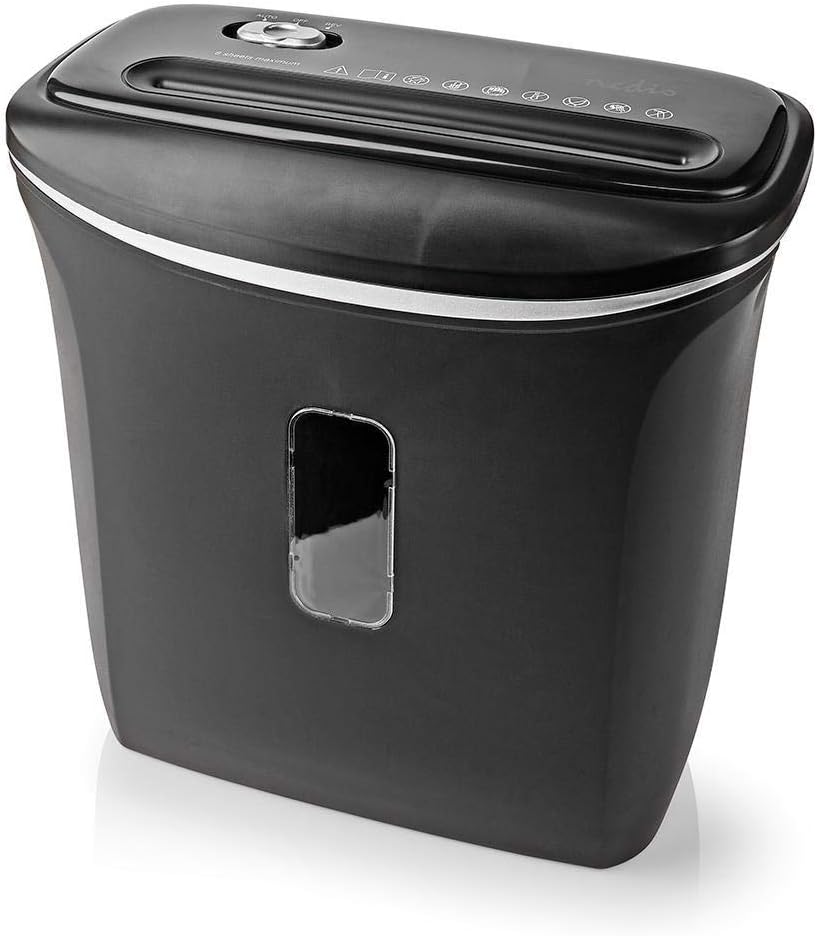
6.1 vaizdas: Kampuotas view of the shredder, highlighting the waste bin's capacity and the clear window for monitoring shredded material.
6.2. Cleaning the Shredder
- Prieš valydami, visada atjunkite smulkintuvą nuo elektros tinklo.
- Smulkintuvo išorę nuvalykite minkštu, sausu skudurėliu. Nenaudokite abrazyvinių valiklių ar tirpiklių.
- To clean the cutting blades, you may use specialized shredder oil sheets or apply a small amount of shredder oil to a sheet of paper and run it through the shredder. This helps lubricate the blades and remove paper dust.
- Never spray cleaning liquids directly into the paper entry slot.
7. Problemų sprendimas
If you encounter issues with your shredder, refer to the following common problems and solutions.
| Problema | Galima priežastis | Sprendimas |
|---|---|---|
| Smulkintuvas neįsijungia. |
|
|
| Popieriaus strigtis. |
|
|
| Shredder runs continuously. |
|
|
8. Specifikacijos
Technical details for the NEDIS PASH120BKA4 Paper Shredder.
| Funkcija | Detalė |
|---|---|
| Prekės ženklas | NEDIS |
| Modelio numeris | PASH120BKA4 |
| Spalva | Juoda |
| Smulkinimo tipas | Skersinis pjūvis |
| Smulkinimo dydis | 4 x 38 mm |
| Saugumo lygis | DIN P-4 |
| Lapo talpa | Up to 6 sheets (A4, 70gsm) |
| Šiukšlių dėžės talpa | 12 litrai |
| Susmulkinti | Paper, Bank Cards |
| Maitinimo šaltinis | Elektros kabelis |
| Prekės svoris | 2.8 kilogramo |
| ASIN | B0847M1RW9 |
| EAN/UPC | 05412810329472 |
9. Garantija ir palaikymas
For warranty information or technical support, please refer to the documentation provided with your purchase or contact NEDIS customer service directly. Keep your proof of purchase for warranty claims.
You can typically find support contact details on the official NEDIS websvetainėje arba ant produkto pakuotės.


